1. Úvod
Thank you for choosing the WORKPRO Cordless Grass Shear & Shrubbery Trimmer and WORKPRO Grass Shears Handheld. This manual provides essential information for the safe and efficient operation, maintenance, and care of your new tools. Please read this manual thoroughly before first use and keep it for future reference.

Obrázek 1.1: Přesview of the WORKPRO Cordless Grass Shear & Shrubbery Trimmer and Handheld Grass Shears, including the main unit, interchangeable blades, and charging cable.
2. Bezpečnostní informace
Vždy dodržujte základní bezpečnostní opatření, abyste snížili riziko požáru, úrazu elektrickým proudem a zranění osob. Uchovávejte tento návod k obsluze pro rychlou orientaci.
Obecná bezpečnostní upozornění
- Přečtěte si všechny pokyny: Seznamte se s ovládacími prvky a správným používáním nástroje.
- Udržujte pracovní prostor čistý a dobře osvětlený: Nepořádek nebo tmavé prostory vedou k nehodám.
- Nepoužívejte elektrické nářadí ve výbušném prostředí: Such as in the presence of flammable liquids, gases, or dust.
- Buďte ve střehu: Watch what you are doing and use common sense when operating a power tool.
- Správně se oblečte: Do not wear loose clothing or jewelry. Keep hair and clothing away from moving parts.
- Používejte osobní ochranné prostředky: Always wear eye protection, non-skid safety shoes, and hearing protection when appropriate.
- Vyhněte se náhodnému spuštění: Před připojením akumulátoru, zvednutím nebo přenášením nářadí se ujistěte, že je vypínač v poloze vypnuto.
- Nepřekračujte: Vždy udržujte správný postoj a rovnováhu.
- Pečlivě udržujte nářadí: Udržujte řezné nástroje ostré a čisté pro lepší a bezpečnější výkon.
- Disconnect the battery pack: Before making any adjustments, changing accessories, or storing power tools.
Specific Safety Warnings for Trimmers
- Držte ruce dál od čepelí: Blades are sharp and can cause injury.
- Do not operate without guards in place: Ensure all safety guards are properly installed before use.
- Zkontrolujte přítomnost cizích předmětů: Before trimming, inspect the area for wires, rocks, or other debris that could be thrown or damage the blades.
- Použijte obě ruce: For the cordless trimmer, use both hands to maintain control, especially during operation.
- Secure the safety lock: For the handheld shears, always engage the safety lock when not in use or during storage.
3. Obsah balení
Po obdržení zkontrolujte prosím obsah balíku, abyste se ujistili, že jsou všechny položky přítomny a nepoškozené:
- WORKPRO Cordless Grass Shear & Shrubbery Trimmer Main Unit
- Nástavec nože nůžek na trávu
- Shrubbery Trimmer Blade Attachment
- WORKPRO Grass Shears Handheld
- Nabíjecí kabel USB-C
- Uživatelská příručka (tento dokument)
4. Identifikace součástí a dílů
Akumulátorový vyžínač
- Hlavní jednotka: Contains the motor, battery, and handle.
- Tlačítko pro uvolnění čepele: For quick and easy blade attachment changes.
- Bezpečnostní tlačítko zámku: Located at the top of the handle, must be pressed before operating the trigger.
- Power Trigger: Aktivuje motor.
- Nabíjecí port USB-C: Pro nabíjení interní baterie.

Figure 4.1: The ergonomic safety lock on the cordless trimmer is designed for easy one-handed operation, located conveniently at the top of the handle.
Handheld Grass Shears
- Čepele: PTFE-coated sharp blades for clean cuts.
- Ergonomická rukojeť: Designed for comfortable grip with a hand guard.
- 360° Rotation Mechanism: Allows blades to rotate for various cutting angles.
- Bezpečnostní závora: Mechanism to lock the blades closed for safe storage.

Figure 4.2: The handheld grass shears feature an ergonomic handle with a hand guard for comfort and safety, along with durable PTFE-coated sharp blades.
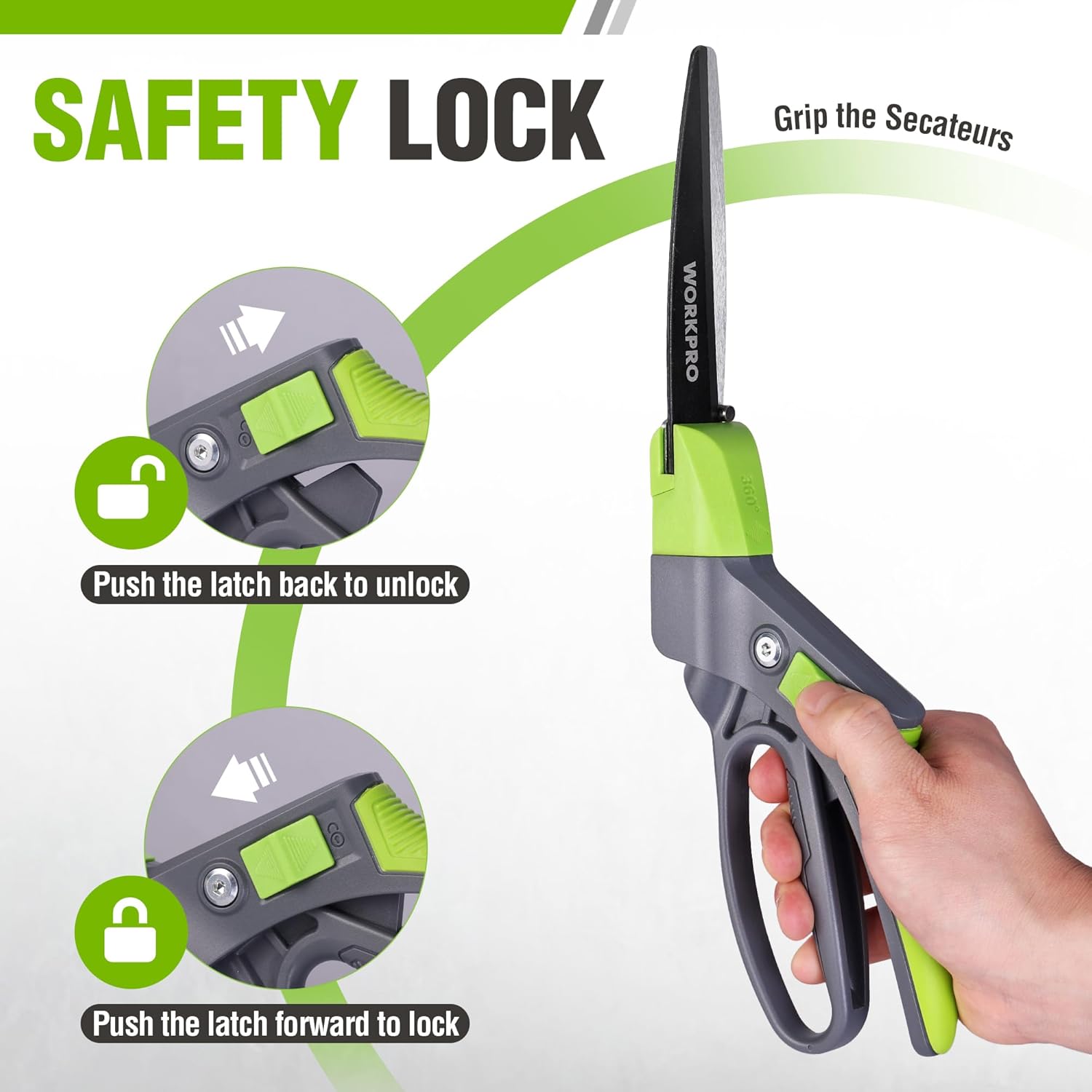
Figure 4.3: The safety lock on the handheld shears is operated by pushing the latch forward to lock the blades and backward to unlock them, ensuring safe handling and storage.
5. Nastavení
Charging the Cordless Trimmer
- Locate the USB-C charging port on the cordless trimmer unit.
- Connect the provided USB-C charging cable to the trimmer.
- Plug the other end of the USB-C cable into a compatible 5V/2A USB power source (e.g., mobile phone charger, laptop/PC, car USB port, power bank).
- Allow approximately 2-3 hours for a full charge. The charging indicator light will change to indicate a full charge.

Figure 5.1: The cordless trimmer is equipped with an upgraded motor and a 2000mAh lithium-ion battery, providing extended operation time after a full charge.
Attaching/Detaching Blades (Cordless Trimmer)
The cordless trimmer features a 2-in-1 design allowing quick switching between grass shear and shrubbery trimmer modes.
- Ensure the trimmer is turned OFF and the safety lock is engaged.
- To remove a blade, locate the blade release button (usually on the side or top of the blade housing) and press it firmly.
- Gently pull the blade attachment away from the main unit.
- To attach a blade, align the new blade attachment with the slots on the main unit.
- Push the blade attachment firmly into place until you hear a click, indicating it is securely locked.

Figure 5.2: The cordless trimmer offers two cutting modes: a grass shear with a max cutting width of 2.95 inches (75mm) and a hedge trimmer with a max cutting length of 4.65 inches (118mm) and max cutting thickness of 0.31 inches (7.8mm).
6. Návod k obsluze
Operating the Cordless Trimmer
- Ensure the correct blade attachment is securely installed and the battery is charged.
- Hold the trimmer firmly with one hand. The design is lightweight (0.82 lbs) for easy handling.
- Press the safety lock button located at the top of the handle.
- While holding the safety lock button, press the power trigger to start the trimmer.
- Guide the trimmer smoothly over the grass or shrubbery you wish to trim. For grass, use a sweeping motion. For shrubs, trim evenly across the surface.
- Release the power trigger to stop the trimmer.
- Always engage the safety lock when not in use.

Figure 6.1: The cordless trimmer is exceptionally lightweight at only 0.82 pounds, reducing hand fatigue and allowing for longer periods of use.
Operating the Handheld Grass Shears
- Disengage the safety latch by pushing it backward.
- Position the blades around the grass or small plants you wish to cut.
- Squeeze the handles together to make a clean cut.
- Otočení o 360°: To adjust the cutting angle, rotate the blade housing. The shears feature 14 cutting positions for maximum flexibility.
- After use, push the safety latch forward to lock the blades in the closed position for safe storage.

Figure 6.2: The handheld grass shears feature a 360° rotation design, allowing users to effortlessly adjust the blade angle for precise trimming in various positions, including horizontal and vertical cuts.

Figure 6.3: The 360° rotating blades of the handheld shears provide maximum flexibility, enabling precise trimming of various plants and grasses from any angle.
7. Údržba
Blade Care and Cleaning
- Vždy odpojte napájení: For the cordless trimmer, ensure it is off and the battery is disconnected before cleaning or performing maintenance. For handheld shears, ensure the safety latch is engaged.
- Čistěte čepele po každém použití: Use a stiff brush or cloth to remove grass clippings, sap, and debris from the blades.
- Lubricate blades: Periodically apply a light machine oil or blade lubricant to the cutting edges to prevent rust and ensure smooth operation.
- Ostření: If blades become dull, they can be professionally sharpened or replaced. Refer to the manufacturer's guidelines for blade replacement.
- Skladování: Store tools in a dry, secure place out of reach of children. Ensure blades are clean, lubricated, and protected (e.g., with blade covers or by engaging safety locks).
Battery Care (Cordless Trimmer)
- Pravidelně nabíjejte: To prolong battery life, charge the battery regularly, even if the tool is not used frequently.
- Vyhněte se extrémním teplotám: Do not store or charge the battery in extremely hot or cold conditions.
- Do not overcharge/over-discharge: The built-in battery management system helps prevent this, but avoid leaving it on charge for excessively long periods after it's full, or completely draining it before recharging.
8. Řešení problémů
| Problém | Možná příčina | Řešení |
|---|---|---|
| Cordless trimmer does not start. | Baterie je slabá nebo vybitá. Bezpečnostní zámek není správně zajištěn. Blade attachment not properly installed. | Baterii plně nabijte. Ensure the safety lock button is pressed before the trigger. Re-attach the blade until it clicks securely into place. |
| Blades are not cutting cleanly or are jamming. | Čepele jsou tupé nebo špinavé. Excessive debris caught in blades. Pokus o řezání příliš silného materiálu. | Clean blades thoroughly and lubricate. Sharpen or replace blades if necessary. Remove debris carefully (ensure power is off). Only cut material within the specified cutting thickness (refer to specifications). |
| Handheld shears are stiff or hard to open/close. | Dirt or sap accumulation. Nedostatek mazání. | Clean blades and pivot points thoroughly. Apply a light machine oil to the pivot and blade surfaces. |
| Výdrž baterie se zdá krátká. | Baterie není plně nabitá. Operating in very dense material. Battery reaching end of life. | Ujistěte se, že je baterie plně nabitá (2–3 hodin). Avoid forcing the tool through thick material; make multiple passes if needed. Contact customer support for battery replacement options if tool is old. |
9. Specifikace
| Funkce | Specifikace |
|---|---|
| Model produktu | B0DZ6FFS5V |
| Cordless Trimmer Motor Speed | Upgraded High Speed 1100rpm |
| Cordless Trimmer Battery | 2000mAh Lithium-iont |
| Cordless Trimmer Charging Time | Approx. 2-3 hours (via USB-C 5V/2A) |
| Cordless Trimmer No-Load Operation Time | Až 40 minut |
| Cordless Trimmer Weight | 0.82 libry (přibližně 0.37 kg) |
| Grass Shear Max Cutting Width | 2.95 palců (75 mm) |
| Hedge Trimmer Max Cutting Length | 4.65 palců (118 mm) |
| Hedge Trimmer Max Cutting Thickness | 0.31 palců (7.8 mm) |
| Handheld Shears Blade Material | PTFE-Coated Carbon Steel |
| Handheld Shears Rotation | 360° with 14 cutting positions |
10. Záruka a podpora
For warranty information, technical support, or to purchase replacement parts, please contact WORKPRO customer service through the official WORKPRO website or your point of purchase. Please have your product model number (B0DZ6FFS5V) and purchase date available when contacting support.
Visit the official WORKPRO store for more information: WORKPRO Store on Amazon