1. Úvod
The ROCAM CR1027 Vibrating Alarm Clock is a portable and rechargeable device designed to provide a customizable wake-up experience. It features dual alarms, adjustable vibration and sound levels, and a long-lasting battery, making it suitable for heavy sleepers, individuals with hearing impairments, or those who prefer a discreet alarm. This manual provides detailed instructions for setup, operation, and maintenance of your alarm clock.

Image 1.1: The ROCAM CR1027 Vibrating Alarm Clock highlighting its cordless, dual alarm, 12/24H, vibrating, volume setting, and rechargeable features.
2. Obsah balení
Zkontrolujte prosím balení, zda neobsahuje následující položky:
- 1 x ROCAM CR1027 Vibrating Alarm Clock
- 1 x USB nabíjecí kabel
- 1 x Uživatelská příručka
- 1 x řemínek na zápěstí

Image 2.1: The complete package contents of the ROCAM CR1027 Vibrating Alarm Clock.
3. Konec produktuview
3.1. Přední displej
The front of the alarm clock features a clear digital display showing the time, AM/PM indicator, day of the week, DST status, alarm icons, and battery level. A speaker grille is located at the bottom of the front face.

Obrázek 3.1: Přední strana view of the ROCAM CR1027 Vibrating Alarm Clock.
3.2. Top Buttons
The top of the device houses the main control buttons:
- (1) Alarm 1 Button: Stiskněte pro view/set Alarm 1.
- (2) Alarm 2 Button: Stiskněte pro view/set Alarm 2.
- TIME/SNOOZE Button: Stiskněte pro view/set current time, or to activate snooze during an alarm.
- (-) Minus Button: Decrease values during setting.
- (+) Plus Button: Increase values during setting.
3.3. Back Switches
The back of the device features several switches for advanced settings:
- Přepínač ON/OFF: Zapnutí nebo vypnutí zařízení.
- LOCK/UNLOCK Switch: To prevent accidental button presses.
- Alarm 1 Day Setting Switch (MON-SUN, MON-FRI, SAT-SUN): Select the days for Alarm 1 to be active.
- Alarm 2 Day Setting Switch (MON-SUN, MON-FRI, SAT-SUN): Select the days for Alarm 2 to be active.
- Vibration Intensity Switch (H, M, L): Adjust the strength of the vibration (High, Medium, Low).
3.4. Side Port
The side of the device includes the USB-C charging port.
4. Nastavení
4.1. Nabíjení zařízení
Before first use, fully charge the alarm clock. Connect the provided USB charging cable to the USB-C port on the side of the device and plug the other end into a compatible USB power adapter (not included). The battery indicator on the display will show charging status. A full charge provides up to 160 days of standby time.

Image 4.1: The alarm clock connected to its USB-C charging cable.
4.2. Zapnutí/vypnutí
Posuňte ON/OFF switch on the back of the device to the 'ON' position to power it on. Slide it to 'OFF' to power down.
5. Návod k obsluze
5.1. Nastavení aktuálního času
- Stiskněte a podržte TIME/SNOOZE tlačítko, dokud nezačnou blikat číslice hodin.
- Použijte (+) or (-) tlačítka pro nastavení hodiny.
- Stiskněte tlačítko TIME/SNOOZE button again to confirm the hour and move to minute adjustment.
- Použijte (+) or (-) tlačítka pro nastavení minut.
- Stiskněte tlačítko TIME/SNOOZE button again to confirm the minutes and move to day adjustment.
- Použijte (+) or (-) buttons to adjust the day of the week.
- Stiskněte tlačítko TIME/SNOOZE button one last time to save all settings and exit.
5.2. Nastavení alarmů (Alarm 1 a Alarm 2)
Zařízení podporuje dva nezávislé alarmy.
- Stiskněte a podržte (1) Alarm 1 tlačítko (resp (2) Alarm 2 button) until the hour digits flash.
- Použijte (+) or (-) tlačítka pro nastavení hodiny budíku.
- Press the corresponding alarm button again to confirm the hour and move to minute adjustment.
- Použijte (+) or (-) tlačítka pro nastavení minut budíku.
- Press the corresponding alarm button again to confirm the minutes and move to alarm mode selection (sound/vibration).
- Použijte (+) or (-) buttons to select the desired alarm mode: Buzzer + Shaker, Single Buzzer, or Single Shaker.
- Press the corresponding alarm button one last time to save settings and exit.
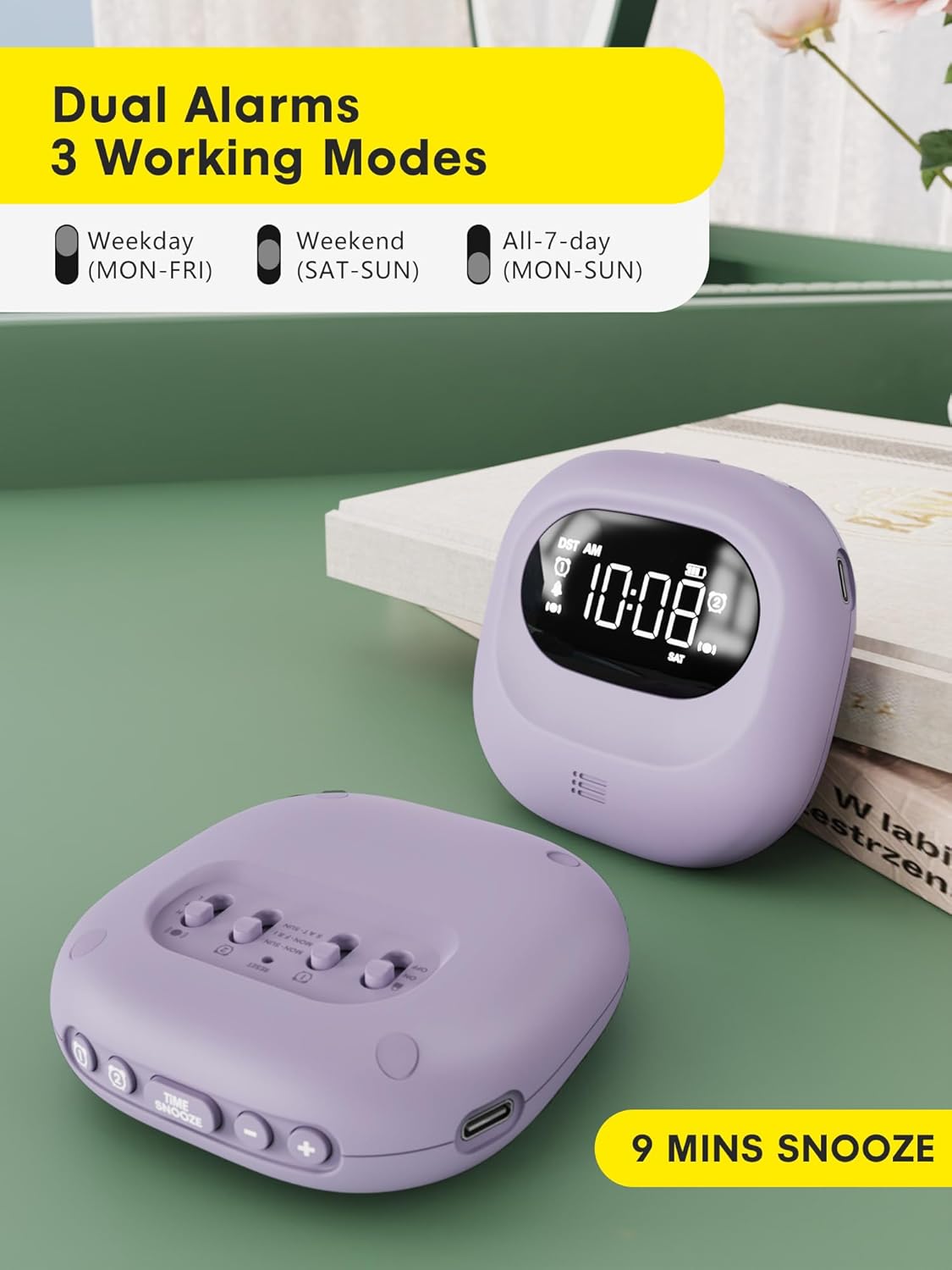
Image 5.1: Dual alarm settings displayed on the ROCAM CR1027.
5.3. Adjusting Alarm Day Settings
On the back of the device, locate the Alarm 1 and Alarm 2 day setting switches. Slide the switch to your preferred setting:
- PO–NE: Alarm will activate every day.
- PO–PÁ: Alarm will activate on weekdays only.
- SO-NE: Alarm will activate on weekends only.
5.4. Adjusting Vibration Strength
Použijte Vibration Intensity Switch (H, M, L) on the back of the device to select your desired vibration strength: High, Medium, or Low.

Image 5.2: Illustration of the three wake-up modes available on the alarm clock.
5.5. Nastavení úrovní hlasitosti
The device offers 5 volume levels for the audible alarm. Adjust this during the alarm setting process using the (+) or (-) buttons when the volume icon is flashing.
5.6. Funkce odložení buzení
Když zazní alarm, stiskněte tlačítko TIME/SNOOZE button to activate the snooze function. The alarm will pause for 9 minutes and then sound again. This can be repeated up to 9 times.

Image 5.3: The snooze function of the alarm clock.
5.7. Funkce dětské pojistky
To prevent accidental changes to settings, slide the ZAMKNOUT ODEMKNOUT switch on the back of the device to the 'LOCK' position. This will disable all buttons until unlocked.

Image 5.4: The child lock feature of the alarm clock.
5.8. Funkce podsvícení
The digital screen lights up when in use and automatically turns off after 30 seconds of inactivity to conserve energy. Press any button to reactivate the backlight.
5.9. Time Format (12H/24H/DST)
The time display can be customized. During time setting, you can cycle through 12-hour, 24-hour, and Daylight Saving Time (DST) formats using the appropriate buttons.

Image 5.5: Customizable time formats on the alarm clock display.
6. Údržba
- Udržujte zařízení čisté otíráním měkkým suchým hadříkem.
- Vyhněte se použití abrazivních čisticích prostředků nebo rozpouštědel.
- Ensure the side sound hole is not covered to maintain normal volume levels.
- Skladujte na chladném a suchém místě, pokud se delší dobu nepoužívá.

Image 6.1: Important note regarding the side sound hole for optimal performance.
7. Řešení problémů
- Alarm not activating: Ensure the alarm is set correctly (time, AM/PM, days of the week) and the device is powered on. Check battery level.
- Vibration too weak/strong: Adjust the Vibration Intensity Switch (H, M, L) on the back.
- Displej není vidět: Press any button to activate the backlight. If the display remains off, check the battery level and charge the device.
- Tlačítka nereagují: Check if the Child Lock function is activated. Slide the LOCK/UNLOCK switch to 'UNLOCK'.
8. Specifikace
| Funkce | Detail |
|---|---|
| Značka | ROCAM |
| Číslo modelu | CR1027 |
| Barva | Fialová |
| Typ zobrazení | Digitální |
| Zdroj napájení | Napájení z baterie |
| Kapacita baterie | 3000mAh (1 Nonstandard Battery included) |
| Pohotovostní doba | Až 160 dny |
| Rozměry produktu | 3.34 cm Š x 1.06 cm V |
| Hmotnost položky | 6.7 unce |
| Materiál | Plast |
| Speciální funkce | 160 Days-Standby, Adjustable Volume, Dual Alarm, Cordless, Rechargeable, Child Lock, Backlight |
9. Záruka a podpora
This ROCAM product comes with an 18-month free replacement warranty. For any questions, technical assistance, or warranty claims, please refer to the contact information provided in your package or visit the official ROCAM support webmísto.


