1. Úvod
Děkuji za nákupasing the Surfola 15.6-inch HD Portable DVD Player, Model SD05W. This manual provides essential information for the safe and efficient use of your device. Please read it thoroughly before use and retain it for future reference.
2. Obsah balení
Ujistěte se, že balíček obsahuje všechny níže uvedené položky:
- Surfola 15.6-inch Portable DVD Player
- Dálkové ovládání
- AC Power Adapter (PSE certified, 100-240V global voltagkompatibilní)
- Nabíječka do auta (kabel 1.8 m)
- AV kabel 3 v 1
- Uživatelská příručka
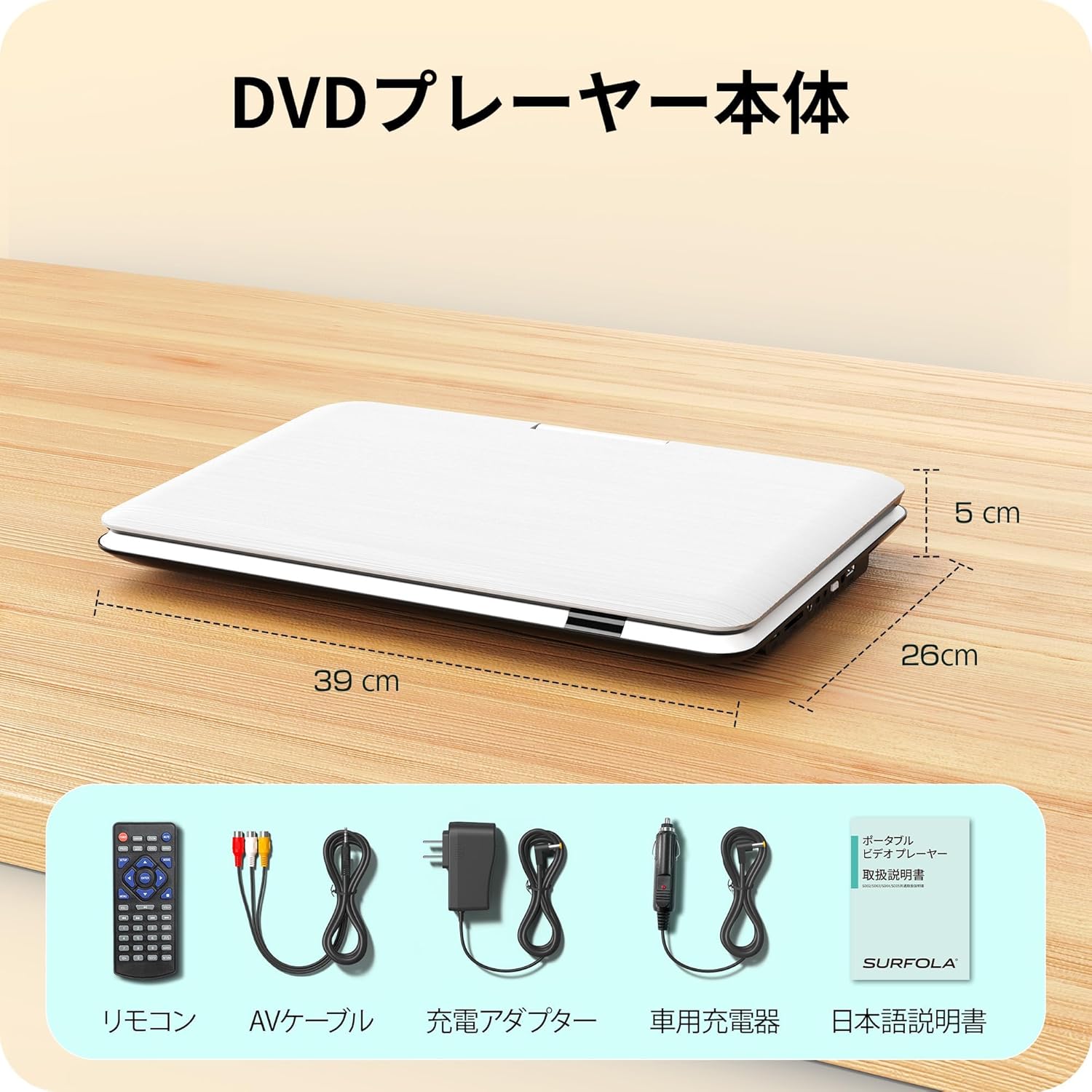
Image: Contents of the Surfola Portable DVD Player package, including the player, remote control, AV cable, AC adapter, car charger, and user manual.
3. Konec produktuview
Familiarize yourself with the various parts and connections of your portable DVD player.

Obrázek: Boční view of the Surfola Portable DVD Player showing various connection ports. These include a USB port, SD card slot, AV OUT, AV IN, DC IN, Power Switch, and Headphone Jack.
Klíčové vlastnosti:
- 15.6palcový HD LCD displej: 1366x768 resolution for clear video playback.
- 270° Rotation & 180° Flip: Screen can be adjusted for optimal viewing úhly.
- Region-Free & CPRM Compatible: Plays DVDs from any region and supports CPRM content.
- Podpora více formátů: Plays video, music, and photo files from USB drives (up to 16GB) and SD cards. Supported formats include MPEG, MP3, JPG. (Note: Blu-ray discs and MP4 format are not supported.)
- Funkce životopisu: Automaticky obnoví přehrávání od místa, kde bylo naposledy zastaveno.
- Více možností napájení: Built-in 5000mAh battery for up to 6 hours of playback, AC adapter (100-240V), and car charger (DC12V).
- AV Input/Output: Connect to a TV or projector for a larger screen experience.
4. Nastavení
4.1 Počáteční zapnutí
- Připojte napájení: Use the provided AC adapter or car charger to power the device. For portable use, ensure the internal battery is charged.
- Zapnout: Locate the power switch (usually on the side or back) and slide it to the "ON" position.

Image: A visual guide showing three simple steps: 1. Turn on the power, 2. Insert a DVD, 3. Video playback begins.
5. Návod k obsluze
5.1 Základní přehrávání DVD
- Open Disc Cover: Gently lift the disc cover.
- Vložit DVD: Place a DVD disc onto the spindle with the label side facing up. Ensure it is seated correctly.
- Close Disc Cover: Zavřete kryt disku.
- Přehrávání: The player will automatically detect the disc and begin playback. Use the remote control or front panel buttons for play, pause, stop, and navigation.
5.2 Přehrávání z USB/SD karty
- Vložit médium: Insert a USB flash drive (up to 16GB) into the USB port or an SD card into the SD card slot.
- Vyberte zdroj: Use the "Source" or "Mode" button on the remote or player to select USB or SD mode.
- Prohlížet Files: Procházejte svým files using the directional buttons and select the desired video, music, or photo file hrát.
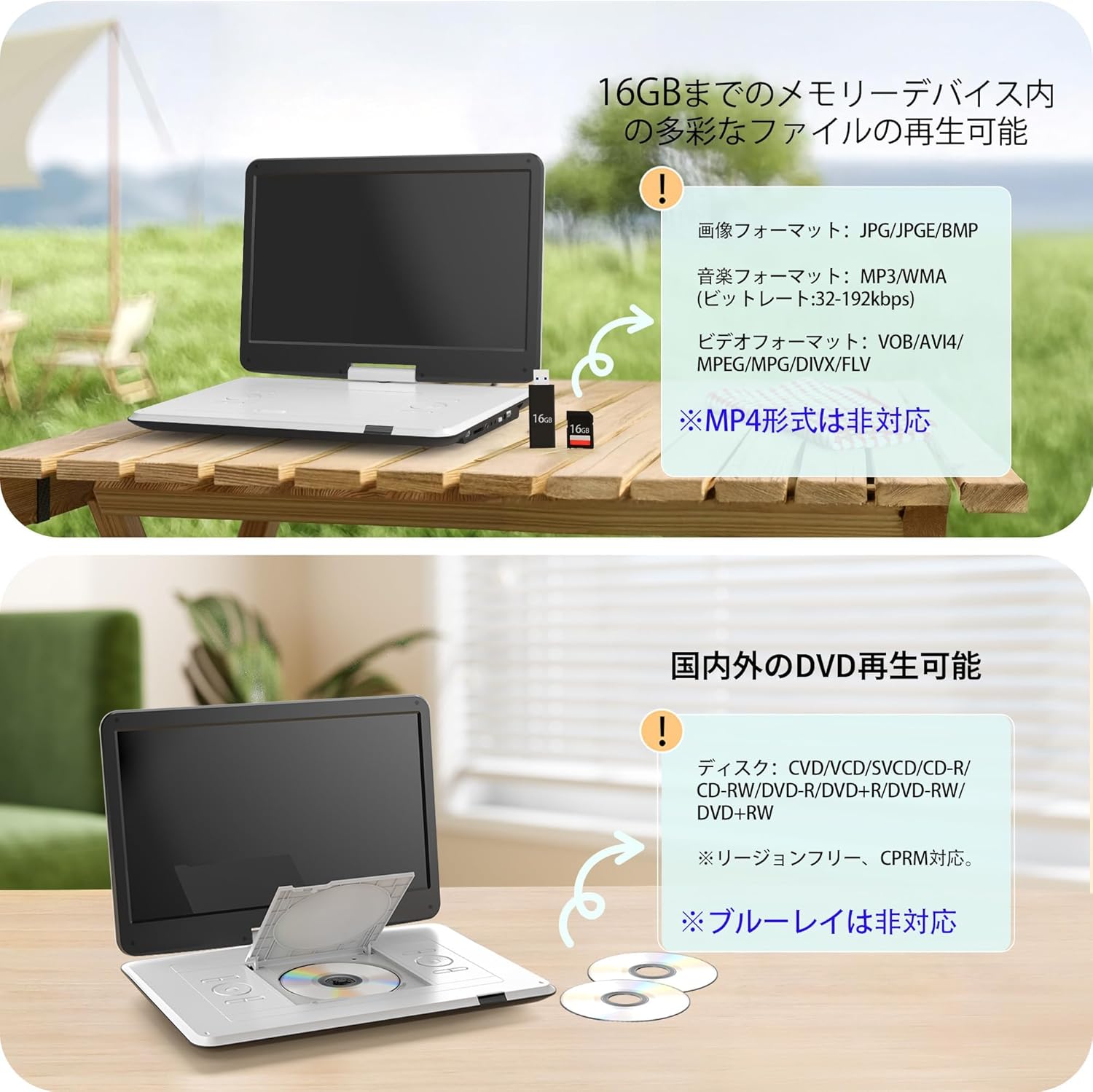
Image: The portable DVD player displaying content from a USB drive and SD card. Text indicates support for various image, music, and video formats, and notes that MP4 is not supported.
5.3 Nastavení obrazovky
The screen can be rotated 270 degrees and flipped 180 degrees for flexible viewing. Adjust the screen to your preferred angle for comfortable viewing in various environments, including in a car.

Image: Demonstrates the screen's ability to rotate 270 degrees and flip 180 degrees, showing various viewing configurations including a folded tablet-like mode.
5.4 Connecting to External Displays (TV/Projector)
Use the included 3-in-1 AV cable to connect your DVD player to a TV or projector for a larger viewzkušenosti.
- Connect AV Cable: Insert one end of the AV cable into the AV OUT port on the DVD player.
- Připojení k displeji: Connect the other end of the AV cable to the corresponding AV IN ports (Yellow for Video, Red/White for Audio) on your TV or projector.
- Vyberte vstup: On your TV or projector, select the correct AV input source.

Image: The portable DVD player connected via AV cable to a television and a projector, demonstrating its capability to synchronize with external displays for a larger viewzkušenosti.
5.5 Funkce obnovení
The player features a resume function that allows it to automatically continue playback from the exact point where it was last stopped, even after powering off the device. This is useful for uninterrupted viewIng.

Image: A visual representation of the resume function, showing that playback continues from the last stopped position even after the device is powered off and on again.
6. Napájení
Your Surfola Portable DVD Player offers three power options:
- Vestavěná baterie: The 5000mAh internal battery provides up to 6 hours of continuous playback on a full charge.
- AC adaptér: Use the included AC power adapter for home use. It supports 100-240V, making it suitable for international travel.
- Nabíječka do auta: The included 1.8m car charger connects to your vehicle's cigarette lighter socket (DC12V) for use on the go.
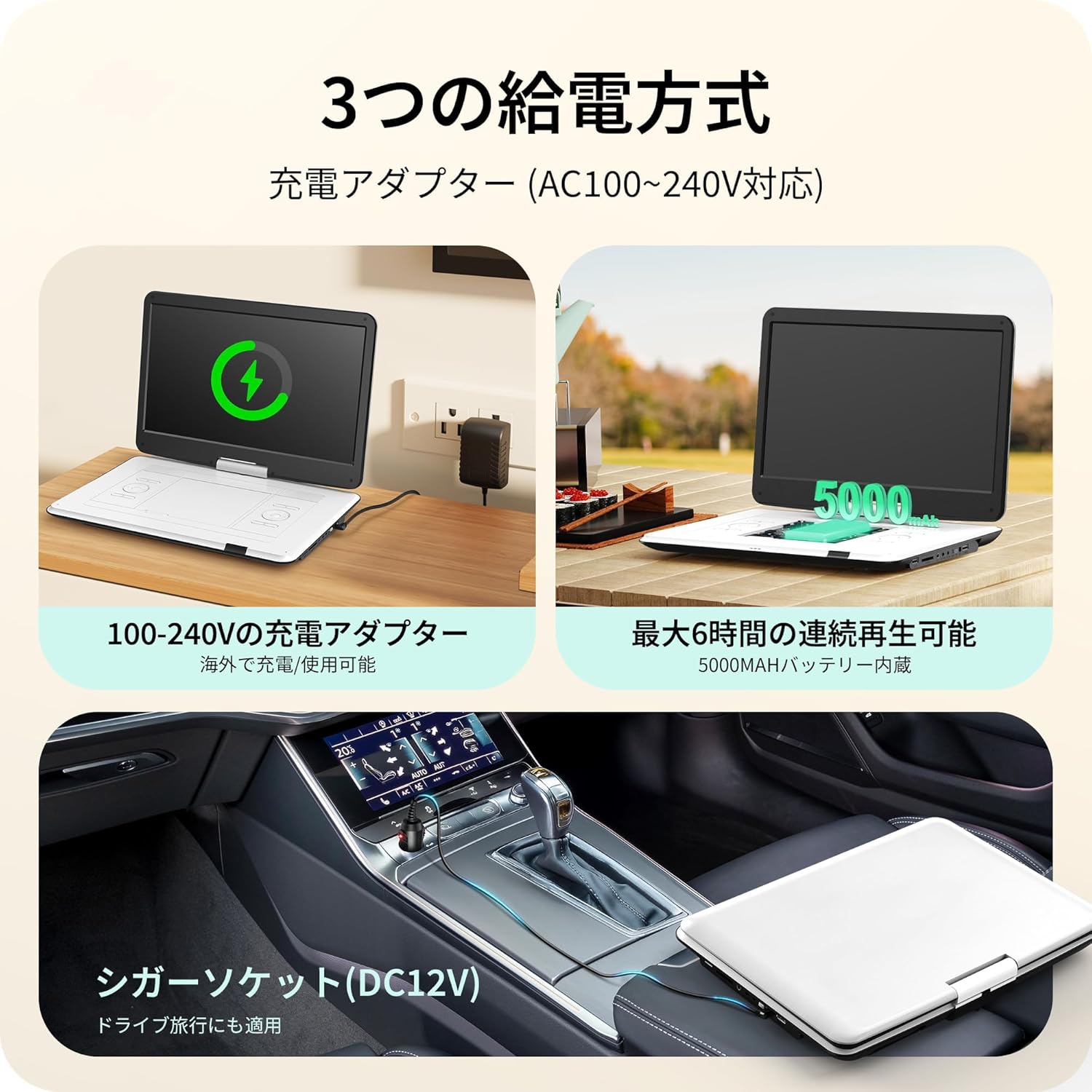
Image: Illustrates the three power supply methods: charging via AC adapter, continuous playback with the 5000mAh internal battery, and powering via car cigarette lighter socket.
7. Údržba
- Čištění obrazovky: K jemnému otření obrazovky použijte měkký hadřík, který nepouští vlákna. V případě odolných skvrn lehceampOtřete hadřík vodou nebo čističem obrazovek. Vyhněte se agresivním chemikáliím.
- Čištění diskové mechaniky: Udržujte diskovou přihrádku bez prachu a nečistot. V případě potřeby použijte měkký kartáč nebo stlačený vzduch.
- Skladování: Pokud přehrávač nepoužíváte, skladujte jej na chladném a suchém místě mimo dosah přímého slunečního záření a extrémních teplot.
- Péče o baterie: Chcete-li prodloužit životnost baterie, vyvarujte se častého úplného vybíjení. Pravidelně ji nabíjejte, i když ji delší dobu nepoužíváte.
8. Řešení problémů
| Problém | Možná příčina | Řešení |
|---|---|---|
| Žádná síla | Battery drained, power adapter not connected, power switch off. | Charge the battery, ensure AC adapter/car charger is properly connected, turn power switch ON. |
| Disk se nepřehrává | Disc inserted incorrectly, disc is dirty/scratched, unsupported disc type (e.g., Blu-ray). | Reinsert disc correctly, clean disc, try a different disc. Note that Blu-ray discs are not supported. |
| Žádný zvuk | Volume too low, headphones not connected properly, external speaker issue. | Increase volume, check headphone connection, ensure external speakers are working if connected. |
| No picture on external display | AV cable not connected correctly, incorrect input selected on TV/projector. | Check AV cable connections, select the correct AV input on your TV/projector. |
| USB/SD karta nebyla rozpoznána | Unsupported format, card/drive capacity too large (over 16GB), media corrupted. | Ensure media is formatted correctly (e.g., FAT32), check capacity (max 16GB), try a different USB/SD card. |
9. Specifikace
| Funkce | Detail |
|---|---|
| Číslo modelu | SD05W |
| Velikost obrazovky | 15.6 palců |
| Typ zobrazení | LCD |
| Rezoluce | 1366 x 768 |
| Kompatibilita disků | DVD, CVD, VCD, SVCD, CD-R, CD-RW, DVD-R, DVD-RW, DVD+RW (Region-Free, CPRM compatible) |
| Podpora USB/SD karet | Až 16 GB |
| Supported Formats (USB/SD) | Video: MPEG, VOB, AVI, DIVX, FLV; Audio: MP3, WMA; Image: JPG, JPEG, BMP |
| Kapacita baterie | 5000 XNUMX mAh |
| Doba nepřetržitého přehrávání | Přibl. 6 hodin |
| Vstup napájení | AC 100-240V (Adapter), DC 12V (Car Charger) |
| Konektivita | USB, SD Card, AV IN, AV OUT, Headphone Jack |
| Rozměry (cca) | 39 x 26 x 5 cm (15.35 x 10.24 x 1.97 palce) |
| Hmotnost (přibližně) | 1.8 kg (3.97 lb) |
Note: Blu-ray discs and MP4 format are not supported.
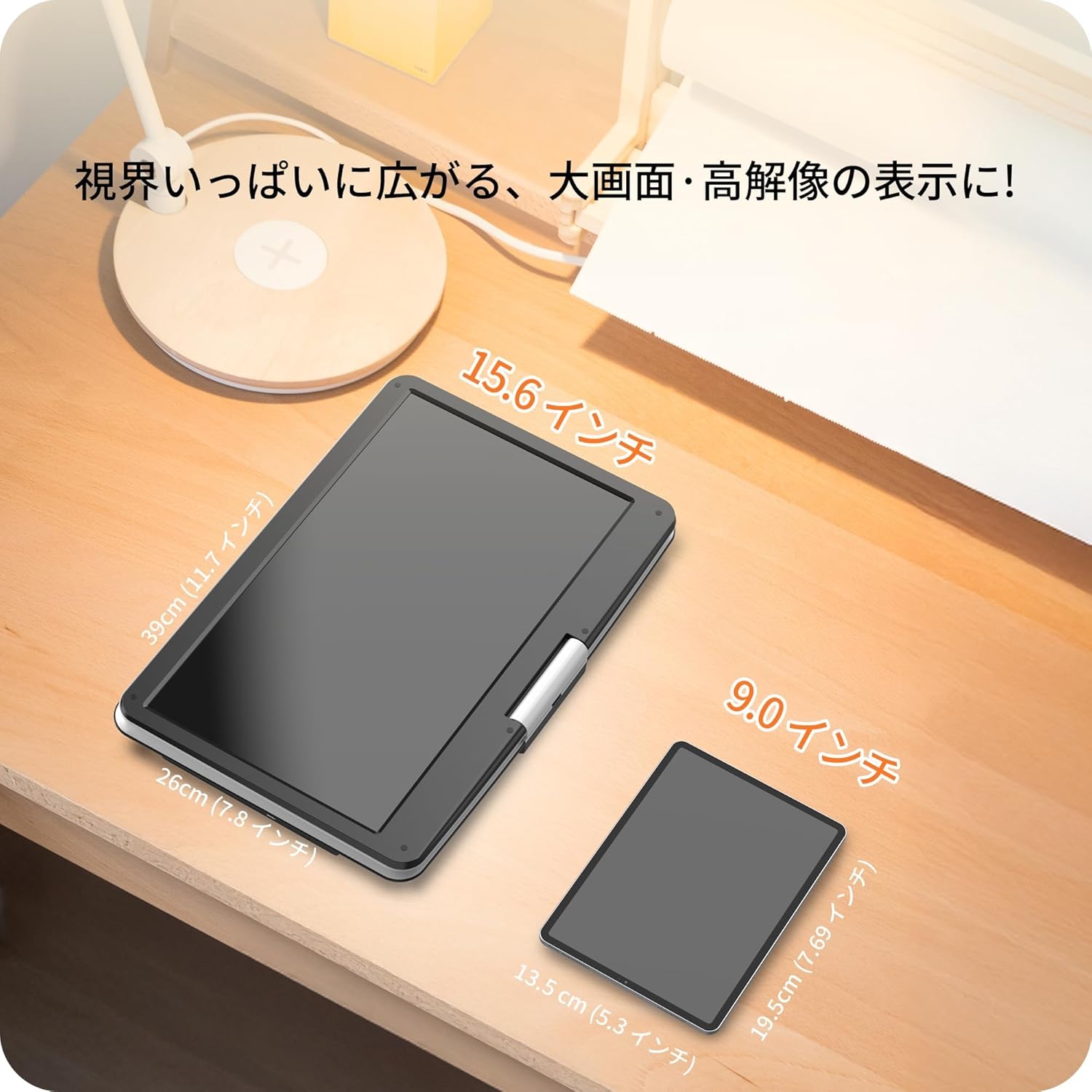
Image: A size comparison showing the 15.6-inch Surfola Portable DVD Player next to a smaller 9.0-inch player, highlighting its larger screen size.
10. Záruka a podpora
For warranty information and customer support, please refer to the contact details provided in your product packaging or visit the official Surfola webUschovejte si účtenku jako doklad o koupi pro případ reklamace.
Výrobce: Surfola


