Model: safe fireproof waterproof 60EE
This user manual provides essential information for the safe and effective operation of your Povanje 5.0 Cuft Fireproof Safe. Please read this manual thoroughly before setup and use, and retain it for future reference.
Ověřte, zda jsou v balení přítomny všechny položky:

Figure 1: Included Accessories. This image displays the various components that come with your safe, such as the backup keys, user manual, mounting screws, a fireproof and waterproof document bag, a protective cover for the lock, and a mat for the interior.
The digital keypad requires 4 AA batteries (not included). The external battery installation design allows for easy replacement.

Figure 2: External Battery Compartment. This image illustrates the external battery compartment on the safe's keypad, designed for convenient battery replacement without needing to open the safe.
Your safe comes with a default factory code of "1234#". It is highly recommended to change this immediately.

Figure 3: Setting Passcode. This diagram illustrates the process of setting both a personal and an optional master password for your safe's electronic keypad.
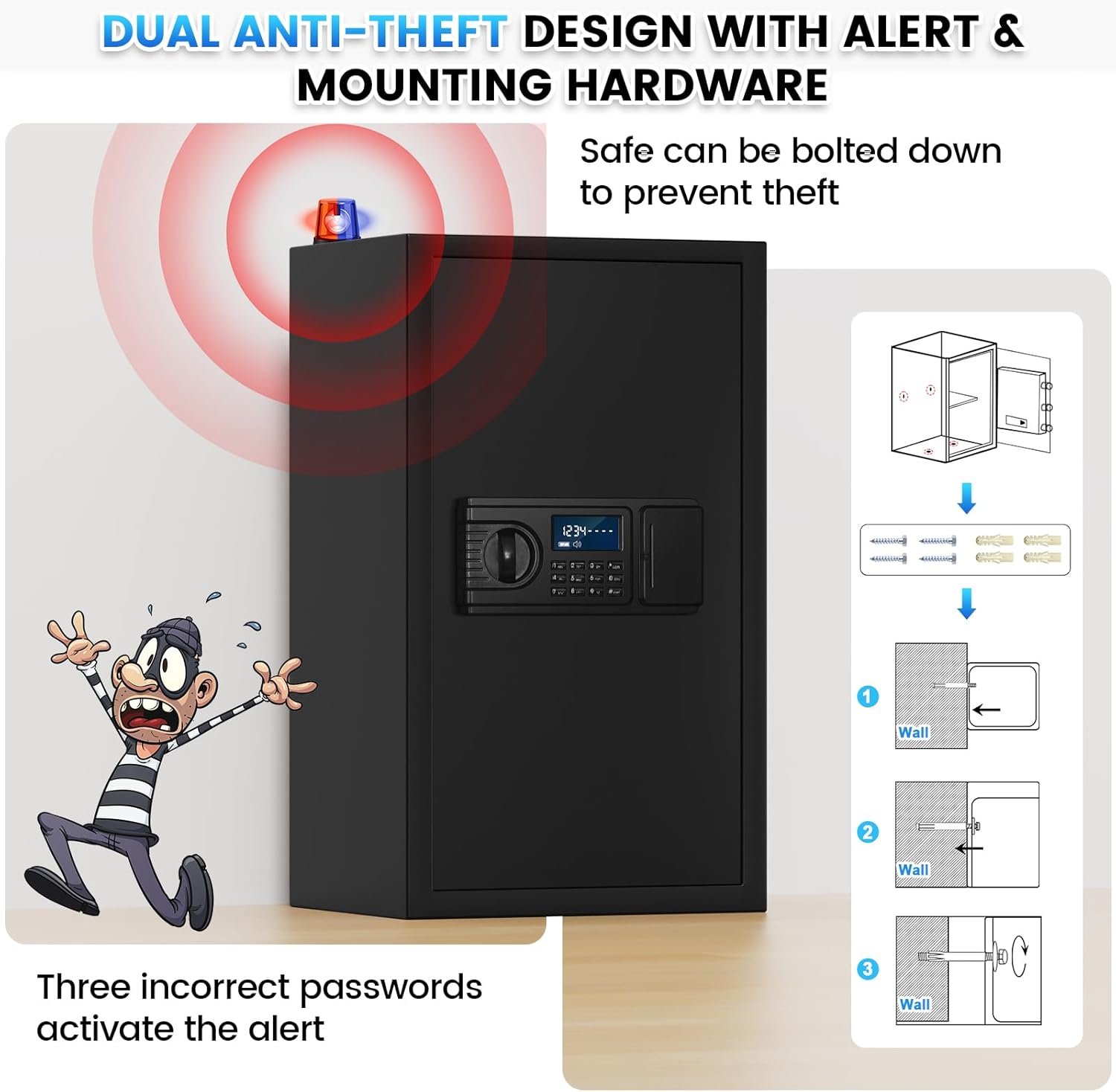
The safe features pre-drilled holes in the back and bottom for secure mounting to a wall or floor, preventing theft.

Figure 4: Mounting Instructions. This image demonstrates the anti-theft alert system and provides a visual guide for securely mounting the safe to a wall using the pre-drilled holes and included hardware.

Figure 5: Two Unlock Ways. This image illustrates both the emergency key and personal code methods for opening the safe, highlighting the convenience of the digital keypad for daily use.
Use emergency keys if batteries are depleted or you forget your passcode.
To prevent others from seeing your entered password, you can activate hidden code mode.

Figure 6: Keypad Features. This image highlights the large LCD screen, low battery reminder, hidden password function, and keyhole serial number for backup key replacement.
The safe is equipped with an anti-theft alarm system for enhanced security.
Video 1: LCD Digital Keypad Fireproof Safe Box Features. This video demonstrates various features of the safe, including the large interior, reinforced lock latches, thickened steel door, one-piece all-steel structure, anti-prying design, wall/floor mounting, large LCD screen, hidden password mode, smart anti-theft alert, and dual opening methods (backup keys and personal code).
When the LCD screen displays a low battery reminder, replace the batteries promptly to ensure continuous operation.
| Problém | Možná příčina | Řešení |
|---|---|---|
| Trezor se neotevírá heslem. | Incorrect passcode entered; low batteries. | Re-enter passcode carefully. Replace batteries. Use emergency key. |
| Alarm sounds after multiple attempts. | Tři nesprávná zadání hesla. | The alarm will sound for 1 minute. Remove batteries to stop it immediately. Re-enter correct passcode or use emergency key. |
| LCD obrazovka je prázdná nebo tmavá. | Slabé nebo vybité baterie. | Vyměňte všechny 4 baterie AA. |
| Cannot set new passcode. | Incorrect procedure followed. | Review "Setting Your Passcode" section carefully and repeat steps. Ensure the reset button is pressed correctly. |

Figure 7: Safe Dimensions and Features. This image provides a visual representation of the safe's external dimensions and highlights key features such as the included fireproof bag, weight, video guide availability, and upgraded packaging.

Figure 8: Removable Shelf Configuration. This image demonstrates the versatility of the safe's interior, showing how items like cash, documents, jewelry, firearms, and passports can be organized with or without the removable shelves.
Povanje offers comprehensive support for your safe:

Figure 9: Customer Support and Guarantees. This image highlights Povanje's commitment to customer satisfaction, including quick response times, money-back guarantees, warranty coverage, and lifetime after-sales support.
![]() |
Návod k obsluze trezoru s dotykovou obrazovkou Komplexní návod k obsluze pro dotykový trezor, který zahrnuje popisy součástí, seznam dílů, první použití, vložení baterií, otevírání a zavírání dvířek, systém duálního alarmu, nastavení uživatelských a administrátorských kódů, režim ztlumení, obnovení továrního nastavení a pokyny k montáži. |
![]() |
Návod k obsluze Safe Box: Průvodce nastavením, obsluhou a montáží Komplexní návod k obsluze a montáži bezpečnostní schránky. Zahrnuje první otevření, nastavení uživatelských kódů, nastavení alarmu a postupy instalace. Obsahuje tipy pro řešení problémů a kontaktní informace. |
![]() |
Návod k obsluze bezpečnostní schránky - Průvodce obsluhou a montáží Komplexní průvodce k bezpečnostní schránce, který zahrnuje první otevření, nastavení uživatelského kódu, funkce automatického uzamčení, technické specifikace a pokyny k montáži. Naučte se, jak si zabezpečit své cennosti pomocí této domácí bezpečnostní schránky. |
![]() |
Uživatelská příručka k bezpečnostnímu zámku Diosmio Komplexní uživatelská příručka k bezpečnostnímu zámku Diosmio, která zahrnuje elektrické specifikace, různé modely a rozměry, příslušenství, podrobné pokyny k obsluze pro přístup s klíčem a heslem, tipy pro řešení problémů a často kladené otázky. |
![]() |
Pokyny a uživatelská příručka k bezpečnostnímu zámku (řada EE) Komplexní pokyny k obsluze a zabezpečení bezpečnostního zámku (řada EE). Tato příručka podrobně popisuje první otevření, nastavení hlavního a osobního kódu, nouzový přístup, upozornění na řešení problémů, způsoby upevnění na stěnu a podlahu a seznam příslušenství k balení. |
![]() |
WASJOYE Safe: Uživatelská příručka a instalační průvodce Komplexní průvodce trezory WASJOYE, který zahrnuje vlastnosti produktu, obsluhu, nastavení zabezpečení, řešení problémů a metody instalace. Obsahuje pokyny v několika jazycích. |