1. Bezpečnostní pokyny
Please read these safety instructions carefully before using your Audizio Toledo turntable. Keep this manual for future reference.
- Zdroj napájení: Connect the turntable only to a power supply of the type described in this manual or on the unit.
- Voda a vlhkost: Nepoužívejte tento přístroj v blízkosti vody nebo vamp prostředí.
- Čištění: Čistěte pouze suchým hadříkem.
- Větrání: Nezakrývejte žádné větrací otvory. Nainstalujte v souladu s pokyny výrobce.
- Teplo: Neinstalujte v blízkosti zdrojů tepla, jako jsou radiátory, tepelné regulátory, kamna nebo jiná zařízení (včetně amplifikátory), které produkují teplo.
- Ochrana napájecího kabelu: Chraňte napájecí kabel před šlapáním nebo přiskřípnutím, zejména u zástrček, zásuvek a v místě, kde vychází z přístroje.
- Servis: Veškeré opravy svěřte kvalifikovanému servisnímu personálu. Servis je nutný, pokud bylo zařízení jakýmkoli způsobem poškozeno, například je poškozen napájecí kabel nebo zástrčka, pokud do zařízení vnikla tekutina nebo do něj spadly předměty, zařízení bylo vystaveno dešti nebo vlhkosti, nefunguje normálně. , nebo byla vypuštěna.
2. Obsah balení
Ujistěte se, že v krabici jsou všechny položky:
- Audizio Toledo Turntable Unit
- Prachový kryt
- Talíř
- Plstěná podložka
- Protiváha
- Adaptér 45 RPM
- Napájecí adaptér
- RCA kabel
- Uživatelská příručka (tento dokument)
- Audio Technica Cartridge (pre-installed)
3. Nastavení
3.1. Umístění
Place the turntable on a firm, level surface away from direct sunlight, heat sources, and excessive vibration.
3.2. Instalace talíře a hnacího řemenu
The Audizio Toledo turntable features a belt-drive system for stable rotation.
- Opatrně umístěte talíř na středovou osu.
- Locate the drive belt, which is usually pre-installed around the inner rim of the platter.
- Using the red ribbon (if provided), gently pull the belt over the motor pulley. Ensure the belt is not twisted.
- Remove the red ribbon once the belt is correctly positioned.
- Umístěte plstěnou podložku na horní část talíře.
Video: Belt Installation Guidelines. This video demonstrates the correct procedure for installing the platter and drive belt on a turntable, ensuring proper function and preventing belt twisting.
Video: Step-By-Step Installation Guide. This video provides a general guide for turntable setup, including platter and belt installation, and counterweight adjustment.
3.3. Counterweight Installation and Adjustment
The adjustable counterweight ensures optimal tracking force for the Audio Technica cartridge.
- Nasuňte protizávaží na zadní stranu raménka.
- With the stylus guard removed, carefully balance the tonearm so it floats freely and horizontally.
- Jakmile je protizávaží vyvážené, držte ho stabilně a otočte očíslovaný kroužek do polohy „0“ (nula).
- Rotate the entire counterweight (including the numbered ring) to the recommended tracking force for the Audio Technica cartridge (typically 3.5 grams for the ATN3600L stylus).
3.4. Instalace protiprachového krytu
Carefully place the dust cover onto the hinges at the rear of the turntable unit.

Obraz: The Audizio Toledo turntable with its protective dust cover open, showcasing the platter and tonearm. The dust cover helps protect the unit from dust and debris when not in use.
3.5. Připojení
The Audizio Toledo offers versatile connectivity options.
- Moc: Connect the power adapter to the DC IN 12V port on the rear of the turntable and then to a wall outlet.
- RCA výstup: For wired connection to an amplifier or powered speakers, connect the RCA cable to the AUDIO OUT (R/L) ports on the rear of the turntable. Use the PHONO/LINE switch to select the appropriate output level for your ampživější.
- Základy: If experiencing hum, connect a grounding wire from the GND terminal on the turntable to the grounding terminal on your ampživější.
- Bluetooth výstup: To connect wirelessly to Bluetooth headphones or speakers, ensure the Bluetooth switch on the rear is set to 'ON'.
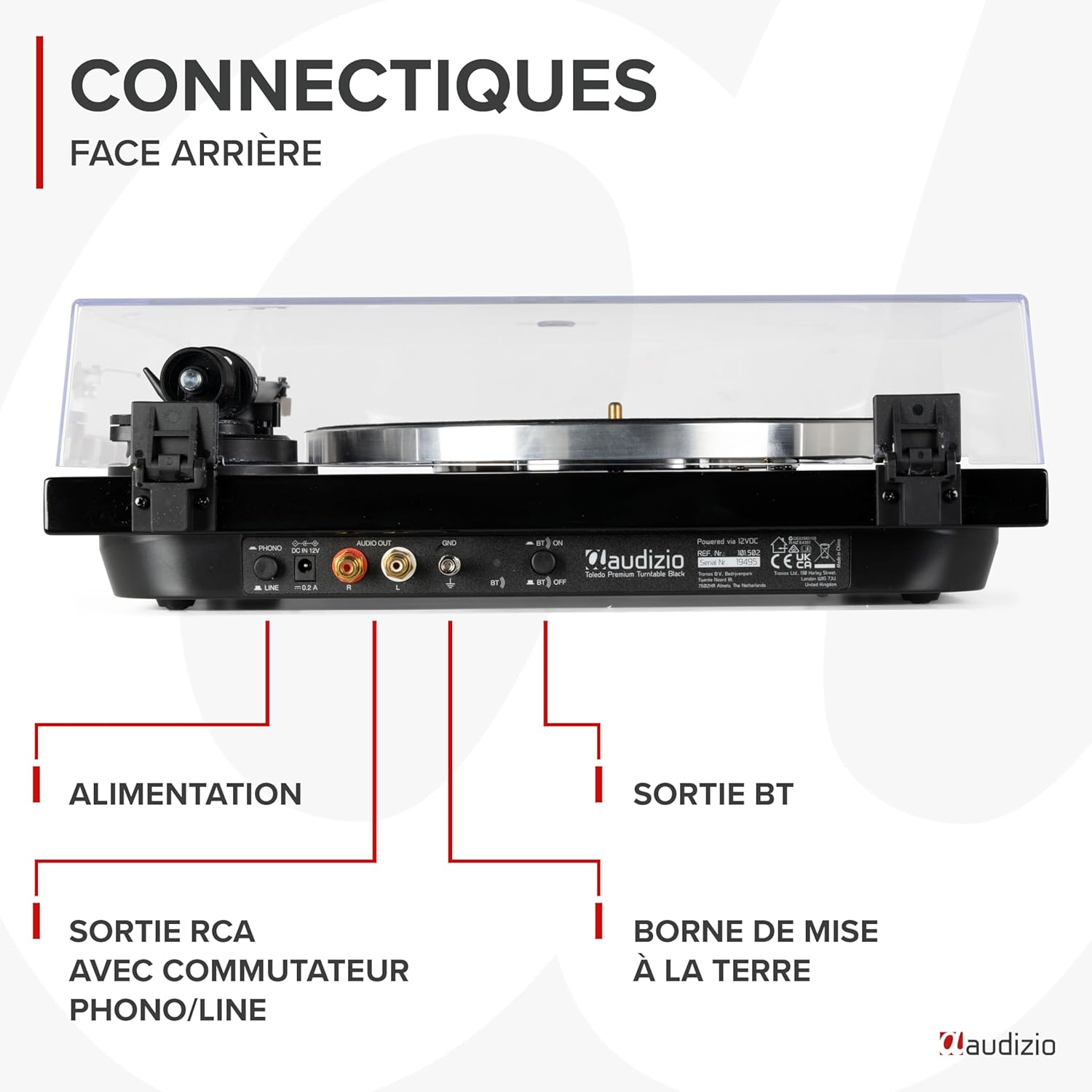
Obraz: Detailní view of the rear panel of the Audizio Toledo turntable, highlighting the power input, RCA audio outputs (R/L), grounding terminal (GND), and the Bluetooth ON/OFF switch. This panel allows for both wired and wireless audio connections.
4. Provoz
4.1. Přehrávání nahrávky
- Položte vinylovou desku na plstěnou podložku na talíři.
- Select the appropriate speed (33 or 45 RPM) using the speed selector switch. For 45 RPM records with a large center hole, use the included 45 RPM adapter.
- Uvolněte třamp.
- Jemně zvedněte raménko přenosky pomocí páčky pro nastavení tónu.
- Umístěte raménko přenosky nad požadovanou stopu na desce.
- Lower the cueing lever to slowly drop the stylus onto the record.
- At the end of the record, the turntable may feature an auto-stop function. Manually lift the tonearm and return it to its rest position.

Obraz: Shora dolů view of the Audizio Toledo turntable with a vinyl record spinning on the platter. The tonearm is positioned on the record, indicating active playback. The speed selector and pitch control knobs are visible on the right side of the unit.

Obraz: Shora dolů view of the Audizio Toledo turntable illustrating compatibility with 7", 10", and 12" records. The image also highlights the two available speeds (33 and 45 RPM) and the pitch control for fine-tuning playback speed.
4.2. Bluetooth Output
Bezdrátové streamování zvuku:
- Ensure the Bluetooth switch on the rear panel is set to 'ON'.
- Activate Bluetooth pairing mode on your headphones or speaker.
- The turntable will automatically search for and connect to the nearest Bluetooth device.

Obraz: The Audizio Toledo turntable wirelessly connected to a pair of Bluetooth headphones, demonstrating its Bluetooth OUT capability. This feature allows users to enjoy their vinyl collection through wireless audio devices.
4.3. RCA výstup
For a wired connection to an external audio system:
- Connect the RCA cable from the turntable's AUDIO OUT ports to the corresponding input on your ampzesilovač nebo aktivní reproduktory.
- Set the PHONO/LINE switch on the turntable's rear panel according to your amplifier's input type. Use 'PHONO' if your amplifier has a dedicated phono input, or 'LINE' if it has a standard auxiliary input.
5. Údržba
5.1. Čištění
- Turntable Unit: Otřete přístroj měkkým, suchým hadříkem. Nepoužívejte abrazivní čisticí prostředky ani rozpouštědla.
- Stylus: Použijte měkký kartáč určený k čištění stylusu a jemně jej kartáčujte zezadu dopředu.
- Protiprachový kryt: Vyčistěte měkkým, damp cloth. Avoid harsh chemicals that may scratch or cloud the plastic.
5.2. Výměna stylusu
The Audizio Toledo uses a replaceable Audio Technica cartridge. A worn stylus can damage your records and degrade sound quality. Replace the stylus after approximately 300-500 hours of playback.
- Gently grasp the front of the cartridge and pull the old stylus assembly downwards and forwards to remove it.
- Align the new stylus assembly with the cartridge body and push it upwards and backwards until it clicks into place.

Obraz: Detailní záběr view of the Audio Technica cartridge and stylus on the tonearm of the Audizio Toledo turntable. This image highlights the precision component responsible for reading the grooves of a vinyl record, ensuring high-quality audio reproduction.
6. Řešení problémů
| Problém | Možná příčina | Řešení |
|---|---|---|
| Žádná síla | Napájecí adaptér není připojen nebo je vadný. | Zkontrolujte připojení k napájení. Zkuste jinou zásuvku. |
| No sound via RCA | RCA cables not connected correctly; PHONO/LINE switch incorrect; ampNesprávný vstup do záchranného zařízení. | Ensure RCA cables are firmly connected. Set PHONO/LINE switch correctly. Select correct input on ampživější. |
| No sound via Bluetooth | Bluetooth not enabled; device not paired. | Ensure Bluetooth switch is ON. Put Bluetooth headphones/speaker into pairing mode. |
| Přeskakující nebo zkreslený zvuk | Dust on record/stylus; incorrect tracking force; turntable not level. | Clean record and stylus. Re-adjust counterweight. Ensure turntable is on a level surface. |
| Speed issues (too fast/slow) | Incorrect speed selected; pitch control misadjusted. | Select correct 33/45 RPM speed. Adjust pitch control knob. |
7. Specifikace
| Funkce | Specifikace |
|---|---|
| Značka | Audizio |
| Název modelu | Toledo |
| Barva | Černý |
| Materiál | Dřevo |
| Hmotnost položky | 5.5 kg |
| Maximální rychlost otáčení | 45 RPM (supports 33 and 45 RPM) |
| Spojení | Bluetooth, RCA (Phono/Line switchable) |
| Speciální funkce | Automatic belt-drive design, Audio Technica Cartridge, Adjustable Tonearm, Anti-vibration feet |
| Kompatibilní zařízení | Bluetooth speakers, headphones, external speakers |
| Nabíjecí baterie | Žádný |

Obraz: The Audizio Toledo turntable with its dimensions indicated: 43cm (length), 33cm (width), and 14cm (height). This provides a clear visual reference for the physical size of the unit.
8. Záruka a podpora
The Audizio Toledo turntable comes with a 2letá záruka výrobce. For technical support, troubleshooting beyond this manual, or warranty claims, please contact your retailer or the official Audizio support channels.
Spare parts are available for 2 years.


