1. Úvod
This manual provides detailed instructions for the installation, operation, and maintenance of your Hodozzy Android Car Stereo, model 2G+64G, specifically designed for Volvo XC60 vehicles manufactured between 2008 and 2013. This head unit features an Android 13 system, 9-inch touchscreen, wireless CarPlay, Android Auto, Mirror Link, GPS navigation, Bluetooth, Wi-Fi, FM/RDS radio, and supports steering wheel controls and a rear view fotoaparát.
2. Bezpečnostní informace
- Před instalací a provozem si pečlivě přečtěte všechny pokyny.
- Installation should be performed by a qualified professional to prevent damage to the vehicle or the unit.
- Neobsluhujte jednotku způsobem, který by vás rozptyloval od řízení. Vždy upřednostňujte bezpečnost silničního provozu.
- Nevystavujte jednotku extrémním teplotám, delšímu přímému slunečnímu záření nebo nadměrné vlhkosti.
- Ujistěte se, že jsou veškeré kabely správně zapojeny, abyste předešli zkratům nebo úrazu elektrickým proudem.
3. Obsah balení
Ověřte, zda jsou v balení přítomny všechny komponenty:
- Hodozzy Android Car Stereo Head Unit (9-inch screen)
- Napájecí kabel
- Dekodér CANBUS
- USB kabely (2x)
- Microphone/Camera Cable
- GPS anténa
- RCA kabely
- Reverse Line Cable
- Uživatelská příručka (tento dokument)
- Instalační nástroj
- Příslušenství (montážní konzole, šrouby)
- Záložní kamera

Obrázek: Overview of the Hodozzy Android Car Stereo unit, its dimensions, and the included accessories in the packing list.
4. Nastavení a instalace
4.1 Kontrola kompatibility:
This product is designed for Volvo XC60 models from 2008 to 2013. It is crucial to verify your car's central control panel configuration. This unit primarily supports vehicles with a left-hand drive configuration (Option A). If your vehicle has a right-hand drive configuration (Option B), please contact customer support for suitable recommendations before proceeding with installation.

Image: Visual guide illustrating the difference between left-hand drive (Option A, compatible) and right-hand drive (Option B, incompatible) central control panels for Volvo XC60.
4.2 Připojení kabelů:
Refer to the wiring diagrams provided. Ensure all cables are securely connected to their corresponding ports. Incorrect wiring can lead to malfunction or damage.
- Napájecí kabel: Connect to the vehicle's power harness. The CANBUS decoder ensures proper communication with the vehicle's systems.
- USB kabely: Connect for external USB devices or charging.
- GPS anténa: Namontujte na místě s průhledným view oblohy pro optimální příjem signálu.
- Záložní kamera: Connect the camera's video output to the unit's camera input. Ensure the reverse trigger wire is connected to the vehicle's reverse light signal for automatic activation.
- RCA kabely: Pro externí audio/video vstup/výstup.

Image: Detailed diagrams showing the connection points on the back of the head unit and descriptions of various cables and their functions.
4.3 Montáž:
Carefully integrate the head unit into your Volvo XC60's dashboard. Use the provided installation tools and accessories to secure the unit. Ensure no wires are pinched or damaged during the mounting process.
5. Návod k obsluze
5.1 Initial Power-On:
Po instalaci zapněte zapalování vozidla. Jednotka by se měla automaticky zapnout. Postupujte podle pokynů na obrazovce pro počáteční nastavení, například pro výběr jazyka a časového pásma.
5.2 Android 13 System:
The unit runs on Android 13 with 2GB RAM and 64GB ROM. This allows for smooth app usage, multitasking, and ample storage. Connect to a 5G/2.4GHz Wi-Fi hotspot to download applications from the pre-installed app store.
5.3 Bezdrátové CarPlay a Android Auto:
Connect your smartphone wirelessly via Bluetooth and Wi-Fi to access CarPlay (for iOS) or Android Auto (for Android devices). This allows for safe access to navigation, music, messages, and other phone features directly on the car stereo display.

Image: Screenshots demonstrating the user interface for Wireless CarPlay, Android Auto, and Mirror Link functionalities on the car stereo display, with corresponding phone screens.
5.4 Mirror Link:
The Mirror Link function allows you to display your phone's screen directly onto the car stereo. This is compatible with both iOS and Android devices, enabling you to view videos or other content from your phone on the larger screen.
5.5 GPS navigace:
The integrated GPS system provides accurate route guidance with real-time traffic updates. Ensure the GPS antenna is properly installed for optimal signal reception.

Image: Display showing offline and online GPS navigation maps, along with an icon indicating Wi-Fi hotspot connectivity.
5.6 Připojení Bluetooth:
Pair your phone via Bluetooth for wireless music streaming and hands-free calling. Access your phone's contacts and call history directly from the unit.
5.7 FM/RDS Radio:
Tune into FM radio stations with clear reception. The RDS (Radio Data System) feature provides additional information such as station name and traffic updates.
5.8 Nastavení EQ:
Customize your audio experience with a variety of EQ sound scenes and frequency division adjustments. This allows for a personalized and immersive sound output.

Image: Screenshots of the Bluetooth calling interface, FM/RDS radio tuner, and graphic equalizer (EQ) settings on the car stereo.
5.9 Dual USB Ports:
Utilize the two USB ports for simultaneous charging of devices and playback of music or video filez úložiště USB.
5.10 Customizable UI Themes:
Choose from 26 different UI desktop themes to personalize the display and user interface according to your preferences.
Image: A collage of various desktop themes available for the 9-inch HD touchscreen, showcasing different layouts and color schemes.
5.11 Steering Wheel Control (SWC):
The unit supports your vehicle's existing steering wheel controls, allowing for hands-free operation of audio and navigation functions without distraction.
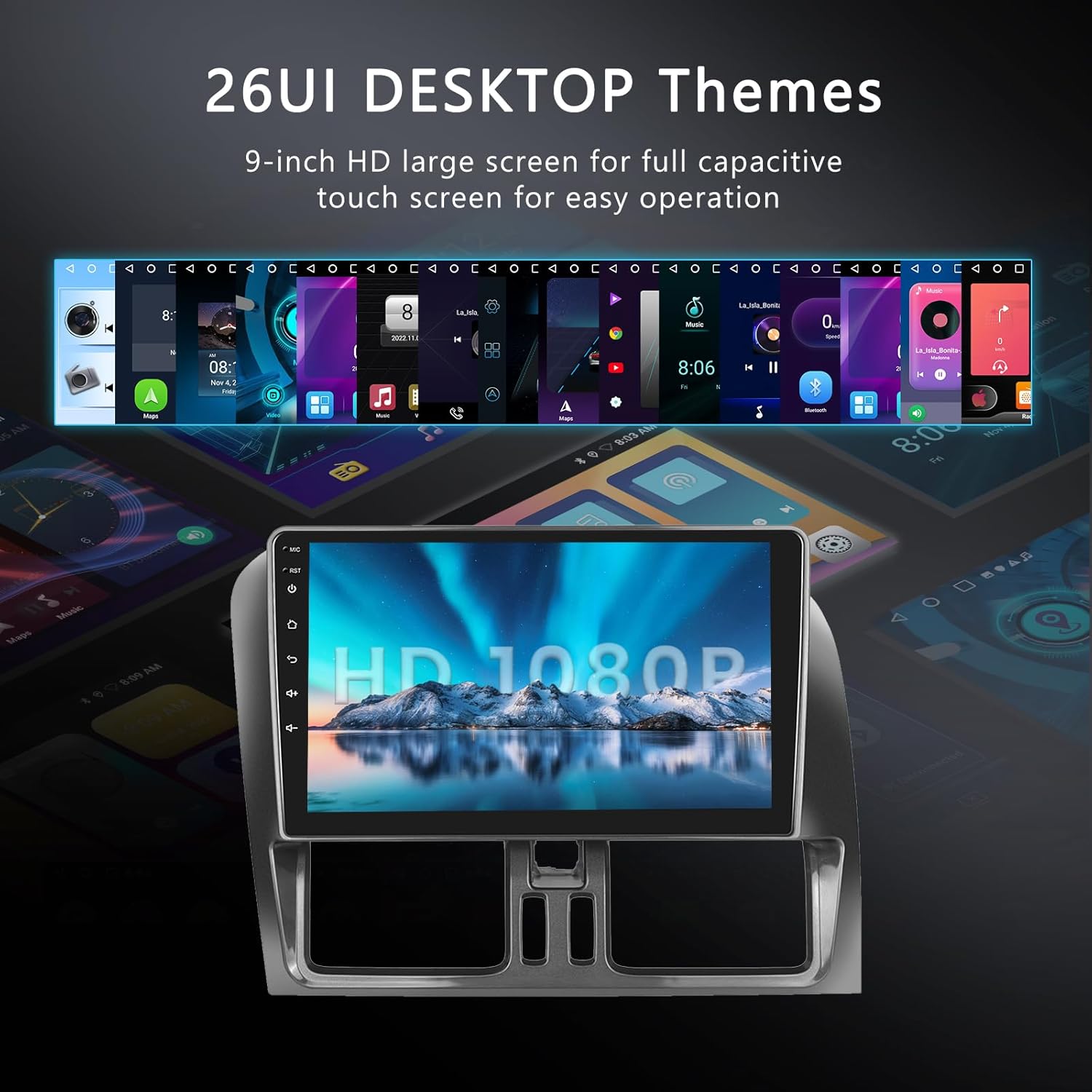
Image: Illustration of steering wheel controls interacting with the car stereo, and a diagram showing the AHD waterproof backup camera with its features (HD image, night vision, 150° wide angle).
5.12 HD Rear View Záložní kamera:
The included AHD waterproof backup camera enhances parking safety by providing a clear, wide-angle rear view on the display when the vehicle is in reverse. It features HD image quality and night vision capabilities.
Video: A demonstration of the Hodozzy Android Car Stereo's features and user interface in operation. This video provides a visual overview schopností systému.
6. Údržba
- Čištění: K čištění obrazovky a zařízení použijte měkký, suchý hadřík. V případě odolných skvrn lehceamphadřík vodou. Vyhněte se agresivním chemikáliím nebo abrazivním materiálům.
- Aktualizace softwaru: Pravidelně kontrolujte dostupnost aktualizací softwaru, abyste zajistili optimální výkon a přístup k novým funkcím. Postupujte podle pokynů na obrazovce, kde najdete všechny dostupné aktualizace.
- Podmínky prostředí: Do not expose the unit to extreme temperatures or high humidity.
7. Řešení problémů
Pokud narazíte na problémy, podívejte se na následující běžné problémy a jejich řešení:
| Problém | Možná příčina | Řešení |
|---|---|---|
| Jednotka se nezapne. | Nesprávné zapojení napájení; Spálená pojistka; Problém s baterií vozidla. | Zkontrolujte připojení napájecích kabelů. Zkontrolujte pojistky vozidla. Ověřte stav baterie vozidla. |
| Žádný zvuk nebo přerušovaný zvuk. | Speaker wiring issues; Volume too low; Mute activated; Incorrect audio settings. | Verify all speaker wires are correctly connected. Adjust volume. Check mute status. Review audio output settings. |
| Nezobrazuje se couvací kamera. | Camera not connected; Reverse trigger wire not connected or faulty; Camera power issue. | Ensure camera video and power cables are securely connected. Verify the reverse trigger wire is correctly connected to the vehicle's reverse light signal. |
| Signál GPS je slabý nebo nepřesný. | GPS anténa je nesprávně umístěna nebo vadná. | Relocate the GPS antenna to a position with a clear view oblohy. Zkontrolujte připojení antény. |
| Problémy s párováním Bluetooth. | Bluetooth není povoleno; Zařízení není v režimu párování; Rušení. | Ensure Bluetooth is enabled on both the unit and your device. Put device in pairing mode. Try pairing in a different location. |
| CarPlay/Android Auto se nepřipojuje. | Wi-Fi/Bluetooth issues; Phone software outdated; App permissions. | Check Wi-Fi and Bluetooth connections. Ensure phone software is up to date. Verify app permissions on your phone. |
Pokud problém přetrvává i po vyzkoušení těchto řešení, kontaktujte zákaznickou podporu.
8. Specifikace
| Funkce | Detail |
|---|---|
| Název modelu | 2G+64G |
| Operační systém | Android 13 |
| Velikost displeje | 9 palce |
| Paměť (RAM) | 2 GB |
| Úložiště (ROM) | 64 GB |
| Konektivita | Bluetooth, Wi-Fi (5G/2.4GHz hotspot) |
| Speciální funkce | Android Auto, Apple CarPlay, Mirror Link, GPS, FM/RDS Radio, EQ, Steering Wheel Control, Backup Camera Support |
| Typ mapy | Celosvětově |
| Typ montáže | Držák na palubní desku |
| Typ služby vozidla | Car (Volvo XC60 2008-2013) |
| Hmotnost položky | 3.43 libry |
| Rozměry balení | 13.5 x 8.94 x 3.78 palce |
9. Informace o záruce
This product comes with a limited warranty of 2 years from the date of purchase. This warranty covers manufacturing defects and malfunctions under normal use. It does not cover damage caused by improper installation, misuse, accidents, unauthorized repairs, or normal wear and tear. Please retain your proof of purchase for warranty claims.
10. Podpora a kontakt
For technical assistance, troubleshooting, or warranty inquiries, please contact Hodozzy customer support:
- E-mail: hodozzyofficial@163.com
Please provide your product model number (2G+64G) and a detailed description of your issue when contacting support.


