Zavedení
Thank you for choosing the TOPUTURE TP4 4-in-1 Foldable Walking Pad Treadmill. This manual provides essential information for the safe and effective use of your new fitness equipment. Please read this manual thoroughly before operation and retain it for future reference. The TOPUTURE TP4 is designed for home and office use, offering versatile exercise modes including walking, climbing, and running, with a compact, foldable design for easy storage.
Bezpečnostní informace
Důležitá bezpečnostní opatření:
- Před zahájením jakéhokoli nového cvičebního programu se vždy poraďte s lékařem.
- Ujistěte se, že je běžecký pás umístěn na rovném a stabilním povrchu.
- Během provozu udržujte děti a domácí zvířata mimo běžecký pás.
- Noste vhodnou sportovní obuv a oblečení.
- Nepoužívejte běžecký pás, pokud je poškozený nebo nefunkční.
- Odpojte běžecký pás ze zásuvky, pokud jej nepoužíváte, nebo před čištěním/údržbou.
- Nepřekračujte maximální nosnost uživatele 136 kg (300 liber).
- Use the safety key/clip at all times during operation.
Komponenty a díly
The TOPUTURE TP4 treadmill comes with the following main components:
- Treadmill Unit (main body with running belt, motor, and base display)
- Handlebar Assembly (with upper LED display and control panel)
- Dálkové ovládání
- Napájecí kabel
- Tool Kit (for minor adjustments and maintenance)
- Uživatelská příručka (tento dokument)
- Mazací olej
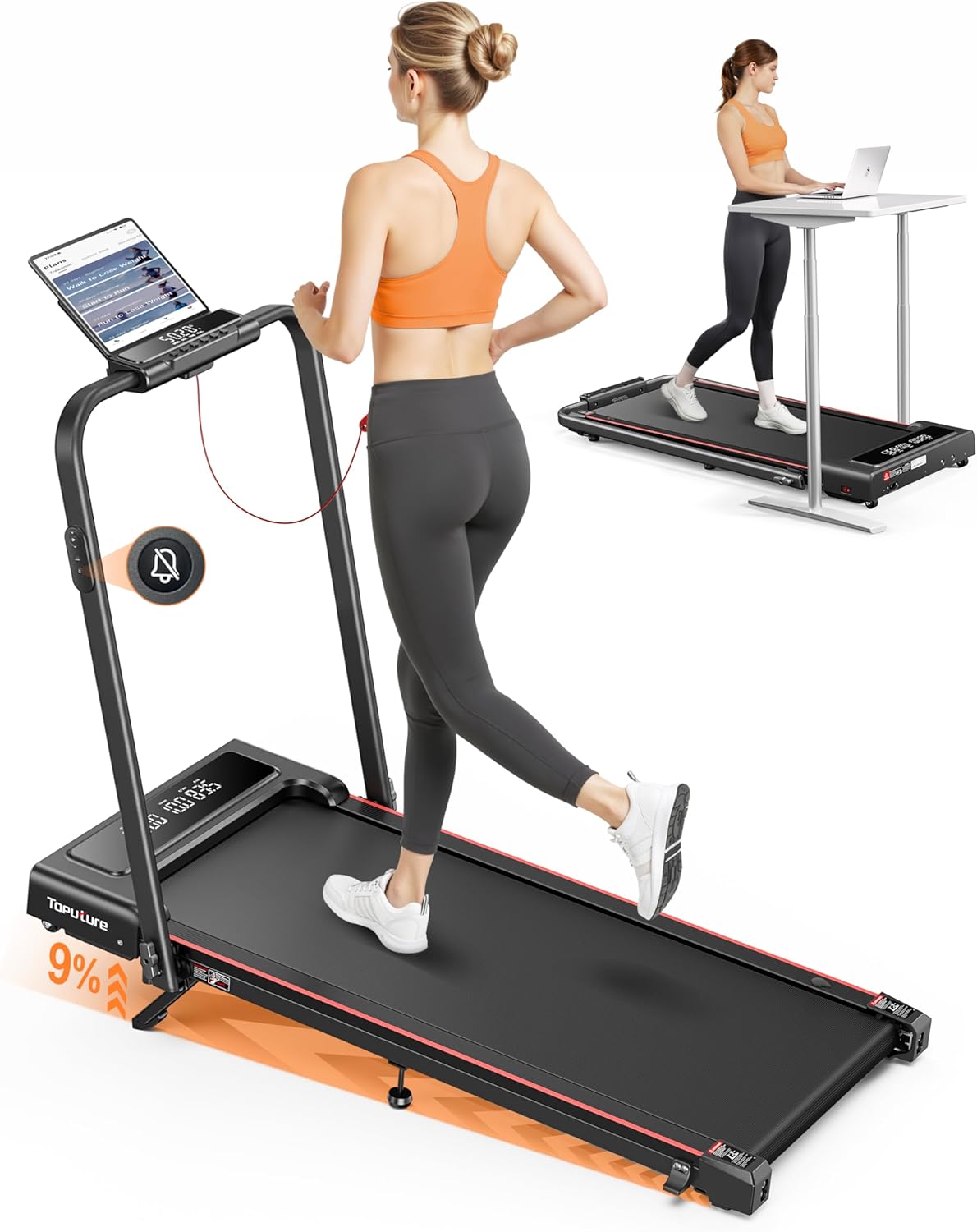
Image: The TOPUTURE TP4 treadmill in its upright running configuration with a user, and in its folded, under-desk walking pad configuration with another user at a standing desk. This illustrates the 4-in-1 functionality.
Nastavení
The TOPUTURE TP4 treadmill is designed for installation-free setup. It is ready to use right out of the box with minimal preparation.
- Rozbalit: Opatrně vyjměte běžecký pás z obalu.
- Umístění: Place the treadmill on a flat, stable surface with adequate clearance around it (at least 2 feet from walls or furniture).
- Rozložte (pokud je to relevantní): If the handlebar is folded down for storage, gently lift it into the upright position until it locks securely. Ensure all locking mechanisms are engaged.
- Připojte napájení: Zapojte napájecí kabel do napájecího vstupu běžeckého pásu a poté do uzemněné elektrické zásuvky.
- Bezpečnostní klíč: Attach the safety key clip to your clothing before starting any exercise.

Image: Demonstrates the treadmill's versatility, showing it used as an under-desk walking pad (0.6-5 MPH) and as a traditional treadmill with the handle upright (5-7.6 MPH).
Návod k obsluze
The TOPUTURE TP4 offers multiple modes and features for a comprehensive workout.
Zapnutí/vypnutí
- To power on, ensure the safety key is in place and press the power button on the control panel or remote.
- To power off, press the power button again or remove the safety key.
Ovládací panel a dálkové ovládání
The treadmill features a dual LED display, showing real-time data such as time, speed, distance, and calories burned. The remote control provides convenient access to functions.

Obrázek: Podrobný view of the treadmill's control panel with dual LED screens, displaying metrics like speed, distance, time, and calories. The remote control is also shown, highlighting its silent button design.
- Start/Stop: Press to begin or end your workout.
- Nastavení rychlosti: Use '+' and '-' buttons to increase or decrease speed. Speed range is 0.6-7.6 MPH.
- Mode (M Mode): Set workout goals based on time, calories, or distance.
- Silent Remote Control: The remote features noiseless buttons for quiet operation.
Powerful and Quiet Motor
The treadmill is equipped with a 2.5 HP motor designed for stable performance and quiet operation, with noise levels below 45dB. It supports a maximum user weight of 300 lbs.

Obrázek: Explodoval view showing the powerful 2.5HP motor and internal components of the treadmill, emphasizing its low noise output (less than 45dB) and robust 300 lbs weight capacity.
Nastavení sklonu
The treadmill offers a 9% manual incline adjustment to simulate uphill running and enhance calorie burning.

Image: Illustrates the 9% manual incline feature, demonstrating how it can boost fat burning compared to a flat surface. A user is shown exercising on the inclined treadmill.
To adjust the incline:
- Ujistěte se, že je běžecký pás vypnutý a odpojený od sítě.
- Locate the incline adjustment mechanism at the rear of the treadmill.
- Unfold the footpad, insert the pin into the desired incline level, and adjust the middle footpad for stability.
- Refer to the included tool kit for any necessary tools for adjustment.
Chytré připojení aplikací
Connect your treadmill to the dedicated smart app via Bluetooth for enhanced features:

Image: Shows the treadmill's smart app connectivity feature, allowing users to sync exercise data, access personalized training plans, and track progress through a mobile application.
- Sync exercise data in real-time.
- Access personalized training plans.
- Track your progress and set new challenges.
Údržba
Pravidelná údržba zajistí dlouhou životnost a optimální výkon vašeho běžeckého pásu.
Čištění
- Otřete povrch běžeckého pásuamp hadříkem po každém použití.
- Vyhněte se použití abrazivních čisticích prostředků nebo rozpouštědel.
- Udržujte prostor kolem běžeckého pásu čistý a bez prachu.
Mazání
The running belt requires periodic lubrication to reduce friction and extend its lifespan. The treadmill features convenient lubrication holes.

Image: Illustrates the multi-layer shock absorption system designed to protect knees and floors, highlighting the toughness, multi-layer damping, and springback features of the running belt.
- Apply lubricating oil every 3-6 months, depending on usage frequency.
- Lift the edge of the running belt and apply a small amount of silicone lubricant to the center of the deck.
- Nechte běžecký pás několik minut běžet nízkou rychlostí, aby se lubrikant rovnoměrně rozprostřel.
Nastavení pásu
If the running belt becomes misaligned or too loose/tight, it may need adjustment using the provided tool kit.
- Refer to the specific instructions in the tool kit for detailed belt adjustment procedures.
- Typically involves turning adjustment bolts at the rear of the treadmill.
Odstraňování problémů
This section addresses common issues you might encounter with your TOPUTURE TP4 treadmill.
| Problém | Možná příčina | Řešení |
|---|---|---|
| Běžecký pás se nezapne. | Power cord not connected, safety key not in place, power outlet issue. | Ensure power cord is securely plugged in. Check safety key. Test outlet with another device. |
| Běžecký pás prokluzuje nebo váhá. | Příliš volný řemen, nedostatečné mazání. | Adjust belt tension (refer to maintenance section). Apply silicone lubricant. |
| Neobvyklý hluk během provozu. | Uvolněné díly, problém s motorem, tření řemene. | Check for loose screws and tighten. Lubricate belt. If noise persists, contact customer support. |
| Dálkové ovládání nereaguje. | Slabá baterie, rušení. | Replace remote control battery. Ensure no obstructions between remote and treadmill. |
| Problémy s připojením k aplikaci. | Bluetooth off, app not updated, treadmill not discoverable. | Ensure Bluetooth is enabled on your device. Restart app and treadmill. Check app store for updates. |
Specifikace
| Funkce | Detail |
|---|---|
| Číslo modelu | TP4 |
| Rozměry produktu (rozložený) | 127 cm (d) x 58.4 cm (š) x 106.7 cm (v) |
| Skládací Velikost | 127 cm (d) x 58.4 cm (š) x 11.4 cm (v) |
| Hmotnost položky | 21.1 kg (46.5 lb) |
| Výkon motoru | 2.5 HP (špička) |
| Rozsah rychlosti | 0.6 - 7.6 mph |
| Maximální sklon | 9% (Manual Adjustment) |
| Hmotnostní kapacita | 300 lb (136 kg) |
| Běžecký pás | 5-layer anti-slip belt with 8 silicone shock absorbers and 2 soft rubber pads |
| Zobrazovací metriky | Čas, rychlost, vzdálenost, spálené kalorie |
| Konektivita | Bluetooth (for Smart App) |
| Speciální funkce | Foldable, Compact Design, Lightweight, Silent Remote Control, Dual Display, Installation-Free |
Záruka a podpora
TOPUTURE provides a warranty for this product. For specific warranty terms and conditions, please refer to the warranty card included in your product packaging or contact TOPUTURE customer service directly.
Zákaznická podpora:
If you have any questions, require technical assistance, or need to claim warranty service, please contact TOPUTURE customer support. Contact information can typically be found on the product packaging, the official TOPUTURE webstránky nebo záruční list.
When contacting support, please have your model number (TP4) and purchase date ready.


