1. Úvod
Thank you for choosing the Angrox Voice Remote Control. This remote is specifically designed as a replacement for Philips Google Smart TVs, offering enhanced functionality including voice control and dedicated shortcut buttons for popular streaming services. Please read this manual carefully to ensure proper setup and operation.

Obrázek: Přední a boční view of the Angrox Voice Remote Control, showcasinjeho ergonomický design a rozložení tlačítek.
2. Nastavení
2.1 Instalace baterie
The remote requires two (2) AAA batteries (not included). Ensure correct polarity when inserting the batteries.
- Remove the battery cover on the back of the remote by sliding it downwards.
- Insert two AAA batteries, matching the positive (+) and negative (-) terminals as indicated inside the battery compartment.
- Nasaďte kryt baterie zpět jeho zasunutím zpět na místo, dokud bezpečně nezacvakne.

Image: A three-step diagram illustrating how to remove the battery cover, insert two AAA batteries, and replace the cover.
2.2 Párování s televizorem
Before using the remote, it must be paired with your Philips Google Smart TV. This remote supports both infrared and Bluetooth technology for optimal performance.
- Ensure your Philips Google Smart TV is powered on.
- Hold down the "VOL-" button and the "Mic" (Google Assistant) button simultaneously for 5 seconds.
- The remote will initiate the pairing process. All pairing transactions occur in the background, and no further setup is typically required once the pairing is successful.

Image: A hand holding the remote, with an arrow pointing from the 'VOL-' and 'Mic' buttons to a TV screen, illustrating the pairing process.

Image: A visual guide showing the remote and a TV screen with on-screen instructions for pairing, emphasizing holding the VOL- and Mic buttons.
2.3 Kompatibilní modely televizorů
This voice replacement remote is compatible with the following Philips Google Smart TV series:
- Řada 7000: 75PUL7552/F7, 65PUL7552/F7, 55PUL7552/F7, 50PUL7552/F7, 43PUL7652/F7
- Řada 7600: 65PUL7672/F7, 55PUL7672/F7, 50PUL7672/F7, 43PUL7672/F7

Image: The remote control centered between two Philips Google Smart TVs, with lists of compatible 7000 and 7600 series models.
3. Návod k obsluze
3.1 Funkce tlačítekview
Familiarize yourself with the various buttons and their functions on your Angrox remote control:
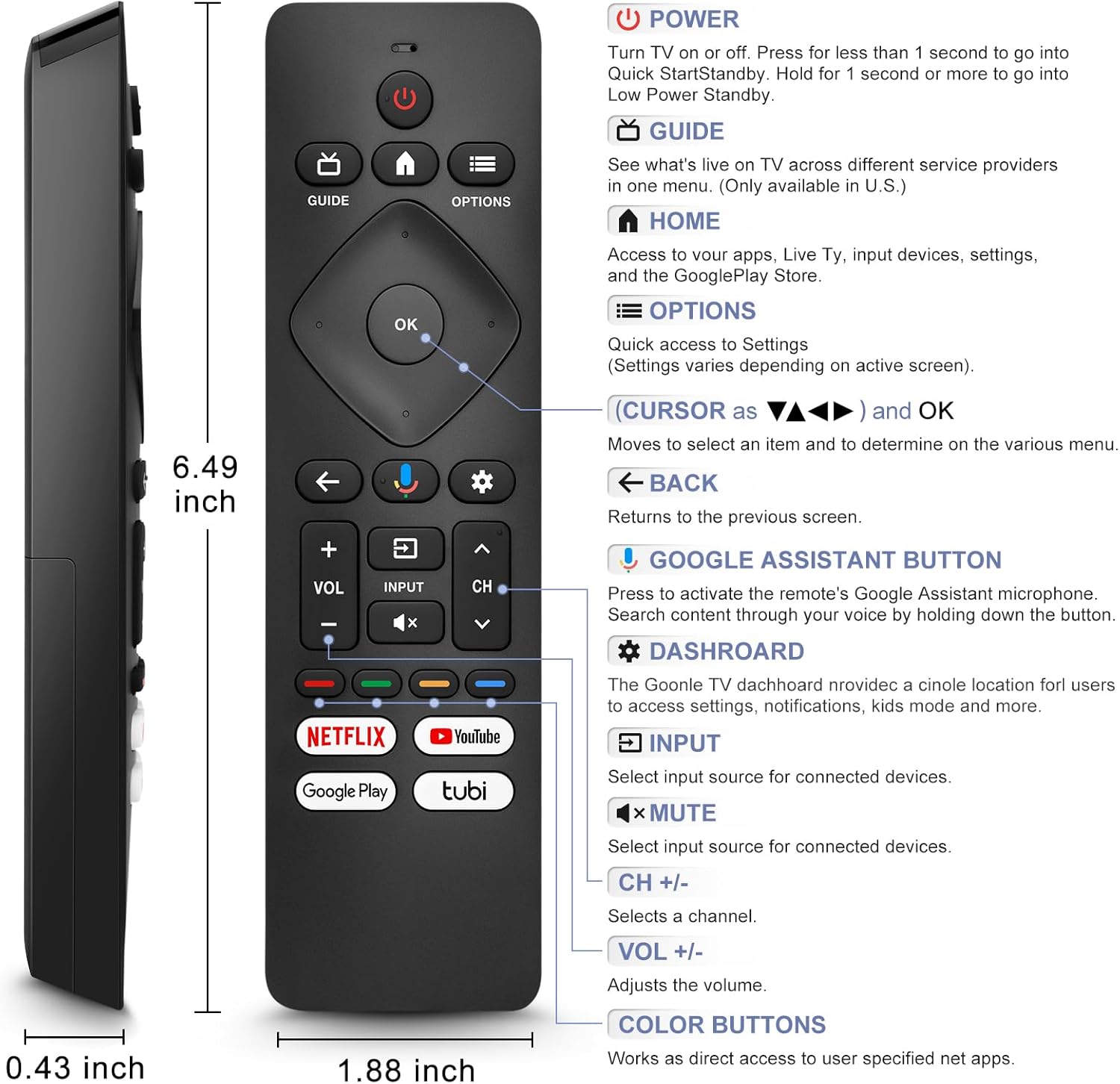
Image: A detailed diagram of the remote control with labels and descriptions for each button, including Power, Guide, Home, Options, Cursor/OK, Back, Google Assistant, Dashboard, Input, Mute, Volume, Channel, and Color Buttons.
- Moc: Press to turn TV on or off. Hold for 1 second for Quick Start Standby, or longer for Low Power Standby.
- Průvodce: Access live TV service providers (availability may vary by region).
- Domov: Access apps, Live TV, input devices, settings, and the Google Play Store.
- Možnosti: Quick access to settings (settings vary based on active screen).
- Cursor (Up/Down/Left/Right) & OK: Procházení nabídek a potvrzování výběrů.
- Zadní: Návrat na předchozí obrazovku.
- Tlačítko Google Assistant: Press and hold to activate the remote's microphone for voice search.
- řídicí panel: Access the Google TV dashboard for settings, notifications, and kids mode.
- Vstup: Vyberte zdroj vstupu pro připojená zařízení.
- Ztlumit: Ztlumení nebo zapnutí zvuku televizoru.
- VOL +/-: Upravte úroveň hlasitosti.
- CH +/-: Select the next or previous channel.
- Barevná tlačítka: Provide direct access to user-specified net apps.
3.2 Funkce hlasového vyhledávání
The integrated voice function allows for easier and more intuitive interaction with your smart TV. Simply press and hold the Google Assistant button and speak your command or query.
- Stiskněte a podržte tlačítko Google Assistant (ikona mikrofonu).
- Mluvte jasně do mikrofonu dálkového ovladače.
- Po skončení mluvení tlačítko uvolněte.
Examples of voice commands include: "What's the weather today?", "Turn down the volume", "Open YouTube", or searching for specific content.
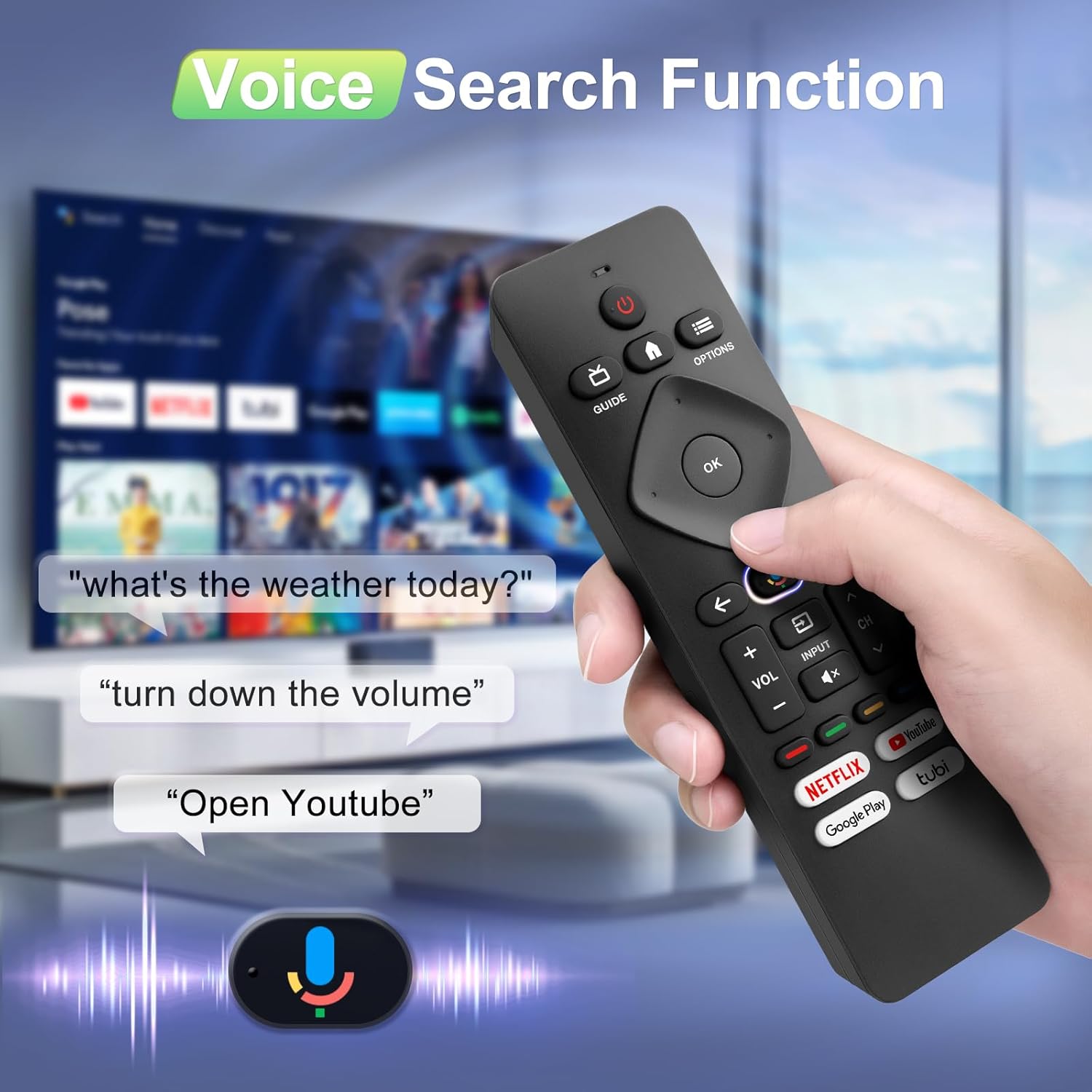
Image: A hand holding the remote, with speech bubbles showing example voice commands like "what's the weather today?" and "Open Youtube", demonstrating the voice search capability.
3.3 Tlačítka zkratek
The remote features four dedicated shortcut buttons for quick access to popular streaming channels:
- Netflix
- Youtube
- Google Play
- Tubi
Pressing these buttons will directly launch the respective application on your TV, provided they are installed and configured.

Image: The remote control highlighting the four dedicated shortcut buttons for Netflix, YouTube, Google Play, and Tubi, with their respective logos.
4. Údržba
Abyste zajistili dlouhou životnost a optimální výkon vašeho dálkového ovladače, dodržujte tyto pokyny pro údržbu:
- Čištění: Dálkový ovladač otírejte měkkým, suchým hadříkem. Nepoužívejte tekuté čisticí prostředky ani abrazivní materiály.
- Výměna baterie: Vyměňte baterie, když dálkový ovladač začne reagovat pomalu nebo přestane fungovat. Vždy vyměňte obě baterie najednou za nové.
- Skladování: Dálkový ovladač skladujte na chladném a suchém místě mimo dosah přímého slunečního záření a extrémních teplot.
- Vyhněte se kapkám: Chraňte dálkový ovladač před fyzickými nárazy, protože pády mohou poškodit vnitřní součásti.
5. Řešení problémů
Pokud narazíte na problémy s dálkovým ovladačem, podívejte se na následující běžná řešení:
- Dálkové ovládání nereaguje:
- Zkontrolujte, zda jsou baterie vloženy správně se správnou polaritou.
- Vyměňte staré baterie za nové baterie typu AAA.
- Ujistěte se, že mezi dálkovým ovladačem a infračerveným přijímačem televizoru nejsou žádné překážky.
- Hlasová funkce nefunguje:
- Ensure the remote is properly paired with your TV via Bluetooth. Refer to Section 2.2.
- Make sure you are pressing and holding the Google Assistant button while speaking.
- Zkontrolujte nastavení televizoru a ujistěte se, že je povoleno hlasové ovládání.
- Buttons Unresponsive or Sticky:
- Clean the remote surface, especially around the buttons, to remove any dirt or debris.
- If buttons remain unresponsive after cleaning and battery replacement, the remote may require replacement.
- Short Remote Distance:
- The remote supports infrared and Bluetooth. Ensure no physical obstructions are blocking the signal.
- The remote is designed for optimal performance within 10 meters (approximately 33 feet) and is available up to 12 meters (approximately 39 feet).
6. Specifikace
| Značka | Angrox |
| Číslo modelu | URMT26CND002 |
| Kompatibilní zařízení | Philips Google Smart TVs (7000 & 7600 Series) |
| Technologie připojení | Infrared, Bluetooth |
| Speciální funkce | Ergonomic, Voice Search, Shortcut Buttons |
| Zdroj napájení | 2 x AAA baterie (nejsou součástí balení) |
| Hmotnost položky | 2.39 unce (cca 67.7 gramů) |
| Rozměry balení | 6.73 x 1.93 x 1.02 palce |
| Trvanlivost tlačítek | Tested for 5,000-8,000 clicks per button |
7. Záruka a podpora
Angrox is committed to providing excellent after-sale service. We focus on the compatibility and quality of our replacement remotes. If you have any questions or concerns regarding your order or the product, please do not hesitate to contact us directly. Our professional after-sale service team is available to assist you.
For support, please refer to the contact information provided with your purchase or visit the Angrox store on Amazon.
