1. Úvod
This manual provides comprehensive instructions for the safe and effective use of your Thermal Master T2 Max Android Thermal Night Vision Monocular. Please read this manual thoroughly before operating the device and retain it for future reference.
The T2 Max is a versatile thermal imaging monocular designed for various applications, including hunting, wilderness rescue, and outdoor surveillance. It features a high-performance thermal detector, advanced image processing, and compatibility with Android smartphones for enhanced functionality.
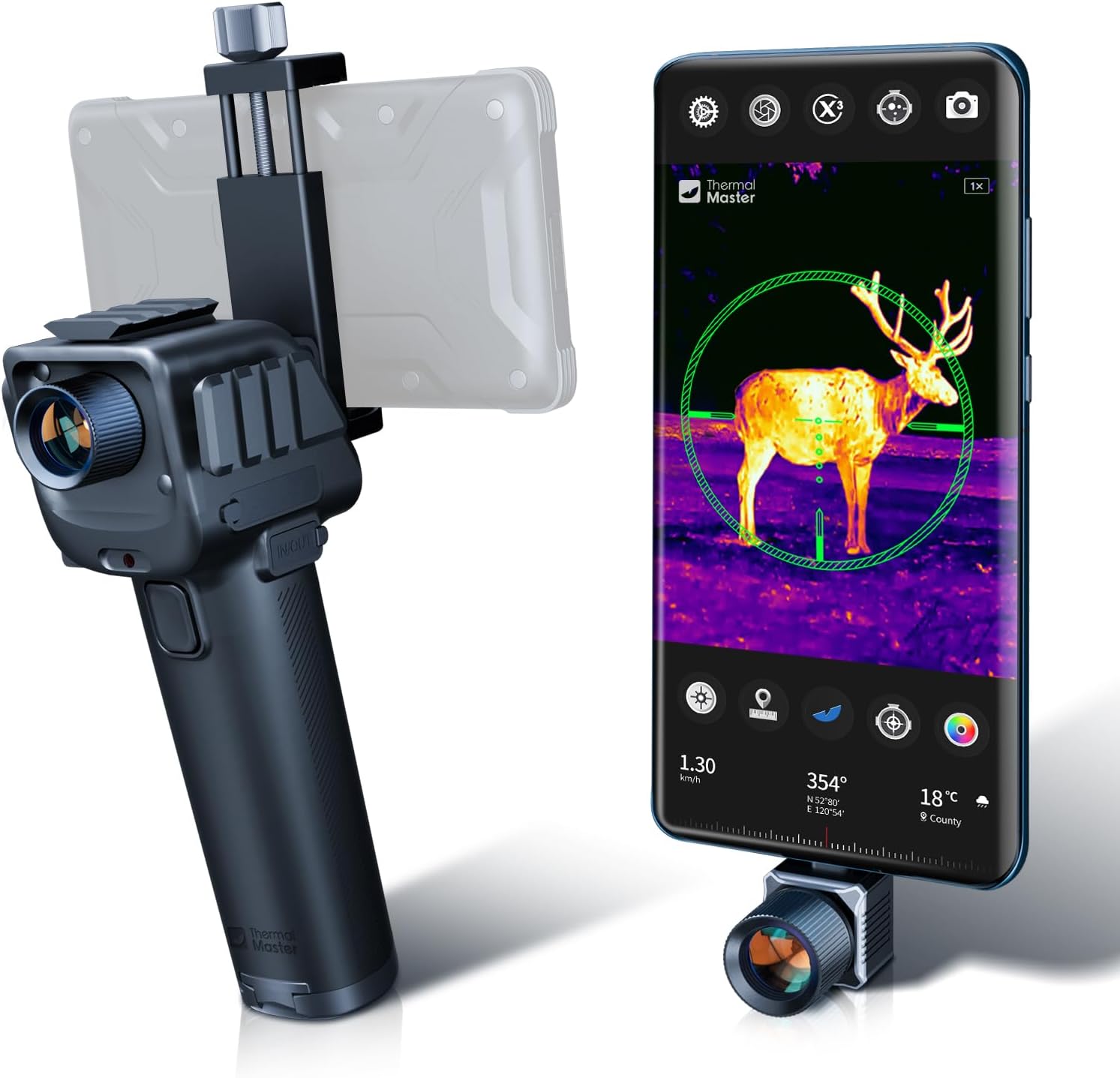
Figure 1.1: The Thermal Master T2 Max Android Thermal Night Vision Monocular connected to a smartphone, displaying a thermal image of a deer.
2. Co je v krabici
Po otevření balení se prosím ujistěte, že obsahuje všechny následující položky:
- T2 Max Android ×1
- Power Handle ×1
- Extension Cable ×1
- 5000mAh Battery (pre-installed or separate)
- Rychlý průvodce
- Karta poprodejního servisu
- Thermal Scope Protect Case
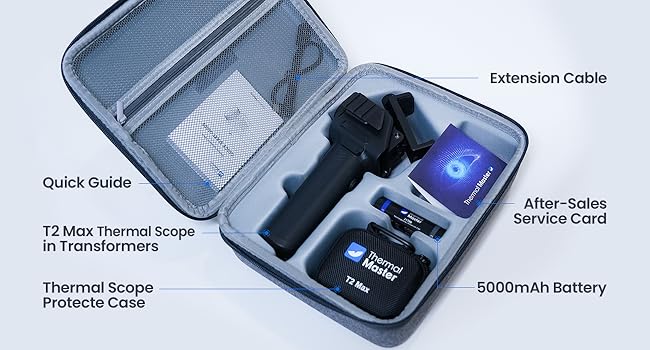
Obrázek 2.1: Přesview of the T2 Max package contents, including the monocular, power handle, extension cable, and protective case.
3. Nastavení a instalace
3.1 Initial Device Assembly
- Attach Power Handle: Securely connect the T2 Max monocular to the provided power handle. Ensure a firm connection.
- Vložte baterii: If not pre-installed, insert the 5000mAh Lithium Ion battery into the power handle.
- Připojení k telefonu Android: Use the extension cable to connect the T2 Max to your Android smartphone. The device is designed to integrate with your phone's display and processing capabilities.
- Instalace aplikace: Download and install the official Thermal Master application from the Google Play Store or by scanning the QR code provided in the Quick Guide. This application is essential for operating the monocular and accessing its features.
3.2 Možnosti montáže
The T2 Max is highly adaptable and can be mounted in various configurations using its two reserved rails (Picatinny Mount or Weaver Mount compatible). This allows for over 20 different retrofit methods.

Figure 3.1: The T2 Max configured as a thermal scope for a rifle and a compound bow, demonstrating its versatility.
- Thermal Scope for Compound Bow/Crossbow: Attach the T2 Max to your bow or crossbow for enhanced targeting in low-light conditions.
- Thermal Scope for Rifles: Mount the device on a rifle using compatible rails.
- Montáž na stativ: For stationary observation or surveillance, the T2 Max can be mounted on a standard tripod.
- Vehicle/Marine Integration: The monocular can be adapted for use as a night vision system on vehicles or boats.
- Wearable/Helmet Mount: With additional accessories (not included), the T2 Max can be configured for helmet or body-worn applications.

Obrázek 3.2: Přamples of diverse mounting options for the T2 Max, including helmet, wearable, and tripod setups.

Figure 3.3: The T2 Max integrated into various platforms such as a car, boat, and bicycle for thermal vision applications.
4. Návod k obsluze
4.1 Zapnutí a první použití
Once connected to your Android smartphone and the application is installed, power on the T2 Max. The thermal image will be displayed on your phone's screen. Familiarize yourself with the on-screen controls within the Thermal Master application.
4.2 Klíčové vlastnosti a funkce
- Long Range Detection: The 15mm focusable front lens (f/0.8) allows detection of targets up to 1600 yards. For example, deer can be detected at 1815 yards, pigs at 1370 yards, and pigeons at over 300 yards.
- Super-IR Resolution: The device utilizes a 512 x 384 resolution, enhanced by the X³ Super Resolution algorithm, which upscales from 256x192 for greater clarity and detail. This is achieved through the Thermal Master high-performance detector and dual image processors (FPGA and self-developed ASIC).
- 15x digitální zoom: Adjust the magnification of the thermal image with a two-finger pinch-to-zoom gesture on your smartphone screen.
- Professional Reticles: The T2 Max offers 8 reticle shapes and 5 colors, providing over 40 reticle combinations. It also includes a unique compound bow target mode with two exclusive patents to increase observation efficiency.
- Obrazové režimy: Switch between different image modes, such as HD mode for more detail in winter conditions and Highlight mode to make targets stand out in summer.

Figure 4.1: Demonstrating the 15x digital zoom capability, allowing users to magnify thermal images for closer inspection.

Figure 4.2: A selection of the 8+1 professional reticles available, including specialized options for compound bow targeting.
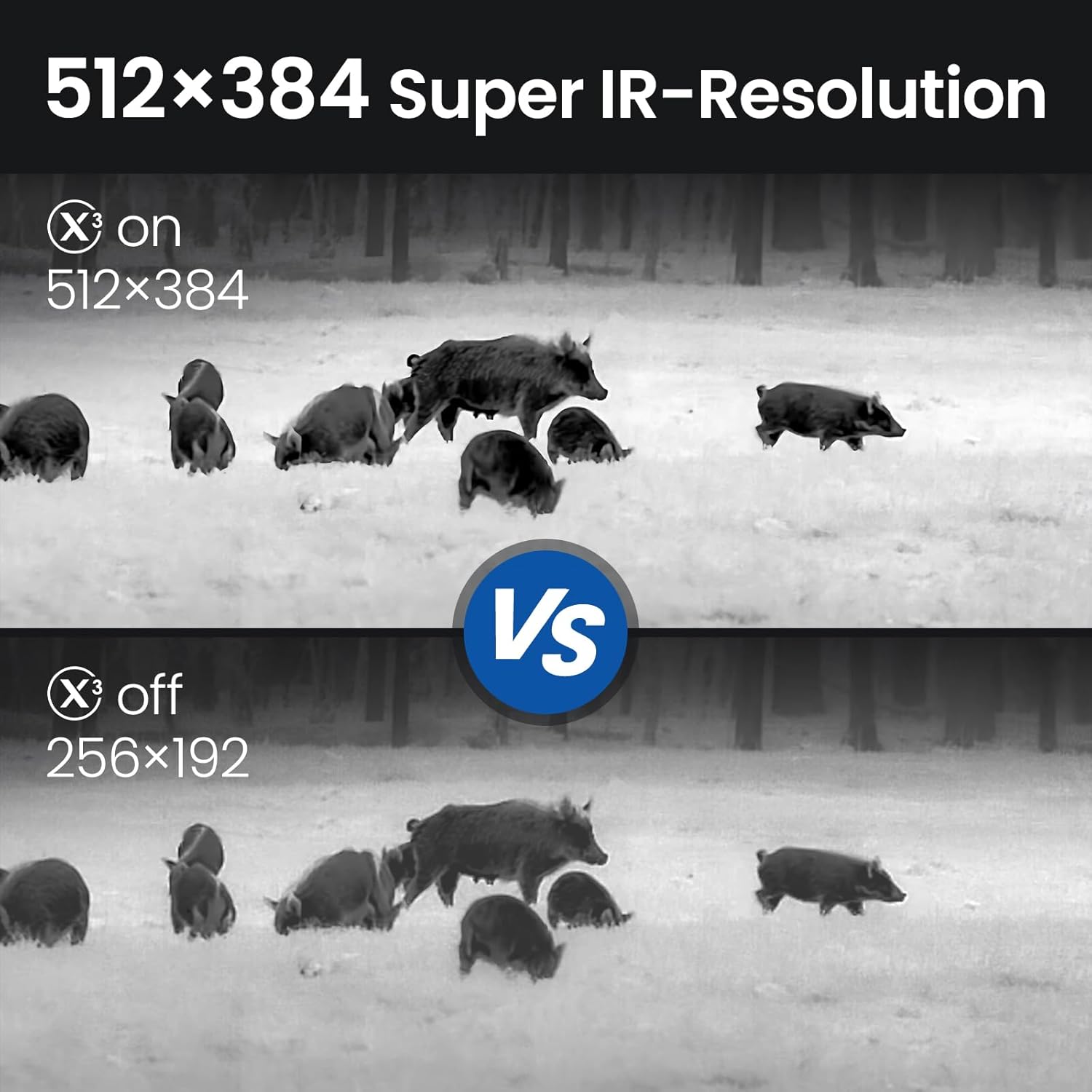
Figure 4.3: Comparison of HD mode (left) for detailed images and Highlight mode (right) for enhanced target visibility.
4.3 Important Safety Note: Smart Burn Protection
The T2 Max features Smart Burn Protection to safeguard its thermal imaging detector. Thermal imaging detectors are highly sensitive and can be permanently damaged if exposed to direct sunlight, intense flames, or other strong heat sources (e.g., cigarette tips). Such damage is irreparable and will render the device unusable.
Always ensure the lens is not pointed directly at the sun or any other strong heat source, especially when the device is powered on.

Figure 4.4: On-screen warning regarding Smart Burn Protection, emphasizing the risk of irreparable damage from direct sun exposure.
5. Údržba a péče
5.1 Čištění zařízení
- Čištění objektivu: Use a soft, lint-free cloth specifically designed for optics to gently wipe the lens. If necessary, use a small amount of lens cleaning solution. Avoid abrasive materials or excessive force.
- Čištění těla: Otřete tělo monokulárního dalekohledu měkkým hadříkemamp hadříkem. Nepoužívejte agresivní chemikálie, rozpouštědla ani abrazivní čisticí prostředky.
- Vyhněte se ponoření do vody: While the device may have some water resistance, avoid submerging it in water.
5.2 Péče o baterii
- Nabíjení: Charge the Lithium Ion battery using the provided charging cable and a compatible power source. Do not use unapproved chargers.
- Skladování: For long-term storage, ensure the battery is partially charged (around 50%). Store the device and battery in a cool, dry place away from direct sunlight and extreme temperatures.
5.3 Skladování
When not in use, store the T2 Max in its protective case to prevent dust accumulation and physical damage. Ensure the lens cap is on to protect the thermal sensor.
6. Řešení problémů
If you encounter issues with your T2 Max, please refer to the following common problems and solutions:
| Problém | Možná příčina | Řešení |
|---|---|---|
| Zařízení se nezapne. | Slabá nebo vybitá baterie. Loose connection to power handle. | Nabijte baterii. Ensure the monocular is securely attached to the power handle. |
| No image on phone screen. | Loose or faulty extension cable connection. Thermal Master app not running or crashed. Device not recognized by phone. | Check and re-secure the extension cable connections at both ends. Close and restart the Thermal Master application. Restart your smartphone and the T2 Max. Ensure your phone's USB settings allow external device connection. |
| Poor image quality / blurry image. | Objektiv je špinavý. Nesprávné zaostření. Environmental factors (e.g., heavy fog, rain). | Clean the lens gently with an optical cleaning cloth. Adjust the focus ring on the monocular. Image quality may be affected by extreme weather conditions. |
| Device gets excessively hot. | Prolonged use in high ambient temperatures. Vnitřní porucha. | Allow the device to cool down. Operate in well-ventilated areas. If overheating persists, discontinue use and contact customer support. |
| Aplikace padá nebo zamrzá. | Softwarová závada. Insufficient phone resources. | Force close the app and restart it. Ensure your phone's operating system is up to date. Clear app cache if necessary. |
If the problem persists after attempting these solutions, please contact Thermal Master customer support for further assistance.
7. Specifikace
The following table outlines the key technical specifications of the Thermal Master T2 Max Android Thermal Night Vision Monocular:
| Funkce | Detail |
|---|---|
| Název modelu | T2 Max Android |
| Značka | Thermal Master |
| Barva | Černý |
| Materiál | Kov |
| Průměr objektivu | 15 milimetrů |
| Kompatibilní zařízení | Android Smartphones, Compound Bow, Cross Bow, Vehicle, Ship |
| Typ montáže | Picatinny Mount or Weaver Mount |
| Noční vidění | Yes (Thermal) |
| Tepelné rozlišení | 512 x 384 (enhanced from 256x192 via X³ Super Resolution) |
| Digitální zoom | Až 15x |
| Typy nitkového kříže | 8 shapes, 5 colors (40+ combinations), Compound Bow Target mode |
| Typ baterie | 1 lithium-iontová baterie (součástí balení) |
| Hmotnost položky | 2.35 libry |
| Rozměry balení | 10 x 8.35 x 3.66 palce |

Figure 7.1: Detailed specifications of the T2 Max, highlighting its performance metrics.
8. Záruka a podpora
8.1 Záruka na produkt
For information regarding the warranty coverage for your Thermal Master T2 Max, please refer to the "After-Sales Service Card" included in your product packaging or visit the official Thermal Master webZáruční podmínky se mohou lišit.
Optional protection plans may be available for purchase separately to extend coverage beyond the standard manufacturer's warranty.
8.2 Zákaznická podpora
If you require technical assistance, have questions about your device, or need to report a defect, please contact Thermal Master customer support. Contact details can typically be found on the official Thermal Master website or on the included service card.
When contacting support, please have your product model number (T2 Max Android) and purchase information readily available.


