1. Úvod
This manual provides essential instructions for setting up, operating, and maintaining your XIAOMI Redmi A3X smartphone. Please read this guide thoroughly to ensure proper use and to maximize the device's capabilities. The Redmi A3X features a 6.71-inch HD+ display, a 5000mAh battery, and runs on Android 14.
2. Obsah balení
Ověřte, zda jsou v krabici s produktem přítomny všechny položky:
- XIAOMI Redmi A3X Mobile Phone
- Kabel USB typu C
- Nástroj pro vysunutí SIM karty
- Rychlý průvodce
- Záruční list
- Bezpečnostní informace
- Wall Charger (Note: Availability may vary by region.)
3. Zařízení skončiloview
Familiarize yourself with the physical components of your Redmi A3X smartphone.
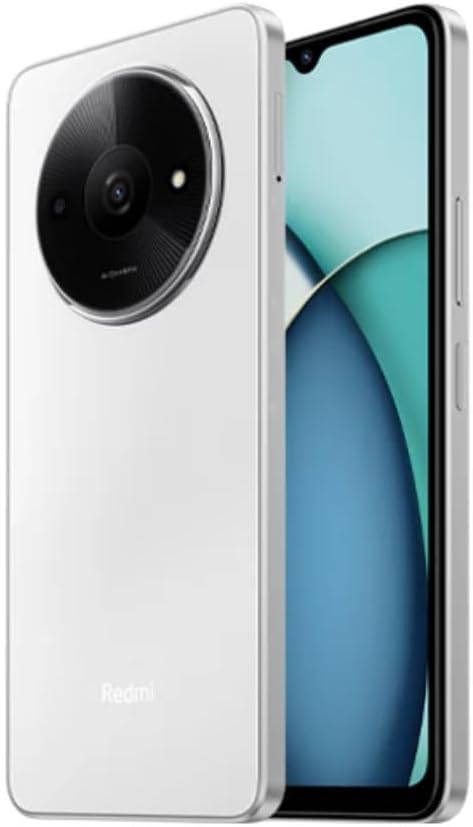
Obrázek 3.1: Přední a zadní View of the Redmi A3X. This image displays the phone in Moonlight White, highlighting its 6.71-inch display and the distinctive circular camera module on the back.

Obrázek 3.2: Redmi A3X Certification Information. This image shows the phone's screen displaying regulatory details such as the model number (24044RN32L), FCC ID (2AFZZN32L), and battery capacity (5000mAh).
3.1 Fyzické vlastnosti
- Zobrazit: 6.71-inch Dot Drop HD+ display.
- Zadní kamera: Circular module housing the 8MP main camera and auxiliary lens.
- Přední kamera: Located in the display's dot drop notch.
- Boční snímač otisků prstů: Integrováno do tlačítka napájení pro pohodlné odemykání.
- Port USB Type-C: Pro nabíjení a přenos dat.
- 3.5mm konektor pro sluchátka: For audio accessories.
- Zásuvka na SIM kartu: Supports Dual SIM and microSD card expansion.
4. Nastavení
4.1 Vložení SIM karet a karty MicroSD
- Vyhledejte držák SIM karty na boku zařízení.
- Vložte nástroj pro vysunutí SIM karty do malého otvoru v přihrádce na SIM kartu a otevřete ji.
- Place your Nano-SIM card(s) and/or microSD card into the tray with the gold contacts facing down. Ensure correct orientation as indicated on the tray.
- Opatrně zatlačte zásobník zpět do telefonu, dokud nebude v jedné rovině s bokem.
Poznámka: This device supports dual SIM cards and a microSD card simultaneously. For USA market, this phone is compatible with T-Mobile, Mint, Tello, and other T-Mobile network providers. Outside the USA, it works with any GSM carrier SIM.
4.2 První zapnutí a nabíjení
- To power on, press and hold the power button (located on the side) until the XIAOMI logo appears.
- Postupujte podle pokynů na obrazovce a dokončete počáteční nastavení, včetně výběru jazyka, připojení k Wi-Fi a nastavení účtu Google.
- To charge the device, connect the USB Type-C cable to the phone's charging port and the other end to the provided wall charger.
- The device supports 10W charging. Use only XIAOMI-approved chargers and cables.
5. Návod k obsluze
5.1 Základní navigace
Your Redmi A3X runs on Android 14. Navigate the interface using gestures or on-screen buttons. Swipe up from the bottom to access the app drawer, swipe down from the top for notifications and quick settings.
5.2 Funkce displeje
- 6.71" HD+ Dot Drop Display: Nabízí široký viewoblast.
- Obnovovací frekvence 90Hz: Provides a smoother visual experience for scrolling and app usage. This can be adjusted in display settings.
- Stejnosměrné stmívání: Reduces screen flickering at low brightness levels for improved eye comfort.
- Noční světlo: Adjusts screen colors to warmer tones to reduce blue light exposure, especially useful before sleep. Activate this feature in Display settings.
6. Funkce fotoaparátu
The Redmi A3X is equipped with an 8MP main rear camera and a 5MP front camera, offering various modes for photography and videography.
6.1 Zadní kamera
- Rezoluce: 8MP with f/2.0 aperture and a 4P lens. Includes an auxiliary QVGA lens.
- Nahrávání videa: Supports 1080P at 30fps and 720P at 30fps.
- Režimy: filmCamera, HDR mode, Portrait mode, Time-lapse.
6.2 Přední kamera
- Rezoluce: 5MP s clonou f/2.2.
- Nahrávání videa: Supports 1080P at 30fps and 720P at 30fps.
- Režimy: filmCamera, HDR mode, Soft-light ring, Portrait mode, Time-lapse.
7. Konektivita
7.1 Network Bands
The device supports a wide range of network bands for global compatibility:
- 4G LTE TDD: 38. 40. 41
- 4G LTE FDD: 1/3/5/7/8/20/28
- 3G WCDMA: 1. 5. 8
- 2G GSM: 2/3/5/8
7.2 Bezdrátové připojení
- Wi-Fi: Supports 2.4GHz and 5GHz Wi-Fi networks.
- Bluetooth: Verze 5.4 pro připojení bezdrátového příslušenství.
- FM rádio: Supported via the 3.5mm headphone jack.
- GPS: Integrované GPS, Glonass, Galileo a Beidou pro přesné lokalizační služby.
8. Bezpečnostní prvky
Your Redmi A3X offers multiple options to secure your device and data.
- Boční snímač otisků prstů: Register your fingerprint(s) for quick and secure unlocking. Access this in Settings > Security & privacy > Device unlock.
- Odemknutí obličejem s umělou inteligencí: Use your face to unlock the device. Ensure good lighting conditions for optimal performance. Access this in Settings > Security & privacy > Device unlock.
9. Údržba
9.1 Obecná péče
- Udržujte zařízení suché. Vlhkost může poškodit elektronické obvody.
- Vyhněte se extrémním teplotám. Vysoké teploty mohou zkrátit životnost elektronických zařízení a poškodit baterie.
- Zařízení neupusťte, neklepejte a netřeste s ním. Hrubé zacházení může poškodit vnitřní obvodové desky a jemnou mechaniku.
- Clean the screen and body with a soft, dry cloth. Avoid using harsh chemicals or abrasive materials.
9.2 Aktualizace softwaru
Your Redmi A3X will receive regular software updates. It is designed to receive 2 major Android version updates and 3 years of security patch updates. Ensure your device is connected to Wi-Fi and has sufficient battery before performing updates.
10. Řešení problémů
| Problém | Možné řešení |
|---|---|
| Zařízení se nezapne. | Ujistěte se, že je baterie nabitá. Připojte nabíječku a před opětovným zapnutím počkejte několik minut. |
| Nelze se připojit k síti. | Check if the SIM card is correctly inserted. Verify that mobile data is enabled in settings. Restart the device. Confirm network compatibility with your carrier. |
| Snímač otisků prstů nefunguje. | Ujistěte se, že máte prst čistý a suchý. Pokud problém přetrvává, znovu zaregistrujte otisk prstu v nastavení. |
| Pomalý výkon. | Close unused applications. Clear cache from apps. Restart the device. Consider performing a factory reset if issues persist (back up data first). |
11. Specifikace
| Funkce | Detail |
|---|---|
| Číslo modelu | 24044RN32L |
| Zobrazit | 6.71" Dot Drop HD+ (1650x720), 90Hz Refresh Rate, DC Dimming |
| Procesor | Unisoc T603, Octa-core up to 1.8GHz |
| BERAN | 3 GB |
| Interní úložiště | 64 GB |
| Rozšiřitelné úložiště | microSD (up to 1TB, shared with SIM slot) |
| Zadní kamera | 8MP (f/2.0) + Auxiliary lens |
| Přední kamera | 5MP (f/2.2) |
| Baterie | 5000mAh (typ), 10W charging |
| Operační systém | Android 14 |
| Konektivita | Dual SIM, 4G LTE, Wi-Fi (2.4GHz/5GHz), Bluetooth 5.4, GPS, FM Radio |
| Senzory | Side fingerprint sensor, AI face unlock, Virtual proximity, Virtual ambient light, Accelerometer, Electronic compass |
| Audio Jack | 3.5 mm |
| Rozměry | Approx. 7.11 x 3.25 x 0.33 inches (based on package dimensions and 8.3mm thickness from description) |
| Hmotnost | 12.8 unce |
12. Záruka a podpora
Your XIAOMI Redmi A3X comes with a warranty. Please refer to the included Warranty Card for detailed terms and conditions. For technical support or further assistance, please visit the official XIAOMI support webnebo kontaktujte jejich zákaznický servis.
Více informací a podpůrných zdrojů naleznete na Obchod XIAOMI na Amazonu.


