Majority Darwin Bluetooth Alarm Clock with 10W Wireless Charging
Model: Darwin | Brand: Majority
Zavedení
This manual provides detailed instructions for the operation and maintenance of your Majority Darwin Bluetooth Alarm Clock. This device integrates an FM radio, dual alarm clock, 10W wireless charging, and ambient lighting to enhance your bedside experience.
Bezpečnostní informace
- Před použitím si pečlivě přečtěte všechny pokyny.
- Udržujte zařízení mimo dosah vody a vlhkosti.
- Nevystavujte extrémním teplotám.
- Nepokoušejte se jednotku rozebírat ani opravovat sami. Obraťte se na kvalifikovaný servisní personál.
- Při používání funkce bezdrátového nabíjení zajistěte dostatečné větrání.
Obsah balení
Ověřte, zda jsou v krabici přítomny všechny položky:
- Majority Darwin Bedside Clock
- Síťový napájecí adaptér
- Uživatelská příručka

Image: Package contents of the Majority Darwin alarm clock, including the clock, power adapter, and user manual.
Konec produktuview
Familiarize yourself with the main components and control buttons of your Darwin alarm clock.
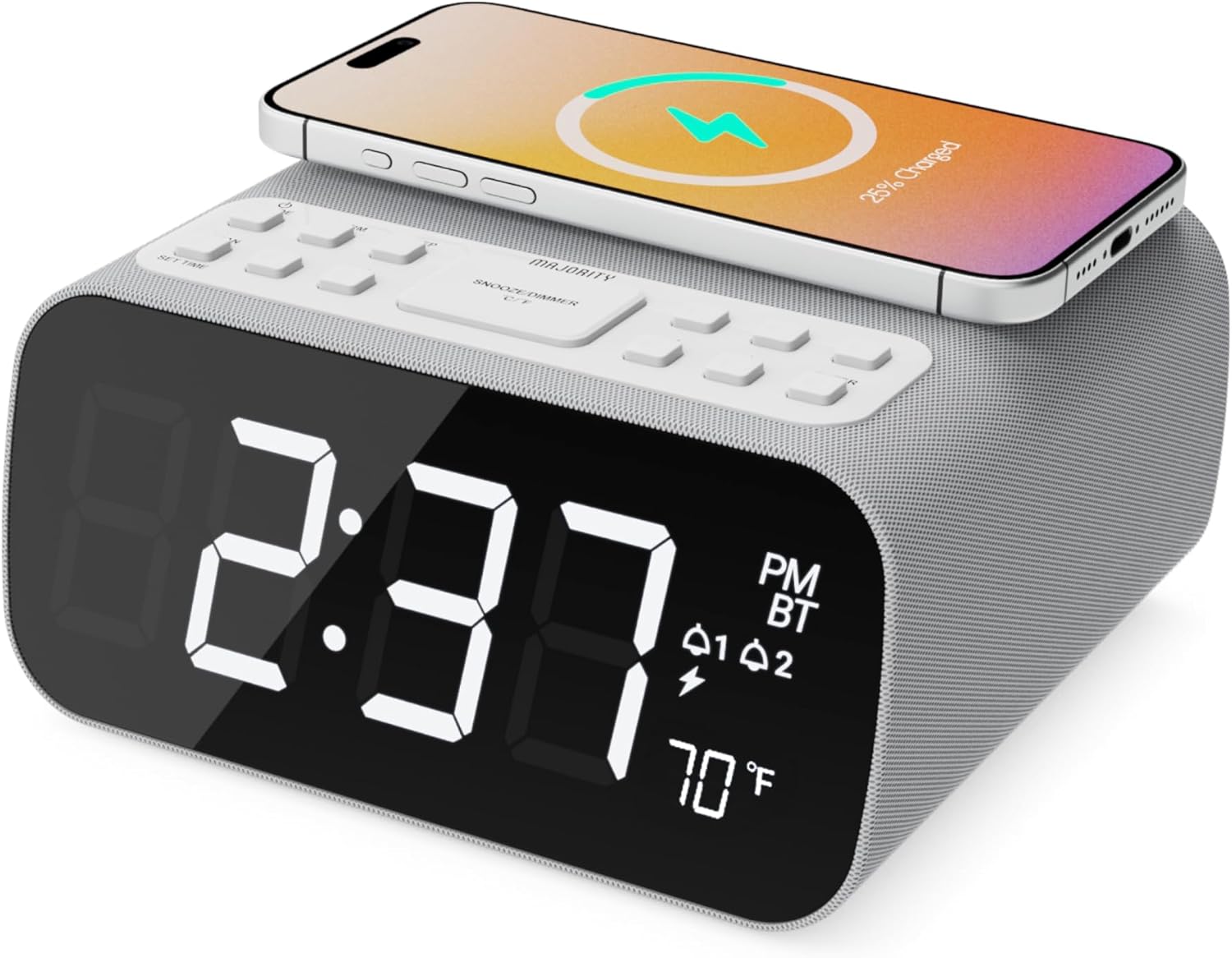
Obrázek: Přední strana view of the Majority Darwin alarm clock showing the large digital display, wireless charging pad on top, and control buttons.

Obrázek: Boční view of the Majority Darwin alarm clock highlighting the control panel with buttons for time, alarm, volume, and light settings.
Ovládací prvky na horním panelu
- Bezdrátová nabíjecí podložka: Place compatible devices here for 10W wireless charging.
- Tlačítko odložit/rozsvítit: Short press to snooze alarm; long press to adjust display brightness or cycle through ambient light colors.
- Time/Date Set Button: Press to enter time/date setting mode.
- Tlačítka alarmu 1/2: Press to activate/deactivate Alarm 1 or Alarm 2. Long press to set alarm time.
- Volume/Tune Buttons: Adjust volume or tune FM radio stations.
- Tlačítko režimu: Switch between FM Radio, Bluetooth, and White Noise modes.
Rear Panel Controls & Ports
- Vstup DC 12V: Connect the mains power adapter here.
- USB nabíjecí port: For charging additional devices via USB cable.
- Přihrádka na baterie: For backup batteries (not for primary power).
- Posuvník stmívače displeje: Manually adjust the brightness of the main time display.
- Night Light Dimmer: Adjust brightness of the ambient light.
Nastavení
Připojení napájení
Connect the provided mains power adapter to the DC 12V input port on the rear of the alarm clock and plug it into a wall outlet. The display will light up.
For battery backup, open the battery compartment on the bottom and insert 2 x AAA batteries (not included). This will retain time settings during a power outage but will not power the display or charging functions.
Obrázek: Zadní view of the Majority Darwin alarm clock with the power adapter connected to the DC 12V input.
Nastavení počátečního času
- Dlouze stiskněte Nastavit čas/datum button on the top panel. The hour digits will start flashing.
- Použijte Volume/Tune tlačítka pro nastavení hodiny.
- Stiskněte tlačítko Nastavit čas/datum znovu stiskněte tlačítko pro potvrzení hodin a přechod k nastavení minut.
- Použijte Volume/Tune tlačítka pro nastavení minut.
- Repeat this process for setting the year, month, and day.
- Stiskněte tlačítko Nastavit čas/datum button one last time to save all settings.
Návod k obsluze
Time Display & Dimmer
The large LED display shows the current time.
Manuální stmívání: Použijte Display Dimmer Slider on the rear panel to manually adjust the brightness of the time display.
Automatické stmívání: The device features an auto-dimming function that adjusts display brightness at fixed time intervals (e.g., dimming at night, brightening during the day).

Obrázek: Přední strana view of the Majority Darwin alarm clock displaying time, AM/PM, and temperature, highlighting the dual alarm icons.
Nastavení alarmu
The Darwin alarm clock supports two independent alarms (Alarm 1 and Alarm 2).
- Long press either the Poplach 1 or Poplach 2 button. The hour digits for that alarm will flash.
- Použijte Volume/Tune tlačítky nastavte požadovanou hodinu buzení.
- Stiskněte odpovídající Poplach znovu stiskněte tlačítko pro potvrzení hodin a přechod k nastavení minut.
- Použijte Volume/Tune tlačítky nastavte požadované minuty budíku.
- Stiskněte tlačítko Poplach button again to select the alarm source (FM radio or built-in tone). Use Volume/Tune tlačítka pro výběr.
- Stiskněte tlačítko Poplach button again to set the alarm volume.
- Stiskněte tlačítko Poplach button one last time to activate the alarm. An alarm icon will appear on the display.
Deactivating an Alarm: Short press the corresponding Poplach 1 or Poplach 2 button to turn it off. The alarm icon will disappear.
Funkce Snooze
Když zazní budík, krátce stiskněte Odložit/rozsvítit button on the top panel to temporarily silence the alarm for 9 minutes. The alarm will sound again after the snooze period.
Provoz FM rádia
- Stiskněte tlačítko Režim tlačítko, dokud se na displeji nezobrazí „FM“.
- Použijte Volume/Tune buttons to manually tune to your desired FM station.
- Auto Scan & Store Presets: Dlouze stiskněte Režim button to automatically scan and save available FM stations as presets.
- Krátce stiskněte Režim pro procházení uložených předvoleb.
Bluetooth Pairing & Playback
- Stiskněte tlačítko Režim button until "BT" appears on the display and the Bluetooth indicator starts flashing.
- On your smartphone or other Bluetooth device, enable Bluetooth and search for "Majority Darwin".
- Select the device to pair. Once connected, the Bluetooth indicator on the alarm clock will stop flashing.
- You can now play audio from your device through the alarm clock's speaker. Use the Volume/Tune buttons on the alarm clock or your device to adjust volume.

Image: A smartphone displaying music playback, connected via Bluetooth to the Majority Darwin alarm clock.
Bezdrátové nabíjení
The top surface of the alarm clock features a 10W wireless charging pad.
- Place your Qi-compatible smartphone directly onto the wireless charging pad.
- Ensure the phone is centered on the charging symbol for optimal charging.
- A charging indicator (e.g., a lightning bolt icon) may appear on your phone's screen or the alarm clock's display to confirm charging.
USB nabíjecí port: An additional USB port on the rear allows you to charge other devices using a USB cable.
Image: The Majority Darwin alarm clock with a smartphone placed on top, indicating active wireless charging.
Night Light / Ambient Light
The alarm clock features an ambient light ring around its base.
- Dlouze stiskněte Odložit/rozsvítit button to turn the ambient light on/off.
- Krátce stiskněte Odložit/rozsvítit button to cycle through different color modes (e.g., red, green, blue, purple, white, color cycle).
- Použijte Stmívač nočního světla on the rear panel to adjust the brightness of the ambient light.

Image: The Majority Darwin alarm clock illuminated with a vibrant ambient light from its base.
White Noise Function
The device includes various white noise sounds to aid relaxation and sleep.
- Stiskněte tlačítko Režim button until the white noise mode is activated (indicated by a specific icon or text on the display).
- Použijte Volume/Tune buttons to adjust the volume of the white noise.
- Krátce stiskněte Režim button again to cycle through different white noise sounds (e.g., nature sounds, fan noise).
Údržba
- Zařízení čistěte měkkým, suchým hadříkem. Nepoužívejte abrazivní čisticí prostředky ani rozpouštědla.
- Udržujte větrací otvory volné.
- If not in use for an extended period, disconnect from power and remove backup batteries.
Odstraňování problémů
Není napájení / Displej vypnutý
- Ujistěte se, že je napájecí adaptér bezpečně připojen k zařízení i k funkční zásuvce.
- Zkontrolujte, zda je elektrická zásuvka funkční.
Bezdrátové nabíjení nefunguje
- Ujistěte se, že je vaše zařízení kompatibilní s Qi.
- Make sure your phone is centered on the charging pad.
- Remove any thick phone cases or metallic objects between the phone and the charging pad.
Problémy s párováním Bluetooth
- Ensure the alarm clock is in Bluetooth pairing mode (BT flashing).
- Make sure your device's Bluetooth is enabled and searching.
- Zkuste zařízení zrušit a znovu spárovat.
- Ensure no other devices are currently connected to the alarm clock via Bluetooth.
Alarm nezní
- Ověřte, zda je alarm aktivován (ikona alarmu je viditelná na displeji).
- Zkontrolujte nastavení hlasitosti budíku.
- Ensure the correct alarm time is set.
Specifikace
| Funkce | Detail |
|---|---|
| Značka | Většina |
| Název modelu | Darwin |
| Bezdrátový nabíjecí výstup | 10W |
| Výstupní výkon reproduktoru | 12 wattů |
| Technologie připojení | Bluetooth |
| Zdroj napájení | Mains Power (Battery Backup) |
| Rozměry produktu | 13.07 x 8.22 x 6.09 palce |
| Hmotnost položky | 1.42 libry (645 gramů) |
| Speciální funkce | Adjustable Volume, Dual Alarm, Bluetooth, Wireless Charging, FM Radio, Dimmable Display, Ambient Night Light, White Noise |
Záruka a podpora
The Majority Darwin Bluetooth Alarm Clock comes with a standard manufacturer's warranty. Please refer to the warranty card included in your package for specific terms and conditions.
For technical support, troubleshooting, or warranty claims, please visit the official Majority webnebo kontaktujte jejich zákaznický servis.
Online resources and FAQs may also be available on the product support page.


