1. Úvod
Děkuji za nákupasing the ELECOM LBT-ECOWS01MBK Open-Ear Bluetooth 5.4 Wireless Headphones. These headphones are designed to allow you to enjoy audio content while remaining aware of your surroundings. This manual provides essential information for the safe and effective use of your new device.

Image: The ELECOM LBT-ECOWS01MBK open-ear wireless headphones and their transparent charging case.
2. Obsah balení
- ELECOM LBT-ECOWS01MBK Open-Ear Wireless Headphones (Left and Right)
- Nabíjecí pouzdro
- USB Charging Cable (USB-A to USB Type-C™)
- Rychlý průvodce
3. Vlastnosti produktu
- Design s otevřeným uchem: Listen to music or videos while simultaneously hearing ambient sounds, ensuring awareness of your surroundings.
- Lehké pohodlí: Each earbud weighs approximately 9.8g, providing a comfortable fit for extended wear without pressure or stuffiness.
- Vysoce kvalitní zvuk: Equipped with a large 16mm diameter driver for clear sound and supports AAC codec for high-quality audio on compatible devices like iPhones.
- Hlasový režim: Optimizes audio frequencies to make human voices clearer, ideal for radio, audiobooks, and conversations.
- Režim nízké latence: Reduces audio-visual delay, enhancing the experience for videos and games.
- Rozšířené přehrávání: Up to 10 hours of continuous playback on a single charge, and up to 25 hours with the charging case.
- Ovládání dotykovým senzorem: Conveniently manage music playback, volume, and calls directly from the earbuds.
- Podpora hlasového asistenta: Compatible with Siri and Google Assistant for hands-free control.
- Použití jednoho sluchátka: Obě sluchátka lze používat nezávisle.
- USB Type-C™ Charging: The charging case features a USB Type-C™ port for convenient charging.

Image: A man wearing the open-ear headphones, demonstrating the ability to hear ambient sounds while enjoying media.
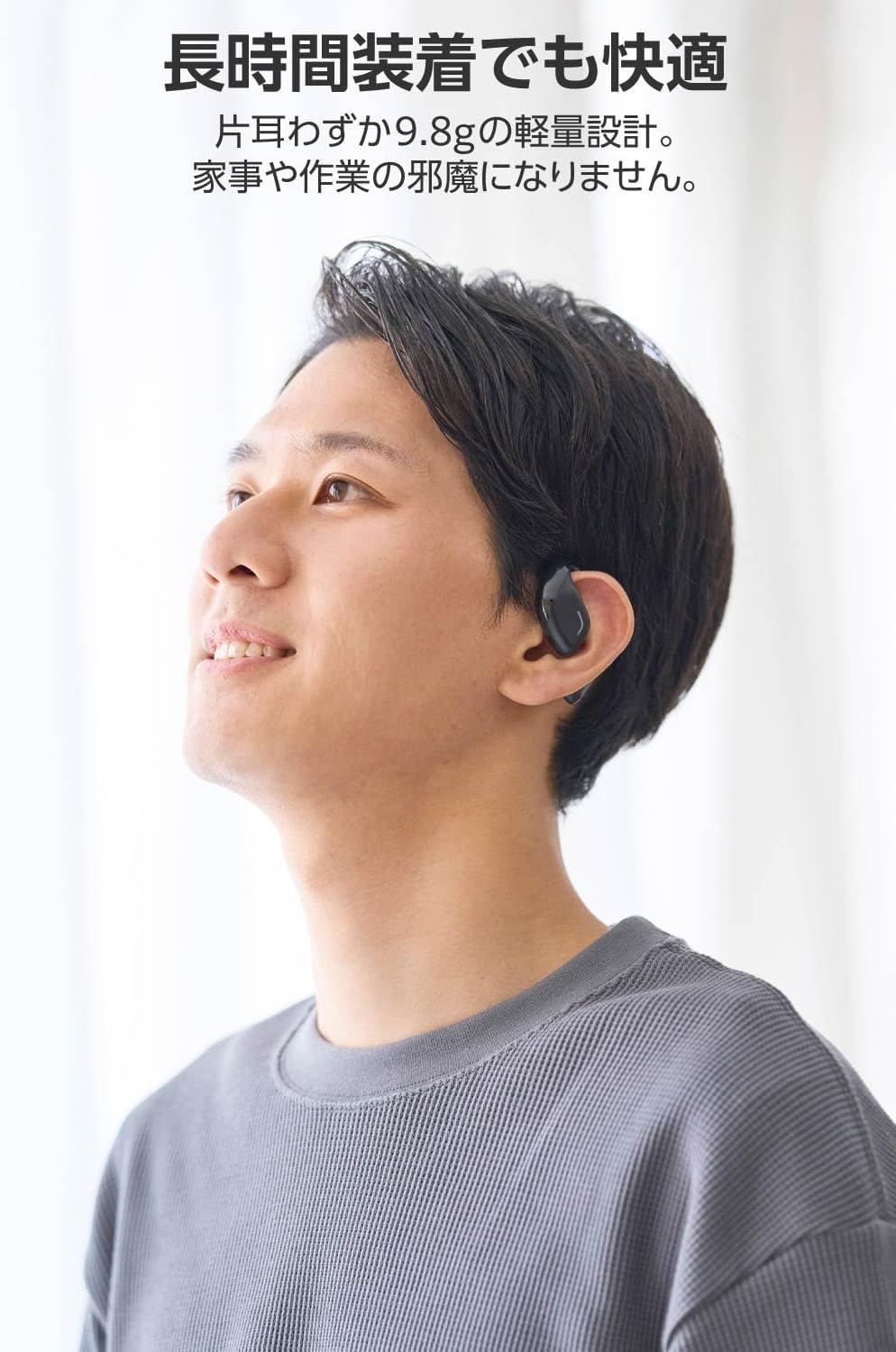
Image: A man wearing the lightweight open-ear headphones, highlighting their comfortable design for long-term use.
4. Nastavení
4.1. Nabíjení sluchátek a pouzdra
Před prvním použitím sluchátka a nabíjecí pouzdro plně nabijte.
- Vložte obě sluchátka do nabíjecího pouzdra.
- Connect the supplied USB Type-C™ cable to the charging port on the case and a USB power adapter (not included).
- LED indikátor na nabíjecím pouzdře bude ukazovat stav nabíjení.
Doba nabíjení:
- Sluchátka: Přibližně 1.5 hodiny
- Nabíjecí pouzdro: Přibližně 1.5 hodiny

Image: Illustration of the charging process for the headphones and case, showing the USB-C port and LED indicators.
4.2. Spárování se zařízením Bluetooth
- Ujistěte se, že jsou sluchátka nabitá.
- Open the charging case. The headphones will automatically enter pairing mode. The LED indicator on the earbuds will flash.
- Na svém zařízení (chytrý telefon, počítač, tablet) povolte Bluetooth a vyhledejte dostupná zařízení.
- Select "LBT-ECOWS01MBK" from the list of found devices.
- Po připojení přestane LED indikátor na sluchátkách blikat.
- After initial pairing, the headphones will automatically connect to the last paired device when removed from the case.
4.3. Nošení sluchátek
The headphones are designed to hook over your ears.
- Identifikujte levé (L) a pravé (R) sluchátko.
- With the LED facing outwards, hook the earbud over the top of your ear.
- Adjust the earbud for a comfortable and secure fit.

Image: Step-by-step guide on correctly wearing the open-ear headphones.
5. Návod k obsluze
5.1. Dotykové ovládání
The headphones feature touch sensors on each earbud for various functions.
| Funkce | Akce | Sluchátko |
|---|---|---|
| Přehrát/Pozastavit | Jediný kohoutek | L nebo R |
| Další stopa | Dvakrát klepněte | R |
| Předchozí stopa | Dvakrát klepněte | L |
| Zvýšení hlasitosti | Dlouhé stisknutí (cca 2 sekund) | R |
| Snížit hlasitost | Dlouhé stisknutí (cca 2 sekund) | L |
| Přijmout/ukončit hovor | Jediný kohoutek | L nebo R |
| Odmítnout hovor | Dlouhé stisknutí | L nebo R |
| Aktivujte hlasového asistenta | Trojité klepnutí | L nebo R |

Image: Visual representation of the touch sensor areas and corresponding music and volume controls.
5.2. Switching Audio Modes
The headphones offer three distinct audio modes:
- Normální režim: Standard audio playback.
- Režim nízké latence: Reduces audio-visual delay, suitable for watching videos or playing games.
- Hlasový režim: Enhances human voice frequencies for clearer dialogue, ideal for audiobooks, podcasts, or calls.
To switch between modes, refer to the quick start guide or the official product page for specific touch gestures, as these can sometimes be customized.

Obrázek: Overview of the three available audio modes and their recommended uses.
5.3. Single Earbud Use
You can use either the left or right earbud independently. When using only one earbud, ensure the other earbud is powered off or stored in the charging case.
6. Údržba
Pro zajištění dlouhé životnosti a optimálního výkonu vašich sluchátek:
- Sluchátka a nabíjecí pouzdro pravidelně čistěte měkkým, suchým hadříkem.
- Nepoužívejte abrazivní čisticí prostředky nebo rozpouštědla.
- Nevystavujte sluchátka extrémním teplotám, vlhkosti nebo přímému slunečnímu záření.
- Udržujte nabíjecí kontakty na sluchátkách a uvnitř pouzdra čisté a bez nečistot.
- Pokud sluchátka nepoužíváte, uložte je do nabíjecího pouzdra, aby byla chráněna a zůstala nabitá.
7. Řešení problémů
Pokud se se sluchátky setkáte s problémy, podívejte se na následující běžná řešení:
- Žádný zvuk:
- Ujistěte se, že jsou sluchátka nabitá.
- Check that the headphones are properly paired and connected to your device.
- Upravte hlasitost na sluchátkách i na připojeném zařízení.
- Nelze spárovat:
- Ujistěte se, že sluchátka jsou v režimu párování (LED bliká).
- Turn off Bluetooth on other nearby devices that may have previously connected.
- Restartujte zařízení a zkuste spárování znovu.
- Přerušované připojení:
- Ujistěte se, že mezi sluchátky a zařízením nejsou žádné překážky.
- Move closer to your device (maximum communication distance is approximately 10m).
- Vyhněte se prostředí se silným elektromagnetickým rušením.
- Dotykové ovládání nereaguje:
- Ujistěte se, že máte prsty čisté a suché.
- Try restarting the headphones by placing them in the case and then taking them out again.
- Low Battery Voice Prompt: If you hear a repeated "Low Battery, please charge" prompt, place the earbuds in the charging case immediately.
If the issue persists, please refer to the official ELECOM support webstránky pro další pomoc.
8. Specifikace
| Funkce | Specifikace |
|---|---|
| Název modelu | LBT-ECOWS01MBK |
| Technologie připojení | Wireless (Bluetooth® Version 5.4) |
| Bluetooth Profiles | A2DP, AVRCP, HFP |
| Podporované kodeky | AAC, SBC |
| Max Communication Distance | Přibližně 10 m (bez překážek) |
| Frequency Response (A2DP) | 20-20,000Hz |
| Doba nepřetržitého přehrávání | Approx. 10 hours (Approx. 25 hours with charging case) |
| Doba nabíjení (sluchátka) | Přibl. 1.5 hodin |
| Doba nabíjení (pouzdro) | Přibl. 1.5 hodin |
| Typ mikrofonu | Typ MEMS |
| Jednotka řidiče | φ16mm Full Range |
| Hmotnost (za sluchátko) | Přibl. 9.8 g |
| Hmotnost (nabíjecí pouzdro) | Přibl. 59.0 g |
| Barva | Matná černá |
| Voděodolnost | Není voděodolný |
| Provozní teplota | 5℃ až 35℃ |
| Provozní vlhkost | 20 % až 80 % (bez kondenzace) |
9. Záruka a podpora
9.1. Informace o záruce
Tento produkt je dodáván s a 1-letá záruka from the date of purchase. Please retain your proof of purchase for warranty claims. The warranty covers manufacturing defects but does not cover damage caused by misuse, accidents, unauthorized modifications, or normal wear and tear.
9.2. Zákaznická podpora
For further assistance, technical support, or detailed product information, please visit the official ELECOM webmísto:
You may also find additional FAQs and troubleshooting tips on the product support pages.


