1. Úvod
Thank you for choosing the GMKtec K10 Mini PC. This compact yet powerful workstation is designed for a wide range of applications, from office productivity and business tasks to multimedia consumption and light gaming. Featuring an Intel Core i9-13900HK processor, 32GB DDR5 RAM, and a 1TB SSD, the K10 delivers exceptional performance in a small form factor. This manual provides essential information for setting up, operating, maintaining, and troubleshooting your new Mini PC.
2. Obsah balení
Prosím, ověřte, zda jsou v balení přítomny všechny položky:
- GMKtec K10 Mini PC
- Napájecí adaptér
- HDMI kabel
- VESA Mount (with screws)
- Uživatelská příručka (tento dokument)
3. Konec produktuview
The GMKtec K10 Mini PC is engineered for high performance and versatility. Below are key features and components:

Figure 3.1: GMKtec K10 Mini PC - Front and Rear View. This image displays the compact design of the K10 Mini PC, highlighting its various connectivity options and dual Wi-Fi antennas.
3.1. Processor and Graphics

Figure 3.2: Intel Core i9-13900HK Processor Details. The K10 is powered by the Intel Core i9-13900HK, featuring 14 cores, 20 threads, 24MB Intel Smart Cache, and a turbo boost frequency of up to 5.4GHz, with a Thermal Design Power (TDP) ranging from 45-70W.

Figure 3.3: Intel Iris Xe Graphics 96EU. Enjoy dedicated graphics performance for efficient video editing, work, and gaming with the integrated Intel Iris Xe Graphics, featuring 96 Execution Units (EU) and a frequency of up to 1500MHz, supporting AV1 video decoding.
3.2. Porty a konektivita

Figure 3.4: Rich Interface with 8 USB Ports. The K10 offers extensive connectivity, including multiple USB 3.2 and USB 2.0 ports, USB Type-C (DP/DATA), dual HDMI 2.0 (4K@60Hz), DisplayPort (DP), 2.5G RJ45 LAN, DC-IN, 3.5mm audio jack, COM port for industrial applications, and a Kensington Lock slot.
3.3. Expansion and Cooling

Figure 3.5: Expansion Slots. The K10 supports significant storage and memory expansion with M.2 2280 PCIe 4.0*3 slots (up to 12TB) and DDR5 SO-DIMM*2 slots (up to 96GB). The standard configuration includes 32GB DDR5 5600MHz SO-DIMM RAM and 1TB NVMe SSD.
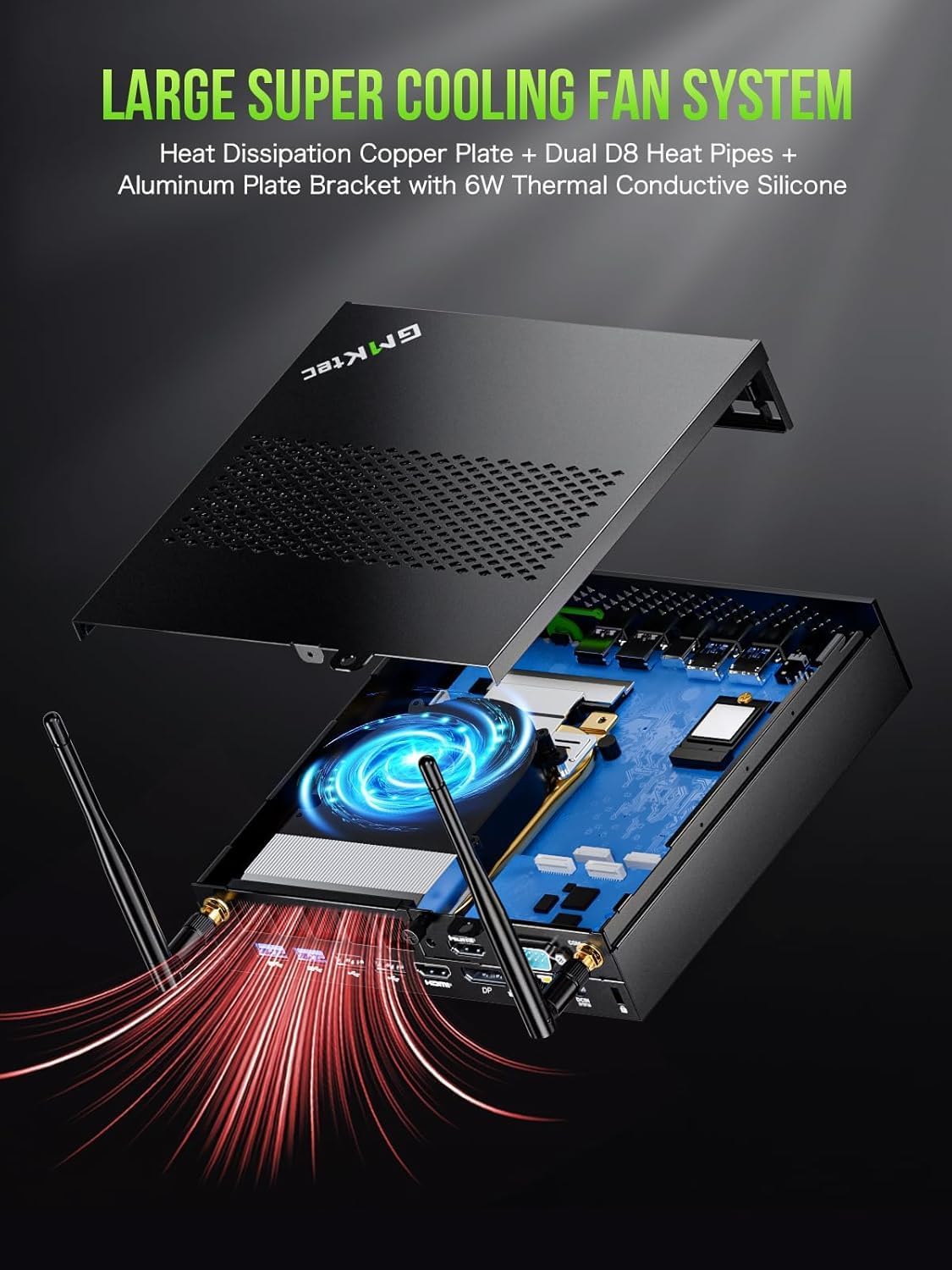
Figure 3.6: Large Super Cooling Fan System. The K10 features an advanced cooling system with a heat dissipation copper plate, dual D8 heat pipes, and an aluminum plate bracket with 6W thermal conductive silicone to ensure optimal performance and stability under load.
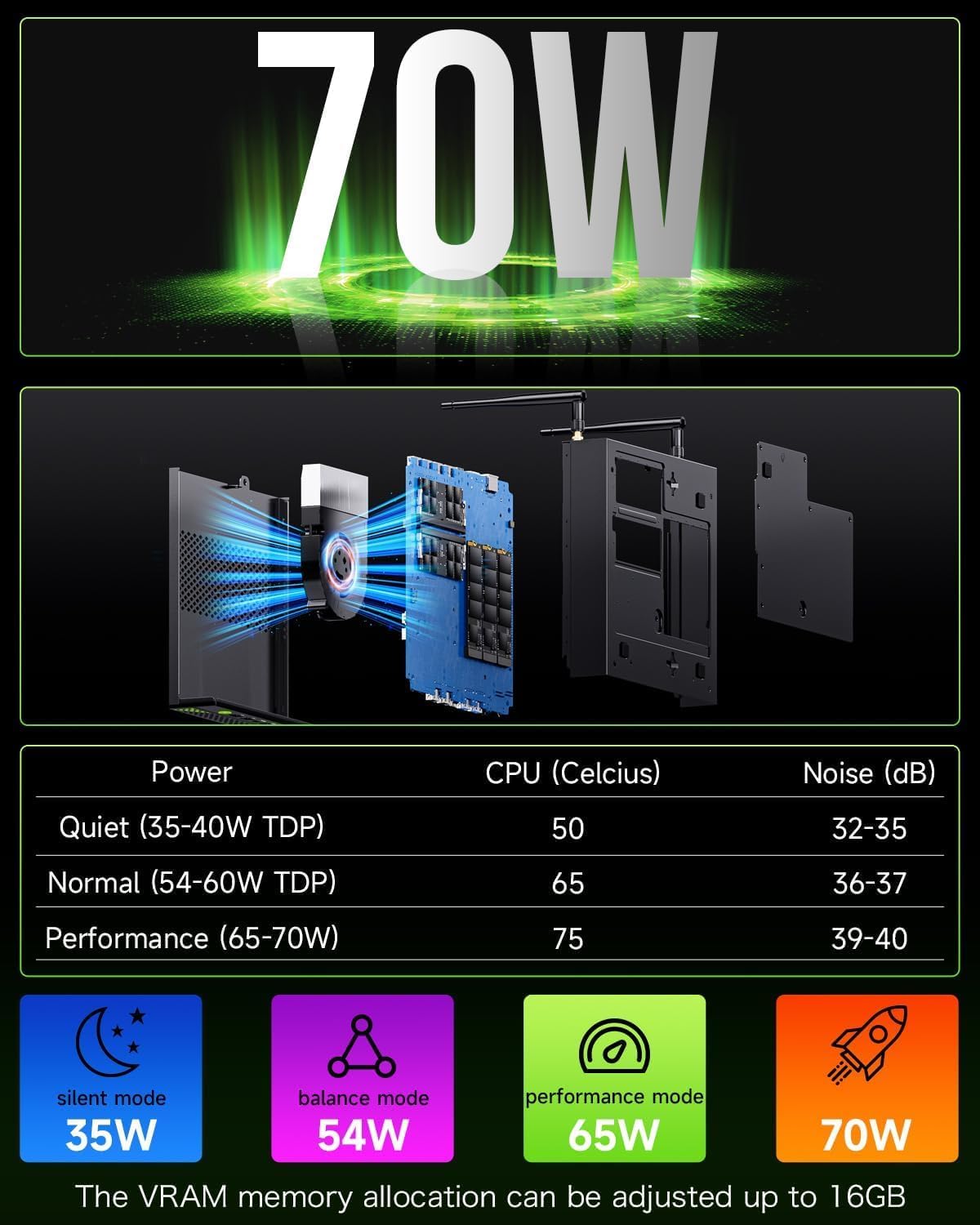
Figure 3.7: Power Consumption and Noise Levels. The K10 offers various power modes: Quiet (35-40W TDP, 50°C CPU, 32-35dB noise), Normal (54-60W TDP, 65°C CPU, 36-37dB noise), and Performance (65-70W TDP, 75°C CPU, 39-40dB noise). VRAM memory allocation can be adjusted up to 16GB.
3.4. Display Capabilities
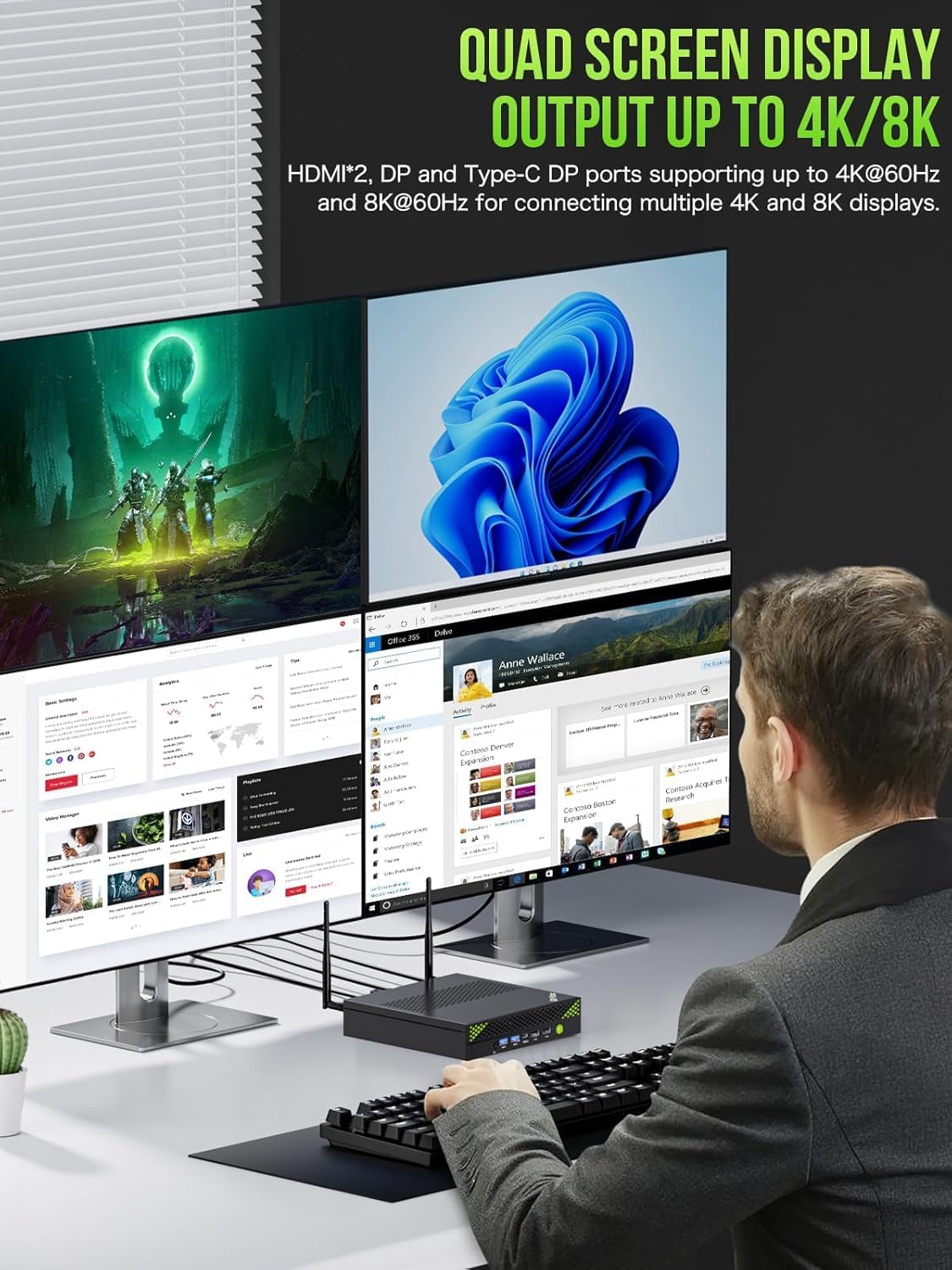
Figure 3.8: Quad Screen Display Output. The K10 supports quad-screen display output up to 4K/8K resolution. It features two HDMI 2.0 ports and one DisplayPort (DP) for connecting multiple 4K displays at 60Hz, and a Type-C DP port supporting up to 8K at 60Hz.
4. Průvodce nastavením
Follow these steps to set up your GMKtec K10 Mini PC:
- Připojení displeje: Connect your monitor(s) to the Mini PC using the HDMI or DisplayPort cables. The K10 supports up to four displays simultaneously.
- Připojení periferií: Zapojte USB klávesnici a myš do dostupných USB portů.
- Připojte napájení: Insert the power adapter cable into the DC-IN port on the Mini PC, then plug the power adapter into a wall outlet.
- Zapnutí: Stiskněte tlačítko napájení na přední straně Mini PC. Systém se automaticky spustí.
- Počáteční nastavení: Postupujte podle pokynů na obrazovce a dokončete počáteční nastavení systému Windows 11 Pro, včetně jazyka, regionu, síťového připojení a vytvoření uživatelského účtu.
5. Návod k obsluze
5.1. Základní obsluha
- Zapnutí/vypnutí: Stisknutím tlačítka napájení zapněte počítač. Chcete-li počítač vypnout, klikněte ve Windows na tlačítko Start a poté vyberte Napájení > Vypnout.
- Restartovat: To restart the PC, click the Start button in Windows, then select Power > Restart.
- Režim spánku: To put the PC into sleep mode, click the Start button in Windows, then select Power > Sleep.
5.2. Připojení k síti
- Wi-Fi: The K10 supports Wi-Fi 6 (802.11ax). To connect to a wireless network, click the Wi-Fi icon in the taskbar, select your desired network, enter the password, and click Connect.
- Ethernet: For a wired connection, connect an Ethernet cable from your router or modem to the 2.5G RJ45 LAN port on the Mini PC.
5.3. Nastavení více displejů
The GMKtec K10 supports connecting up to four displays simultaneously for enhanced productivity or immersive experiences. Use a combination of the HDMI, DisplayPort, and USB Type-C (DP Alt Mode) ports. After connecting the displays, right-click on the desktop, select 'Display settings', and configure your display layout (Extend, Duplicate, or Second screen only).
6. Údržba
Správná údržba zajišťuje dlouhou životnost a optimální výkon vašeho Mini PC:
- Čištění: Regularly clean the exterior of the Mini PC with a soft, dry cloth. Use compressed air to clear dust from the ventilation grilles to prevent overheating. Ensure the device is powered off and unplugged before cleaning.
- Větrání: Ensure the Mini PC is placed in a well-ventilated area, away from direct sunlight or heat sources. Do not block the air vents.
- Aktualizace softwaru: Keep your Windows 11 Pro operating system and drivers updated to the latest versions. This improves security, stability, and performance.
- Záloha dat: Pravidelně zálohujte důležitá data na externí disk nebo cloudové úložiště, abyste předešli jejich ztrátě.
7. Řešení problémů
If you encounter issues with your GMKtec K10 Mini PC, refer to the following common problems and solutions:
| Problém | Možná příčina | Řešení |
|---|---|---|
| Počítač se nezapne. | Chybí napájení; vadný napájecí adaptér. | Ensure the power adapter is securely connected to the PC and the wall outlet. Try a different outlet. |
| Žádné zobrazení na monitoru. | Incorrect display cable connection; monitor input not selected. | Check display cable connections. Ensure the monitor is set to the correct input source (HDMI/DP). Try a different display cable or port. |
| Pomalý výkon. | Příliš mnoho spuštěných aplikací; nedostatek volného úložiště; přehřívání. | Close unnecessary applications. Free up disk space. Ensure proper ventilation and clean dust from vents. Check power mode settings. |
| Problémy s připojením k Wi-Fi/Ethernetu. | Driver issues; router problems; incorrect settings. | Restart the PC and router. Check network cable (for Ethernet). Update network drivers. Verify Wi-Fi password. |
| Zařízení USB nebyla rozpoznána. | Faulty USB port; driver issues. | Try a different USB port. Update USB drivers in Device Manager. Restart the PC. |
8. Specifikace
Detailed technical specifications for the GMKtec K10 Mini PC:
| Funkce | Specifikace |
|---|---|
| Značka | GMKtec |
| Číslo modelu | K10 |
| Série | GMKtec NUCBOX |
| Operační systém | Windows 11 Pro |
| Značka procesoru | Intel |
| Typ procesoru | Core i9-13900K (13900HK) |
| Rychlost procesoru | Až 5.4 GHz |
| Počet jader | 14 |
| Velikost mezipaměti | 24 MB |
| Memory Storage Capacity (RAM) | 32 GB DDR5 |
| Maximální podporovaná paměť | 64 GB |
| Velikost pevného disku | 1 TB (SSD) |
| Technologie pevných disků | SSD |
| Rozhraní pevného disku | PCIE x 16 |
| Značka grafického čipsetu | Intel |
| Popis grafické karty | Integrovaný |
| GPU | Grafika Intel Iris Xe |
| RAM grafické karty | 16 GB (VRAM allocation) |
| Typ grafické paměti RAM | DDR5 SDRAM |
| Maximální rozlišení displeje | 7680x4320 (8K) |
| Procesorová zásuvka | FCBGA1744 |
| Typ připojení | Bluetooth, WiFi, Ethernet |
| Typ bezdrátové technologie | 802.11ax (Wi-Fi 6), Bluetooth 5, 2.4 GHz/5 GHz Radio Frequency |
| Hardwarové rozhraní | 802.11 ac/b/g/n, 3.5 mm Audio, Bluetooth 5, HDMI, Display Port, USB 3.2 Gen 2, USB Type C |
| Počet portů HDMI | 2 |
| Počet portů USB 2.0 | 4 |
| Počet portů USB 3.0 | 4 |
| Typ konektoru | Bluetooth, Ethernet, HDMI, USB, Wi-Fi |
| Kompatibilita zařízení | Keyboard, Printer, Monitor, Mouse, Television |
| Specifické použití produktu | Každodenní použití |
| Typ PC | Mini PC |
| Rozměry balení | 22.5 x 22.4 x 9.9 cm; 2.23 kilogramů |
| Výrobce | GMKtec |
| Datum prvního uvedení na trh na Amazon.com.be | 20. ledna 2025 |
9. Záruka a podpora
GMKtec is committed to providing excellent customer service and support for your K10 Mini PC.

Figure 9.1: Warranty & Support Information. This image outlines the available support channels for GMKtec products.
9.1. Informace o záruce
The GMKtec K10 Mini PC comes with a 2-letá záruka. For specific details regarding warranty coverage and terms, please refer to the documentation included with your product or contact GMKtec customer support.
9.2. Zákaznická podpora
For any questions, technical assistance, or support inquiries, please use the following channels:
- Podpora Amazon: If purchased through Amazon, you can contact support by logging into your Amazon account, navigating to 'Your Orders', and selecting 'Ask Product Question' for the GMKtec K10.
- After-Sales Support (Email): For direct assistance, you can send an email to the GMKtec After-Sales Team at podpora@gmktec.com. GMKtec offers 24/7 customer support.
- Doživotní technická podpora: GMKtec provides lifetime technical support for its products.


