1. Úvod
This manual provides essential information for the proper setup, operation, and maintenance of your ZEISS DTI 6/20 Thermal Imaging Camera. Please read these instructions carefully before using the device to ensure optimal performance and longevity.
2. Co je v krabici
Ověřte, zda balení obsahuje všechny následující komponenty:
- Termokamera
- Objektiv (20 mm)
- Neoprenový popruh
- Přenosné pouzdro včetně ramenního popruhu
- USB kabel
- Hadřík na čištění optiky
- Lithium-iontová baterie
- Rychlý průvodce
- Bezpečnostní poznámky
- Záruční list
- dokument EULA
3. Konec produktuview
The ZEISS DTI 6/20 is a high-resolution thermal imaging monocular designed for detailed observation in low-light conditions. It features advanced image processing and ergonomic design for ease of use.

Obrázek 1: Úhlové view of the ZEISS DTI 6/20 Thermal Imaging Camera. This image displays the overall design, including the objective lens, eyepiece, and the ZEISS branding on the side.
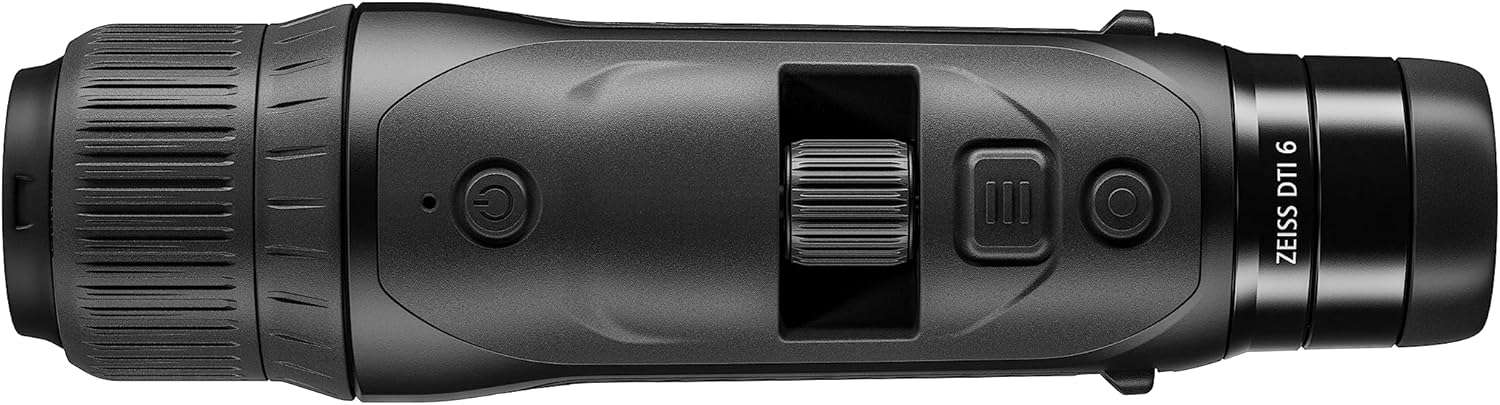
Obrázek 2: Nahoru view of the ZEISS DTI 6/20, highlighting the power button, scroll wheel for magnification control, and other operational buttons. The ergonomic placement of controls is visible.
Klíčové vlastnosti:
- ZSIP Pro Image Technology: Delivers sharp, high-contrast thermal images.
- Displej s vysokým rozlišením: AMOLED display with 1024x768 resolution, paired with a 640x480 sensor and 12µm pixel pitch.
- Zvětšení: 1.5x optical magnification with up to 10x digital zoom, controlled by a scroll wheel.
- Přizpůsobení: 4 preset scene modes and up to 5 user-created layouts. Adjustable zoom settings, display brightness, and color palettes.
- Interní úložiště: 16GB for capturing images and videos.
- Životnost baterie: Up to 6.5 hours of continuous operation with a removable lithium-ion battery.
- Ergonomický design: Suitable for both left and right-handed users, with controls positioned for natural access even with gloves.
- Konektivita aplikace: Seamless data transfer and live streaming to smartphones via the ZEISS Hunting App using Bluetooth, USB, or WLAN.
4. Nastavení
4.1 Instalace baterie
- Najděte přihrádku na baterie na zařízení.
- Otevřete kryt přihrádky.
- Insert the provided lithium-ion battery, ensuring correct polarity.
- Bezpečně zavřete kryt bateriového prostoru.
4.2 Počáteční zapnutí
- Press and hold the power button (refer to Figure 2) until the ZEISS logo appears on the display.
- Allow the device to initialize. This may take a few seconds.
- Adjust the diopter on the eyepiece for clear focus according to your vision.
5. Návod k obsluze
5.1 Zapnutí/vypnutí
- Zapnutí: Stiskněte a podržte tlačítko napájení.
- Vypnutí: Press and hold the power button until the shutdown sequence initiates.
5.2 Magnification Control
Use the scroll wheel located on the top of the device (refer to Figure 2) to adjust the digital zoom level. Rotate the wheel forward to increase magnification and backward to decrease it.
5.3 scénické režimy
The DTI 6/20 offers 4 preset scene modes optimized for different observation conditions. Access these modes through the device's menu to enhance image clarity based on your environment.
NIKDY Přizpůsobení
The device allows for extensive personalization:
- Uživatelské rozvržení: Create and save up to 5 custom display layouts.
- Nastavení obrazovky: Adjust display brightness to suit ambient light conditions.
- Barevné palety: Select from various color palettes to optimize thermal contrast and target identification.
5.5 App Connectivity (ZEISS Hunting App)
Enhance your experience by connecting the DTI 6/20 to the ZEISS Hunting App on your smartphone.

Obrázek 3: A user operating the ZEISS DTI 6/20 thermal imaging camera in an outdoor environment, demonstrating its ergonomic handling and practical application.
- Přenos dat: Transfer images and videos from the device's 16GB internal storage to your smartphone via Bluetooth, USB, or WLAN.
- Živé vysílání: Stream live thermal footage directly to your smartphone for shared viewnahrávání nebo nahrávání.
- Další úpravy: The app provides additional options for device settings and management.
6. Údržba
6.1 Čištění
- Use the provided optics cleaning cloth to gently wipe the lenses. Avoid abrasive materials.
- Pro tělo zařízení použijte měkký, damp tkanina. Nepoužívejte agresivní chemikálie nebo rozpouštědla.
- Před čištěním se ujistěte, že je zařízení vypnuté.
6.2 Péče o baterii
- Před prvním použitím baterii plně nabijte.
- Pokud zařízení a baterii delší dobu nepoužíváte, skladujte je na chladném a suchém místě.
- Nevystavujte baterii extrémním teplotám.
7. Řešení problémů
7.1 Zařízení se nezapíná
- Ujistěte se, že je baterie správně nainstalována a plně nabitá.
- Try charging the battery for at least 30 minutes before attempting to power on again.
7.2 Image Appears Blurry
- Adjust the diopter on the eyepiece for your vision.
- Ensure the objective lens is clean and free from smudges or debris.
- Check the focus of the thermal image using the manual focus ring if available.
7.3 Connectivity Issues with ZEISS Hunting App
- Ensure Bluetooth or WLAN is enabled on both the device and your smartphone.
- Verify that the ZEISS Hunting App is updated to the latest version.
- Restart both the thermal camera and your smartphone.
8. Specifikace
| Funkce | Specifikace |
|---|---|
| Rozměry produktu | 9.06 x 2.44 x 2.68 palce |
| Hmotnost položky | 1.52 libry (24.33 uncí) |
| Číslo modelu položky | 527020-9911-000 |
| Značka | ZEISS |
| Název modelu | DTI 6/20 |
| Popis čočky okuláru | Plössl |
| Typ zaměření | Manuální ostření |
| Zdroj napájení | Napájení z baterie (lithium-iontová) |
| Kompatibilní zařízení | Smartphone |
| Popis ohniskové vzdálenosti | 300 mm |
| Pole View | 10 stupňů |
| Poměr zoomu | 3x Optical, up to 10x Digital |
| Rozlišení snímače | 640 x 480 with 12 micron pixel pitch |
| Rozlišení displeje | 1024 x 768 HD AMOLED |
| Interní úložiště | 16 GB |
| Doba chodu baterie | 6.5 hodin (nepřetržitě) |
9. Záruka a podpora
The ZEISS DTI 6/20 Thermal Imaging Camera is manufactured by ZEISS. For detailed warranty information, please refer to the included warranty card or visit the official ZEISS website. For technical support, service, or inquiries, please contact ZEISS customer service through their official channels.
Výrobce: ZEISS


