1. Úvod
This manual provides detailed instructions for the installation, operation, and maintenance of your Eonon GPCX6 10.1-inch Android 13 Car Stereo Navigation System. Please read this manual thoroughly before using the product to ensure proper functionality and safety. Keep this manual for future reference.
2. Konec produktuview
The Eonon GPCX6 is an advanced in-car digital media receiver designed for 2010-2016 Jeep Compass and Patriot models. It features a 10.1-inch IPS HD touchscreen and runs on the Android 13 operating system, offering a comprehensive suite of entertainment and navigation functionalities.
Klíčové vlastnosti:
- Operační systém: Android 13 (API level 33) with Rockchip processor for smooth performance.
- Zobrazit: 10.1-inch IPS HD touchscreen (1280x720 resolution) with 178° viewúhel.
- Paměť a úložiště: 2GB RAM + 32GB ROM.
- Integrace smartphonu: Wireless/Wired Apple CarPlay and Android Auto, plus Screen Mirroring for iOS and Android devices.
- Konektivita: Built-in Bluetooth 5.4 for hands-free calls and music streaming, Wi-Fi 6 (2.4Gbps), 3 USB ports.
- Zvuk: High-quality FM/AM radio with RDS, 36-band graphic equalizer, 6 EQ modes, ST TDA7388 amplifier (4x45W max output power), RCA audio output.
- Integrace vozidla: Supports original steering wheel controls, door information, and driving data display.
- Navigace: Online and offline GPS navigation capabilities.
- Rozšiřitelnost: Supports Eonon dashcam (A100, not included) and DAB+ (V0056, not included).
- Bezpečnostní funkce: 1080P AHD Backup Camera ready (Eonon A0125 backup camera included).
- Aktualizace softwaru: Over-the-Air (OTA) firmware updates for system stability and security (does not upgrade Android system version).

Figure 2.1: Eonon GPCX6 Car Stereo with included accessories.
3. Nastavení a instalace
The Eonon GPCX6 is designed for plug-and-play installation in compatible vehicles. Professional installation is recommended to ensure correct wiring and functionality.
3.1 Obsah balení:
Před instalací ověřte, zda jsou v balení přítomny všechny komponenty:

Figure 3.1: What's in the Box. Includes main unit, CAN Bus Decoder, Power Cable, Audio Video Adapter Cables, USB Adapter Cables, Backup Camera Video Input Cable, GPS Antenna, External Microphone, Radio Antenna Adapter Cables, Adhesive Pad, Spare Fuse, and User Manual.
3.2 Kompatibilita s vozidlem:
This unit is specifically designed for 2010-2016 Jeep Compass and Patriot models. Ensure your vehicle's dashboard matches the compatible configurations shown below.
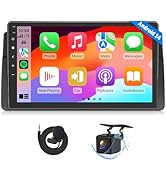
Figure 3.2: Applicable dashboard models for installation.
3.3 Schéma zapojení:
Refer to the following diagram for proper wiring connections. Incorrect wiring can damage the unit or vehicle electronics.

Figure 3.3: Wiring Diagram. Key connections include CAN Bus Decoder, Power Cable, RX/TX, AMP, BRAKE, External Microphone, Subwoofer Output, Video Input, AUX Audio In/Out, Front/Rear Audio Out, USB Ports, Backup Camera Input, Brake Shift Control, +12V for Backup Camera, GND Wire, WiFi Antenna, Bluetooth Antenna, GPS Antenna, and Radio Antenna Input.
Důležité poznámky:
- Connect the CAN Bus Decoder (1) to the vehicle's CAN bus system.
- Ensure the Power Cable (2) is correctly connected to the vehicle's power supply.
- The BRAKE wire (5) should be connected to the vehicle's brake signal for safety features.
- The included external microphone (7) should be positioned for optimal voice pickup.
- Connect the GPS Antenna (26) and WiFi Antenna (24) for navigation and internet connectivity.
- The Backup Camera Input (20) is for the included Eonon A0125 camera.
4. Návod k obsluze
This section details the primary functions and operations of your Eonon GPCX6 car stereo.
4.1 Power On/Off and Basic Interface:
Press and hold the power button to turn the unit on or off. The unit features a 10.1-inch IPS HD touchscreen. Navigate through applications and settings by tapping and swiping.

Figure 4.1: Android 13 operating system interface.
4.2 Wireless/Wired Apple CarPlay:
Connect your iPhone for a seamless in-car experience, accessing navigation, music, and calls.
- On the car stereo, open the 'Zlink5' application.
- Na iPhonu zapněte Wi-Fi a Bluetooth.
- V seznamu zařízení Bluetooth v telefonu vyhledejte zařízení „EONON“ a spárujte ho.
- Once connected, tap 'Use CarPlay' on your iPhone.
- Počkejte několik sekund, než se připojení dokončí.

Obrázek 4.2: Postup bezdrátového připojení Apple CarPlay.
4.3 Wireless/Wired Android Auto:
Connect your Android device for a smarter, safer way to use your phone while driving.
- On the car stereo, open the 'Zlink5' application.
- Na telefonu s Androidem zapněte Wi-Fi a Bluetooth.
- V seznamu zařízení Bluetooth v telefonu vyhledejte zařízení „EONON“ a spárujte ho.
- Počkejte několik sekund, než se připojení dokončí.

Obrázek 4.3: Kroky pro bezdrátové připojení k systému Android Auto.
4.4 Screen Mirroring:
Promítněte obrazovku telefonu na displej autorádia.
Pro zařízení se systémem iOS:
- Click the Zlink5 app on the car stereo, then set the car stereo to iPhone wireless screen mirroring mode.
- Zapněte hotspot iPhonu a připojte se k autorádiu.
- Zapněte funkci zrcadlení obrazovky iPhonu a vyberte „zj-airplay“.

Figure 4.4: iOS Screen Mirroring connection steps.
Pro zařízení Android:
- Click the Zlink5 app on the car stereo, then set the car stereo to Android wireless screen mirroring mode.
- Zapněte hotspot telefonu a připojte se k autorádiu.
- Nainstalujte si do telefonu aplikaci Zplus. Zapněte aplikaci a vyberte „bezdrátové připojení“.

Figure 4.5: Android Screen Mirroring connection steps.
4.5 Bluetooth Functions:
The built-in Bluetooth 5.4 module allows for hands-free calling and audio streaming.
- Párování: Enable Bluetooth on your phone and search for 'EONON' to pair.
- Hovory handsfree: Make and receive calls directly from the stereo interface. The external microphone ensures clear communication.
- Streamování hudby: Play audio from your paired device through the car's speakers.

Figure 4.6: Bluetooth module for quick and stable connection, noise reduction, crystal-clear call quality, and high-quality music.
4.6 Audio Equalizer:
Customize your audio experience with the 36-band graphic equalizer and 6 preset EQ modes.

Figure 4.7: Audio equalizer settings for personalized sound.
4.7 Radio (FM/AM):
Access local radio stations using the built-in high-quality FM/AM radio tuner with RDS (Radio Data System).
4.8 Customization:
Personalize the user interface to your preference.
- Témata uživatelského rozhraní: Vyberte si ze 3 přizpůsobitelných témat uživatelského rozhraní.
- Logo boty: Set a custom boot logo.
- Barva tlačítka: Upravte barvu fyzických tlačítek.
- Tapeta: Change the background wallpaper.

Figure 4.8: Customizable UI themes.

Figure 4.9: Customization options for boot logo, button color, and wallpaper.
4.9 Adaptive Screen Brightness:
The unit features adaptive screen brightness adjustment for optimal visibility in various lighting conditions.

Figure 4.10: Adaptive screen brightness adjustment.
4.10 Backup Camera (A0125):
The included Eonon A0125 backup camera provides a clear view when reversing. It features a 140° rear viewing angle, 720P AHD resolution, and IP68 waterproofing.
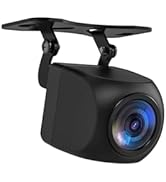
Figure 4.11: Backup camera features with reversing guidelines.
4.11 Dash Cam Support (A100, not included):
The unit supports the Eonon A100 dash cam (sold separately) for recording driving footage. It offers a 120° viewing angle and 1280x720P video playback.

Figure 4.12: Dash cam support features.
4.12 OBD2 Support (V0056, not included):
Connect an Eonon V0056 OBD2 scanner (sold separately) to monitor vehicle fault diagnosis and real-time status.

Figure 4.13: OBD2 functionality for vehicle diagnostics.
5. Údržba
Regular maintenance helps ensure the longevity and optimal performance of your car stereo.
- Čištění obrazovky: Dotykovou obrazovku jemně otřete měkkým hadříkem, který nepouští vlákna. V případě odolných šmouh lehceampOtřete hadřík vodou nebo čisticím prostředkem vhodným pro obrazovky. Vyhněte se agresivním chemikáliím nebo abrazivním materiálům.
- Aktualizace softwaru: Periodically check for Over-the-Air (OTA) firmware updates in the system settings. These updates can improve system stability, fix bugs, and enhance security. Note that these are firmware updates and do not upgrade the core Android system version.
- Obecná péče: Avoid exposing the unit to extreme temperatures, direct sunlight for prolonged periods, or excessive moisture. Ensure all connections remain secure.
Figure 5.1: Over-the-Air (OTA) firmware update interface.
6. Řešení problémů
If you encounter issues with your Eonon GPCX6, refer to the following common problems and solutions:
| Problém | Možná příčina | Řešení |
|---|---|---|
| Jednotka se nezapne. | Incorrect power wiring, blown fuse, vehicle battery issue. | Check power cable connections. Inspect vehicle fuses and the spare fuse provided. Ensure vehicle battery is charged. |
| Žádný zvuk z reproduktorů. | Speaker wiring incorrect, volume too low, audio source not selected. | Verify speaker connections. Increase volume. Select the correct audio source (e.g., Radio, Bluetooth, CarPlay). |
| CarPlay/Android Auto se nepřipojuje. | Bluetooth/Wi-Fi off on phone, incorrect pairing, Zlink5 app not open. | Ensure Bluetooth and Wi-Fi are enabled on your phone. Re-pair the device. Open the Zlink5 app on the stereo. |
| Signál GPS je slabý nebo nepřesný. | GPS antenna improperly installed or obstructed. | Ujistěte se, že je anténa GPS bezpečně připojena a umístěna v oblasti s volným view z nebe. |
| Dotykový displej nereaguje. | Dočasná softwarová závada, rušení chráničem obrazovky. | Restart the unit. If a screen protector is installed, ensure it is properly applied and not causing issues. |
If the problem persists after attempting these solutions, please contact Eonon customer support for further assistance.
7. Specifikace
Detailed technical specifications for the Eonon GPCX6 car stereo.
| Funkce | Specifikace |
|---|---|
| Název modelu | GPCX6 |
| Operační systém | Android 13 |
| Velikost displeje | 10.1 palce |
| Rozlišení displeje | 1280x720 |
| Paměť (RAM) | 2 GB |
| Úložiště (ROM) | 32 GB |
| Technologie připojení | Bluetooth 5.4, USB, Wi-Fi 6 |
| Speciální funkce | Touchscreen, Wireless/Wired CarPlay & Android Auto, Screen Mirroring, Built-in Mic, Steering Wheel Control Support, OTA Updates |
| Typ mapy | Worldwide (Online/Offline GPS) |
| Zahrnuté komponenty | Couvací kamera (A0125) |
| Typ montáže | Držák na palubní desku |
| Hmotnost položky | 5.99 libry |
| Rozměry balení | 17 x 11 x 9 palce |
8. Záruka a podpora
Your Eonon GPCX6 car stereo is covered by a manufacturer's warranty.
- Záruční doba: 2 rok záruka výrobce.
- Podpora: For technical assistance, troubleshooting beyond this manual, or warranty claims, please contact Eonon customer support through their official webna webu nebo u prodejce, kde byl produkt zakoupen.


