1. Úvod
Thank you for choosing the tenlamp G10+MIC Podcast Microphone Bundle. This comprehensive kit is designed to provide high-quality audio for podcasting, live streaming, gaming, and recording. It includes a G10 live sound card audio mixer and a 3.5mm condenser microphone, offering a versatile solution for content creators. This manual provides detailed instructions for setup, operation, maintenance, and troubleshooting to ensure optimal performance of your equipment.
2. Obsah balení
Please verify that all items listed below are included in your package. If any components are missing or damaged, please contact customer support.
- G10 Live Sound Card Audio Mixer
- 3.5mm Condenser Microphone
- Mikrofonní stolní stojan
- Mikrofonní držák nárazů
- Popový filtr
- Microphone Foam Windscreen
- 3.5mm Audio Cables (x3)
- USB-C to USB-A Data Cable (for PC connection and charging)
- USB-C to USB-C OTG Cable (for mobile device connection)
- Monitorovací sluchátka
- Uživatelská příručka

3. Průvodce nastavením
Postupujte podle těchto kroků k nastavení vašeho tenlamp G10+MIC Podcast Microphone Bundle for optimal performance.
3.1 Sestava mikrofonu
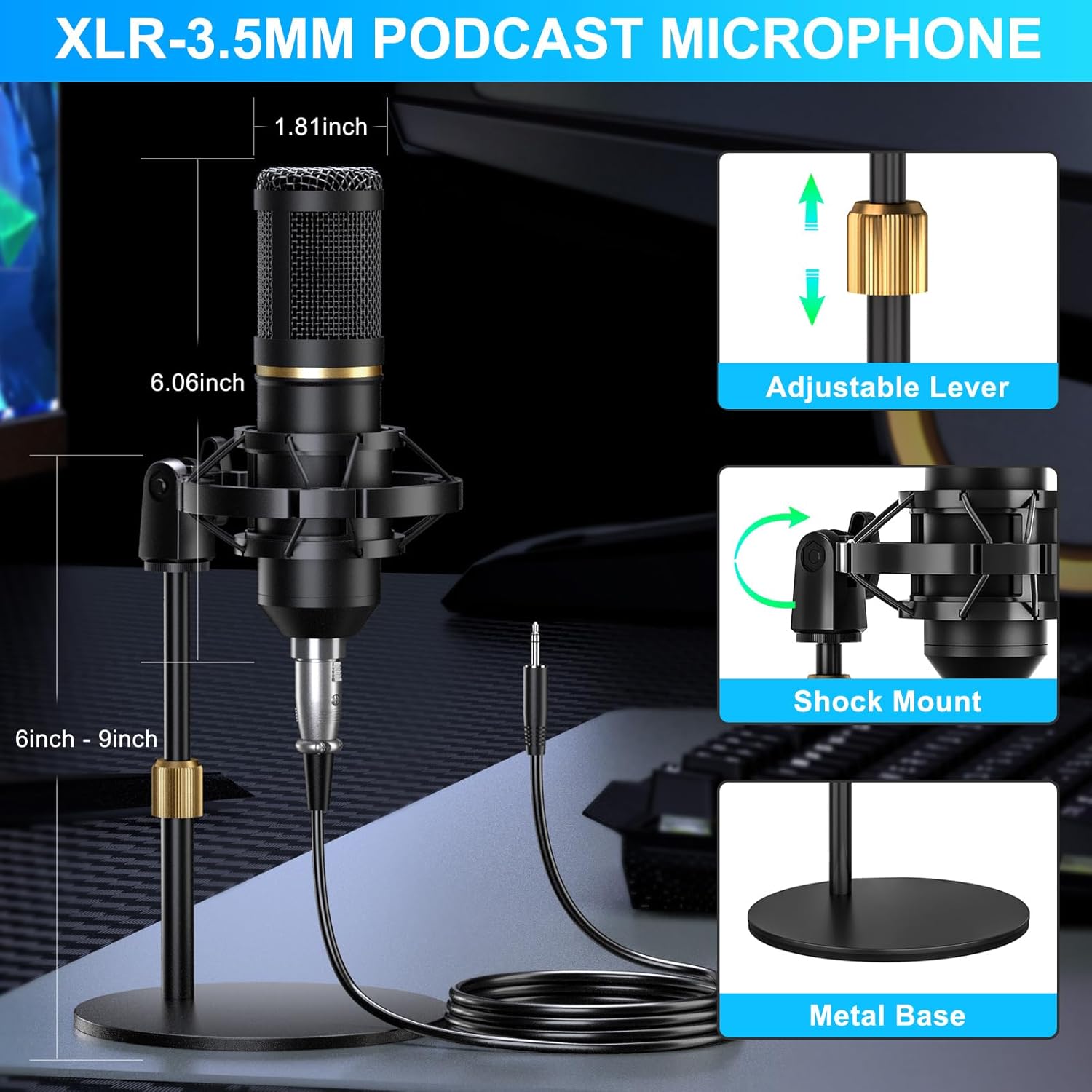
- Attach the microphone shock mount to the desk stand.
- Gently place the 3.5mm condenser microphone into the shock mount.
- Secure the pop filter to the microphone stand, positioning it approximately 2-3 inches in front of the microphone.
- Place the foam windscreen over the microphone for additional protection against plosives and environmental noise.
3.2 Connecting the G10 Mixer
The G10 mixer offers multiple connectivity options for various devices and scenarios.
- Připojení napájení: Connect the USB-C to USB-A cable to the DC 5V port on the mixer and to a power adapter or a computer USB port for power and charging. The mixer has a built-in battery for portable use.
- Připojení mikrofonu: Connect the 3.5mm condenser microphone to the 3.5mm MIC input port on the mixer. For XLR microphones (not included in this bundle), use the XLR MIC input.
- Monitoring Headphones: Plug your monitoring headphones into the "Monitor" jack on the mixer to hear your audio output.
- Připojení k počítači: Use the USB-C to USB-A data cable to connect the mixer's OTG port to your computer (PC or Mac). The mixer will be recognized as an audio input/output device.
- Připojení mobilního zařízení: Use the USB-C to USB-C OTG cable to connect the mixer's OTG port to your smartphone or tablet. Alternatively, use the 3.5mm TRRS audio cables to connect the "Live1" or "Live2" ports to your mobile device's headphone jack.
- External Music Input: Connect an external music source (e.g., another phone, MP3 player) to the "Music" input port using a 3.5mm audio cable.
- Výstup reproduktoru: Connect external speakers to the "Output to Speaker" port if desired.

3.3 Připojení Bluetooth
The G10 mixer supports Bluetooth for wireless music input.
- Stiskněte tlačítko BT button on the mixer to activate Bluetooth mode. The Bluetooth indicator will flash.
- On your mobile device, search for "G10 Mixer" in the Bluetooth settings and pair.
- Once connected, the Bluetooth indicator will remain solid. You can now play background music wirelessly through the mixer.

4. Návod k obsluze
Familiarize yourself with the G10 mixer's controls and features to enhance your audio experience.
4.1 Základní ovládání zvuku
- Knoflík hlasitosti mikrofonu: Adjusts the input volume of the microphone.
- Ovladač hlasitosti hudby: Controls the volume of background music input (from external source or Bluetooth).
- Monitor Volume Knob: Adjusts the volume of your monitoring headphones.
- Knoflík Reverb: Controls the depth and length of the reverb effect.
- Denoise Button: Activates or deactivates the intelligent noise reduction feature.
- Tlačítko pro uhýbání: When activated, this feature automatically lowers background music volume when you speak, ampposílení vašeho hlasu.

4.2 Sound Effects and Voice Modes
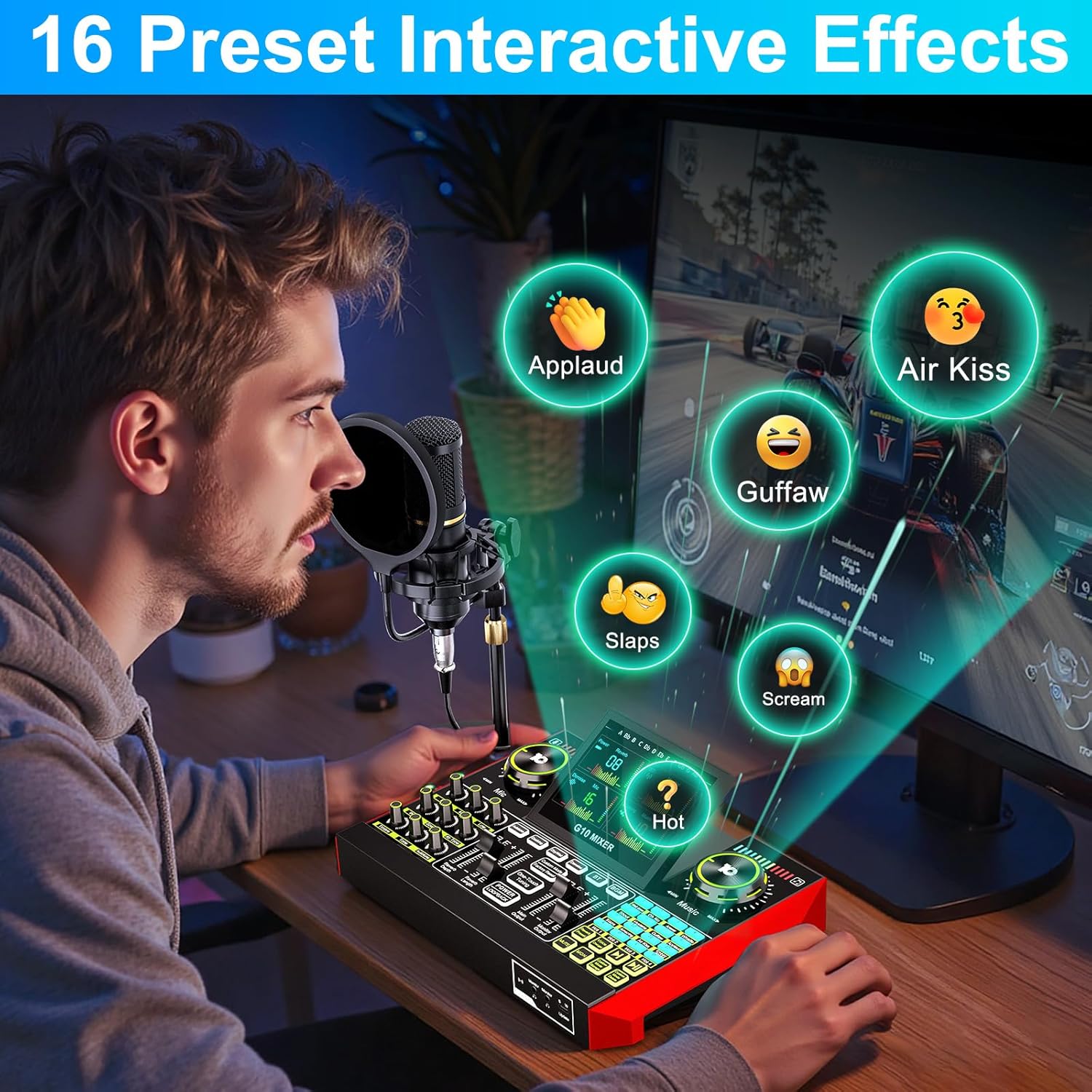
- Preset Interactive Effects: The mixer features 16 built-in sound effects (e.g., applause, laughter, air kiss). Press the corresponding buttons to trigger them during your stream or recording.
- Měnič hlasu: Transform your voice with various preset modes such as Female, Deep, Baby, or Uncle. Adjust bass and reverb to customize the effect.
- Preset Voice Modes: Explore 19 preset voice modes designed for different scenarios. You can also save your customized sound modes for quick access.
- Reverb režimy: Select from 5 preset reverb modes to add professional audio effects suitable for vocals or instruments.

4.3 Speciální funkce
- Follow Singing (BGM) Mode: When activated, you can hear the original track while singing, but your audience will only hear the instrumental and your voice. This is ideal for live music performances.
- Remove Vocal: This function removes the original vocals from a song, allowing you to sing along to an instrumental track.
- Vestavěná baterie: The G10 mixer includes a built-in battery, providing up to 12 hours of usage for portable and outdoor recording or streaming.

5. Údržba
Proper maintenance ensures the longevity and optimal performance of your tenlamp G10+MIC Podcast Microphone Bundle.
- Čištění: Use a soft, dry cloth to wipe down the mixer and microphone. Avoid using liquid cleaners or abrasive materials, which can damage the surfaces or internal components.
- Skladování: When not in use, store the equipment in a cool, dry place away from direct sunlight and extreme temperatures.
- Péče o kabely: Avoid bending or kinking cables sharply. Store them neatly to prevent damage.
- Péče o baterie: For the built-in battery, avoid fully discharging it frequently. Charge it regularly, even if not in constant use, to maintain battery health.
6. Řešení problémů
If you encounter issues with your tenlamp G10+MIC Podcast Microphone Bundle, refer to the following common solutions.
| Problém | Možná příčina | Řešení |
|---|---|---|
| Žádný zvuk z mikrofonu | Microphone not connected properly; Mic volume too low; Denoise feature too aggressive; Incorrect input selected on computer/device. | Ensure microphone cable is securely plugged into the 3.5mm MIC input. Increase Mic volume knob. Temporarily disable Denoise. Verify "G10 Mixer" is selected as the input device in your computer's sound settings or streaming software. |
| Žádný zvuk ze sluchátek/reproduktorů | Headphones/speakers not connected; Monitor/Output volume too low; Incorrect output selected on computer/device. | Ensure headphones are plugged into the Monitor jack or speakers into the Output port. Increase Monitor volume knob. Verify "G10 Mixer" is selected as the output device. |
| Zkreslený nebo nejasný zvuk | Mic volume too high (clipping); Denoise feature affecting clarity; Faulty cable. | Reduce Mic volume. Adjust Denoise level or disable it. Try a different audio cable. |
| Voice changer not working as expected | Incorrect voice mode selected; Bass/Reverb settings interfering. | Cycle through different voice modes. Adjust Bass and Reverb settings to find the desired effect. Ensure the voice changer feature is activated. |
| Problémy s připojením Bluetooth | Bluetooth not activated; Device not in pairing mode; Interference. | Ensure the BT button is pressed and flashing. Make sure your mobile device's Bluetooth is on and searching. Move closer to the mixer and away from other wireless devices. |
If the problem persists after trying these solutions, please contact tenlamp zákaznickou podporu pro další pomoc.
7. Specifikace
Key technical specifications for the tenlamp G10+MIC Podcast Microphone Bundle.
| Funkce | Detail |
|---|---|
| Značka | tenlamp |
| Číslo modelu | G10+MIC |
| Hmotnost položky | 4.84 libry (přibližně 2.19 kg) |
| Product Dimensions (Mixer) | 10.9"H x 2.28"Š x 7.67"V (cca 27.7 x 5.8 x 19.5 cm) |
| Technologie připojení | Bluetooth, USB |
| Počet kanálů | 2 |
| Zdroj napájení | Napájení z baterie (vestavěný) |
| svtage | 5 voltů |
| Kompatibilní zařízení | Notebook, osobní počítač, smartphone |
| Kompatibilita operačního systému | Android, Windows, iOS, macOS |
| Typ mikrofonu | 3.5mm Condenser Microphone |
| Battery Life (Mixer) | Až 12 hodin (přibližně) |

8. Záruka a podpora
tenlamp is committed to providing high-quality products and customer satisfaction.
- Zásady výměny: Enjoy a 365-day replacement policy for manufacturing defects.
- Služby zákazníkům: 24/7 customer service support is available to assist you with any inquiries or issues.
- Technická podpora: Lifetime technical support is provided for your tenlamp G10+MIC Podcast Microphone Bundle.
For support, please refer to the contact information provided with your purchase or visit the official tenlamp webmísto.


