1. Úvod
This manual provides essential information for the safe and efficient use of your SBS Powerbank 10K Slim. Please read these instructions carefully before using the device and retain them for future reference.
The SBS Powerbank 10K Slim is a portable charging device designed to provide power to various electronic devices, including smartphones, tablets, and other USB-powered gadgets. It features a 10,000 mAh capacity, intelligent charging technology, and multiple output ports for versatile use.
2. Obsah balení
Ověřte, zda jsou v balení přítomny všechny položky:
- SBS Powerbank 10K Slim
- Kabel USB-A na USB-C
- Uživatelská příručka
3. Vlastnosti produktu
- Kapacita 10,000 mAh: Capable of recharging a smartphone up to 4 times or a tablet up to 2 times.
- Intelligent Charge (IC) 10 Watts: Automatically detects the maximum power your device can accept and adjusts output accordingly, providing protection against overheating and short circuits.
- Tenký a kompaktní design: Portable and lightweight for easy transport in a pocket or bag.
- USB-C vstup/výstup: The USB-C port functions for both charging the power bank and charging external devices.
- Stavové LED indikátory: Easily monitor the remaining charge level of the power bank.
- Více výstupních portů: Includes 1x USB-C port and 2x USB-A ports for charging various devices simultaneously.
4. Nastavení
4.1 První nabití powerbanky
Before first use, fully charge the power bank. Connect the supplied USB-A to USB-C cable to the power bank's USB-C port and the USB-A end to a compatible USB wall charger (not included) or a computer's USB port. The LED indicators will illuminate to show the charging progress.

Image: The power bank being charged using the included USB-C to USB-A cable connected to a laptop.
4.2 Identifikace portů
The power bank features various ports for charging and discharging:
- USB 1 (USB-A 1A Standard): Output for standard charging (5W).
- USB-C (Type-C Fast Charge): Input/Output for fast charging (10W).
- USB 2 (USB-A 2.1A Intelligent Charge): Output for intelligent fast charging (10W).

Obrázek: Podrobný view of the power bank's charging ports, indicating their types and power outputs.
5. Návod k obsluze
5.1 Nabíjení externích zařízení
To charge your device, connect it to one of the power bank's output ports (USB 1, USB 2, or USB-C) using an appropriate charging cable. The power bank will automatically begin charging. You can charge up to three devices simultaneously.

Image: The power bank actively charging a smartphone and a pair of wireless earbuds.
5.2 Kontrola stavu baterie
Press the power button once to activate the LED indicators. The blue LEDs will show the remaining charge level of the power bank. Each LED typically represents approximately 25% of the battery capacity.

Image: The power bank's side with the power button and LED indicators displaying the charge level.
5.3 Intelligent Charge (IC) Function
The Intelligent Charge feature on the USB 2 (USB-A 2.1A) and USB-C ports automatically identifies the connected device and delivers the optimal charging current up to 10W. This ensures efficient and safe charging for a wide range of devices.

Image: The power bank charging a smartphone, highlighting its 10,000 mAh capacity and recharge capability.
6. Údržba
6.1 Obecná péče
- Uchovávejte powerbanku v suchu a mimo dosah vlhkosti.
- Vyhněte se extrémním teplotám (horku nebo chladu).
- Zařízení čistěte měkkým, suchým hadříkem. Nepoužívejte agresivní chemikálie ani abrazivní materiály.
- Powerbanku nepouštějte na zem, nerozebírejte ani se ji nepokoušejte sami opravovat.
6.2 Skladování
When storing the power bank for extended periods, ensure it is charged to approximately 50-75% capacity. Recharge it every 3-6 months to maintain battery health.
6.3 Bezpečnostní opatření
- This power bank includes built-in protections against short circuits, overcharging, and over-discharging.
- Do not expose the power bank to fire or direct sunlight.
- Uchovávejte mimo dosah dětí.
7. Řešení problémů
7.1 Powerbanka se nenabíjí
- Ujistěte se, že je nabíjecí kabel bezpečně připojen k powerbankě i ke zdroji napájení.
- Zkuste jiný USB adaptér do zásuvky nebo USB port.
- Ověřte, zda je zdroj napájení aktivní.
7.2 Zařízení se nenabíjí z powerbanky
- Check if the power bank has sufficient charge (press the button to check LEDs).
- Ensure the charging cable connecting your device to the power bank is functional and correctly inserted.
- Zkuste jiný výstupní port na powerbankě.
- Some devices may require a specific charging cable or adapter.
7.3 Pomalé nabíjení
- Ensure you are using the appropriate port for faster charging (USB-C or USB 2).
- The charging speed can be affected by the cable quality, the device being charged, and the power bank's remaining charge level.
8. Specifikace
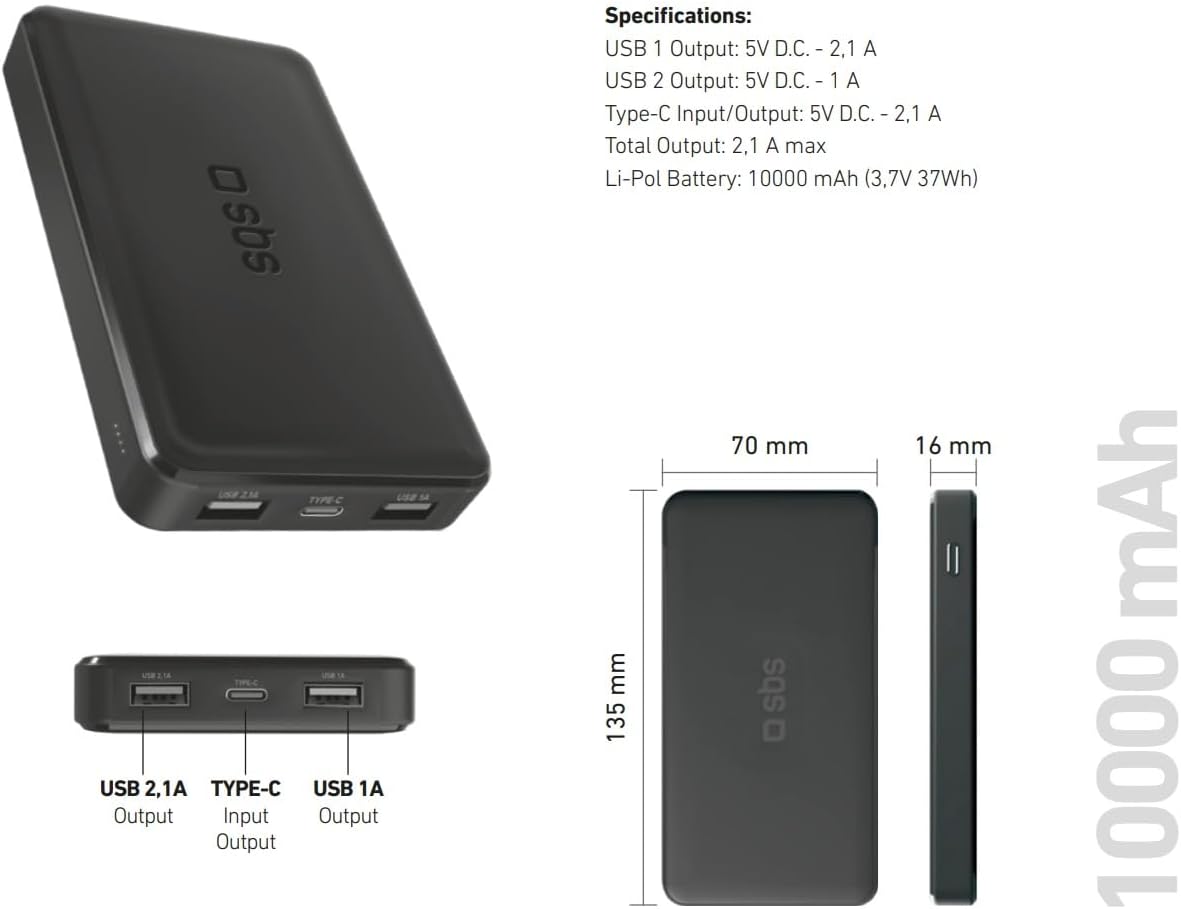
Image: Technical specifications and physical dimensions of the power bank.
| Funkce | Detail |
|---|---|
| Název modelu | TTBB10000TCK |
| Kapacita baterie | 10,000 mAh (3.7V 37Wh) |
| Typ baterie | Lithium-Polymer |
| USB 1 výstup | 5V D.C. - 1A (5W) |
| USB 2 výstup | 5V D.C. - 2.1A (10W Intelligent Charge) |
| Vstup/výstup USB-C | 5V D.C. - 2.1A (10W Fast Charge) |
| Celkový výkon | 2.1A max |
| Barva | Černý |
| Rozměry | 135 mm x 70 mm x 16 mm |
| Hmotnost | 230 gramů |
| Speciální funkce | Fast Charge, Lightweight, Short-circuit Protection, Over-discharge Protection, Slim Design |
| Kompatibilní zařízení | Smartphone, Tablet, Smartwatch, Speaker, Laptop (charging only) |
9. Záruka a podpora
9.1 Záruka výrobce
This SBS Powerbank 10K Slim comes with a 2letá záruka výrobcePro případné reklamace si prosím uschovejte doklad o koupi. Záruka se vztahuje na vady materiálu a zpracování při běžném používání.
9.2 Zákaznická podpora
For further assistance, technical support, or warranty inquiries, please visit the official SBS website or contact their customer service department. You can find more information and products from SBS by visiting their official store: SBS Brand Store.


