1. Úvod
Thank you for choosing the Hiwill HiElite A41 4.1 Dolby Atmos Soundbar. This manual provides essential information for setting up, operating, and maintaining your new audio system. Please read it thoroughly before use to ensure optimal performance and safety.
The HiElite A41 system is designed to deliver a powerful and immersive audio experience, featuring Dolby Atmos technology, a wired subwoofer, and two wired front surround speakers for a dynamic 4.1 channel sound configuration.

Image 1.1: The Hiwill HiElite A41 4.1 Dolby Atmos Soundbar system, including the main soundbar unit, wired subwoofer, and two wired front surround speakers, positioned in front of a television.
2. Bezpečnostní informace
- Před použitím zařízení si pečlivě přečtěte všechny pokyny.
- Uschovejte tento návod pro budoucí použití.
- Nevystavujte soundbar dešti, vlhkosti ani extrémním teplotám.
- Zajistěte řádné větrání kolem jednotky, abyste zabránili přehřátí.
- Neblokujte žádné ventilační otvory.
- Používejte pouze nástavce/příslušenství specifikované výrobcem.
- Během bouřky nebo při dlouhodobém nepoužívání odpojte zařízení ze zásuvky.
- Veškeré opravy svěřte kvalifikovanému servisnímu personálu.
- Tento výrobek není voděodolný. Vyhněte se kontaktu s kapalinami.
3. Obsah balení
Zkontrolujte prosím, zda je ve vašem balíčku obsaženo vše:
- Soundbar
- Kabelový subwoofer
- 2 Wired Front Surround Speakers
- Napájecí adaptér
- Stereo kabel 3.5 mm
- ARC kabel (HDMI)
- Optický kabel
- Dálkové ovládání
- 2 baterie AAA (pro dálkové ovládání)
- Sada pro montáž na stěnu
- Uživatelská příručka (tento dokument)
4. Konec produktuview
4.1 Klíčové vlastnosti
- 4.1 Channel Dolby Atmos Sound: Experience immersive, multi-dimensional audio with precise sound localization.
- 300W špičkový výkon: Delivers powerful and clear audio for movies, music, and games.
- High-Tech Alloy Speakers: Features aluminum-magnesium alloy diaphragms for deeper bass, clearer treble, and precise vocals.
- Zpracování HXS ClearVoice: Enhances dialogue clarity and refines sound for an immersive listening experience.
- 5.25-inch Wired Subwoofer: Provides robust, wall-shaking bass.
- 2 Wired Front Surround Speakers: Rozšiřuje zvukytage for a more enveloping audio environment.
- Adjustable Bass and Treble: Customize your audio preferences.
- Více možností připojení: HDMI ARC, Optical, 3.5mm Stereo, and Bluetooth.
4.2 Komponenty
The HiElite A41 system consists of a main soundbar, a wired subwoofer, and two wired front surround speakers.

Image 4.1: Illustration of the 4.1 channel Dolby Atmos sound system, demonstrating how sound is projected from the soundbar, subwoofer, and two front surround speakers to create an immersive audio field.
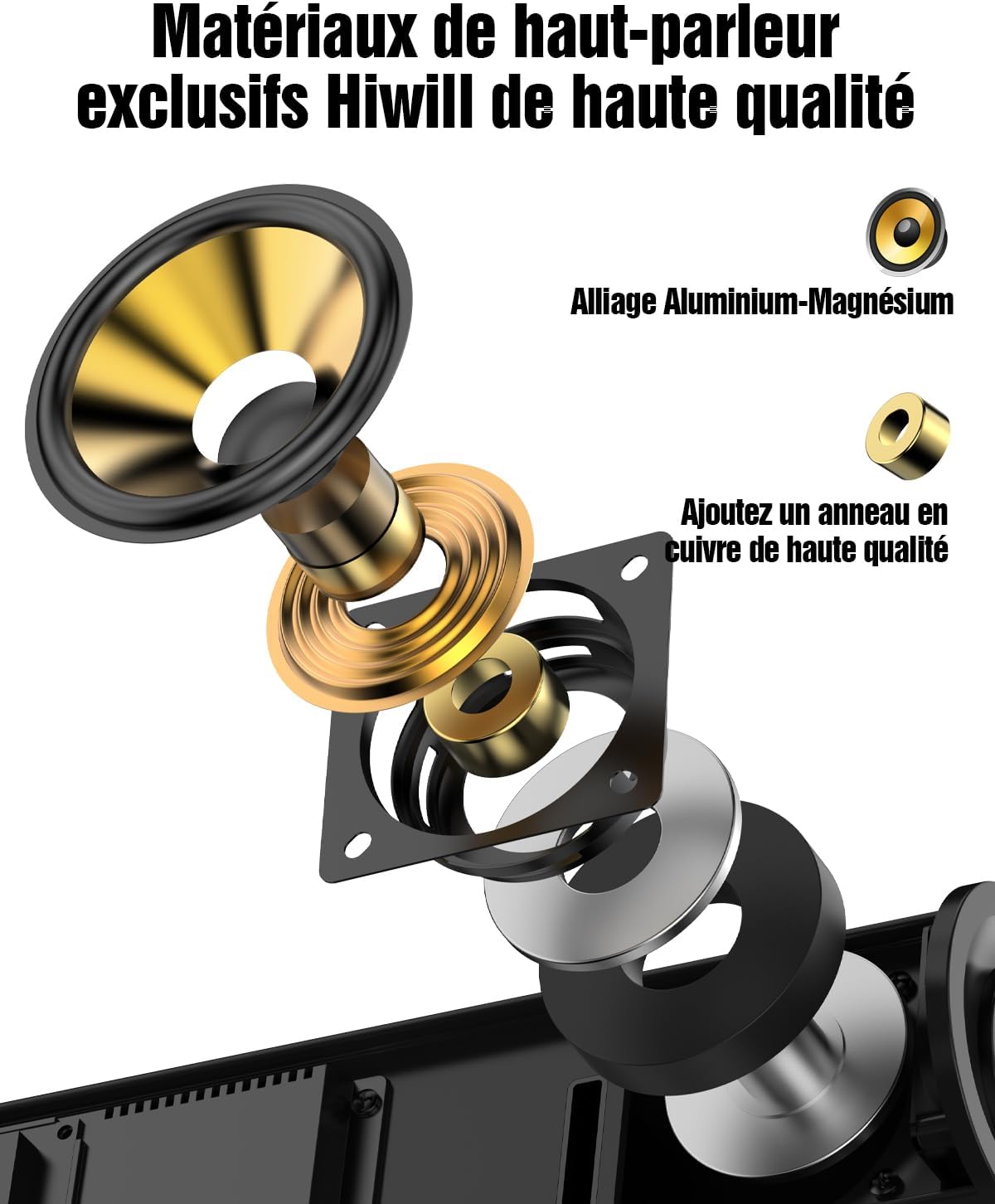
Obrázek 4.2: Rozložený diagram znázorňujeasing the internal components of a Hiwill speaker, highlighting the aluminum-magnesium alloy diaphragm and a high-quality copper ring for enhanced audio performance.

Obrázek 4.3: Vnitřní view of the 5.25-inch wired subwoofer, illustrating its powerful driver and design optimized for deep bass reproduction.

Image 4.4: A visual representation of the Digital Signal Processor (DSP) chip, emphasizing its role in achieving a frequency response of 45Hz-20KHz, 99% high fidelity, and less than 1% Total Harmonic Distortion (THD).
5. Nastavení
5.1 Umístění
- Soundbar: Place the soundbar centrally below your TV. Ensure it is on a stable, flat surface or mounted securely to the wall.
- subwoofer: Position the wired subwoofer on the floor, preferably near the soundbar or in a corner for enhanced bass.
- Přední prostorové reproduktory: Connect the two wired front surround speakers to the main soundbar unit. These speakers are designed to be placed on either side of your TV, or mounted on the wall, to expand the front soundstage.

Image 5.1: The two wired front surround speakers are shown mounted on the wall, flanking a television, to create a wider and more immersive sound experience.
5.2 Připojení
- Moc: Connect the power adapter to the soundbar and then plug it into a wall outlet.
- Subwoofer & Surround Speakers: Connect the wired subwoofer and the two wired front surround speakers to their respective ports on the soundbar.
- TV Connection (Recommended - HDMI ARC): Connect one end of the HDMI ARC cable to the HDMI ARC port on your TV and the other end to the HDMI ARC port on the soundbar. This allows for high-quality audio transmission and TV remote control integration.
- TV Connection (Alternative - Optical): If your TV does not have an HDMI ARC port, connect the optical cable from your TV's optical output to the OPTICAL input on the soundbar.
- Other Devices (3.5mm AUX): For connecting devices with a 3.5mm audio output, use the provided 3.5mm stereo cable.
6. Návod k obsluze
6.1 Zapnutí/vypnutí
Stisknutím tlačítka napájení na dálkovém ovladači nebo na soundbaru zapnete nebo vypnete zařízení.
6.2 Výběr vstupu
Press the 'Input' button on the remote control to cycle through available input sources: HDMI ARC, Optical, AUX, and Bluetooth.
6.3 Ovládání hlasitosti
Use the 'VOL+' and 'VOL-' buttons on the remote control or the soundbar to adjust the master volume.
6.4 Zvukové režimy
The soundbar offers optimized sound profiles for different content types:
- NEWS Mode: Enhances vocal clarity for news broadcasts and dialogue-heavy content.
- Režim FILM: Nabízí dynamický a pohlcující zvuktage pro filmy.
- Režim HUDBA: Optimizes audio for a balanced and rich musical experience.
Press the corresponding button (NEWS, MOVIE, MUSIC) on the remote control to select a sound mode.
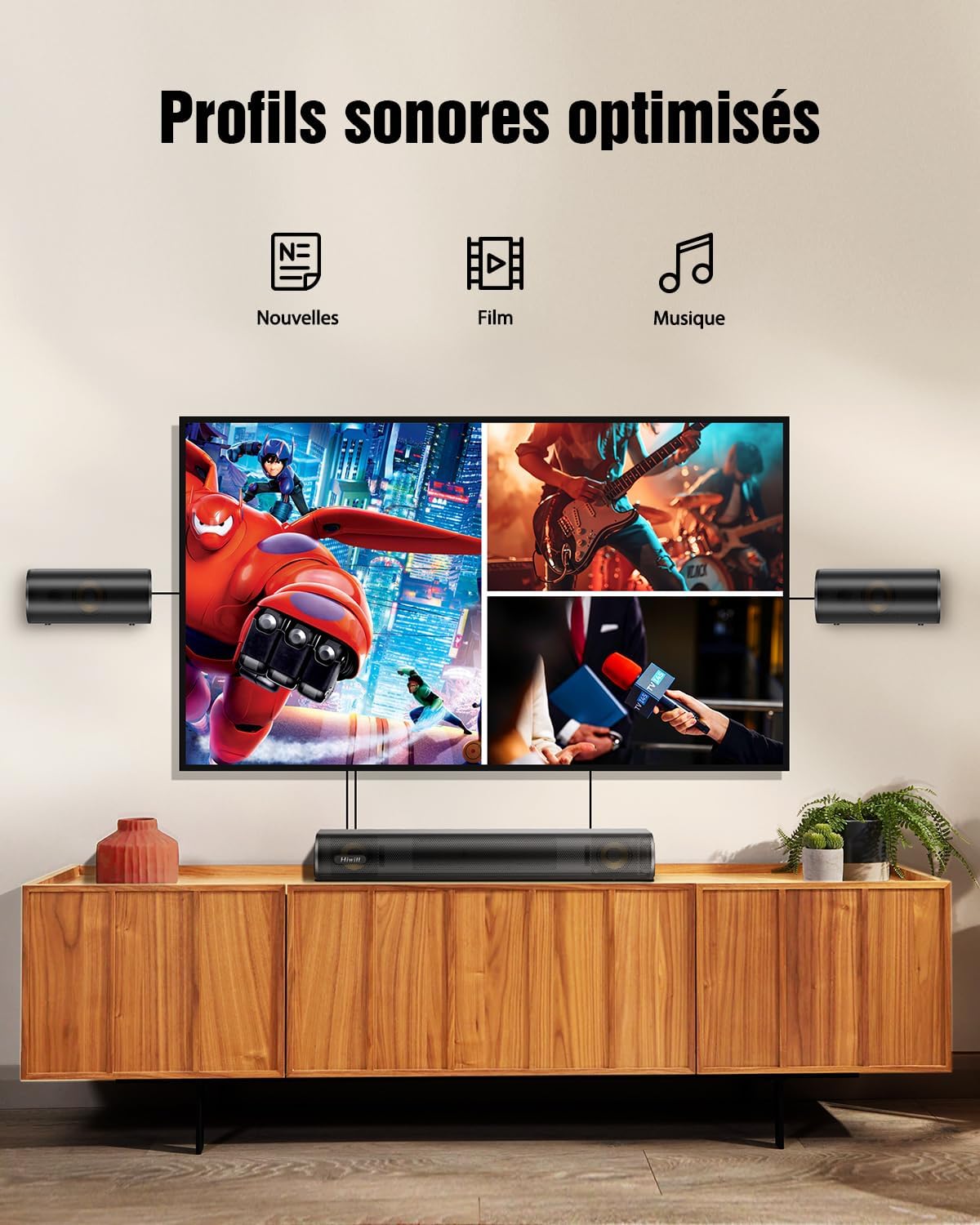
Image 6.1: Visual representation of the three optimized sound profiles: News, Movie, and Music, each tailored for specific audio content.
6.5 Adjusting Bass and Treble
Use the 'BASS+' / 'BASS-' and 'TRE+' / 'TRE-' buttons on the remote control to fine-tune the bass and treble levels according to your preference. The adjustable range is typically from -6 to +6.

Image 6.2: The remote control for the soundbar, highlighting the buttons for adjusting bass and treble levels, allowing users to personalize their audio experience.
6.6 Párování Bluetooth
- Press the 'Bluetooth' button on the remote control to switch to Bluetooth mode. The LED indicator on the soundbar will flash.
- On your mobile device, enable Bluetooth and search for 'HiElite A41'.
- Select 'HiElite A41' to pair. Once connected, the LED indicator will stop flashing and remain solid.
7. Aktualizace firmwaru
Hiwill periodically releases firmware updates to improve performance and add new features. It is recommended to keep your soundbar's firmware up to date.
- Expanded surround soundstage
- Clearer dialogues & deeper bass
- Funkce inteligentní paměti
- Reduced default volume
- Automatic LED turn-off (30s)
- Softened screen brightness
Please contact Hiwill customer support or visit the official Hiwill website to obtain the latest firmware and detailed update instructions.

Image 7.1: A graphic illustrating the benefits of a firmware upgrade, including an expanded surround soundstage, clearer dialogues, deeper bass, intelligent memory function, reduced default volume, automatic LED turn-off, and softened screen brightness.
8. Údržba
- Čištění: Use a soft, dry cloth to clean the surface of the soundbar, subwoofer, and surround speakers. Do not use liquid cleaners or abrasive materials.
- Větrání: Ujistěte se, že větrací otvory nejsou zablokovány prachem nebo nečistotami.
- Skladování: Pokud budete přístroj skladovat delší dobu, odpojte jej ze zásuvky a uložte jej na chladném a suchém místě.
9. Řešení problémů
| Problém | Možná příčina | Řešení |
|---|---|---|
| Žádná síla | Napájecí kabel není připojen; Zásuvka není aktivní | Ujistěte se, že je napájecí kabel bezpečně připojen; zkuste jinou zásuvku. |
| Žádný zvuk | Incorrect input source; Volume too low; Cables not connected properly | Select the correct input source; Increase volume; Check all audio cables (HDMI ARC, Optical, AUX) |
| Párování Bluetooth se nezdařilo | Soundbar není v režimu párování; Zařízení je příliš daleko; Rušení | Ensure soundbar is in Bluetooth pairing mode; Move device closer; Turn off other Bluetooth devices |
| Dálkové ovládání nefunguje | Vybité baterie; Překážka mezi dálkovým ovladačem a soundbarem | Replace AAA batteries; Remove any obstructions; Ensure remote is pointed at the soundbar's sensor |
| Zkreslený zvuk | Volume too high; Poor audio source quality; Incorrect cable connection | Reduce volume; Try a different audio source; Re-check cable connections |
10. Specifikace
| Funkce | Detail |
|---|---|
| Název modelu | HiElite A41 |
| Značka | Hiwill |
| Typ reproduktoru | Soundbar |
| Konfigurace kanálů prostorového zvuku | 4.1 |
| Režim zvukového výstupu | Dolby Atmos, 3D Spatial Audio |
| Maximální výstupní výkon reproduktoru | 300 wattů |
| Frekvenční odezva | 45Hz-20KHz |
| Technologie připojení | Kabelové, Bluetooth |
| Technologie bezdrátové komunikace | Bluetooth |
| Kontrolní metoda | Dálkové ovládání |
| Kompatibilní zařízení | Osobní počítač, televize |
| Doporučená použití | For game console, For music player, For computer, For television |
| Rozměry produktu (D x Š x V) | 41.6 x 11.3 x 6 cm |
| Hmotnost položky | 5 kg |
| Zdroj napájení | Elektrický kabel |
| Speciální funkce | Dolby Atmos enabled, Aluminum-Magnesium alloy diaphragms, 2 front surround speakers, HarmonicX sound processing, Adjustable bass and treble |
| Je voděodolný | Žádný |
| Země původu | Čína |
11. Záruka a podpora
11.1 Záruka výrobce
The Hiwill HiElite A41 Soundbar comes with a 2letá záruka výrobceTato záruka se vztahuje na vady materiálu a zpracování při běžném používání. Uschovejte si prosím doklad o koupi pro případ uplatnění záruky.
11.2 Zákaznická podpora
For technical assistance, troubleshooting, or warranty inquiries, please contact Hiwill Customer Support:
- Webmísto: Visit the official Hiwill webweb s zdrojovými zdroji podpory, častými dotazy a kontaktními informacemi.
- E-mail: Refer to your product packaging or the Hiwill webweb s e-mailovou adresou zákaznické podpory.
When contacting support, please have your product model (HiElite A41) and purchase details ready.


