Zavedení
The My Arcade Atari Pixel Pocket Pro is a portable, officially licensed Atari video game system designed for on-the-go entertainment. This compact device includes 25 classic Atari games, offering a nostalgic gaming experience in a convenient keychain format. This manual provides essential information for setting up, operating, and maintaining your device.
Obsah balení
- My Arcade Atari Pixel Pocket Pro device
- Uživatelská příručka (tento dokument)

Image: The My Arcade Atari Pixel Pocket Pro device shown within its retail packaging, highlighting the product's branding and key features.
Konec produktuview
The Pixel Pocket Pro features a 2-inch full-color screen and intuitive button controls for an authentic arcade experience. Its compact design includes a keychain for easy portability.

Obrázek: Přední strana view of the My Arcade Atari Pixel Pocket Pro, displaying the screen, directional pad, SELECT, START, VOLUME, and 'A' buttons.
Image: The My Arcade Atari Pixel Pocket Pro with visual callouts indicating 25 officially licensed Atari titles, a 2-inch full-color screen, and power via 3 AAA batteries.
Nastavení
Instalace baterie
- Najděte přihrádku na baterie na zadní straně zařízení.
- Using a small Phillips head screwdriver (not included), carefully remove the screw securing the battery compartment cover.
- Odstraňte kryt.
- Insert three (3) AAA batteries (not included) into the compartment, ensuring correct polarity (+/-) as indicated inside the compartment.
- Nasaďte kryt prostoru pro baterie a zajistěte jej šroubem.
Poznámka: Vždy používejte nové baterie a staré baterie zlikvidujte zodpovědně. Nekombinujte staré a nové baterie ani různé typy baterií.

Obrázek: Zpět view of the My Arcade Atari Pixel Pocket Pro, showing the location of the battery compartment cover.
Návod k obsluze
Zapnutí/vypnutí
- Chcete-li zařízení zapnout, stiskněte START tlačítko.
- Chcete-li zařízení vypnout, stiskněte a podržte tlačítko START button for approximately 3 seconds until the screen turns off.
Výběr hry
- After powering on, use the directional pad to navigate through the list of available games.
- Stiskněte tlačítko A tlačítko pro výběr hry a zahájení hraní.
Ovládání hlasitosti
- Použijte OBJEM button to adjust the sound level. Pressing it cycles through different volume settings.
Hratelnost
- The directional pad controls movement within the game.
- The A button typically serves as the action or fire button.
- The VYBRAT button may be used for in-game options or pausing, depending on the specific game.
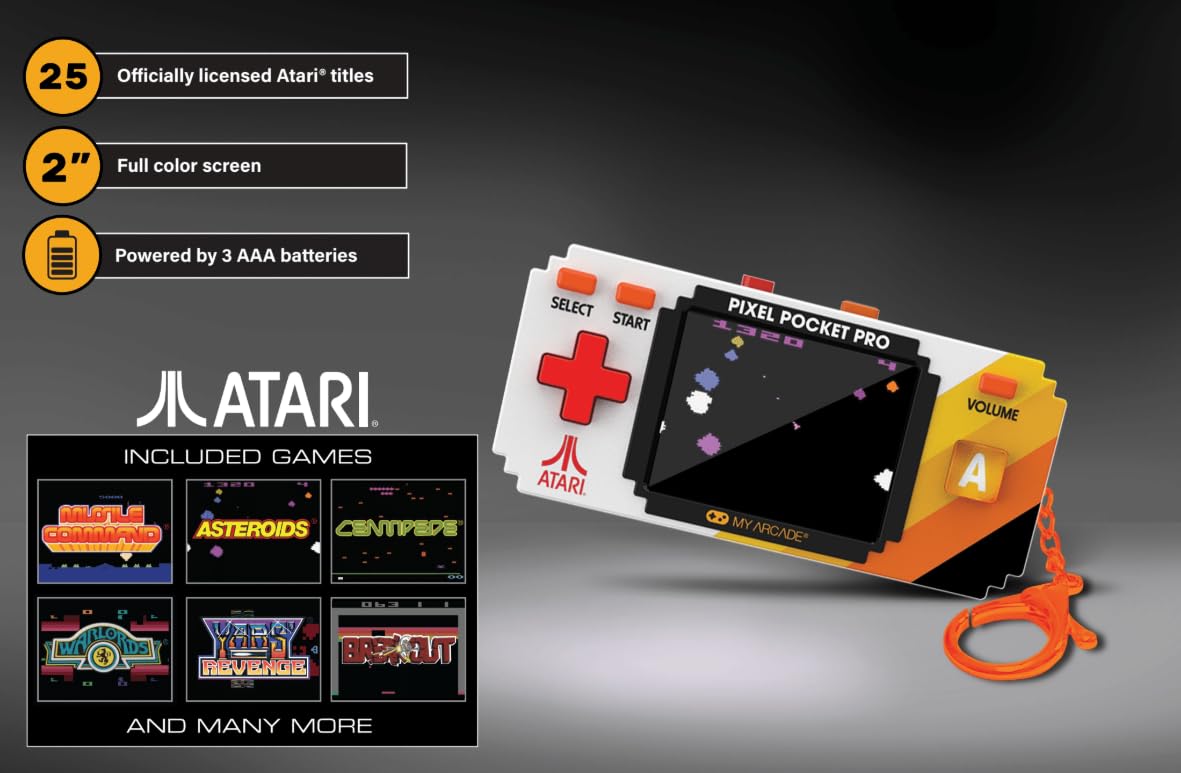
Image: A hand holding the My Arcade Atari Pixel Pocket Pro, demonstrating its portable size and how it is used for gameplay.
Údržba
Čištění
- Otřete zařízení měkkým suchým hadříkem.
- Do not use liquid cleaners or abrasive materials, as these can damage the screen or casing.
Péče o baterie
- Pokud zařízení nebudete delší dobu používat, vyjměte baterie, abyste zabránili jejich vytečení.
- Zařízení skladujte na chladném a suchém místě mimo dosah přímého slunečního záření.
Odstraňování problémů
Device Does Not Power On
- Ujistěte se, že jsou baterie vloženy správně se správnou polaritou.
- Vyměňte za nové baterie AAA.
- Zkontrolujte, zda je kryt přihrádky na baterie bezpečně uzavřen.
Žádný zvuk nebo slabý zvuk
- Stiskněte tlačítko OBJEM button to increase the sound level.
- Ujistěte se, že reproduktor není zablokován.
Screen Issues (e.g., Blurry, Flickering)
- Ensure the screen is clean and free of smudges.
- Replace batteries, as low power can sometimes affect screen performance.
- Pokud problém přetrvává, kontaktujte zákaznickou podporu.
Specifikace
| Číslo modelu | DGULN-7134 |
| Značka | Moje Arkáda |
| Velikost obrazovky | 2 inches (full color) |
| Typ ovladače | Ovládání tlačítkem |
| Zdroj napájení | Napájení z baterie |
| Jsou vyžadovány baterie | 3 x AAA (nejsou součástí balení) |
| Rozměry (Š x V x H) | 1.75 cm x 3.8 cm x 1 cm (přibližně) |
| Hmotnost | 4.5 unce (přibližně) |
| Materiál | Plast |
| Počet her | 25 Officially Licensed Atari Titles |
Záruka a podpora
For warranty information or technical support, please refer to the contact details provided on the product packaging or visit the official My Arcade webwebu. Uschovejte si účtenku jako doklad o koupi.
Image: A QR code for collecting more My Arcade products. Scan this code to explore other available items.
Explore more My Arcade products: https://qrco.de/collectthem


