1. Úvod
Děkuji za nákupasing the Lafocuse 12-inch LED Digital Wall and Desk Clock. This clock is designed to provide clear time, date, day, and temperature information with versatile placement options and convenient remote control operation. Please read this manual carefully before use to ensure proper setup and functionality.
2. Bezpečnostní informace
- Ensure the clock is connected to a stable power source. This clock operates solely via a power cable; an adapter is not included.
- Uchovávejte zařízení mimo dosah vody nebo prostředí s vysokou vlhkostí.
- Do not attempt to disassemble or repair the clock yourself. Contact customer support for assistance.
- Use only the specified button cell battery for the memory function. Incorrect battery type may cause damage.
- Keep the remote control away from children to prevent accidental ingestion of small parts.
3. Obsah balení
Ověřte, zda jsou v balení přítomny všechny položky:
- Lafocuse 12-inch LED Digital Clock (Model ZH0153A)
- Dálkové ovládání
- Napájecí kabel USB
- Uživatelská příručka
- Button Cell Battery (for memory function)
4. Konec produktuview
The Lafocuse Digital Clock features a large LED display for easy readability. It shows time, date, day of the week, and temperature. The back panel includes control buttons and connection ports.
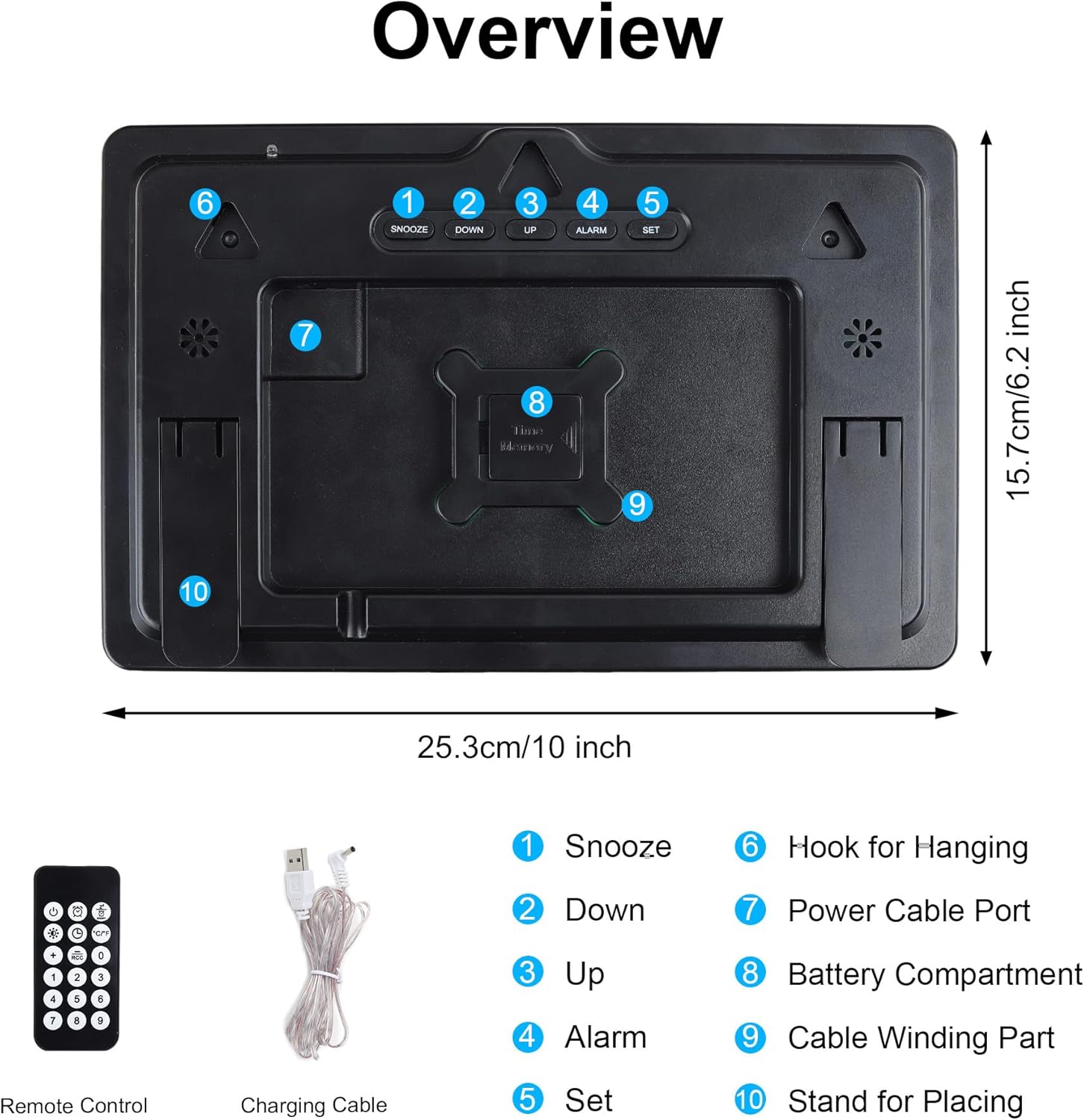
Obrázek 1: Zadní panelview a příslušenství
- Tlačítko "Odložit: Activates snooze during an alarm.
- Tlačítko DOLŮ: Decreases values during setting, navigates menus.
- Tlačítko NAHORU: Increases values during setting, navigates menus.
- Tlačítko ALARM: Vstupuje do režimu nastavení budíku.
- Tlačítko SET: Enters time/date setting mode, confirms settings.
- Háček na zavěšení: Používá se pro montáž na stěnu.
- Port napájecího kabelu: Connects the USB power cable.
- Přihrádka na baterie: For the button cell memory battery.
- Cable Winding Part: For organizing the power cable.
- Stand for Placing: Used for desk placement.

Figure 2: Front Display of the Digital Clock
5. Nastavení
5.1 Připojení napájení
- Connect the provided USB power cable to the Power Cable Port (7) on the back of the clock.
- Zapojte druhý konec kabelu USB do kompatibilního napájecího adaptéru USB (není součástí balení) nebo do portu USB.
- The clock will power on and display the default time.
5.2 Memory Battery Installation
A button cell battery is included to retain time and alarm settings during a power outage.
- Locate the Battery Compartment (8) on the back of the clock.
- Open the compartment and insert the button cell battery, ensuring correct polarity (+/-).
- Bezpečně uzavřete přihrádku na baterie.
5.3 Možnosti montáže
The clock can be placed on a desk or mounted on a wall.

Figure 3: Wall Mounting and Desk Placement Options
Umístění stolu:
Extend the built-in stand (10) on the back of the clock to place it securely on any flat surface.
Montáž na stěnu:
Use the three durable hooks (6) on the back of the clock to hang it on screws or nails securely fastened to a wall.
6. Návod k obsluze
The clock can be operated using the buttons on the back or the included remote control.

Obrázek 4: Ovládání dálkovým ovládáním
6.1 Nastavení času a data
- Stiskněte tlačítko SOUBOR button on the back of the clock or the remote control. The hour digits will flash.
- Použijte UP or DOLŮ tlačítka pro nastavení hodiny.
- Stiskněte SOUBOR znovu pro přechod na nastavení minut. Upravte minuty pomocí UP or DOLŮ.
- Pokračujte v stisknutí SOUBOR procházet nastavení roku, měsíce a dne a upravovat každé z nich pomocí UP or DOLŮ.
- Po nastavení dne stiskněte SOUBOR one last time to confirm and exit the setting mode.
6.2 Nastavení alarmu
- Stiskněte tlačítko POPLACH button on the back of the clock or the remote control. The alarm hour digits will flash.
- Použijte UP or DOLŮ tlačítky pro nastavení hodiny budíku.
- Stiskněte POPLACH again to move to alarm minute setting. Adjust minutes with UP or DOLŮ.
- Stiskněte POPLACH one last time to confirm and activate the alarm. An alarm icon will appear on the display.
- Chcete-li alarm deaktivovat, stiskněte tlačítko POPLACH znovu stiskněte tlačítko, dokud ikona budíku nezmizí.
6.3 Funkce odložení
Když zazní alarm, stiskněte PODŘIMOVAT button (1) on the back of the clock or the corresponding button on the remote control. The alarm will pause for 5 minutes and then sound again. To stop the alarm completely, press any other button on the clock or remote.

Figure 5: Snooze Function in Use
6.4 Nastavení jasu
The clock offers 4 levels of brightness and an automatic photosensitive function.

Figure 6: Adjustable Brightness Levels
Ruční nastavení:
Press the brightness control button on the remote control to cycle through the 4 brightness levels (High, Medium, Low, Off).
Automatic Photosensitive Function:
Activate the photosensitive function via the remote control. The clock will automatically adjust its brightness based on ambient light conditions, ensuring it is not too bright in dark environments.

Figure 7: Automatic Photosensitive Brightness
6.5 Režim 12/24 hodin
Press the 12/24H button on the remote control to switch between 12-hour and 24-hour time display formats.
6.6 Zobrazení teploty
The clock automatically displays the ambient temperature. No specific setting is required for this function.
7. Vlastnosti
- Velký 12palcový LED displej: Provides clear visibility of time, date, day, and temperature from various angles.
- Možnosti dvojitého umístění: Can be easily mounted on a wall or placed on a desk.
- Dálkové ovládání: Conveniently adjust settings and manage alarms from a distance.
- Funkce paměti: Built-in button cell battery preserves time and alarm settings during power interruptions.
- Nastavitelný jas: Four manual brightness levels and an automatic photosensitive mode to suit different environments.
- Funkce odložení: Allows for an additional 5 minutes of sleep after the alarm sounds.
- Zobrazení teploty: Shows ambient temperature in Celsius.
8. Údržba
8.1 Čištění
Wipe the clock surface with a soft, dry cloth. Do not use abrasive cleaners or solvents, as they may damage the display or casing.
8.2 Battery Replacement (Memory Function)
If the clock consistently loses its settings after a power outage, the button cell memory battery may need replacement. Refer to Section 5.2 for installation instructions.
9. Řešení problémů
| Problém | Možná příčina | Řešení |
|---|---|---|
| Hodiny se nezapínají. | Chybí napájení nebo je vadný kabel/adaptér. | Ensure the USB power cable is securely connected and the power adapter is working. This clock requires constant power via cable. |
| Nastavení se po výpadku napájení ztratítage. | Memory battery is dead or not installed correctly. | Replace the button cell memory battery or ensure it is installed with correct polarity. |
| Dálkové ovládání nefunguje. | Remote battery is dead or line of sight is blocked. | Replace the remote control battery. Ensure there are no obstructions between the remote and the clock. |
| Displej je příliš jasný/tmavý. | Je třeba upravit nastavení jasu. | Manually adjust brightness using the remote or activate the automatic photosensitive function. |
10. Specifikace
- Model: ZH0153A
- Typ displeje: LED digitální
- Velikost obrazovky: 12 palců
- Rozměry (D x Š x V): 25 x 3.81 x 15.7 cm (přibližně 10 x 1.5 x 6.2 palce)
- Hmotnost: 530 gramů
- Materiál: Plast
- Zdroj napájení: USB Cable (adapter not included)
- Baterie paměti: Button Cell (included)
- Úrovně jasu: 4 manual levels + Automatic Photosensitive
- Funkce: Time, Date, Day, Temperature, Alarm, Snooze, 12/24H Mode
11. Záruka a podpora
Lafocuse products are manufactured with high-quality standards. For any questions, technical support, or warranty claims, please contact your retailer or Lafocuse customer service. Please retain your proof of purchase for warranty purposes.
