Konec produktuview
The Lafocuse Digital LED Alarm Clock (Model ZH0154A) features a large 6.7-inch LED display for clear visibility. It offers multiple functions including time, date, and temperature display, adjustable brightness, and a customizable snooze function. The clock can be powered via USB cable or AAA batteries, providing flexibility for placement.

Obrázek: Přední strana view of the Lafocuse Digital LED Alarm Clock displaying the time.
Obsah balení
- Lafocuse Digital LED Alarm Clock (Model ZH0154A)
- Napájecí kabel USB
- Uživatelská příručka
Note: 3 AAA batteries and a USB power adapter are not included and must be purchased separately.
Identifikace součásti
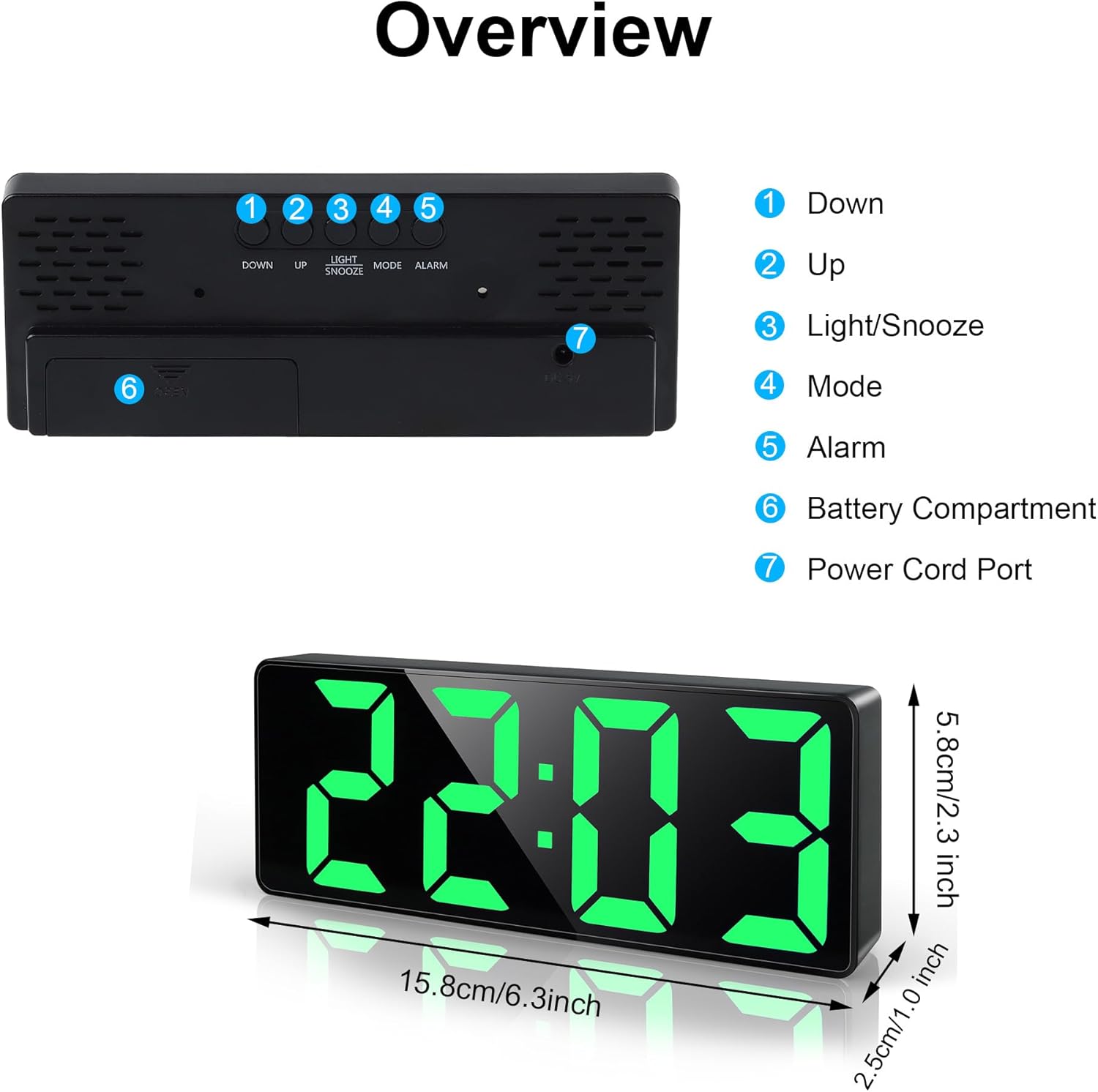
Obrázek: Horní a zadní část view of the alarm clock, highlighting control buttons and ports.
- Tlačítko DOLŮ: Používá se ke snížení hodnot nebo navigaci v nabídkách.
- Tlačítko NAHORU: Používá se ke zvyšování hodnot nebo navigaci v nabídkách.
- LIGHT/SNOOZE Button: Adjusts display brightness, activates snooze, or turns off the screen.
- Tlačítko MODE: Switches between time, date, and temperature display modes, and enters setting modes.
- Tlačítko ALARM: Vstupuje do režimu nastavení budíku.
- Přihrádka na baterie: Holds 3 AAA batteries (not included).
- Port napájecího kabelu: USB input for continuous power.
Nastavení
Napájení hodin
The clock offers two power options:
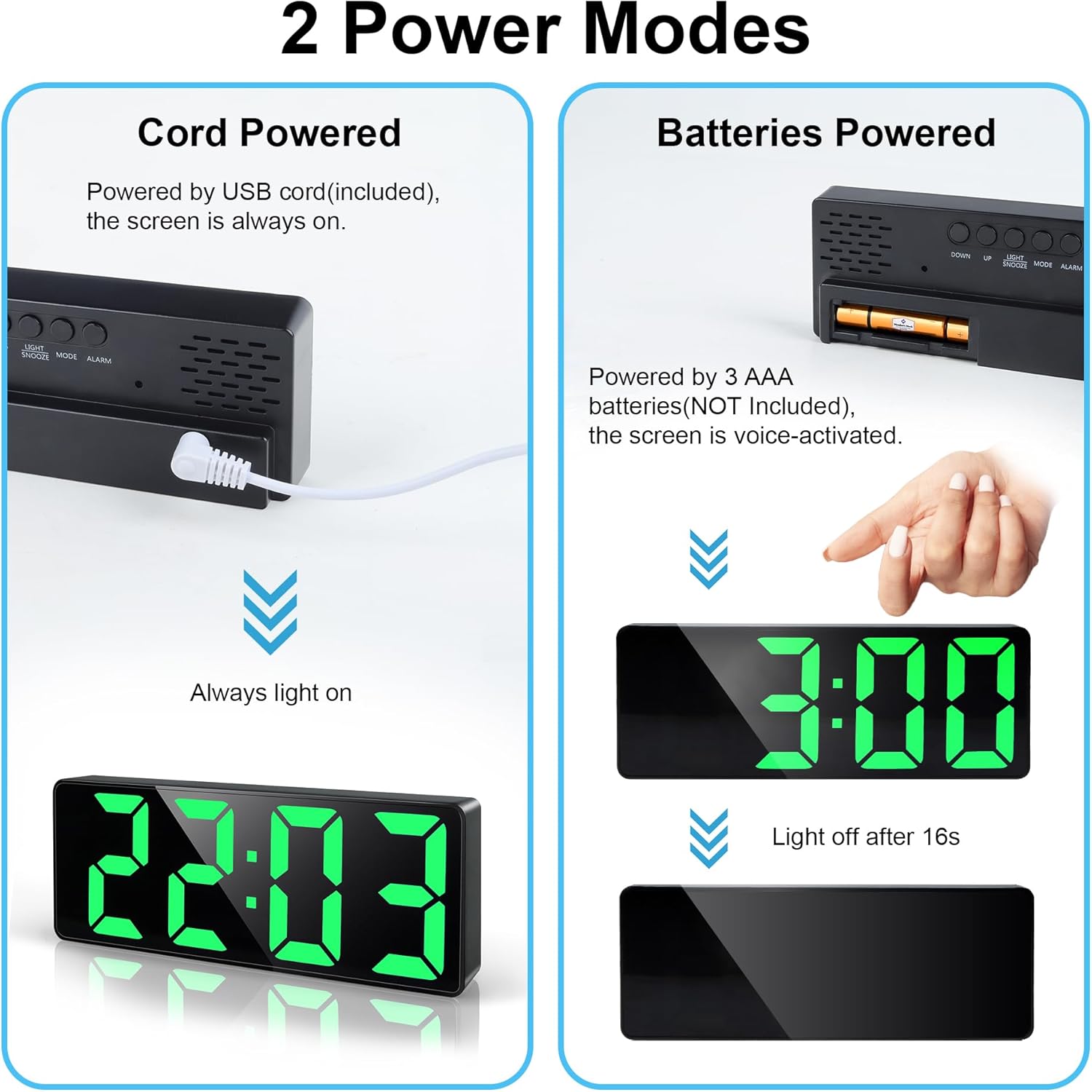
Image: Illustration of the two power modes: USB cable connection for continuous display and battery compartment for voice-activated display.
- USB Cable Power (Recommended for continuous display):
- Connect the provided USB cable to the Power Cord Port (7) on the back of the clock.
- Plug the other end of the USB cable into a USB power adapter (not included) or a powered USB port.
- The LED display will remain continuously lit.
- Battery Power (For power saving, display activates on sound/touch):
- Open the Battery Compartment (6) on the back of the clock.
- Insert 3 new AAA batteries (not included), ensuring correct polarity (+/-).
- Zavřete přihrádku na baterie.
- When powered by batteries, the LED display will turn off after approximately 16 seconds to conserve energy. To activate the display, gently tap the clock or make a sound.
Návod k obsluze
Nastavení času a data
- Stiskněte tlačítko MODE button (4) to cycle through Time, Date, and Temperature display.
- Chcete-li nastavit čas, stiskněte a podržte tlačítko MODE button (4) until the hour digits flash.
- Použijte UP (2) a DOLŮ (1) buttons to adjust the hour.
- Stiskněte MODE (4) again to confirm the hour and move to minutes.
- Použijte UP (2) a DOLŮ (1) buttons to adjust the minutes.
- Stiskněte MODE (4) again to confirm minutes and move to the 12/24-hour format setting.
- Použijte UP (2) a DOLŮ (1) buttons to select either 12H or 24H format.
- Stiskněte MODE (4) again to confirm the time format and move to year setting.
- Continue using UP (2) a DOLŮ (1) to adjust the Year, Month, and Day, pressing MODE (4) after each setting to confirm and advance.
- Po nastavení dne stiskněte MODE (4) one last time to exit the setting mode.

Image: The clock cycling through temperature, time, and date display modes.
Nastavení alarmu
The clock supports three alarm modes: Monday-Friday (1-5), Monday-Saturday (1-6), and Monday-Sunday (1-7).
- Stiskněte tlačítko POPLACH button (5) to enter alarm setting mode. The alarm time will flash.
- Použijte UP (2) a DOLŮ (1) buttons to adjust the alarm hour.
- Stiskněte POPLACH (5) again to confirm the hour and move to minutes.
- Použijte UP (2) a DOLŮ (1) buttons to adjust the alarm minutes.
- Stiskněte POPLACH (5) again to confirm minutes and move to alarm mode selection.
- Použijte UP (2) a DOLŮ (1) buttons to select the desired alarm mode (1-5, 1-6, or 1-7).
- Stiskněte POPLACH (5) again to confirm the alarm mode and exit setting.
- Chcete-li aktivovat nebo deaktivovat budík, krátce stiskněte POPLACH button (5) outside of setting mode. An alarm icon will appear/disappear on the display.

Image: The clock displaying the snooze function and options for 3 alarm modes.
Funkce Snooze
Když zazní alarm, stiskněte SVĚTLO / SNOOZE button (3) to activate the snooze function. The alarm will pause and sound again after the set snooze duration.
- Adjusting Snooze Time:
- While in normal time display mode, press and hold the SVĚTLO / SNOOZE button (3) until the snooze time flashes.
- Použijte UP (2) a DOLŮ (1) buttons to adjust the snooze duration from 1 to 60 minutes.
- Stiskněte SVĚTLO / SNOOZE (3) again to confirm and exit.
- To turn off the alarm completely when it sounds, press any button other than SVĚTLO / SNOOZE (3).

Image: A user activating the snooze function on the alarm clock.
Nastavení jasu displeje
The clock has 3 levels of brightness and an option to turn off the display.
- To cycle through brightness levels: Krátce stiskněte SVĚTLO / SNOOZE button (3). The display will cycle through Bright, Medium, Low.
- Chcete-li vypnout displej: Stiskněte a podržte SVĚTLO / SNOOZE button (3) for approximately 3 seconds. The display will turn off completely. This is useful for undisturbed sleep.
- To reactivate the display from off: Stiskněte libovolné tlačítko.
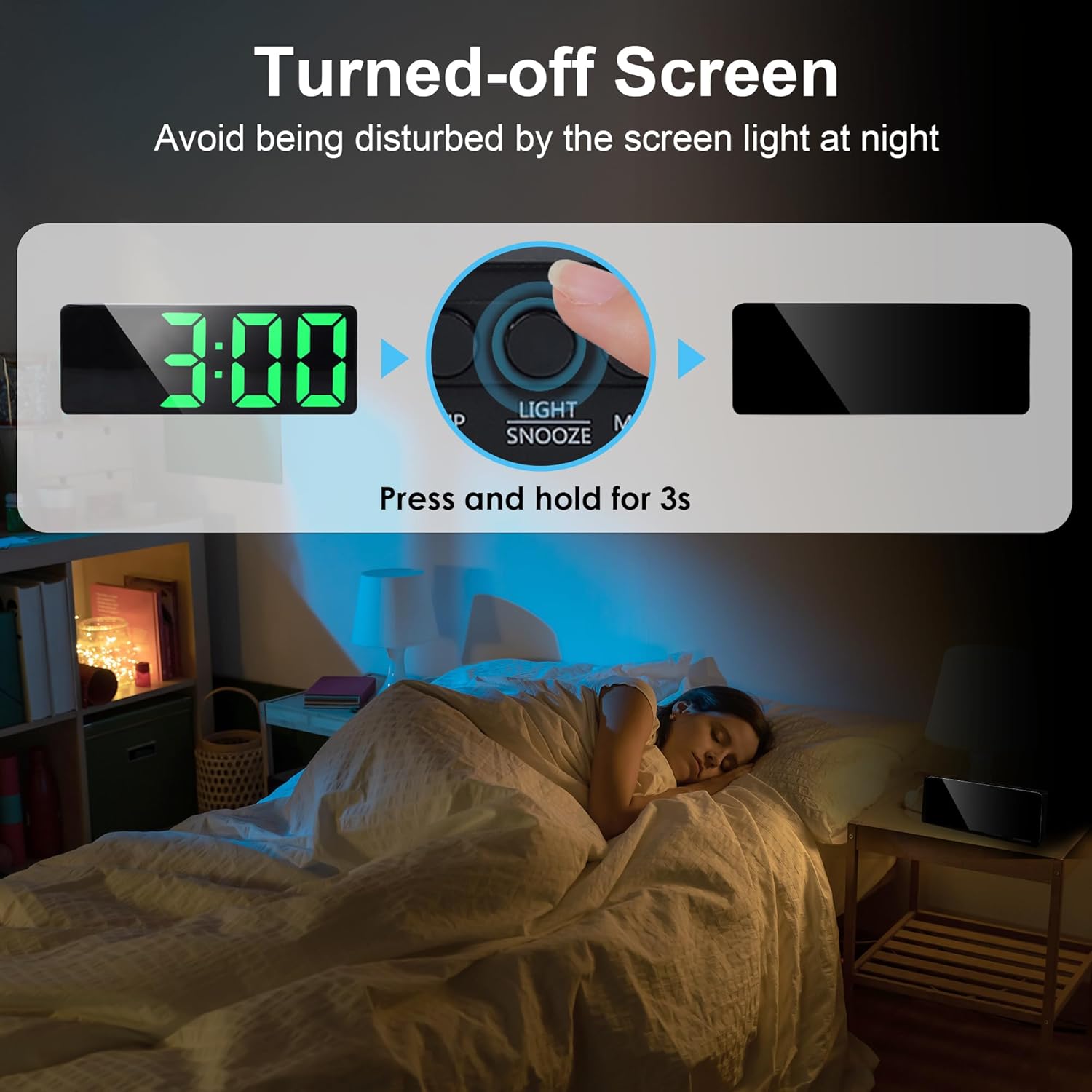
Image: Instructions on how to turn off the screen to avoid light disturbance at night.
Údržba
- Hodiny čistěte měkkým, suchým hadříkem. Nepoužívejte abrazivní čisticí prostředky ani rozpouštědla.
- Nevystavujte hodiny extrémním teplotám, přímému slunečnímu záření nebo vysoké vlhkosti.
- If using battery power, replace all three AAA batteries simultaneously when they are depleted. Do not mix old and new batteries or different types of batteries.
- Pokud hodiny nebudete delší dobu používat, vyjměte baterie, abyste zabránili vytečení.
Odstraňování problémů
| Problém | Možná příčina | Řešení |
|---|---|---|
| Display is off (battery mode). | Aktivován režim úspory energie. | Klepnutím na hodiny nebo vydáním zvuku aktivujete displej. |
| Display is off (USB mode). | No power or cable issue. | Check USB cable connection and power source. Ensure the adapter is working. |
| Alarm se nespustí. | Budík není aktivovaný nebo je nesprávně nastavený. | Ensure the alarm icon is visible on the display. Re-check alarm time and mode settings. |
| Čas/datum je nesprávný. | Není správně nastaveno nebo došlo k výpadku napájení. | Re-set the time and date following the operating instructions. |
| Displej je příliš jasný/tmavý. | Je třeba upravit úroveň jasu. | Krátce stiskněte SVĚTLO / SNOOZE button (3) to cycle through brightness levels. |
Specifikace
| Značka | Lafocuse |
| Číslo modelu | ZH0154A |
| Typ zobrazení | Digitální LED |
| Velikost obrazovky | 6.7 palců (17 cm) |
| Rozměry (D x Š x V) | 15.8 x 3.81 x 5.8 cm (6.2 x 1.5 x 2.3 palce) |
| Hmotnost | 150 g (5.3 oz) |
| Materiál | Plast |
| Zdroj napájení | USB cable (DC 5V) or 3 x AAA batteries (not included) |
| Speciální funkce | Adjustable Brightness (3 levels + off), Adjustable Snooze (1-60 min), 3 Alarm Modes (Mon-Fri, Mon-Sat, Mon-Sun), Time/Date/Temperature Display, Sound/Tap Activated Display (battery mode) |
Záruka a podpora
For warranty information or technical support, please refer to the documentation included with your purchase or contact Lafocuse customer service through the retailer where the product was purchased.
