1. Úvod
This manual provides comprehensive instructions for the installation, operation, maintenance, and troubleshooting of your ASUS TUF Gaming Radeon RX 9070 XT OC Edition 16GB GDDR6 Graphics Card. Please read this manual thoroughly before using the product to ensure proper functionality and longevity.

Image 1.1: ASUS TUF Gaming Radeon RX 9070 XT OC Edition Graphics Card and its retail packaging.
2. Konec produktuview
The ASUS TUF Gaming Radeon RX 9070 XT OC Edition is a high-performance graphics card designed for demanding computing tasks and gaming. It features advanced cooling solutions and durable components to ensure stable operation.
Klíčové vlastnosti:
- PCIe® 5.0 Interface: Provides high-bandwidth connectivity for optimal performance.
- 16GB GDDR6 Memory: Ample memory for high-resolution textures and complex scenes.
- HDMI/DP 2.1 Outputs: Supports multiple high-resolution displays.
- 3.125-slot Design: Robust physical design for enhanced cooling.
- Komponenty vojenské úrovně: Ensures rock-solid power delivery and extended lifespan.
- Ochranný povlak PCB: Guards against environmental factors like moisture and dust.
- Tepelná podložka pro grafický procesor s fázovou změnou: Improves thermal conductivity and heat dissipation.
- Axial-tech Fans with Dual Ball Bearings: Enhanced airflow and durability.
- Design MaxContactu: Increases heat spreader contact with the GPU for improved thermal transfer.
- Vented Exoskeleton: High-quality shroud and backplate with vents for better heat dissipation.
Podrobnosti součásti:

Image 2.1: Military-Grade Components. TUF Chokes and MOSFETs provide stable power, while TUF 5K metallic capacitors offer increased temperature tolerance and lifespan.

Image 2.2: Ultimate Durability Features. The Phase-Change GPU Thermal Pad ensures optimal thermal performance, the Protective PCB Coating prevents short circuits, and Dual Ball Fan Bearings extend fan lifespan.

Image 2.3: Cooling Mastery. MaxContact Design enhances heat transfer, Axial-tech fans improve airflow, and the Vented Exoskeleton aids heat dissipation.
3. Nastavení a instalace
Proper installation is crucial for the performance and stability of your graphics card. Always ensure your system is powered off and unplugged before beginning installation.
3.1 Systémové požadavky
- PCI Express® 5.0 compliant motherboard with one x16 graphics slot.
- Minimum 750W power supply unit (PSU) recommended. For optimal performance and stability, a TUF Gaming Gold 850W PSU is suggested.
- Dostatečný prostor ve skříni počítače pro 3.125slotovou grafickou kartu.
- Compatible operating system (e.g., Windows 10/11 64-bit).

Image 3.1: The graphics card paired with a recommended TUF Gaming Gold PSU for reliable power delivery.
3.2 Fyzická instalace
- Připravte si systém: Power off your computer and unplug all cables. Open your PC case.
- Vyhledejte slot PCIe: Najděte na základní desce dostupný slot PCI Express x16.
- Odstraňte kryty slotů: Odstraňte potřebné kryty rozšiřujících slotů z pouzdra počítače.
- Vložte grafickou kartu: Carefully align the graphics card with the PCIe slot and press down firmly until it is securely seated. Ensure the retention clip on the motherboard engages.
- Zabezpečte kartu: Fasten the graphics card to the PC case using screws. Due to the card's size and weight, it is highly recommended to use the included TUF Gaming Graphics Card Holder or a third-party sag bracket to prevent GPU sag.
- Připojení napájecích kabelů: Connect the required PCIe power cables from your power supply to the graphics card's power connectors. Refer to Image 3.2 for connector locations.

Image 3.2: Power connector locations on the graphics card.
3.3 Připojení displejů
Connect your display cables (HDMI or DisplayPort) to the corresponding ports on the graphics card. This card supports Native DisplayPort 2.1a x 3 and Native HDMI 2.1b.
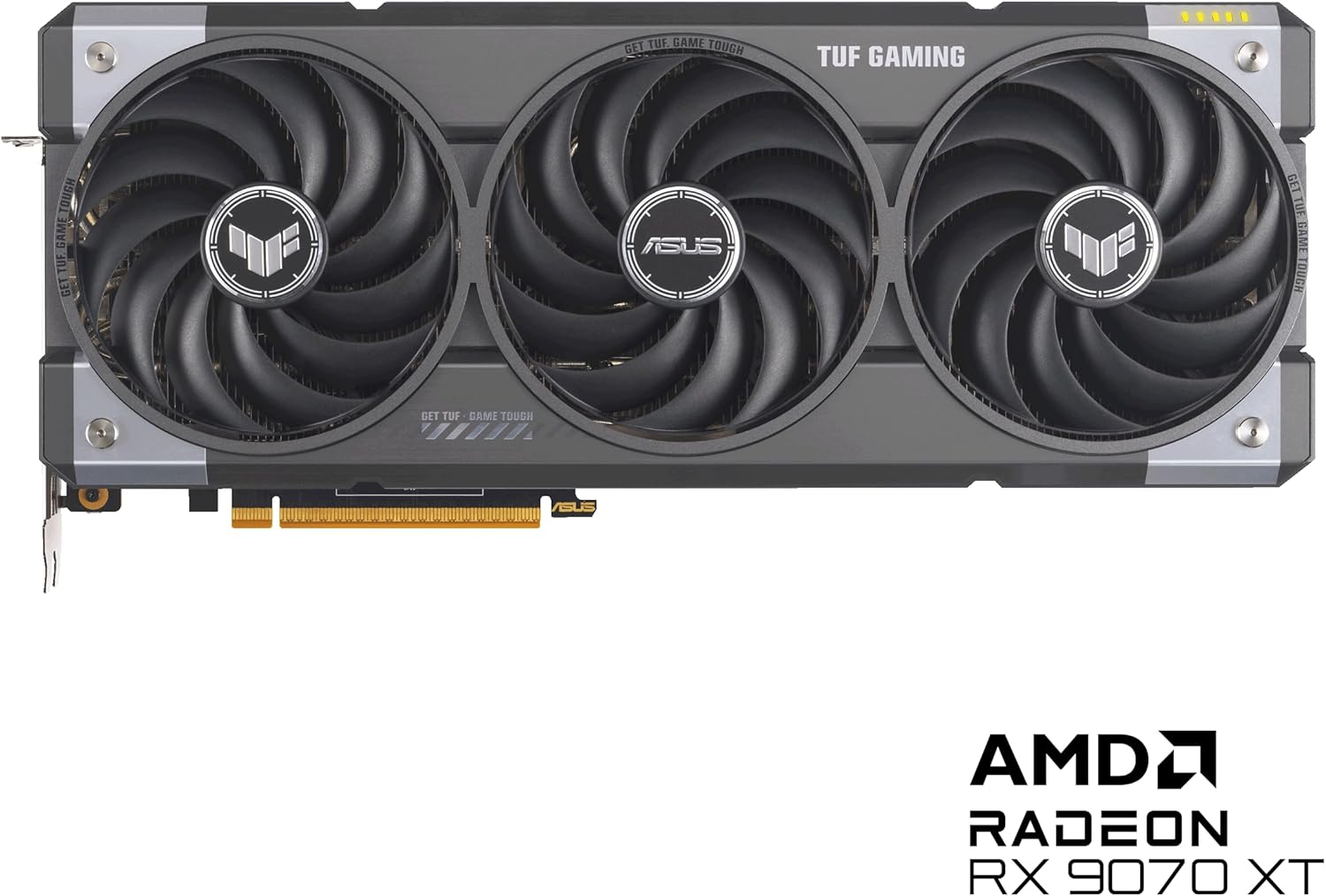
Image 3.3: Display output ports (HDMI and DisplayPort) on the graphics card.
4. Návod k obsluze
After physical installation, software setup is required to utilize your graphics card fully.
4.1 Instalace ovladače
- Zapnutí: Close your PC case, plug in all cables, and power on your computer.
- Počáteční spuštění: Your system may boot using generic display drivers.
- Stáhnout ovladače: Navštivte oficiální podporu ASUS webweb (www.asus.com/support/). Navigate to 'Graphics Cards', select your model (TUF-RX9070XT-O16G-GAMING), and download the latest AMD Radeon drivers for your operating system.
- Nainstalujte ovladače: Run the downloaded driver installer and follow the on-screen prompts. A system restart may be required.
4.2 Softwarové nástroje
Společnost ASUS nabízí software pro vylepšení vašich grafických karet:
- Vylepšení GPU III: This utility allows for monitoring, overclocking, and fine-tuning of your graphics card's performance, cooling, and power settings.
- AMD Adrenaline Software: Provides comprehensive control over your AMD Radeon graphics card, including game optimization, display settings, and advanced features like AMD FidelityFX Super Resolution and AMD HYPR-RX.

Image 4.1: Software integration for customization and enhanced functionality.
5. Údržba
Pravidelná údržba pomáhá zajistit optimální výkon a prodlužuje životnost grafické karty.
- Odstranění prachu: Pravidelně čistěte prach z ventilátorů a chladiče pomocí stlačeného vzduchu. Před čištěním se ujistěte, že je systém vypnutý a odpojený od sítě.
- Kontrola ventilátoru: Check the axial-tech fans for any obstructions or unusual noises. The dual ball bearings are designed for long-lasting, reliable operation.
- Aktualizace softwaru: Keep your graphics drivers and utility software (e.g., GPU Tweak III, AMD Adrenaline) updated to benefit from performance improvements and bug fixes.
- Ochrana životního prostředí: The protective PCB coating helps guard against moisture and dust, but avoid exposing the card to extreme conditions.
6. Řešení problémů
Pokud narazíte na problémy s grafickou kartou, postupujte podle následujících běžných kroků pro řešení problémů:
- Žádný výstup na displej:
- Ensure the monitor is connected to the graphics card, not the motherboard's integrated graphics.
- Verify all power cables are securely connected to the graphics card and PSU.
- Znovu vložte grafickou kartu do slotu PCIe.
- Vyzkoušejte s jiným kabelem displeje nebo monitorem.
- Problémy s ovladači:
- Perform a clean installation of the latest graphics drivers from the ASUS support webmísto.
- If issues persist, try an older, stable driver version.
- Přehřívání:
- Zajistěte dostatečné proudění vzduchu uvnitř skříně počítače.
- Clean dust from the graphics card's fans and heatsink.
- Monitor temperatures using GPU Tweak III or AMD Adrenaline software.
- Nestabilita/pády systému:
- Ensure your power supply unit meets the recommended wattage.
- Check for system memory (RAM) stability.
- Pokud je přetaktováno, vraťte se k výchozímu nastavení.
For further assistance, please contact ASUS customer support or visit their official support webmísto.
7. Specifikace
| Funkce | Specifikace |
|---|---|
| Číslo modelu | TUF-RX9070XT-O16G-GAMING |
| Grafický koprocesor | AMD RX9070 |
| Značka čipové sady | AMD |
| Velikost paměti RAM grafické karty | 16 GB GDDR6 |
| Rychlost paměti | 4000 MHz |
| Maximální rozlišení obrazovky | 7680x4320 pixelů |
| Video výstupní rozhraní | Native DisplayPort 2.1a x 3, Native HDMI 2.1b |
| Hmotnost položky | 5.66 libry |
| Rozměry balení | 16.85 x 9.06 x 5 palce |
| Barva | ČERNÝ |
8. Záruka a podpora
Your ASUS TUF Gaming Radeon RX 9070 XT OC Edition Graphics Card comes with a Certifikát spolehlivosti TUF, signifying its adherence to stringent quality standards.
For warranty information, technical support, driver downloads, and software updates, please visit the official ASUS support webmísto:
Please have your product model number (TUF-RX9070XT-O16G-GAMING) and serial number ready when contacting support.

Image 8.1: Included accessories, including the TUF Certificate of Reliability and Speedsetup Manual.


