1. Konec produktuview
The Aune X1s GT is an advanced Hi-Res Digital-to-Analog Converter (DAC) and headphone amplifier, designed to deliver high-fidelity audio performance. It features a precise PLL core, external clock support, and a fully-discrete balanced headphone amplifier, making it suitable for various audio setups including PC, mobile devices, and dedicated audio transports.

Obrázek 1: Přední strana view of the Aune X1s GT Hi-Res DAC.
Klíčové vlastnosti:
- High-Resolution Audio Decoding: Supports USB input up to 32 bit/768 kHz DSD512 and Coaxial input up to 24 bit/384 kHz DoP128.
- External Clock Support: Features PLL technology and a 10MHz external clock input for enhanced audio precision.
- Synchronizace hodin: Ensures low jitter and natural sound by feeding the digital and DAC parts with the same clock source.
- Výkonná sluchátka Ampživější: Utilizes a fully-discrete balanced headphone amplifier circuit with 4x24 BJTs and a ±9V power supply.
- Exceptional Specifications: Achieves THD+N as low as 0.00013% and a noise floor as low as 1.92 µV.
2. Průvodce nastavením
2.1 Vybalení a úvodní kontrola
Carefully remove the Aune X1s GT from its packaging. Verify that all components, including the Quick Start Guide, are present and that the device is free from any visible damage.
2.2 Připojení zařízení
The Aune X1s GT offers multiple input and output options. Refer to the diagram below for port identification.

Figure 2: Aune X1s GT front and rear panel connections.
- Připojení napájení: Connect the provided power adapter to the "Power In" port on the rear panel and then to a suitable power outlet.
Pozor: This device operates on 110V. Please check your local voltage before placing an order.
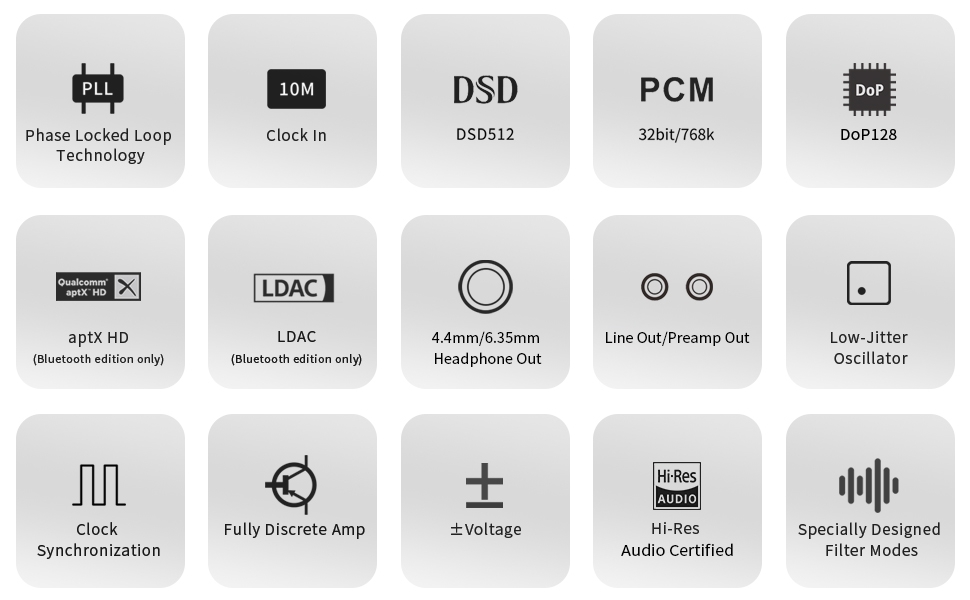
Figure 3: Important voltage compatibility notice.
- Vstupní připojení:
- Vstup USB: Connect your computer, smartphone (with OTG adapter), or digital player to the "USB" port using a compatible USB cable.
- Koaxiální vstup: Connect devices such as CD players or digital transports to the "COAX" port using a coaxial cable.
- Optický vstup: Connect devices to the "OPT" port using an optical cable.
- Vstup externích hodin: For advanced users, connect a 10MHz external clock (e.g., Aune XC1) to the "External Clock Input" port.

Figure 4: Multi-connectivity options for the Aune X1s GT.
- Výstupní připojení:
- Sluchátkový výstup: Connect your headphones to either the 6.35mm or 4.4mm balanced headphone jack on the front panel.
- RCA Preamp výstup: Připojte k externímu napájení ampreproduktory nebo aktivní reproduktory pomocí kabelů RCA.
- Linkový výstup RCA: Provides a fixed line-level output for connection to an integrated ampzvlhčovač nebo přijímač.
3. Návod k obsluze
3.1 Zapnutí/vypnutí
Locate the power switch on the rear panel. Flip the switch to the "On" position to power on the device. The indicator lights on the front panel will illuminate. Flip the switch to "Off" to power down.
3.2 Výběr vstupu
Press the "Input" button on the front panel to cycle through the available input sources: USB, OPT (Optical), COAX (Coaxial), and B/C (Bluetooth, if applicable to your model). The corresponding indicator light will show the active input.
3.3 Ovládání hlasitosti
Adjust the large rotary volume knob on the front panel to control the output level for headphones and the Preamp Output. The Line Output provides a fixed level and is not affected by the volume knob.
3.4 Filter Modes
The X1s GT features specially designed filter modes to optimize sound for different listening scenarios. These modes are distinct from standard ES9038 series default filters and are controlled by an internal algorithm:
- Režim 1: Obecné použití.
- Režim 2: Optimized for headphones.
- Režim 3: Pure mode for general use.
- Režim 4: Pure mode for headphones.
Refer to the Quick Start Guide or product interface for instructions on how to switch between these modes.

Figure 5: PLL Core and supported frequencies.
3.5 Přehrávání zvuku ve vysokém rozlišení
The X1s GT is capable of decoding high-resolution audio from various sources:
- Z počítače: Connect via USB. The X1s GT can support up to 32bit/768kHz DSD512, allowing playback of Hi-Res music files or content from online libraries like Apple Music HiFi.
- From Smartphone/Pad: Connect via USB (OTG cable may be required). This transforms your mobile device into a high-quality streaming media center.
- From Digital Transport/CD Player: Connect via Coaxial or Optical input. The X1s GT supports up to PCM 384kHz and DSD128 via Coaxial.
Video 1: Oficiální video s produktemasing the Aune X1s GT Hi-Res DAC features and design.
4. Údržba
4.1 Čištění
To maintain the appearance and functionality of your Aune X1s GT, regularly wipe the exterior with a soft, dry, lint-free cloth. Avoid using abrasive cleaners, solvents, or chemical sprays, as these can damage the finish or internal components.
4.2 Obecná péče
- Keep the device in a cool, dry place away from direct sunlight, heat sources, and excessive humidity.
- Zajistěte řádné větrání kolem jednotky, abyste zabránili přehřátí.
- Nepokládejte těžké předměty na horní část zařízení.
- Disconnect the power adapter during lightning storms or when the unit is left unused for extended periods.
5. Řešení problémů
If you encounter issues with your Aune X1s GT, please refer to the following common troubleshooting steps:
| Problém | Možná příčina | Řešení |
|---|---|---|
| Žádná síla | Napájecí kabel není připojen; Vypínač je vypnutý; Vadná zásuvka. | Ensure power cable is securely connected. Flip power switch to "On". Try a different power outlet. |
| Žádný zvukový výstup | Incorrect input selected; Volume too low; Output device not connected or faulty; Driver issues (for USB). | Verify correct input is selected. Increase volume. Check headphone/speaker connections. Reinstall USB drivers on your computer if necessary. |
| Zkreslený zvuk | Input signal too high; Faulty cables; Incorrect filter mode. | Reduce input volume from source. Replace cables. Try different filter modes. |
| Zařízení nebylo počítačem rozpoznáno | USB cable issue; Driver not installed or corrupted; USB port issue. | Try a different USB cable and USB port. Install or update the latest drivers from Aune's official webweb. Restartujte počítač. |
If the problem persists after attempting these solutions, please contact Aune customer support for further assistance.
6. Specifikace
| Funkce | Detail |
|---|---|
| Číslo modelu | X1sGT |
| Podpora USB vstupu | Up to 32 bit/768 kHz DSD512 |
| Coaxial Input Support | Up to 24 bit/384 kHz DoP128 |
| Sluchátkové výstupy | 4.4mm Balanced, 6.35mm Single-Ended |
| Analogové výstupy | RCA Preamp Out, RCA Line Out |
| External Clock Support | 10 MHz |
| THD+N | As low as 0.00013% |
| Hluková podlaha | As low as 1.92 µV |
| Napájení | ±9V (internal amplifier section) |
| Rozměry (balení) | 9.69 x 7.2 x 4.49 palce |
| Hmotnost (balení) | 4.21 libry |
| Země původu | Čína |
7. Záruka a podpora
Aune is committed to providing excellent customer service and product support.
7.1 Informace o záruce
All Aune products come with a 2letý poprodejní servis. This warranty covers manufacturing defects and ensures that your product functions as intended under normal use conditions.
7.2 Zákaznická podpora
Should you encounter any issues or have questions regarding your Aune X1s GT, please contact our customer support team. We have a dedicated after-sales system to address your concerns promptly and provide satisfactory solutions.
For support, please visit the official Aune webwebu nebo kontaktujte prodejce přímo prostřednictvím vaší nákupní platformy.
Poznámka: If you receive a product with traces of use, it may be due to logistics or warehousing. Please communicate with us to resolve the issue.


