1. Úvod
This manual provides essential instructions for the setup, operation, and maintenance of your TMY Projector. Please read this manual thoroughly before using the product to ensure proper functionality and to maximize your viewzkušenosti. Uschovejte tento návod pro budoucí použití.
2. Konec produktuview
2.1 Obsah balení
Ověřte, zda jsou v balení přítomny všechny položky:
- TMY Projector Unit
- Dálkové ovládání
- HDMI kabel
- Napájecí kabel
- Záruční list
2.2 Klíčové vlastnosti
- Oficiálně licencováno Netflixem: Access streaming services directly without external devices.
- Rozlišení 1080P: Delivers clear and detailed images.
- Electric Focus & Auto Keystone: Automatic image adjustment for optimal clarity and shape.
- Otočný stojan o 270°: Flexible projection angles, including ceiling projection.
- Upgraded WiFi 6 Connectivity: Zajišťuje stabilní a rychlé bezdrátové streamování.
- Dual-Mode Bluetooth 5.2: Connects to external speakers or functions as a standalone Bluetooth speaker.
- Více možností připojení: HDMI, USB, Phone/PC mirroring.
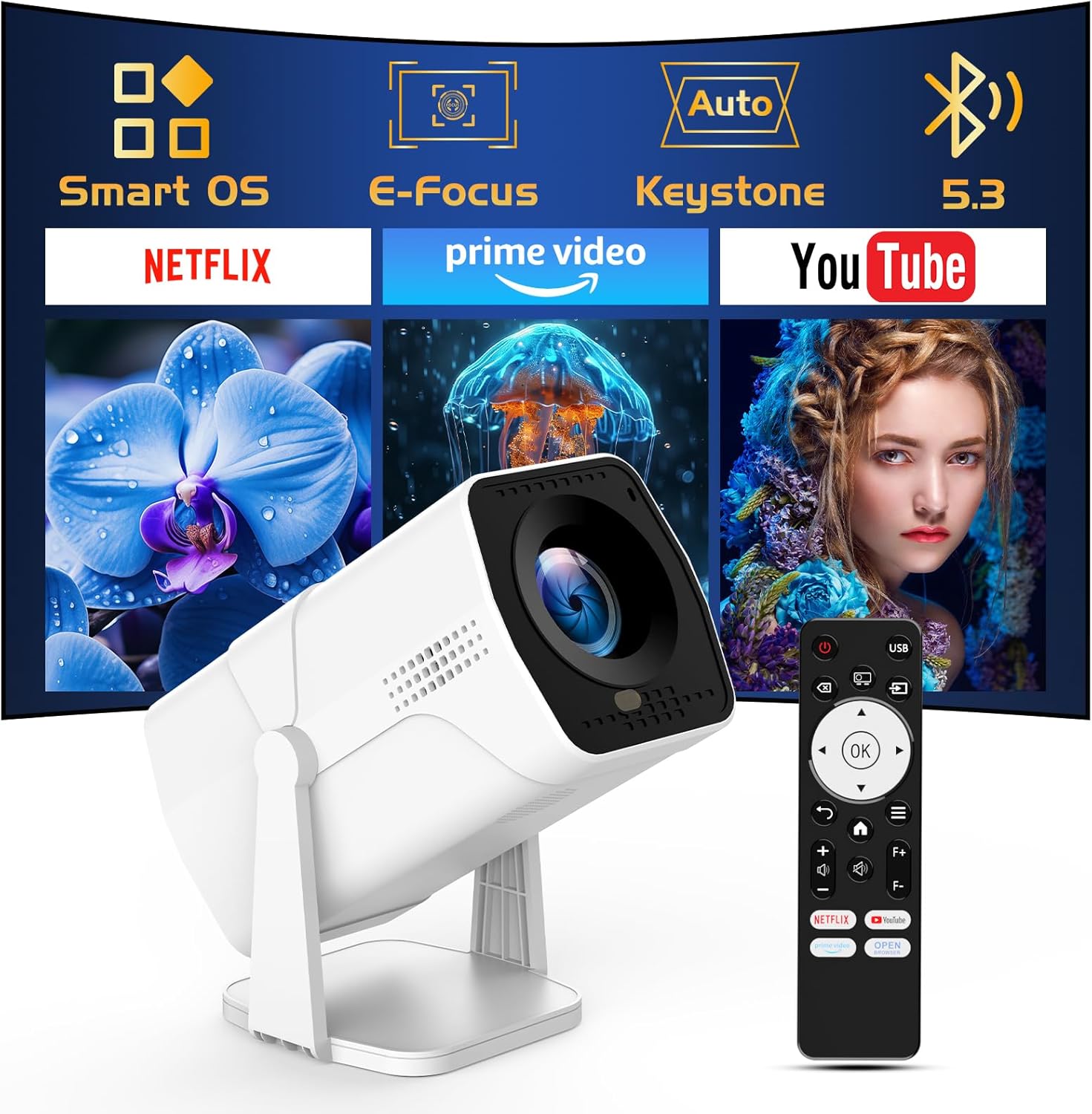
Image: The TMY Projector unit, its remote control, and a projected screen displaying logos for Smart OS, E-Focus, Auto Keystone, Bluetooth 5.3, Netflix, Prime Video, and YouTube.
3. Nastavení
3.1 Umístění
Position the projector on a stable, flat surface. The 270° rotatable stand allows for versatile placement, including projecting onto walls or ceilings. Ensure adequate ventilation around the projector.

Image: A TMY Projector positioned on a bedside table, projecting an image onto the ceiling, demonstrating its 270° rotatable stand for multi-angle viewIng.
3.2 Připojení napájení
- Připojte napájecí kabel ke vstupnímu portu projektoru.
- Zapojte druhý konec napájecího kabelu do standardní elektrické zásuvky.
3.3 Počáteční zapnutí a nastavení zaostření
- Stisknutím tlačítka napájení na projektoru nebo na dálkovém ovladači zapněte zařízení.
- Vlastnosti projektoru Elektrické ostření a Auto Keystone correction. The image will automatically adjust for clarity and a rectangular shape within approximately 2 seconds.
- If further adjustment is needed, use the remote control to fine-tune the focus.

Image: A TMY Projector projecting a vibrant image onto a screen, with an overlay illustrating the 'FOCUS' function and icons for Auto Keystone and 50%-100% Zoom.
3.4 Síťové připojení (WiFi)
The projector supports WiFi 6 for a fast and stable internet connection.
- Navigate to the 'Settings' menu using the remote control.
- Vyberte „Síť“ nebo „Nastavení Wi-Fi“.
- Choose your desired WiFi network from the list and enter the password.
- Potvrďte připojení.

Image: A TMY Projector wirelessly connected to a tablet, smartphone, and laptop, illustrating its WiFi 6 connectivity for faster streaming with no lagging.
3.5 Připojení Bluetooth
The projector features Dual-Mode Bluetooth 5.2 for audio connectivity.
- Projector Mode (Output): To connect to external Bluetooth speakers or soundbars: Navigate to 'Bluetooth Settings', enable Bluetooth, and pair with your audio device.
- Speaker Mode (Input): To use the projector's built-in speakers as a standalone Bluetooth speaker: Select 'Speaker Mode' in the Bluetooth settings. Your phone or other device can then connect to the projector to play audio.

Image: A TMY Projector illustrating its two-way Bluetooth 5.2 functionality, showing connections to a soundbar (Projector Mode) and a smartphone (Speaker Mode).
4. Provoz
4.1 Navigating the Smart OS
The projector runs on a smart TV operating system. Use the provided remote control to navigate menus, select applications, and control playback.

Image: The TMY Projector unit with a projected screen showing a grid of built-in smart OS applications, including Netflix, YouTube, Prime Video, TikTok, and others.
4.2 Accessing Built-in Apps
The projector comes with pre-installed and officially licensed applications such as Netflix, Prime Video, and YouTube. Access these directly from the home screen or through the 'App Store' for additional content.

Image: A TMY Projector projecting a screen filled with content from officially licensed apps like Netflix, Prime Video, and YouTube, with the remote control in the foreground.
4.3 Připojení externích zařízení
Projektor nabízí několik portů pro připojení externích zařízení:
- HDMI: Connect TV sticks, TV boxes, PCs/Laptops, or gaming consoles (e.g., PS).
- USB: Přehrát média files directly from USB drives or connect other USB accessories.
- Phone/PC Mirroring: Wirelessly mirror content from your smartphone or PC (refer to the on-screen instructions for specific mirroring protocols).
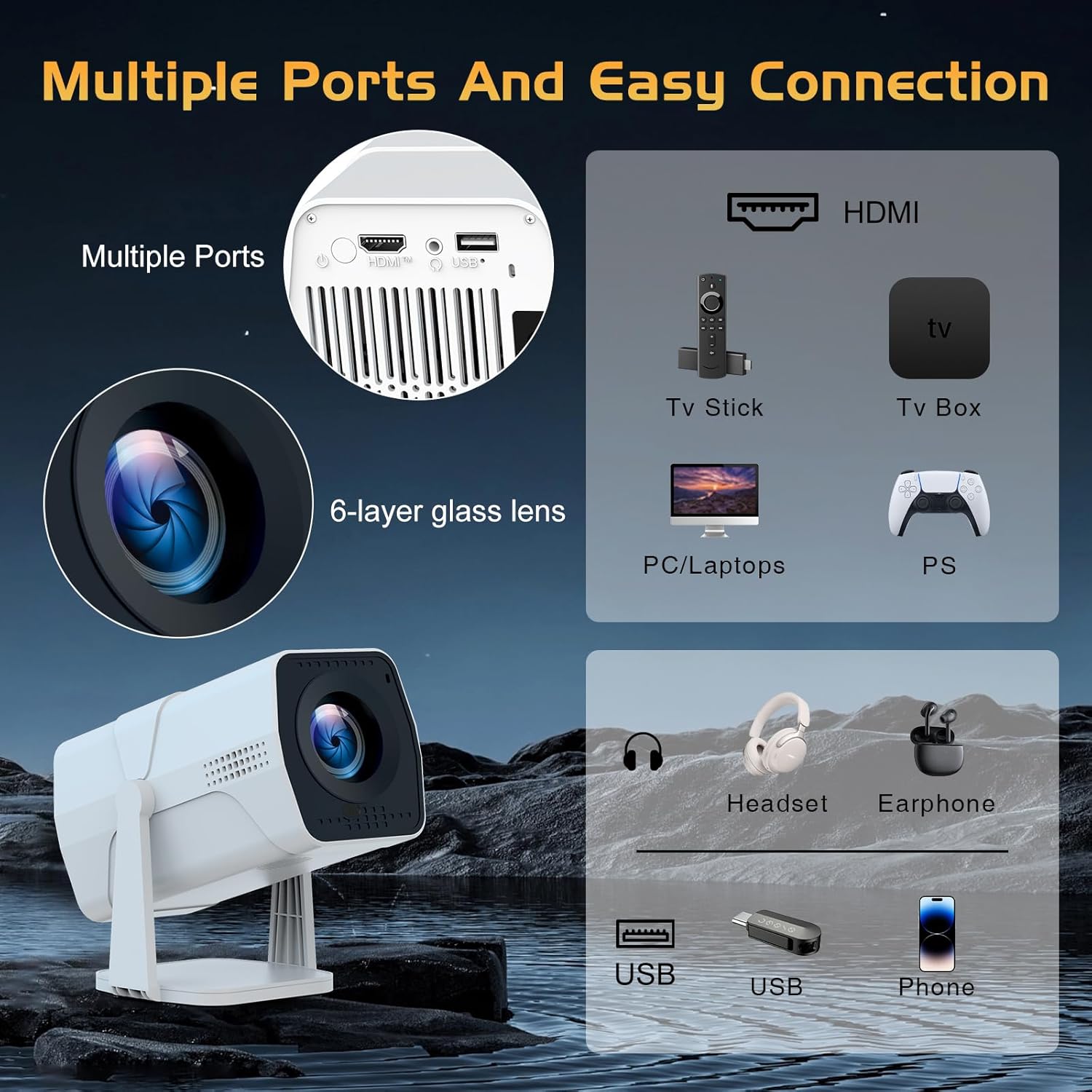
Image: A detailed diagram showing the multiple ports on the TMY Projector (HDMI, USB) and various connection possibilities, including TV sticks, PCs, gaming consoles, headsets, and phones.
4.4 Screen Zoom Function
The projector includes a 50%-100% zoom function, allowing you to adjust the screen size without moving the projector. This feature can be accessed via the remote control or settings menu.
5. Údržba
To ensure the longevity and optimal performance of your TMY Projector, follow these maintenance guidelines:
- Čištění objektivu: Používejte měkký hadřík bez žmolků, speciálně určený pro optické čočky. Vyhněte se abrazivním materiálům nebo agresivním chemikáliím.
- Čištění exteriéru: Vnější povrch projektoru otřete měkkým, suchým hadříkem. Nepoužívejte tekuté čisticí prostředky přímo na zařízení.
- Větrání: Ujistěte se, že ventilační otvory nejsou zablokovány, aby nedošlo k přehřátí.
- Skladování: When not in use for extended periods, store the projector in a cool, dry place, away from direct sunlight and dust.
6. Řešení problémů
If you encounter issues with your TMY Projector, refer to the following common problems and solutions:
- Bez napájení:
- Ujistěte se, že je napájecí kabel bezpečně připojen k projektoru i k funkční elektrické zásuvce.
- Zkontrolujte, zda je elektrická zásuvka funkční.
- Žádný obraz / Rozmazaný obraz:
- Verify the projector is powered on and the lens cap is removed.
- Allow the automatic focus and keystone correction to complete. If still blurry, manually adjust focus using the remote.
- Ensure the projection surface is suitable and the projector is within the recommended distance.
- If using an external source (HDMI), ensure the correct input source is selected.
- Žádný zvuk:
- Zkontrolujte úroveň hlasitosti na projektoru a všech připojených externích zvukových zařízeních.
- Pokud používáte reproduktory Bluetooth, ujistěte se, že jsou správně spárované a připojené.
- If using internal speakers, ensure external Bluetooth output is not selected.
- Dálkové ovládání nereaguje:
- Ujistěte se, že jsou baterie správně vloženy a nejsou vybité.
- Namiřte dálkový ovladač přímo na infračervený přijímač projektoru.
- Problémy s WiFi připojením:
- Ensure your WiFi network is active and within range.
- Zkontrolujte znovu heslo k Wi-Fi.
- Restartujte projektor a WiFi router.
- If the connection times out, try moving the projector closer to the router or reducing interference.
7. Specifikace
| Funkce | Specifikace |
|---|---|
| Značka | TMY |
| Model | B0DRFF5KMF |
| Hmotnost položky | 2.79 libry |
| Rozměry produktu | 5.35 x 4.84 x 7.09 palce |
| Barva | Bílý |
| Speciální funkce | Speakers, Electric Focus, Auto Keystone, 270° Rotatable Stand |
| Technologie připojení | HDMI, USB, WiFi 6, Bluetooth 5.2 |
| Rozlišení displeje | 1920 x 1080 (1080P Full HD) |
| Doporučená použití | Krytý |

Image: A visual comparison showing the TMY Projector's 1080P Full HD image quality, emphasizing that it is recommended for use in dark environments for optimal viewing, contrasted with daytime or light-on conditions.
8. Záruka a podpora
TMY is committed to providing excellent customer service and product support.
- Záruka: Na tento produkt se vztahuje 3letá záruka.
- Zásady vrácení: Enjoy a 30-day return period.
- Technická podpora: Lifetime after-sale service and technical support are available.
- Doba odezvy: Expect a quick reply within 24 hours for support inquiries.
Pro další pomoc navštivte prosím oficiální stránky Obchod TMY na Amazonu or contact customer support through the provided channels in your warranty card.