Zavedení
The TECKNET TK-KB030 Wireless Ergonomic Keyboard is designed to provide a comfortable and efficient typing experience. Featuring a split layout, curved key arrangement, and an integrated wrist rest, this keyboard aims to reduce strain during extended use. It offers versatile connectivity options including 2.4GHz wireless and Bluetooth 5.0, allowing connection to multiple devices.
Obsah balení
Po vybalení zkontrolujte obsah balení:
- TECKNET Wireless Ergonomic Keyboard (TK-KB030)
- USB-A Receiver (for 2.4GHz connection)
- Nabíjecí kabel USB-C
- Uživatelská příručka
Vlastnosti produktu
Ergonomic Key Layout
The keyboard features a split layout and a curved key arrangement designed to align with the natural arc of your fingers. This design promotes a neutral wrist posture and allows your hands to rest at shoulder-width distance, reducing lateral stretching and typing strain.
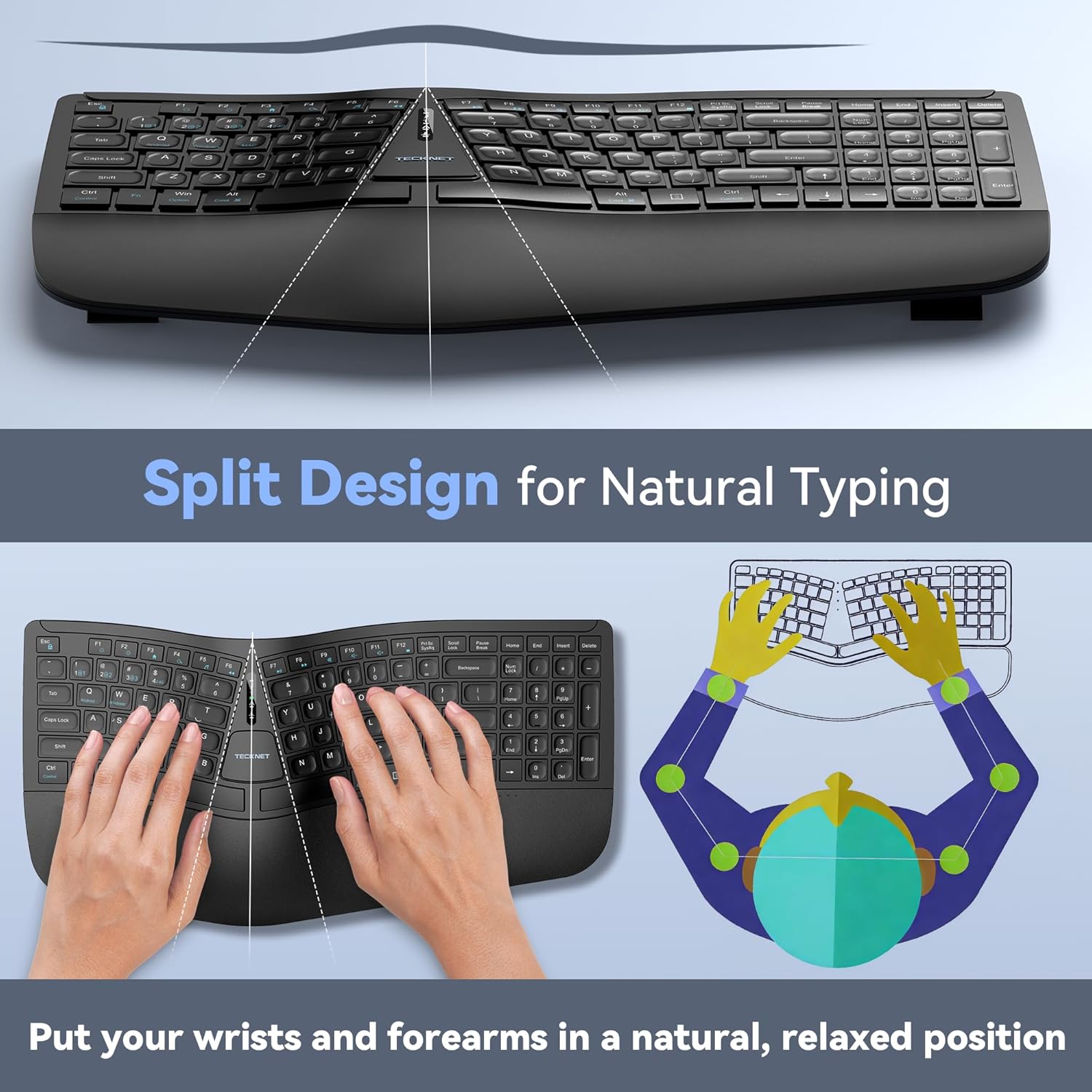
Image: The keyboard's split design, illustrating how it allows for natural hand and wrist positioning to reduce strain.
Integrated High-Density Memory Foam Wrist Rest
A built-in dual-density wrist rest provides support and comfort. The bottom layer offers stable support, while the top layer of slow-rebound memory foam conforms to your hands, distributing pressure evenly.
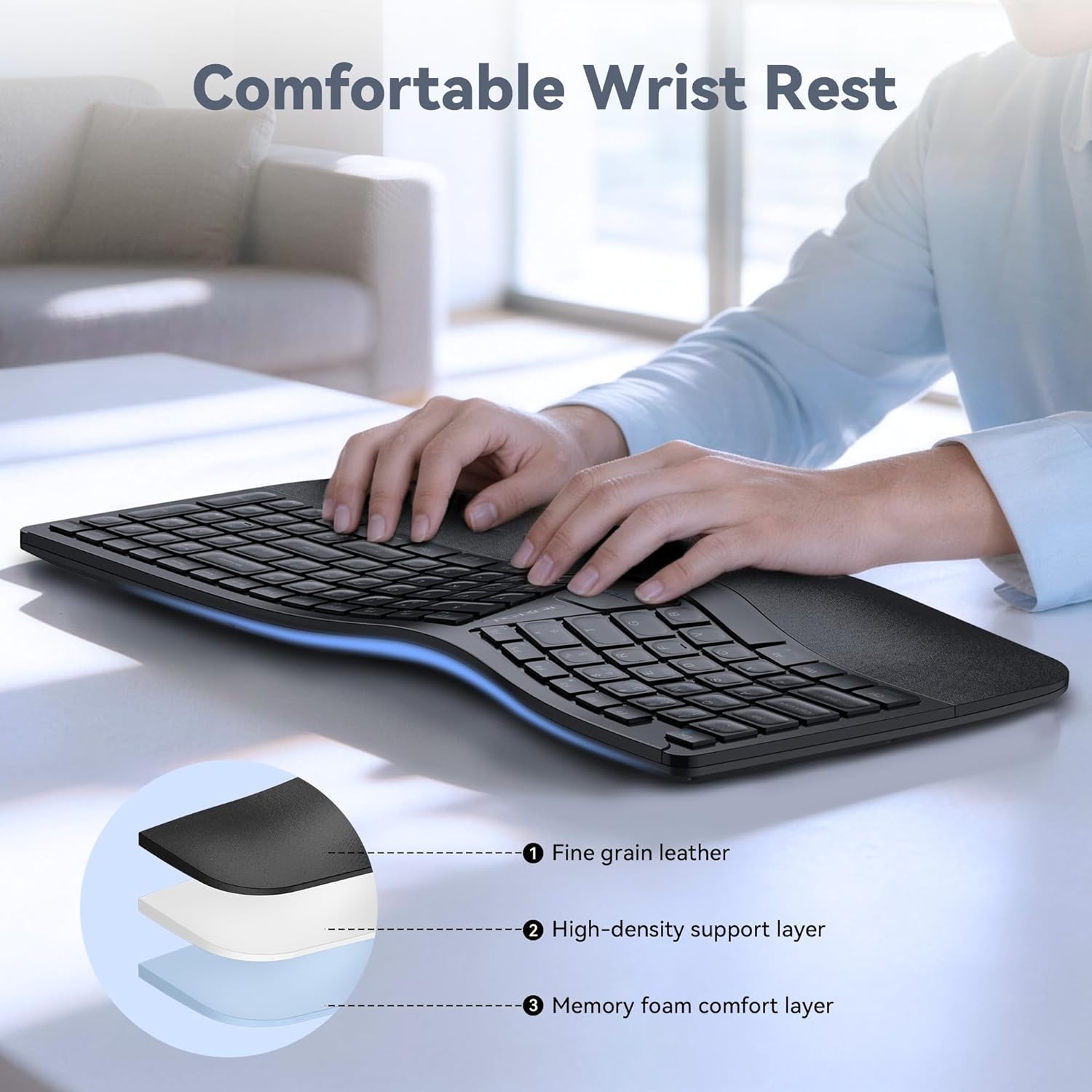
Image: Diagram showing the layers of the integrated wrist rest: fine grain leather, high-density support layer, and memory foam comfort layer.
Bluetooth + 2.4GHz Wireless Connectivity
The keyboard supports Bluetooth 5.0 with pairing memory for up to 3 devices and includes a USB wireless dongle for 2.4GHz connectivity. This allows connection to up to 4 devices (1 via 2.4GHz, 3 via Bluetooth) and seamless switching between them.
Dlouhá výdrž baterie a rychlé nabíjení
Equipped with a 500mAh rechargeable lithium battery, the keyboard fully charges in approximately 4 hours and provides up to 200 hours of continuous use. The USB-C port supports simultaneous charging and use.
Víceúhlové nastavení
The keyboard base features 4-stage adjustable feet, offering tilt options of 0°, 1.2°, 3°, and 6.2° to accommodate various working scenarios and personal preferences.
Nastavení
Bezdrátové připojení 2.4 GHz
- Locate the USB-A receiver, typically stored in a compartment on the keyboard.
- Zapojte přijímač USB-A do volného portu USB v počítači.
- Turn on the keyboard using the power switch (usually located on the back or side).
- The keyboard should automatically connect to your device. The 2.4G indicator light may illuminate briefly.
Bluetooth Connection (BT1, BT2, BT3)
- Zapněte klávesnici.
- Stiskněte a podržte BT1, BT2nebo BT3 key for 3-5 seconds until the corresponding Bluetooth indicator light flashes rapidly. This indicates the keyboard is in pairing mode.
- Na svém zařízení (počítači, tabletu, chytrém telefonu) přejděte do nastavení Bluetooth a vyhledejte nová zařízení.
- Select "TECKNET Keyboard" or a similar name from the list of available devices.
- Follow any on-screen prompts to complete the pairing process. The indicator light will stop flashing and remain solid for a few seconds upon successful connection.
- Repeat these steps for BT2 and BT3 to pair with additional devices.

Image: The keyboard connected to multiple devices (PC via 2.4G, tablet via BT1, laptop via BT2, smartphone via BT3), demonstrating its versatile connectivity.
Návod k obsluze
Přepínání mezi připojenými zařízeními
To switch between connected devices, simply press the corresponding connectivity key: 2.4G, BT1, BT2nebo BT3. The keyboard will switch to the selected device within a few seconds.
Nabíjení klávesnice
When the battery is low, the battery indicator light will flash. Connect the supplied USB-C charging cable to the keyboard's USB-C port and the other end to a USB power source (e.g., computer USB port, wall adapter). The indicator light will show charging status and turn off when fully charged.
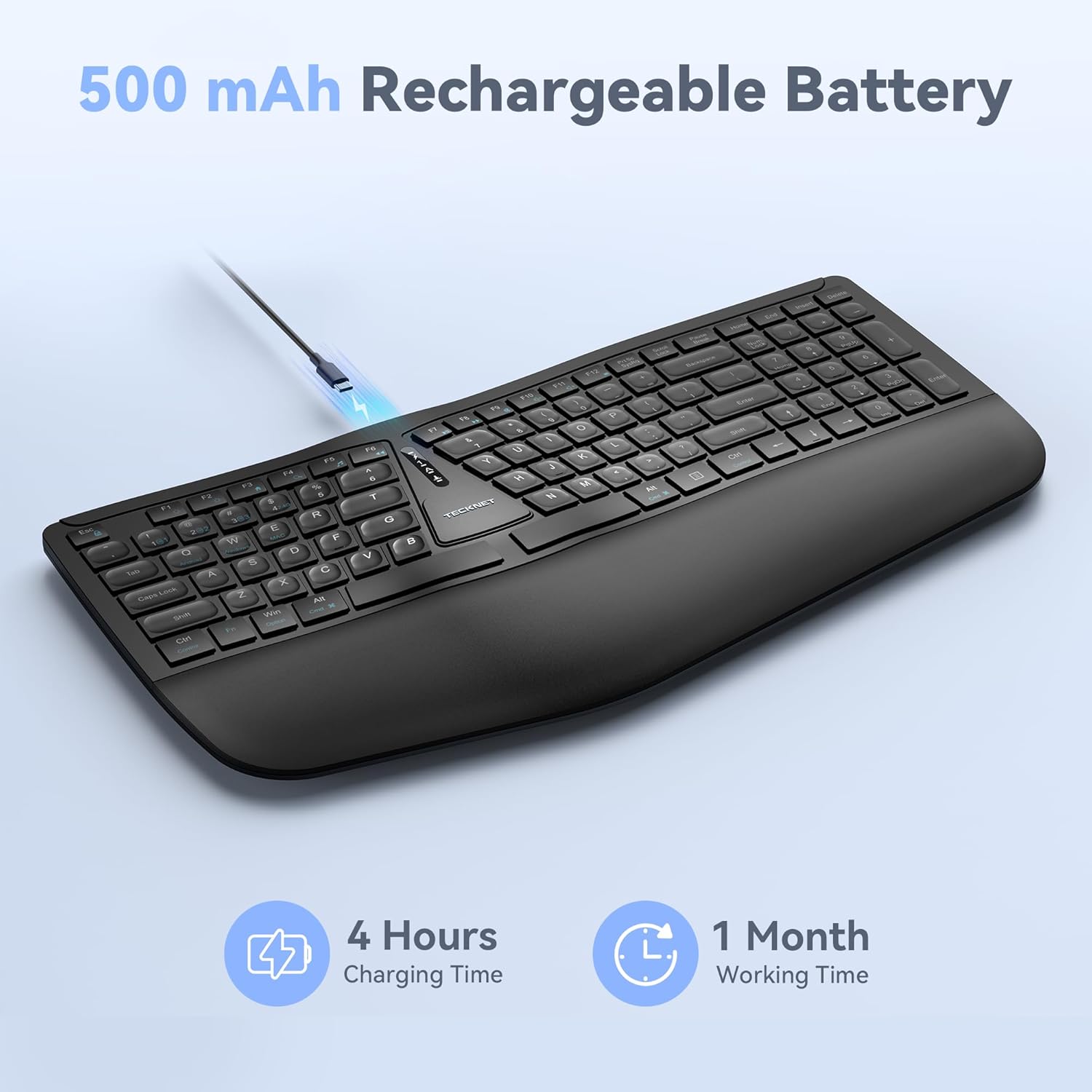
Image: The keyboard connected via a USB-C cable for charging, with an icon indicating 4 hours charging time for 1 month working time.
Nastavení sklonu klávesnice
The keyboard features adjustable feet on the underside. You can adjust the tilt to one of four positions: 0° (flat), 1.2° (backward tilt), 3° (rear stand open), or 6.2° (front tripod open). Experiment with different angles to find the most comfortable typing position for your setup.
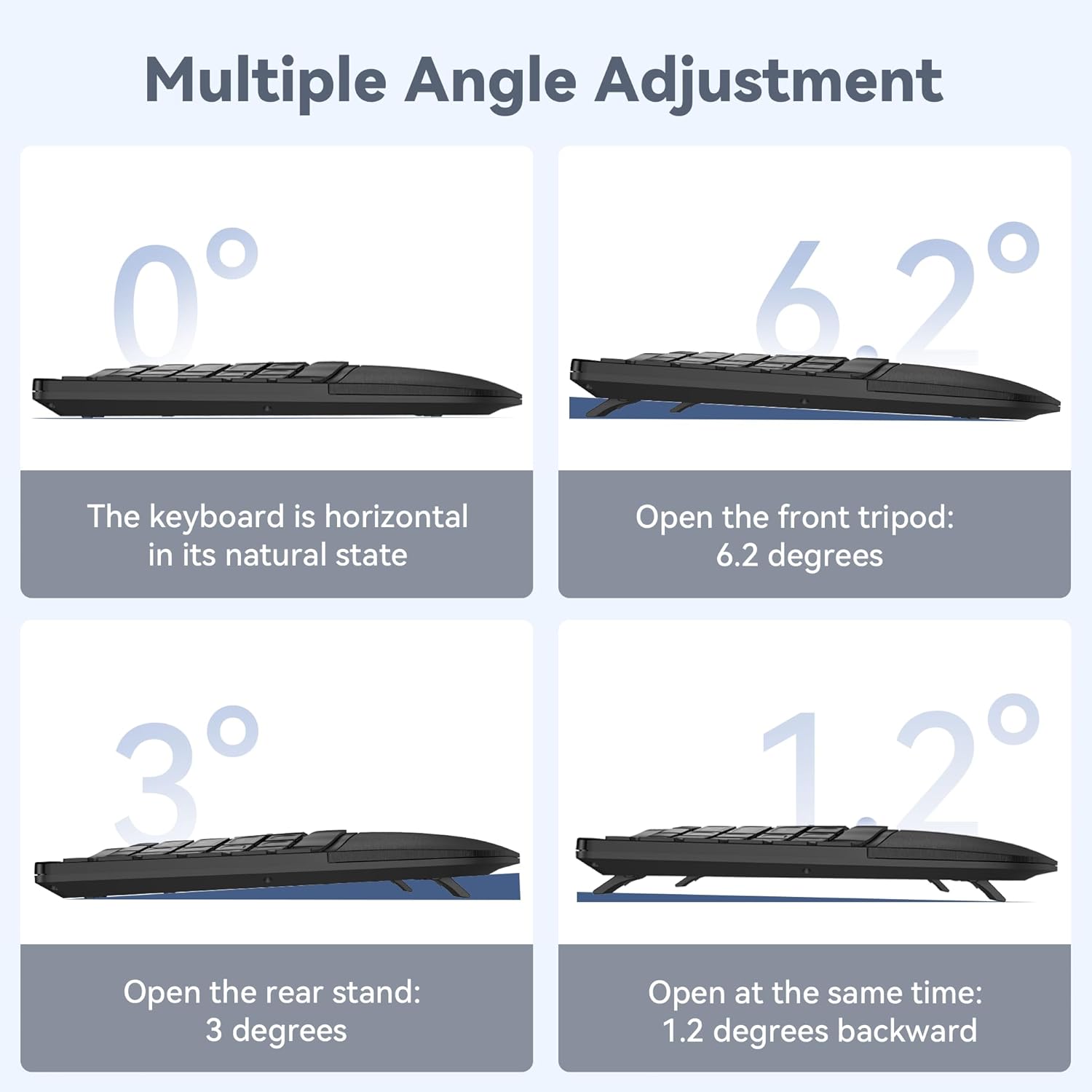
Image: Four diagrams illustrating the different tilt angles (0°, 1.2°, 3°, 6.2°) achievable with the keyboard's adjustable feet.
Údržba
- Čištění: Použijte měkký, damp cloth to clean the keyboard surface. Avoid harsh chemicals or abrasive materials.
- Skladování: Klávesnici skladujte na suchém a chladném místě mimo dosah přímého slunečního záření a extrémních teplot.
- Péče o baterie: To prolong battery life, avoid fully discharging the keyboard frequently. Charge it when the low battery indicator appears.
Odstraňování problémů
Klávesnice se nepřipojuje
- Ujistěte se, že je klávesnice zapnutá a plně nabitá.
- For 2.4GHz connection, verify the USB receiver is securely plugged into your device. Try a different USB port.
- For Bluetooth connection, ensure Bluetooth is enabled on your device and the keyboard is in pairing mode (flashing BT indicator). Remove previous pairings on your device and try pairing again.
- Zkuste restartovat počítač nebo zařízení.
Klávesy nereagují
- Zkontrolujte úroveň nabití baterie a v případě potřeby klávesnici nabijte.
- Ensure the keyboard is connected to the correct device (check the 2.4G/BT indicator).
- If specific keys are not working, gently clean around the keycaps to remove any debris.
Zpoždění nebo přerušované připojení
- Přesuňte klávesnici blíže k zařízení, abyste snížili rušení.
- Avoid placing the keyboard near other wireless devices (e.g., Wi-Fi routers, cordless phones) that might cause interference.
- Ujistěte se, že ovladače vašeho zařízení jsou aktuální.
Specifikace
| Číslo modelu | TK-KB030 |
| Technologie připojení | Bezdrátové připojení 2.4 GHz, Bluetooth 5.0 |
| Kapacita baterie | Lithiová baterie 500mAh |
| Doba nabíjení | Přibl. 4 hodin |
| Doba nepřetržitého používání | Až 200 hodin |
| Rozměry klávesnice (D x Š x V) | 43.3 cm x 22.6 cm x 3 cm (17 palce x 8.9 palce x 1.2 palce) |
| Hmotnost položky | 790 g (1.7 lb) |
| Kompatibilní zařízení | PC, Laptop, Tablet, Smartphone (Windows compatible) |
| Materiál | Plast |

Image: Keyboard dimensions (length, width, height) and a hand size guide (S, M, L) with recommended keyboard size for M-L hands.
Záruka a podpora
The TECKNET Wireless Ergonomic Keyboard TK-KB030 comes with a 36měsíční záruka bez starostí. This warranty covers any issues encountered during normal use of the product.
For technical assistance, troubleshooting, or warranty claims, please contact TECKNET customer service. Refer to the contact information provided on the product packaging or the official TECKNET webstránky pro podrobnosti o podpoře.


