1. Úvod
Welcome to the user manual for your new XIAOMI Poco X7 Pro 5G smartphone. This guide provides essential information on setting up, operating, maintaining, and troubleshooting your device. Please read this manual thoroughly to ensure optimal performance and longevity of your smartphone.
The Poco X7 Pro is a high-performance 5G smartphone featuring the MediaTek Dimensity 8400-Ultra chipset, built with a 4nm process technology and ARM Cortex-A725 CPU architecture. It is designed for speed and efficiency.
2. Obsah balení
Upon unboxing your Poco X7 Pro, please verify that the following items are included:
- Chytrý telefon XIAOMI Poco X7 Pro 5G
- Protective film (pre-applied or in box)
Note: Other accessories such as a power adapter, charging cable, or SIM ejector tool may be sold separately and are not always included in the standard package. Please check the product packaging for a complete list of included items.
3. Zařízení skončiloview
Seznamte se s fyzickými součástmi vašeho Poco X7 Pro 5G.

Obrázek 3.1: Přední strana view of the Poco X7 Pro 5G smartphone, highlighting its storage capacity.
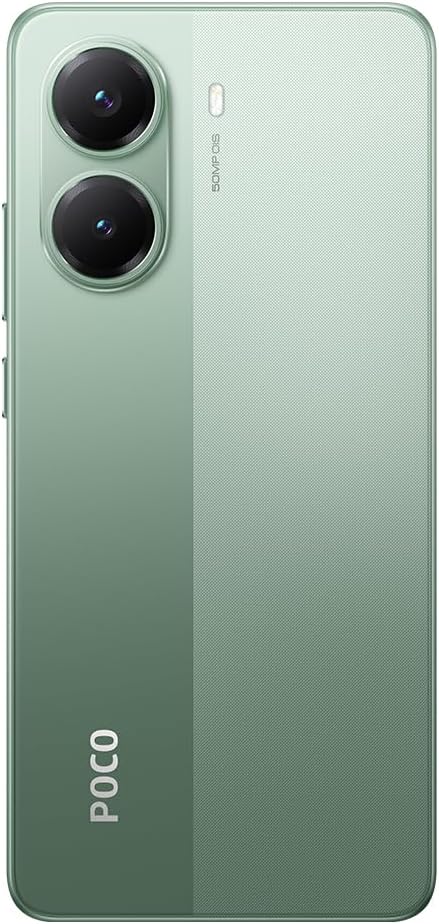
Obrázek 3.2: Zadní view of the Poco X7 Pro 5G, showcasing the camera setup and design.
3.1. Fyzikální komponenty
- Zobrazit: 6.67-inch AMOLED screen with 2712x1220 resolution and 120Hz refresh rate. Protected by Gorilla Glass 7i.
- Zadní kamera: 50 MP main camera with OIS (Optical Image Stabilization) and f/1.5 aperture, utilizing a Sony IMX882 sensor. Supports 4K video recording at 60fps with dual OIS and EIS stabilization.
- Přední kamera: (Specific MP not detailed in features, but typically located at the top center of the display).
- tlačítka: Power button and volume rockers typically located on the side.
- Porty: Port USB-C pro nabíjení a přenos dat.
- Zásuvka na SIM kartu: Slot for inserting SIM cards.
4. Počáteční nastavení
4.1. Vložení SIM karty
- Vyhledejte držák SIM karty na boku zařízení.
- Insert the SIM ejector tool (if available, otherwise a thin pin) into the small hole next to the tray to open it.
- Vložte kartu (karty) Nano-SIM do slotu zlatými kontakty dolů.
- Opatrně zatlačte zásobník zpět do slotu, dokud nebude v jedné rovině se zařízením.
4.2. Zapnutí zařízení
- Press and hold the Power button (usually on the right side) until the XIAOMI logo appears on the screen.
- Postupujte podle pokynů na obrazovce a dokončete počáteční nastavení, včetně výběru jazyka, připojení k Wi-Fi a přihlášení k účtu Google.
4.3. Nabíjení baterie
Your device comes with a 6,000 mAh battery. For optimal performance, fully charge the device before first use.

Figure 4.1: Illustration of the 6000 mAh battery and 90W HyperCharge capability, allowing a full charge in approximately 42 minutes.
- Connect a compatible USB-C charging cable to the device's charging port.
- Connect the other end of the cable to a compatible power adapter (sold separately) and plug it into a power outlet.
- The device supports 90W fast wired charging, capable of charging from 0% to 100% in approximately 42 minutes.
5. Základní obsluha
5.1. Gesta na dotykové obrazovce
- Klepněte na: Vyberte položku nebo aktivujte funkci.
- Dotkněte se a podržte: Přístup k kontextovým nabídkám nebo přesun položek.
- Výpad: Procházení obrazovek nebo seznamů.
- Štípání: Přiblížení nebo oddálení obrázků a web stránky.
5.2. Funkce fotoaparátu
Your Poco X7 Pro features an advanced camera system.

Figure 5.1: Detail of the 50 MP main camera with OIS and the 20 MP front camera.
- Zadní kamera: The 50 MP main camera with OIS (Optical Image Stabilization) and f/1.5 aperture uses Sony's IMX882 sensor. It supports 4K video recording at 60fps with dual OIS and EIS stabilization for clear and steady footage.
- Přední kamera: Capture high-quality selfies and video calls.
- Režimy fotoaparátu: Explore various modes such as Portrait, Night, Pro, and Panorama for diverse photographic experiences.
5.3. Funkce displeje
The device's display offers exceptional visual quality.

Figure 5.2: Key display specifications including brightness, refresh rate, and resolution.
- Jas: Advertised to reach up to 3,200 nits of peak brightness for excellent visibility even in bright conditions.
- Obnovovací frekvence: Features a 120Hz refresh rate for smooth scrolling and fluid animations.
- Dotkněte se Sampsazba ling: Offers a 2,560 Hz touch sampling rate for highly responsive touch input.
- Rezoluce: 2712 x 1220 pixels, providing sharp and detailed visuals.
6. Údržba
6.1. Čištění zařízení
- K jemnému otření obrazovky a těla telefonu použijte měkký hadřík, který nepouští vlákna.
- Nepoužívejte agresivní chemikálie, abrazivní čisticí prostředky ani stlačený vzduch.
- The Poco X7 Pro has an IP68 dust and water resistance rating, meaning it can withstand immersion in up to 1.5 meters of fresh water for up to 30 minutes. However, it is not recommended for use in water and water damage is not covered under warranty.
6.2. Aktualizace softwaru
Regularly check for and install software updates to ensure your device has the latest features, security patches, and performance improvements. Your device runs on Android 15.
- Přejít na Nastavení > O telefonu > Verze MIUI (or similar) to check for updates.
- Před zahájením aktualizace se ujistěte, že je zařízení připojeno k Wi-Fi a má dostatečně nabitou baterii.
7. Řešení problémů
Pokud se se zařízením setkáte s problémy, vyzkoušejte následující běžná řešení:
- Zařízení se nezapne: Ujistěte se, že je baterie nabitá. Připojte zařízení k nabíječce alespoň na 15 minut a poté jej zkuste znovu zapnout.
- Aplikace padá nebo zamrzá: Close the problematic app and reopen it. If the issue persists, restart your phone. You can also clear the app's cache or reinstall it.
- Špatné síťové připojení: Check if your SIM card is properly inserted. Try toggling Airplane Mode on and off. If the issue persists, contact your network provider.
- Rychlé vybíjení baterie: Reduce screen brightness, disable unnecessary background apps, and turn off features like Bluetooth or GPS when not in use. Check battery usage in settings to identify power-hungry apps.
- Dotyková obrazovka nereaguje: Restart your device. If the screen remains unresponsive, a factory reset might be necessary (back up your data first).
V případě složitějších problémů se obraťte na oficiální podporu XIAOMI. webnebo kontaktujte zákaznický servis.
8. Technické specifikace
Detailed specifications for the XIAOMI Poco X7 Pro 5G:
| Funkce | Specifikace |
|---|---|
| Značka | XIAOMI |
| Název modelu | POCO X7 PRO |
| Operační systém | Android 15 |
| Typ procesoru | Snapdragon (MediaTek Dimensity 8400-Ultra) |
| Rychlost procesoru | 3.25 GHz |
| Velikost RAM | 8 GB |
| Kapacita úložiště | 256 GB |
| Velikost obrazovky | 6.67 palce |
| Typ zobrazení | AMOLED |
| Rezoluce | 2712 x 1220 |
| Obnovovací frekvence | 120 Hz |
| Kapacita baterie | 6000 mAh (lithium-iontová) |
| Nabíjení | 90W Fast Wired Charging |
| Zadní kamera | 50 MP with OIS, f/1.5 aperture, Sony IMX882 sensor |
| Rozlišení videa | 4K at 60fps (with dual OIS and EIS stabilization) |
| Konektivita | 5G, Bluetooth, NFC, USB, Wi-Fi |
| Odolnost vůči vodě/prachu | IP68 |
| Hmotnost | 400 g |
| Rok Model | 2025 |
9. Bezpečnostní informace
Dodržujte prosím následující bezpečnostní opatření, abyste předešli zranění nebo poškození zařízení:
- Nevystavujte zařízení extrémním teplotám, přímému slunečnímu záření ani otevřenému ohni.
- Zabraňte pádu zařízení na zem nebo jeho vystavení silným nárazům.
- Používejte pouze schválené nabíječky a příslušenství.
- Nepokoušejte se zařízení rozebírat ani opravovat sami. Obraťte se na autorizovaný servisní personál.
- Uchovávejte zařízení mimo dosah zdravotnických prostředků, mohlo by dojít k jejich narušení.
- Zařízení a jeho baterii zlikvidujte zodpovědně v souladu s místními předpisy.
10. Záruka a podpora
Your XIAOMI Poco X7 Pro 5G is covered by a limited warranty. For specific warranty terms and conditions, please refer to the warranty card included with your product or visit the official XIAOMI webmísto.
For technical support, service, or further assistance, please contact XIAOMI customer service or visit their official support channels. You can find contact information on the XIAOMI webmísto.


