Zavedení
Thank you for choosing the Zwide SA11 Tablet PC. This device is designed to offer a versatile computing experience, combining the portability of a tablet with the functionality of a laptop. Featuring an N150 processor, 12GB RAM, and 512GB SSD, it is equipped for various tasks from office work to entertainment.
This manual provides essential information on setting up, operating, maintaining, and troubleshooting your Zwide SA11 Tablet PC to ensure optimal performance and longevity.

Figure 1: Zwide SA11 Tablet PC showcasing its key specifications on the screen.
Nastavení
1. Počáteční nabíjení a zapnutí
Before first use, ensure the tablet is fully charged. Connect the provided power adapter to the USB-C charging port (USB-C2.0) on the device and to a power outlet. The charging indicator light will illuminate.
To power on the tablet, press and hold the power button located on the side until the Zwide logo appears on the screen.
2. Počáteční nastavení systému Windows
Upon first boot, you will be guided through the Windows 11 Professional setup process. Follow the on-screen instructions to configure language, region, network connection, and user accounts.
3. Připojení periferií
The Zwide SA11 supports various peripherals. Refer to the interface diagram below for port locations.
- Klávesnice: A dedicated keyboard (sold separately) can be connected via the magnetic connector. Bluetooth keyboards are also supported.
- Myš: Connect a USB mouse to the USB 3.0 port or a Bluetooth mouse.
- Externí displej: Use the full-function USB-C port (USB-C1) to connect to an external monitor.
- Sluchátka: Connect 3.5mm headphones to the audio jack.

Obrázek 2: Přesview of the Zwide SA11 Tablet PC's interface ports.
Obsluha počítače Tablet PC
1. Navigating Windows 11
The Zwide SA11 runs on Windows 11 Professional. You can interact with the device using the 10.95-inch IPS touchscreen, a connected keyboard, or a mouse.
- Dotyková obrazovka: Tap, swipe, pinch-to-zoom, and use multi-touch gestures for intuitive navigation.
- Klávesnice a myš: For traditional PC experience, use the optional dedicated keyboard and a mouse.
2. Tablet Mode vs. PC Mode
The Zwide SA11 is a 2-in-1 device. When the dedicated keyboard is attached, it functions as a compact laptop. Detach the keyboard to use it as a standalone tablet, ideal for media consumption or touch-based applications.
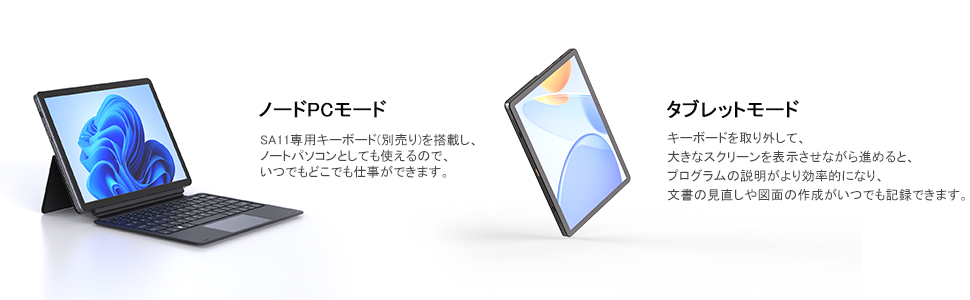
Figure 3: Zwide SA11 in PC Mode (left) and Tablet Mode (right).
3. Display and Sensors
The 10.95-inch IPS display offers a resolution of 1920x1200 pixels, providing clear and vibrant visuals. The tablet features gravity and magnetic sensors, allowing the screen to automatically rotate 360 degrees. Closing the case will put the screen into sleep mode.

Figure 4: Automatic screen rotation and multi-mode usage enabled by gravity and magnetic sensors.
4. Použití fotoaparátu
The Zwide SA11 is equipped with a 5MP front camera and an 8MP rear camera with autofocus (AF) motor. This allows for automatic focus adjustment during shooting, producing clear and beautiful images.

Figure 5: Detail of the 8MP AF rear camera.
Údržba
1. Čištění zařízení
K čištění obrazovky a těla tabletu použijte měkký hadřík, který nepouští vlákna. V případě odolných šmouh je lehceampOtřete hadřík vodou nebo čističem obrazovek. Nepoužívejte agresivní chemikálie ani abrazivní materiály.
2. Péče o baterie
To prolong battery life, avoid fully discharging the battery frequently. It is recommended to keep the battery charge between 20% and 80% when possible. Store the device in a cool, dry place if not used for extended periods.
3. Aktualizace softwaru
Pravidelně kontrolujte a instalujte aktualizace systému Windows, abyste zajistili, že váš systém má nejnovější bezpečnostní záplaty a vylepšení výkonu. Přejděte na Nastavení > Aktualizace systému Windows pro správu aktualizací.
4. Chladicí systém
The Zwide SA11 features an internal cooling fan to manage heat and extend the device's lifespan. Ensure that the ventilation openings are not obstructed during use to allow for proper airflow.

Figure 6: Internal cooling fan for optimal thermal management.
Odstraňování problémů
This section addresses common issues you might encounter with your Zwide SA11 Tablet PC.
1. Zařízení se nezapne
- Ensure the battery is sufficiently charged. Connect the power adapter and wait a few minutes before attempting to power on.
- If an external USB device (especially via USB-A) is connected, try disconnecting it and then power on. Some users have reported issues with power-on when certain USB-A devices are connected.
- Stiskněte a podržte tlačítko napájení po dobu 10–15 sekund pro provedení tvrdého resetu.
2. Screen Remains Black After Update
- If the screen turns black after a Windows update, do not immediately force power off. Wait for at least 30 minutes to an hour, as the update might still be processing in the background.
- If the issue persists, try connecting the tablet to an external monitor via the full-function USB-C port to see if there is display output.
- Perform a hard reset by holding the power button until the device shuts down, then restart.
3. Nízká výdrž baterie
- Upravte jas obrazovky na nižší nastavení.
- Zavřete nepotřebné aplikace na pozadí.
- Pokud Wi-Fi nebo Bluetooth nepoužíváte, vypněte je.
- Ensure Windows is updated to the latest version, as updates often include power management improvements.
4. Problémy s připojením (Wi-Fi/Bluetooth)
- Toggle Wi-Fi/Bluetooth off and on in Windows settings.
- Restartujte tablet.
- Ensure drivers are up to date via Windows Update or Zwide support webmísto.
Specifikace
The following table details the technical specifications of the Zwide SA11 Tablet PC.
| Funkce | Specifikace |
|---|---|
| Značka | Zwide |
| Název modelu | SA11 |
| Operační systém | Windows 11 Professional |
| Značka CPU | Intel |
| Rychlost CPU | 3.6 GHz (N150 Processor) |
| BERAN | 12 GB |
| Kapacita úložiště | 512GB SSD |
| Velikost obrazovky | 10.95 palce |
| Rozlišení displeje | 1920x1200 pixelů |
| Značka grafické karty | Intel (Integrated) |
| Konektivita | Wi-Fi (2.4G/5G) |
| Porty | 1x USB 3.0, 1x Full-function USB-C, 1x USB-C 2.0 (Charging), 1x 3.5mm Headphone Jack |
| Typ baterie | Lithium Polymer (2 cells) |
| Energie baterie | 25.84 watthodin |
| Hmotnost položky | 1.03 kg |
| Rozměry balení | 36.5 x 22.6 x 5.7 cm |

Figure 7: The N150 processor, offering improved performance over previous models.

Figure 8: High-resolution display for immersive viewa multitasking.
Záruka a podpora
For warranty information and technical support, please refer to the documentation included with your purchase or visit the official Zwide webwebu. Můžete také kontaktovat přímo prodejce a požádat o pomoc.
Keep your purchase receipt and product serial number readily available when contacting support.


