Zavedení
This manual provides detailed instructions for the setup, operation, and maintenance of your Weofly Nova Active Noise Cancelling Headphones. Please read this manual thoroughly before using the product to ensure optimal performance and longevity.
Co je v krabici
Upon unboxing your Weofly Nova headphones, please verify that all the following components are included:
- Weofly Nova Over-Ear Headphones
- Nabíjecí kabel USB-A na USB-C
- 3.5mm AUX Cable (USB-C to 3.5mm TRS)
- Uživatelská příručka

Image: The Weofly Nova Active Noise Cancelling Headphones in Sliver, showcasinjejich design.
Konec produktuview
The Weofly Nova headphones are designed for comfort and high-quality audio, featuring Active Noise Cancellation and Bluetooth 5.4 connectivity.

Image: A woman wearing the Weofly Nova headphones, illustrating their lightweight and stylish design. The headphones weigh only 130g.

Image: Two pairs of Weofly Nova headphones, one in brown and one in white, highlighting their distinct aesthetic and color options.
Klíčové vlastnosti:
- Aktivní potlačení hluku (ANC): Advanced technology to reduce ambient noise.
- Bluetooth V5.4: For faster and more stable wireless connections.
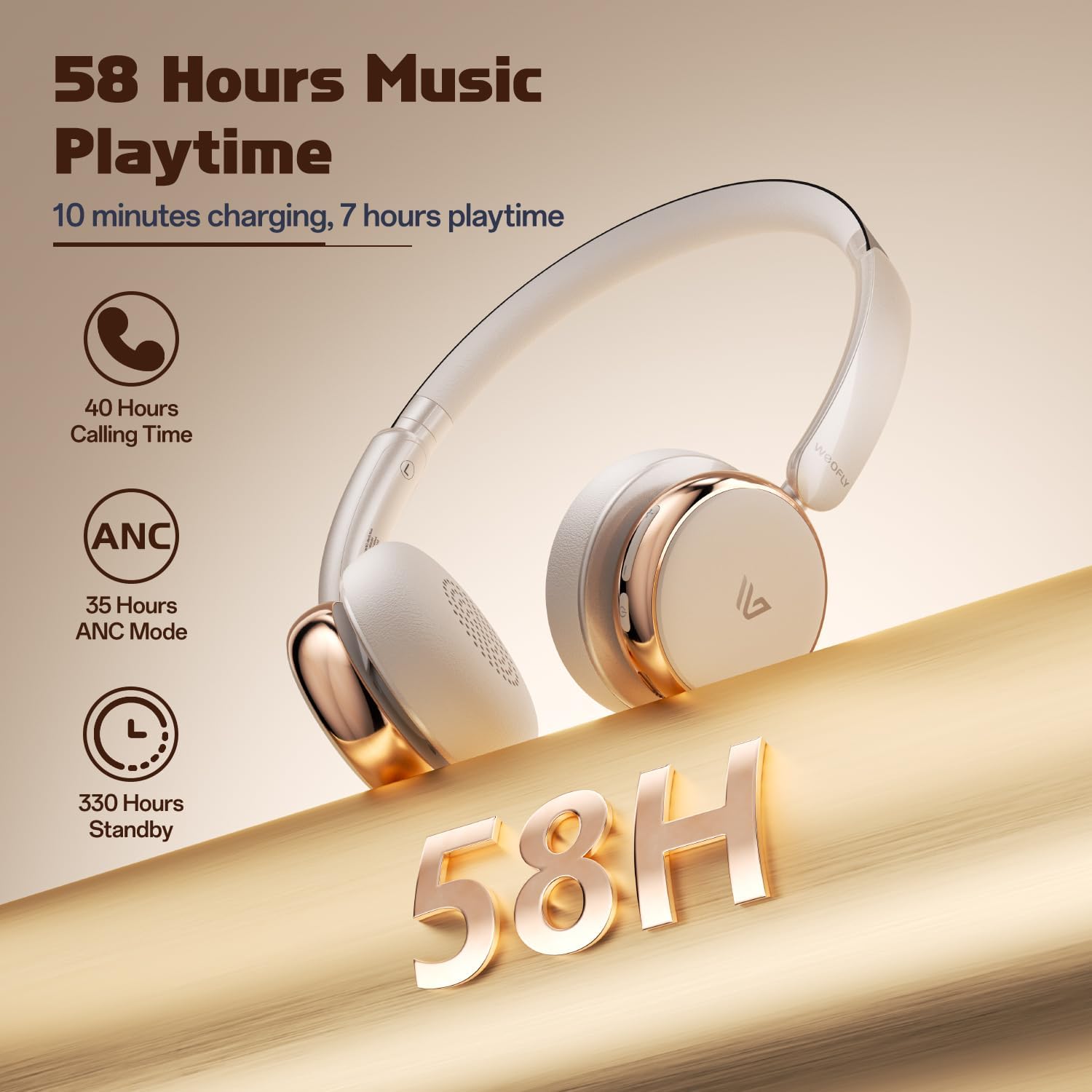
- Dlouhá výdrž baterie: Up to 58 hours of music playtime on a single charge.
- Pohodlný design: Ultra-soft memory protein earcups and adjustable headband.
- Vysoce věrný zvuk: 40mm dynamic drivers for clear audio with rich bass.
- Připojení více zařízení: Connect to two smart devices simultaneously.
Video: Overview of the Weofly Nova Active Noise Cancelling Headphones, demonstrating their features and design.
Pokyny pro nastavení
1. Nabíjení sluchátek
Before first use, fully charge your Weofly Nova headphones. A full charge takes approximately 2 hours.
- Connect the USB-C end of the charging cable to the headphone's charging port.
- Připojte konec USB-A ke kompatibilnímu napájecímu adaptéru USB (není součástí balení) nebo k portu USB počítače.
- Kontrolka bude zobrazovat stav nabíjení a po plném nabití zhasne nebo změní barvu.

Image: The Weofly Nova headphones being charged via a USB-C cable, illustrating the fast charging capability.
2. Zapnutí/vypnutí
- Zapnutí: Stiskněte a podržte tlačítko napájení, dokud kontrolka nezačne blikat.
- Vypnutí: Stiskněte a podržte tlačítko napájení, dokud kontrolka nezhasne.
3. Párování Bluetooth
The headphones support quick pairing. The first time you power them on, they will automatically enter pairing mode.
- Ujistěte se, že jsou sluchátka vypnutá.
- Press and hold the Power button for approximately 5 seconds until the indicator light flashes blue and red alternately, indicating pairing mode.
- Na svém zařízení (chytrý telefon, tablet, notebook) povolte Bluetooth a vyhledejte dostupná zařízení.
- Select "Weofly Nova" from the list of devices.
- Po připojení bude kontrolka svítit trvale modře nebo pomalu modře blikat.
The headphones can connect to two devices simultaneously. To connect a second device, repeat the pairing process. The headphones will automatically switch between devices for calls or media playback.

Image: An illustration showing the Weofly Nova headphones connecting to a laptop and a smartphone via advanced Bluetooth 5.4, highlighting faster transmission and stable connection.
Návod k obsluze
1. Aktivní potlačení hluku (ANC)
The Weofly Nova headphones feature Active Noise Cancellation to minimize ambient sounds.
- Aktivace/deaktivace ANC: Press the dedicated ANC button on the earcup. An audible prompt will confirm the status.

Image: A woman wearing Weofly Nova headphones while focused on her laptop, demonstrating the effectiveness of ANC in reducing distractions.
2. Přehrávání hudby
Ovládejte hudbu přímo ze sluchátek:
- Přehrát/pozastavit: Stiskněte jednou multifunkční tlačítko.
- Další skladba: Stiskněte a podržte tlačítko pro zvýšení hlasitosti.
- Předchozí skladba: Stiskněte a podržte tlačítko snížení hlasitosti.
- Zvýšit hlasitost: Krátce stiskněte tlačítko pro zvýšení hlasitosti.
- Snížit hlasitost: Krátce stiskněte tlačítko pro snížení hlasitosti.
3. Správa hovorů
Snadná správa telefonních hovorů:
- Přijmout/ukončit hovor: Stiskněte jednou multifunkční tlačítko.
- Odmítnout hovor: Stiskněte a podržte multifunkční tlačítko po dobu 2 sekund.
- Znovu vytočit poslední číslo: Dvakrát stiskněte multifunkční tlačítko.
4. Hlasový asistent
Activate your device's voice assistant:
- Aktivovat Voice Assistant: Trojnásobně stiskněte multifunkční tlačítko.

Image: A multi-panel image illustrating the comfort of the headphones during travel, and the functionality of voice assistance and built-in microphone for hands-free calls.
5. Herní režim
For reduced latency during gaming, activate Game Mode:
- Aktivace/Deaktivace herního režimu: Press and hold the Multi-function button for 2 seconds (while not on a call or playing music).
6. Kabelové připojení
Use the provided 3.5mm AUX cable for a wired connection:
- Connect the USB-C end of the AUX cable to the headphone's USB-C port.
- Connect the 3.5mm end to your audio source's headphone jack.
- Sluchátka se automaticky přepnou do kabelového režimu.
Údržba
To ensure the longevity and optimal performance of your Weofly Nova headphones, follow these maintenance guidelines:
- Čištění: K čištění sluchátek používejte měkký, suchý hadřík. Nepoužívejte abrazivní čisticí prostředky ani rozpouštědla.
- Skladování: Sluchátka skladujte na chladném a suchém místě mimo dosah přímého slunečního záření a extrémních teplot.
- Vyhněte se vlhkosti: Nevystavujte sluchátka vodě ani nadměrné vlhkosti.
- Zacházejte opatrně: Zabraňte pádu sluchátek na zem nebo jejich vystavení silným nárazům.
Odstraňování problémů
If you encounter issues with your Weofly Nova headphones, refer to the following common solutions:
| Problém | Řešení |
|---|---|
| Sluchátka se nezapínají | Ensure the headphones are fully charged. Connect to a power source and allow to charge for at least 30 minutes before attempting to power on again. |
| Nelze spárovat se zařízením | Ujistěte se, že jsou sluchátka v režimu párování (bliká modře/červeně). Vypněte a zapněte Bluetooth na vašem zařízení. Přesuňte sluchátka blíže k zařízení. Vymažte předchozí připojení Bluetooth na vašem zařízení. |
| Žádný zvuk nebo nízká hlasitost | Check headphone and device volume levels. Ensure headphones are properly connected via Bluetooth or AUX cable. Test with a different audio source. |
| ANC nefunguje efektivně | Ensure ANC is activated. Adjust headphone fit to ensure a good seal around your ears. ANC is most effective against low-frequency, constant noise. |
| Přerušované připojení | Ensure no obstacles are between the headphones and your device. Move away from other wireless devices that may cause interference. Ensure headphones are fully charged. |
Specifikace
Technical details for the Weofly Nova Active Noise Cancelling Headphones:
- Název modelu: Nova
- Technologie připojení: Bezdrátové (Bluetooth)
- Technologie bezdrátové komunikace: Bluetooth 5.4
- Typ zvukového ovladače: 40mm dynamický ovladač
- Kontrola hluku: Aktivní potlačení hluku
- Životnost baterie: Up to 58 hours (music playtime), 40 hours (talk time), 35 hours (ANC mode)
- Doba nabíjení: Přibližně 2 hodiny
- Kapacita baterie: 500 XNUMX mAh
- Hmotnost položky: 0.26 kilogramů (9.1 uncí)
- Umístění uší: Přes ucho
- Kompatibilní zařízení: Mobilní telefony, tablety, notebooky, chytré reproduktory
Obrázek: Podrobný view of the Weofly Nova earcup, emphasizing the 40mm dynamic driver responsible for high-fidelity sound quality.

Image: The Weofly Nova headphones prominently displaying '58H', signifying their extended battery life of 58 hours for music playback.
Záruka a podpora
Weofly products come with a standard manufacturer's warranty. For specific warranty details, please refer to the warranty card included in your product packaging or visit the official Weofly website. For technical support, troubleshooting assistance, or any inquiries regarding your Weofly Nova headphones, please contact Weofly customer service through the contact information provided on our webwebu nebo v dokumentaci k produktu.