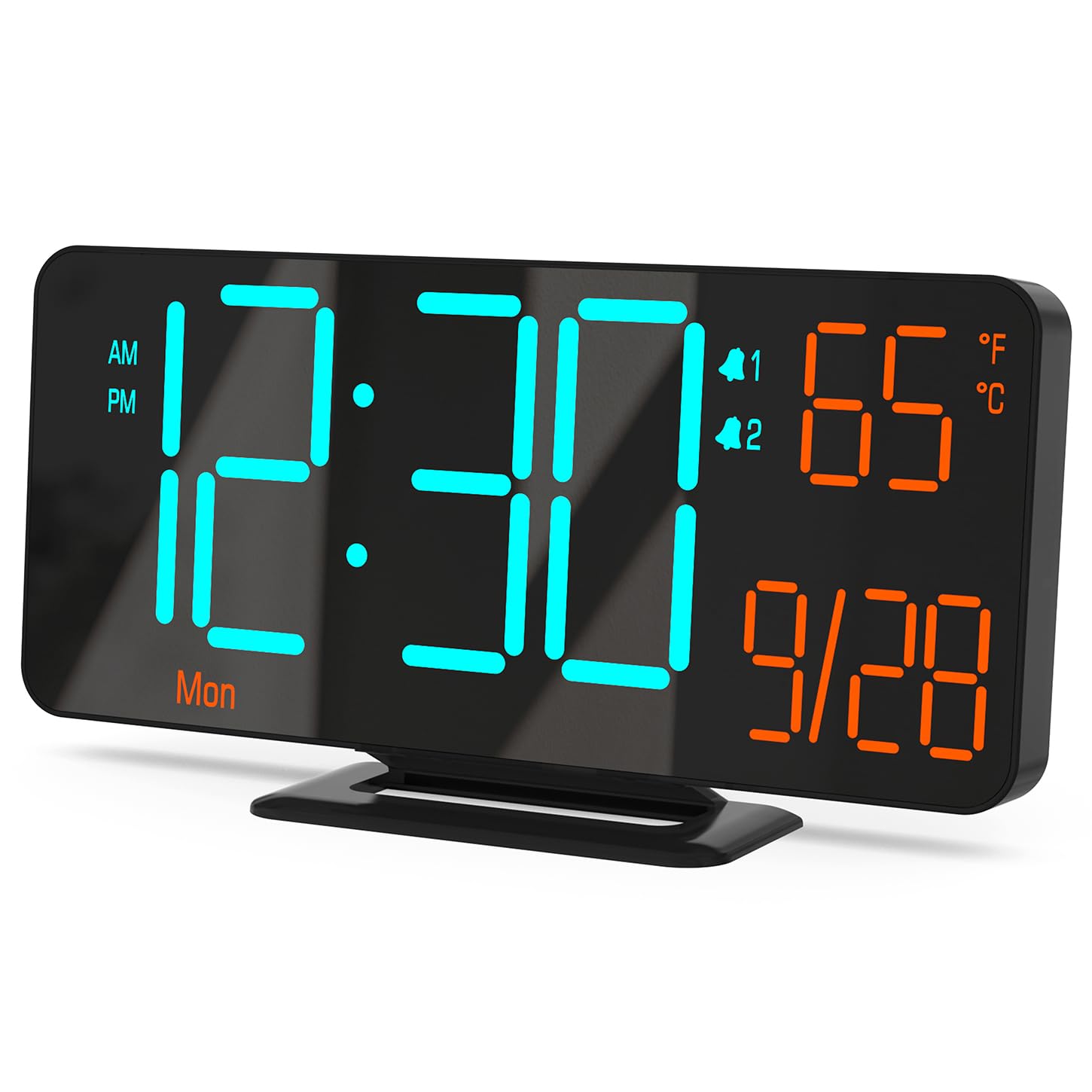
Figure 0: KOSUMOSU Digital Alarm Clock, Model ACD-330.
1. Úvod
This user manual provides detailed instructions for the KOSUMOSU Digital Alarm Clock, Model ACD-330. Please read this manual thoroughly before operating the device to ensure proper use and to understand all features. Keep this manual for future reference.
2. Konec produktuview
2.1 Klíčové vlastnosti
- 6.7-inch LED display with cool blue and orange light digits.
- Automatic and manual dimming capabilities (High, Medium, Low, OFF, Auto).
- Dual alarm clock with snooze function (5-minute snooze).
- Selectable 12/24 hour time format.
- Displays date, day of the week, seconds, and indoor temperature (Fahrenheit/Celsius).
- USB powered (requires 5V/1A AC adapter, not included).
- Includes a button battery for time preservation during power outages.
2.2 Obsah balení
- KOSUMOSU Digital Alarm Clock (Model ACD-330)
- USB Power Cable (1.5-meter)
- Lithium Metal Button Battery (pre-installed for backup)
- Uživatelská příručka (tento dokument)
2.3 Schéma produktu

Obrázek 1: Zadní view of the alarm clock with labeled function buttons and dimensions.
- 1. Light Sensor: For automatic dimming.
- 2. Dimming Buttons (-/+): Adjust brightness manually.
- 3. ℉/℃/Sec Button: Toggle between Fahrenheit/Celsius and display seconds.
- 4. SET Button: Enter setting mode for time, date, and alarms.
- 5. Alarm 1 Set Button: Set Alarm 1.
- 6. Alarm 2 Set Button: Set Alarm 2.
- 7. Snooze Button: Activates snooze during an alarm.
- 8. USB-A Power Cable Input: Connects to 5V/1A AC adapter.
- 9. Přihrádka na baterie: For backup button battery.
3. Nastavení
3.1 Připojení napájení
Connect the provided USB power cable to the USB-A input port on the back of the alarm clock. Plug the other end of the USB cable into a 5V/1A AC adapter (not included) and then into a wall outlet. The clock display will illuminate.

Figure 2: Power connection setup. An AC adapter is required and not included.
3.2 Záložní baterie
The clock includes a pre-installed Lithium Metal button battery. This battery is solely for preserving time settings during a power outage and does not power the display. Ensure the battery is properly seated in its compartment for this function to work.
4. Návod k obsluze
4.1 Nastavení času a data
- Stiskněte a podržte SOUBOR po dobu přibližně 3 sekund pro vstup do režimu nastavení času. Číslice hodin budou blikat.
- Použijte + or - tlačítka pro nastavení hodiny.
- Stiskněte SOUBOR znovu pro potvrzení hodiny a přechod k nastavení minut. Číslice minut budou blikat.
- Použijte + or - tlačítka pro nastavení minut.
- Stiskněte SOUBOR again to confirm the minute and move to 12/24 hour format selection.
- Použijte + or - buttons to select either 12-hour (with AM/PM indicator) or 24-hour format.
- Stiskněte SOUBOR again to confirm the format and move to year setting.
- Continue using + or - to adjust the year, month, and day, pressing SOUBOR after each adjustment to confirm and proceed.
- Po nastavení dne stiskněte SOUBOR naposledy pro ukončení režimu nastavení.
4.2 Display Modes (Seconds / Temperature)
The clock can display either seconds or indoor temperature. To switch between these modes, short press the ℉/℃/Sec tlačítko.
When displaying temperature, you can toggle between Fahrenheit (℉) and Celsius (℃) by pressing and holding the ℉/℃/Sec tlačítko po dobu přibližně 3 sekund.

Figure 3: Various display modes including temperature and seconds.
4.3 Nastavení jasu (stmívání)
The clock offers both manual and automatic dimming features.
- Manuální stmívání: Krátce stiskněte + or - buttons to cycle through brightness levels: High, Medium, Low, and OFF.
- Automatické stmívání: Stiskněte a podržte + button for approximately 3 seconds to activate or deactivate auto-dimming. When active, the light sensor on the clock will automatically adjust the display brightness based on ambient light conditions.
Obrázek 4: Přamples of manual and automatic dimming levels.
4.4 Nastavení alarmů (Alarm 1 a Alarm 2)
Hodiny mají dva nezávislé budíky. Proces nastavení je pro oba stejný.
- Stiskněte a podržte Alarm 1 Set or Alarm 2 Set button for approximately 3 seconds to enter alarm setting mode. The alarm hour digits will flash.
- Použijte + or - tlačítka pro nastavení hodiny budíku.
- Stiskněte příslušné Alarm set Dalším stisknutím tlačítka potvrďte hodiny a přejděte k nastavení minut. Číslice minut budíku budou blikat.
- Použijte + or - tlačítka pro nastavení minuty budíku.
- Stiskněte příslušné Alarm set button again to confirm the minute and select the alarm cycle:
- 1-5: Weekdays (Monday-Friday)
- 1-7: Everyday (Monday-Sunday)
- 6-7: Weekends (Saturday-Sunday)
- Stiskněte příslušné Alarm set button one last time to save the alarm settings and exit.
4.5 Aktivace/deaktivace alarmů
To turn an alarm ON or OFF, short press the Alarm 1 Set or Alarm 2 Set button. An alarm icon (1 or 2) will appear on the display when the alarm is active.
4.6 Funkce odložení
Když zazní alarm, stiskněte velké PODŘIMOVAT button on the top of the clock to activate the snooze function. The alarm will pause for 5 minutes and then sound again. The alarm duration is approximately 5 minutes if not snoozed or turned off.
To turn off a sounding alarm completely, press any other button on the back of the clock (e.g., SET, +, -). The alarm will reset for the next scheduled activation.

Figure 5: Illustration of the snooze function.
5. Údržba
- Povrch hodin čistěte měkkým, suchým hadříkem. Nepoužívejte abrazivní čisticí prostředky ani rozpouštědla.
- Nevystavujte hodiny extrémním teplotám, přímému slunečnímu záření nebo vysoké vlhkosti.
- Hodiny nerozebírejte. Ztratíte tím záruku.
- If the backup battery needs replacement, use a compatible Lithium Metal button battery.
6. Řešení problémů
| Problém | Možná příčina | Řešení |
|---|---|---|
| Displej je prázdný. | Žádné napájení. | Ensure the USB cable is securely connected to a 5V/1A AC adapter and the adapter is plugged into a working power outlet. |
| Čas je po výpadku proudu nesprávnýtage. | Záložní baterie je vybitá nebo chybí. | Check or replace the Lithium Metal button battery. Reset the time manually. |
| Alarm se nespustí. | Budík není aktivovaný nebo je nesprávně nastavený. | Ensure the alarm icon (1 or 2) is visible on the display. Verify alarm time and cycle settings. |
| Displej je příliš jasný/tmavý. | Manual or auto-dimming settings. | Adjust brightness manually using +/- buttons or toggle auto-dimming by holding the + button. |
| Naměřená teplota se zdá být nepřesná. | Hodiny umístěné v blízkosti zdroje tepla/větracího otvoru. | Přemístěte hodiny do oblasti se stabilní okolní teplotou. |
7. Specifikace
| Model: | ACD-330 |
| Typ displeje: | LED |
| Velikost displeje: | 6.7 palců |
| Příkon: | 5V/1A DC (USB powered) |
| Záložní baterie: | 1 x Lithium Metal (included) |
| Rozměry produktu: | 16.26 x 3.81 x 8.38 cm (6.4 x 1.5 x 3.3 palce) |
| Hmotnost produktu: | 131.54 g (0.29 lb) |
| Speciální vlastnosti: | Auto Dimmable, Calendar Display, Dual Alarm, Snooze, Temperature Display (℉/℃) |
8. Záruka a podpora
KOSUMOSU offers a 2-year warranty for this product. If you encounter any problems related to quality or usage, please contact KOSUMOSU customer service for assistance. Contact information can typically be found on the product packaging or the retailer's webmísto, kde byl produkt zakoupen.
For further support or inquiries, please refer to the official KOSUMOSU webnebo kontaktujte jejich tým zákaznické podpory.


