1. Úvod
Thank you for choosing the OKP Life K5 Robot Vacuum. This intelligent cleaning device is designed to provide efficient and convenient floor cleaning for your home. Featuring Wi-Fi connectivity and remote control capabilities, the K5 offers multiple cleaning modes and smart navigation to ensure a thorough clean. Please read this manual carefully before using the product to ensure proper operation and maintenance.
2. Obsah balení
Po vybalení ověřte, zda jsou všechny položky přítomny a v dobrém stavu.
- OKP Life K5 Robot Vacuum Cleaner (1 unit)
- Dálkové ovládání (1 jednotka)
- Charging Dock (1 unit)
- Napájecí adaptér (1 kus)
- Side Brushes (4 units, 2 for immediate use, 2 spares)
- Čisticí nástroj (1 kus)
- Uživatelská příručka (tento dokument)

Image: The OKP Life K5 Robot Vacuum, its remote control, and a set of four side brushes, illustrating the typical package contents.
3. Konec produktuview
3.1 Součásti robotického vysavače
Familiarize yourself with the main parts of your K5 Robot Vacuum.

Obrázek: Pohled shora dolů view of the OKP Life K5 Robot Vacuum, highlighting its sleek, disc-shaped design and central power button.
- Main Body: Contains the motor, dustbin, and navigation sensors.
- Power Button/Indicator Light: For manual operation and status indication.
- Dustbin: 550ml capacity for collecting debris.
- Side Brushes: Two rotating brushes to sweep debris into the suction path.
- Driving Wheels: For movement across various floor types.
- Charging Contacts: For automatic recharging at the charging dock.
- Sensors: Anti-drop and anti-collision sensors for safe navigation.
3.2 Dálkové ovládání
The remote control provides convenient access to various cleaning functions.

Image: A close-up of the white remote control for the OKP Life K5 Robot Vacuum, showing its various function buttons for control and mode selection.
- Power Button: Turns the robot on/off or starts/pauses cleaning.
- Directional Buttons: Manually control the robot's movement.
- Home Button: Sends the robot back to the charging dock.
- Mode Selection Buttons: Switch between Auto, Spot, Edge, and Zigzag cleaning modes.
- Suction Power Adjustment: Adjusts the vacuum's suction strength.
4. Nastavení
4.1 Příprava robota
- Remove all protective films and stickers from the robot and charging dock.
- Attach the side brushes by pressing them onto the square posts until they click into place.
4.2 Umístění nabíjecí stanice
- Umístěte nabíjecí stanici ke zdi na tvrdý a rovný povrch.
- Ujistěte se, že je po obou stranách doku alespoň 0.5 metru (1.6 stopy) volného prostoru a 1.5 metru (4.9 stopy) před ním.
- Zapojte napájecí adaptér do nabíjecí stanice a poté do zásuvky ve zdi.
4.3 Počáteční nabíjení
For optimal performance, fully charge the robot before its first use.
- Manually place the robot onto the charging dock, ensuring the charging contacts align.
- The indicator light on the robot will show charging status (e.g., breathing light).
- Plné nabití obvykle trvá 4-5 hodiny.

Image: The OKP Life K5 Robot Vacuum automatically navigating back to its charging dock, demonstrating its self-charging capability when the battery is low.
4.4 Připojení k Wi-Fi a aplikaci
The OKP Life App allows for advanced control and scheduling.
- Download the "OKP Life" app from the App Store (iOS) or Google Play Store (Android).
- Zaregistrujte si účet a přihlaste se.
- Follow the in-app instructions to add your K5 robot vacuum. Ensure your Wi-Fi network is 2.4GHz.
- The robot can also be connected to Amazon Alexa and Google Assistant for voice control. Refer to the app for detailed instructions on integrating with these smart home platforms.

Image: A user interacting with the OKP Life K5 Robot Vacuum via a smartphone app, with icons indicating compatibility with Google Assistant and Amazon Alexa, and a note about 2.4GHz Wi-Fi connectivity.
5. Návod k obsluze
5.1 Zahájení úklidu
- Od Robota: Press the power button on the robot once.
- Z dálkového ovládání: Stiskněte tlačítko napájení na dálkovém ovládání.
- Z aplikace: Tap the "Start Cleaning" button in the OKP Life app.
- Hlasový příkaz: Use a connected smart assistant (e.g., "Alexa, turn on Robot Vacuum").
5.2 Pausing/Resuming a Clean
- Press the power button on the robot or remote, or use the app/voice command.
- Press again to resume cleaning.
5.3 Sending Robot to Charging Dock
- Press the "Home" button on the remote control or in the app.
- The robot will automatically return to its charging dock when the battery is low.
5.4 Režimy čištění
The K5 offers multiple cleaning modes to suit different needs, selectable via the remote control or app.
- Automatické čištění: The robot intelligently navigates and cleans the entire accessible area. This is the default mode.
- Bodové čištění: The robot cleans a concentrated area in a spiral pattern, ideal for localized dirt or spills.
- Čištění hran: Robot čistí podél stěn a hran nábytku, aby zajistil důkladné pokrytí.
- Čištění cikcakem: The robot cleans in a systematic back-and-forth pattern, covering the maximum area and reducing missed spots.

Image: The OKP Life K5 Robot Vacuum cleaning a room, with an overlay illustrating its efficient Z-Shape (zigzag) cleaning path, designed to maximize coverage and minimize missed areas.
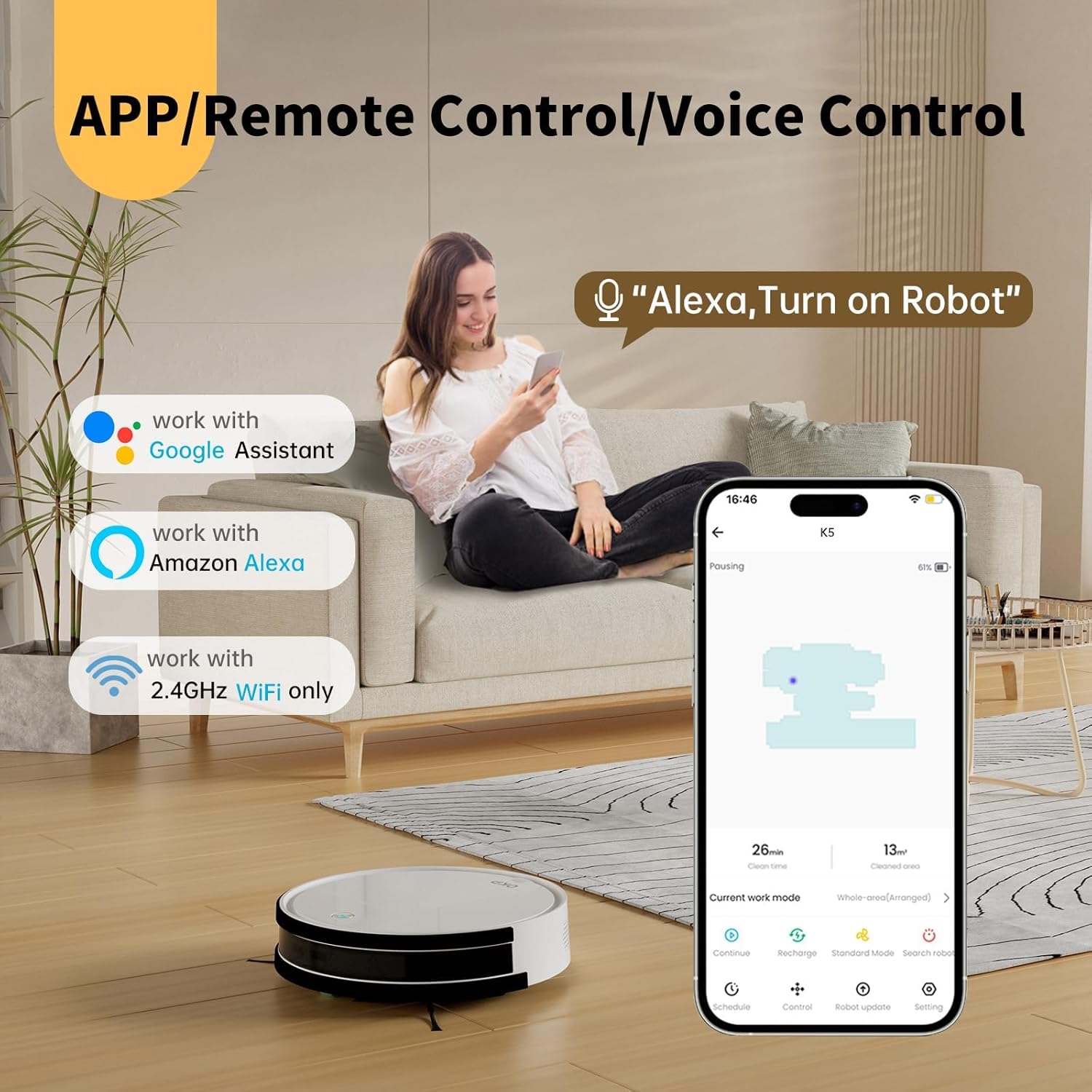
Image: The OKP Life K5 Robot Vacuum demonstrating its suction power, with illustrations of various debris types (debris, dust, beans, hair) being effectively vacuumed, indicating its versatility for different cleaning scenarios.
6. Údržba
Pravidelná údržba zajišťuje optimální výkon a prodlužuje životnost vašeho robotického vysavače.
6.1 Vyprázdnění odpadkového koše
- Stiskněte tlačítko pro uvolnění prachového koše a vytáhněte prachový koš.
- Otevřete víko popelnice a vysypte její obsah do odpadkového koše.
- V případě potřeby opláchněte nádobu na prach vodou (před opětovným vložením se ujistěte, že je zcela suchá).
6.2 Čištění filtru
- Vyjměte filtr z nádoby na prach.
- Jemně poklepejte na filtr, abyste odstranili prach. HEPA filtr nemyjte vodou.
- Vyměňujte filtr každé 3–6 měsíců, v závislosti na používání.
6.3 Čištění bočních kartáčů
- Remove the side brushes by pulling them upwards.
- Odstraňte všechny vlasy nebo nečistoty omotané kolem kartáčů.
- Reattach the brushes. Replace if worn or damaged.
6.4 Čištění senzorů a nabíjecích kontaktů
- Otřete senzory proti pádu, senzory proti kolizi a nabíjecí kontakty na robotu i nabíjecí stanici čistým a suchým hadříkem.
- Udržujte tyto oblasti čisté, aby byla zajištěna správná navigace a nabíjení.
7. Řešení problémů
If your robot vacuum encounters issues, refer to the following common problems and solutions.
| Problém | Možná příčina | Řešení |
|---|---|---|
| Robot se nezapne. | Slabá baterie; Vypnuto. | Charge the robot; Ensure the main power switch (if present) is ON. |
| Robot se nemůže nabíjet. | Znečištěné nabíjecí kontakty; Nabíjecí dok není napájen. | Clean charging contacts; Ensure charging dock is plugged in and has power. |
| Robot se často zasekává. | Obstacles; Sensors dirty. | Clear cables, rugs, or small objects; Clean sensors. |
| Špatný čisticí výkon. | Plný zásobník na prach; Ucpaný filtr; Opotřebované kartáče. | Vyprázdněte nádobu na prach; Vyčistěte/vyměňte filtr; Vyčistěte/vyměňte boční kartáče. |
| Nelze se připojit k Wi-Fi/aplikaci. | Nesprávné pásmo Wi-Fi (podporováno pouze 2.4 GHz); Nesprávné heslo; Robot je příliš daleko od routeru. | Ensure 2.4GHz Wi-Fi; Re-enter password; Move robot closer to router. |
Pokud problém přetrvává, kontaktujte prosím zákaznickou podporu.
8. Specifikace
| Značka | OKP Život |
| Název modelu | K5 |
| Sací výkon | 2100 PA |
| Kapacita popelnice | 550 ml |
| Zdroj napájení | Napájení z baterie |
| Form Factor | Diskovitý |
| Speciální funkce | Smart, Edge Cleaning, Obstacle Avoidance, Selective Room Cleaning, Bagless, Wi-Fi Connectivity, Remote Control, Voice Control (Alexa, Google Assistant), Automatic Charging, Multiple Cleaning Modes (Auto/Spot/Edge/Zigzag) |
| Rozměry (přibližně) | 280mm (width) x 77mm (height) / 11.02 inches (width) x 3 inches (height) |
9. Záruka a podpora
OKP Life products come with a standard manufacturer's warranty. Please refer to the warranty card included in your package or visit the official OKP Life webpodrobné záruční podmínky naleznete na webu.
For technical support, troubleshooting assistance, or to order replacement parts, please contact OKP Life customer service through the contact information provided on their official website or within the OKP Life app.
Webmísto: Visit the OKP Life Store on Amazon


