1. Konec produktuview
The Marantz AV10 is a high-performance AV Receiver designed to deliver an exceptional home theater experience. It features 15.4 channels, advanced HDMI connectivity, USB, Ethernet, multiroom capabilities, and support for immersive audio formats like Dolby Atmos and DTS:X. The unit is engineered for superior audio quality and seamless integration into modern home entertainment systems.
Klíčové vlastnosti:
- Výjimečná kvalita zvuku: Immerse in rich, detailed sound with advanced processing.
- Bezproblémová integrace: Connect all audio and video components effortlessly.
- Cutting-Edge Processing: Experience immersive sound with advanced technologies.
- Intuitivní ovládání: Fine-tune your audio experience with ease.
- Elegantní design: Elegant and robust, complementing modern home theater setups.
- Technologie budoucnosti: Stay ahead with support for upcoming audio advancements.
2. Nastavení
2.1 Vybalení a umístění
Carefully remove the Marantz AV10 from its packaging. Ensure all accessories are present. Place the receiver on a stable, level surface with adequate ventilation to prevent overheating. Avoid placing it near heat sources or in enclosed cabinets without proper airflow.
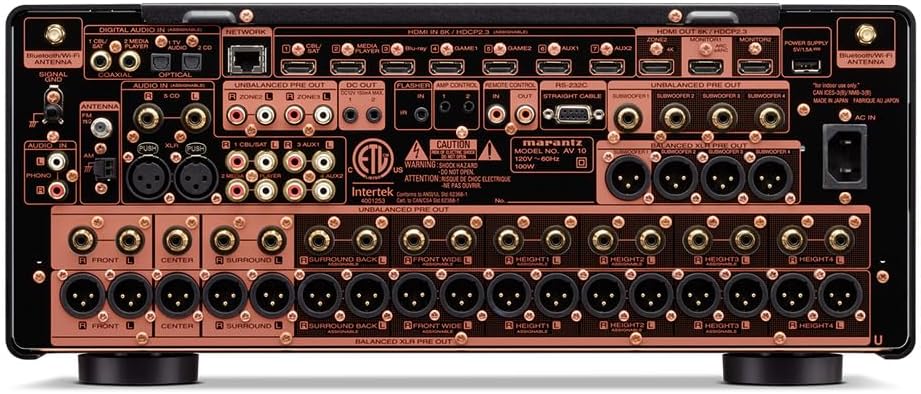
Přední view of the Marantz AV10 AV Receiver, showcasing its sleek design with input and volume knobs, and a central display.
2.2 Připojení
Before making any connections, ensure the AV10 receiver and all connected devices are powered off and unplugged from the wall outlet.
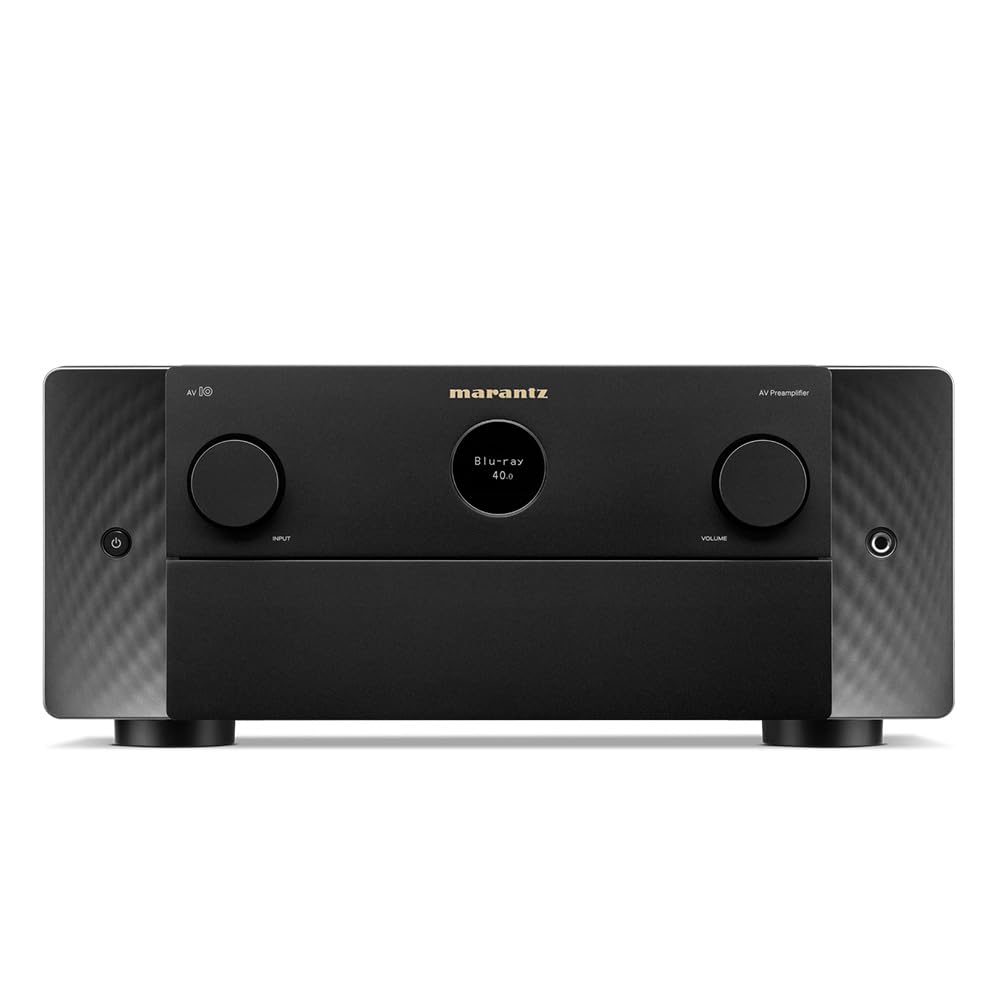
Rear panel of the Marantz AV10 AV Receiver, illustrating the comprehensive array of input and output ports including HDMI, XLR, RCA, Ethernet, and speaker terminals.
- HDMI připojení: Connect your video sources (Blu-ray player, game console, streaming device) to the HDMI IN ports. Connect your TV or projector to the HDMI OUT (MONITOR) port. The AV10 supports 8K/60Hz and 4K/120Hz with eARC.
- Audio připojení: Use the appropriate analog or digital audio inputs for devices without HDMI. For high-quality audio, utilize the balanced XLR pre-outs for connecting to external power ampzáchranáři.
- Internetové připojení: Connect an Ethernet cable to the NETWORK port for wired internet access, or attach the included Wi-Fi antennas for wireless connectivity.
- USB: Use the USB port for media playback from compatible storage devices.
- Připojení reproduktorů: Connect your speakers to the corresponding speaker terminals. Ensure correct polarity (+ to + and - to -) for optimal sound. The AV10 supports up to 15.4 channels.
2.3 Speaker Configuration
The Marantz AV10 offers flexible speaker configuration options. Use the on-screen setup assistant (accessible via your TV connected to the HDMI OUT) to guide you through the process. This includes assigning channels, setting speaker sizes, and configuring crossover frequencies.
For optimal sound, utilize the Audyssey MultEQ XT32 room correction system. Connect the supplied setup microphone to the front panel's SETUP MIC jack and follow the on-screen instructions to calibrate your speakers to your room's acoustics.
3. Provoz
3.1 Základní ovládací prvky
The front panel of the AV10 provides essential controls for daily operation:

Close-up of the input selector knob on the Marantz AV10, used to switch between various audio and video sources.
- Vypínač: Zapíná nebo vypíná jednotku.
- Výběr vstupu: Rotates to select the desired input source (e.g., Blu-ray, Game, Media Player).
- Knoflík hlasitosti: Upravuje hlavní úroveň hlasitosti.
- Zobrazit: Zobrazuje aktuální vstup, úroveň hlasitosti, formát zvuku a další informace o stavu.
The included remote control provides full access to all functions and settings, including menu navigation, sound modes, and zone control.
3.2 Vícemístný zvuk
The AV10 supports multi-room audio playback, allowing you to enjoy different audio sources in various zones of your home. Utilize the built-in HEOS technology, Wi-Fi, Bluetooth, or Apple AirPlay 2 to stream music from popular services like Spotify, Pandora, and Amazon Music throughout your home.
3.3 Hlasové ovládání
Control your Marantz AV10 effortlessly using voice commands. The receiver is compatible with major voice assistants, allowing you to adjust volume, change tracks, switch inputs, and more, hands-free.
4. Údržba
- Čištění: Regularly wipe the unit with a soft, dry cloth. Do not use abrasive cleaners or solvents.
- Větrání: Ujistěte se, že větrací otvory na horní a boční straně jednotky nejsou zablokované, aby nedošlo k přehřátí.
- Aktualizace firmwaru: Pravidelně kontrolujte aktualizace firmwaru prostřednictvím síťového připojení, abyste zajistili optimální výkon a přístup k novým funkcím.
5. Řešení problémů
If you encounter issues with your Marantz AV10, refer to the following common troubleshooting steps:
- Bez napájení: Ujistěte se, že je napájecí kabel bezpečně připojen a že je zásuvka funkční.
- Žádný zvuk: Check all audio cable connections, ensure the correct input source is selected, and verify speaker connections and volume levels.
- Žádné video: Verify HDMI cable connections, ensure the correct input source is selected, and check your TV/projector input settings.
- Problémy s připojením k síti: Confirm your Ethernet cable is connected or Wi-Fi antennas are properly attached. Check your router and internet connection.
- Dálkové ovládání nefunguje: Vyměňte baterie v dálkovém ovladači. Ujistěte se, že mezi dálkovým ovladačem a infračerveným senzorem přijímače nejsou žádné překážky.
For more detailed troubleshooting, consult the full online manual or contact Marantz customer support.
6. Specifikace
| Funkce | Specifikace |
|---|---|
| Značka | Marantz |
| Číslo modelu | AV10 |
| Kanály | 15.4 |
| Technologie připojení | HDMI |
| Celkový počet portů HDMI | 10 |
| Režim zvukového výstupu | Stereo, prostorový zvuk |
| Konfigurace kanálů prostorového zvuku | 5.1 (Supports up to 15.4 with external amplifikace) |
| Kódování videa | H.264, H.265/HEVC |
| Speciální funkce | Multiroom |
| Typ ovladače | Dálkové ovládání |
| Kompatibilní zařízení | Speaker, Tablet, PC, Smartphone, Television, Personal Computer, Game Console |
| Hmotnost položky | 37 libry |
| Rozměry balení | 23 x 22 x 13 palce |
7. Záruka a podpora
The Marantz AV10 AV Receiver comes with a manufacturer's warranty. Please refer to the warranty card included in your product packaging for specific terms and conditions. For technical support, product registration, or service inquiries, visit the official Marantz webnebo kontaktujte jejich oddělení zákaznických služeb.
Online resources, including a comprehensive user manual and FAQs, are available on the Marantz support page.


