1. Důležité bezpečnostní informace
Please read this entire manual before installation and assembly. If you have any questions regarding any of the instructions or warnings, please contact your local distributor for assistance.
- We accept no responsibility for incorrect or faulty installation.
- Follow the enclosed installation instructions carefully.
- Check the condition and completeness of all items before beginning.
- The fastening materials supplied for wall mounting are intended exclusively for fastening to solid masonry or concrete. For other wall types, such as hollow bricks, plasterboard, or lightweight construction, please contact a specialist retailer for information on suitable fastening elements.
- Under no circumstances should you exceed the limit values specified for the product.
2. Obsah balení
Verify that all components are present and undamaged before installation. If any parts are missing or damaged, do not attempt to install. Contact customer support for replacement parts.

Figure 2.1: XTRARM TiTon Double TV Wall Mount and included hardware components, including various screws, anchors, washers, and a drilling template.
Balíček obvykle obsahuje:
- XTRARM TiTon Double TV Wall Mount assembly
- Standard mounting hardware for TV and wall (various screws, anchors, washers)
- Vrtací šablona
- Small spirit level
- Multiple hook-and-loop straps for cable management
3. Specifikace
| Funkce | Specifikace |
|---|---|
| Typ montáže | Držák na zeď |
| Typ pohybu | Articulated, Swivel, Tilt, Rotate |
| Materiál | Kov |
| Barva | Černý |
| Vzdálenost od zdi | 12.9 cm (retracted) to 120 cm (extended) |
| Otáčení | Up to 90° (portrait/landscape) |
| Otočný | Up to 180° (90° left/right) |
| Náklon | -5° až +12° |
| Doporučená velikost TV | Approximately 52 – 110 inches |
| Hmotnostní kapacita | Maximálně 80 kg |
| Kompatibilita VESA | 100x100mm, 100x200mm, 200x100mm, 200x200mm, 200x300mm, 300x200mm, 300x300mm, 400x200mm, 400x300mm, 400x400mm, 500x300mm, 600x200mm, 600x400mm |

Figure 3.1: VESA compatibility and maximum weight capacity.

Figure 3.2: Key dimensions and movement capabilities of the mount.
Figure 3.3: Comprehensive technical drawing with detailed dimensions and adjustment ranges.
4. Nastavení a instalace
Proper installation is crucial for the safety and stability of your TV. Ensure you have the necessary tools and assistance before proceeding.
4.1 Potřebné nástroje (není součástí balení)
- Vrtat
- Stud finder (if mounting to wood studs)
- Tužka
- Měřicí páska
- Nástrčný klíč nebo nastavitelný klíč
- Šroubovák s křížovou hlavou
4.2 Výběr místa montáže
Select a wall location that can safely support the weight of the mount and your TV. For solid concrete or masonry walls, use the provided anchors. For wood stud walls, ensure the mount is centered on a stud. Avoid mounting to drywall alone.
4.3 Attaching the Wall Plate
- Position the drilling template at the desired height on the wall and mark the drill holes with a pencil. Use the included spirit level to ensure it is perfectly horizontal.
- Drill pilot holes at the marked locations. The drill bit size will depend on your wall type and the chosen anchors/screws.
- Vložte hmoždinky do zdi (pokud jsou pro váš typ zdi nutné) do předvrtaných otvorů.
- Align the wall plate with the drilled holes and secure it to the wall using the appropriate screws and washers. Ensure it is firmly attached.
4.4 Připevnění držáků televizoru k televizoru
- Opatrně položte televizor displejem dolů na měkký, čistý povrch, abyste zabránili poškození obrazovky.
- Identifikujte montážní otvory VESA na zadní straně televizoru.
- Select the correct size screws and spacers (if needed) from the provided hardware that fit your TV's VESA pattern.
- Attach the two vertical TV brackets to the back of your TV, ensuring they are level and securely fastened. Do not overtighten.
4.5 Montáž televizoru na nástěnnou desku
- With assistance, carefully lift the TV and hook the attached TV brackets onto the wall plate.
- Ujistěte se, že je televizor bezpečně upevněn na nástěnné desce.
- Engage any safety locking mechanisms on the brackets to prevent accidental dislodgement.

Obrázek 4.1: Přample of the XTRARM TiTon Double TV Wall Mount installed with a television.
5. Návod k obsluze
The XTRARM TiTon Double mount offers full motion capabilities for optimal viewing úhly.
5.1 Adjusting Wall Distance
Gently pull or push the TV to extend or retract the mount. The mount allows for a wall distance ranging from 12.9 cm to 120 cm.

Figure 5.1: Adjustable wall distance of the mount.
5.2 Nastavení natočení
The mount can swivel up to 180 degrees (90 degrees left or right) to direct the screen towards different viewoblasti.

Figure 5.2: Swivel capability of the mount.
5.3 Nastavení sklonu
Adjust the vertical tilt of your TV from -5 degrees to +12 degrees to reduce glare and optimize viewing comfort. Loosen the tilt adjustment knobs, set the desired angle, and then retighten the knobs.
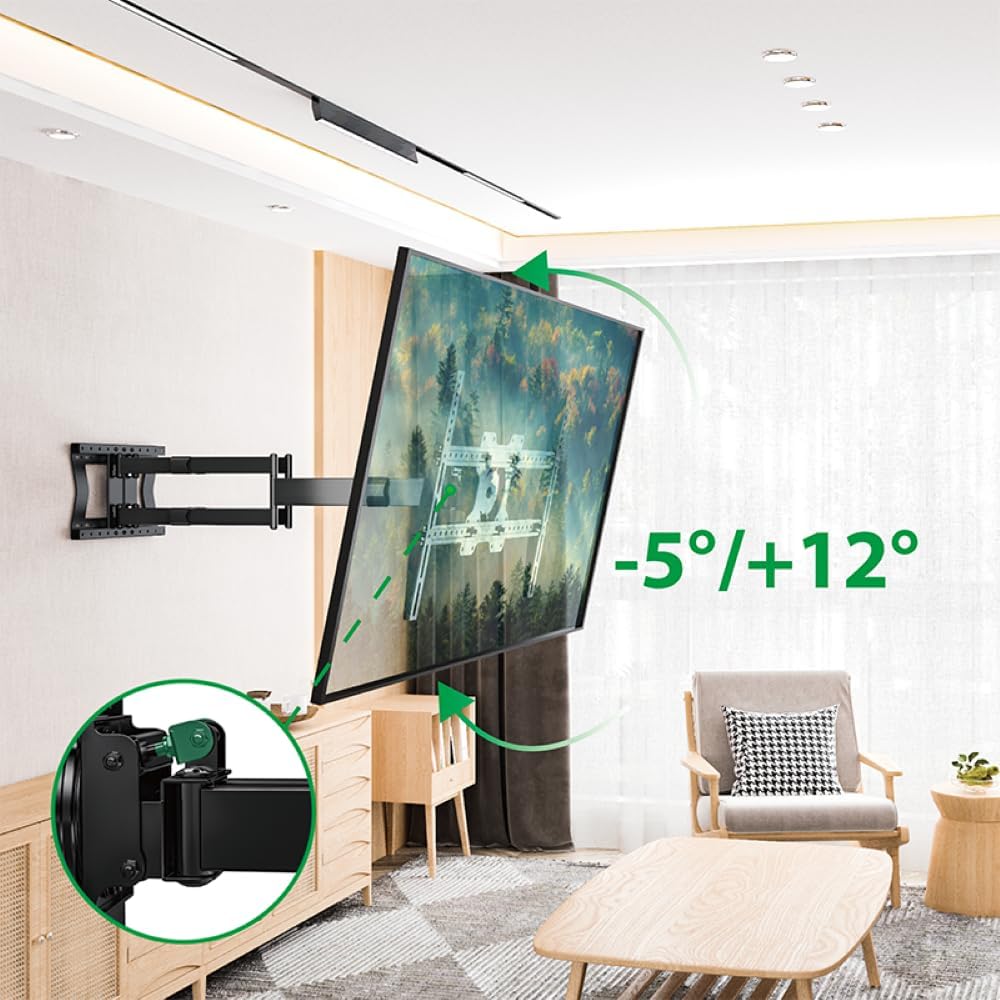
Figure 5.3: Tilt adjustment range and mechanism.
5.4 Nastavení rotace
The mount allows for a 90-degree rotation, enabling you to switch between landscape and portrait orientation for your TV.

Figure 5.4: 90-degree rotation capability.
5.5 Správa kabelů
Use the provided hook-and-loop straps to bundle and organize cables along the mount arms for a tidy appearance and to prevent snagging during adjustments.
6. Údržba
Pravidelná údržba zajistí dlouhou životnost a bezpečný provoz vašeho nástěnného držáku televizoru.
- Čištění: Otřete držák měkkým, suchým hadříkem. Nepoužívejte abrazivní čisticí prostředky ani rozpouštědla, která by mohla poškodit povrchovou úpravu.
- Zkontrolujte připojení: Pravidelně kontrolujte všechny šrouby a vruty, zda jsou pevně utažené. V případě potřeby je dotáhněte, ale nepřetahujte je.
- Zkontrolujte opotřebení: Pravidelně kontrolujte držák, zda nevykazuje známky opotřebení, poškození nebo koroze. Pokud zjistíte jakékoli problémy, přestaňte jej používat a kontaktujte zákaznickou podporu.
7. Řešení problémů
If you encounter any issues with your XTRARM TiTon Double TV Wall Mount, refer to the following common problems and solutions:
| Problém | Možná příčina | Řešení |
|---|---|---|
| Televizor není vodorovně | Wall plate or TV brackets not level during installation. | Carefully remove the TV, adjust the wall plate or TV brackets using a spirit level, and re-mount. |
| Difficulty moving the mount | Joints may be too tight or require lubrication. | Check for any overtightened bolts. Apply a small amount of silicone-based lubricant to moving joints if necessary. |
| Držák se zdá nestabilní | Loose wall plate, incorrect anchors, or exceeding weight capacity. | Immediately remove the TV. Re-check all wall plate fasteners. Ensure correct anchors were used for your wall type. Verify TV weight does not exceed 80 kg. If issues persist, consult a professional installer. |
8. Záruka a podpora
For information regarding warranty coverage, technical support, or replacement parts, please refer to the documentation provided at the time of purchase or visit the official XTRARM webwebu. Uschovejte si účtenku jako doklad o koupi.


