Zavedení
The TOMLOV DM9B Digital Microscope is a versatile and powerful tool designed for detailed observation and analysis. Featuring a 7-inch rotatable FHD screen, 12MP ultra-precise focusing camera, and up to 1200X magnification, it is ideal for a wide range of applications including coin collecting, soldering, PCB repair, and general scientific observation. This manual provides comprehensive instructions for setting up, operating, and maintaining your DM9B Digital Microscope.
Bezpečnostní informace
- Keep the device away from water and high humidity to prevent electric shock.
- Do not attempt to disassemble or modify the microscope. Refer all servicing to qualified personnel.
- Use only the specified power adapter (5V) to avoid damage.
- Zabraňte přímému vystavení objektivu silným světelným zdrojům, které by mohly poškodit snímač.
- Ujistěte se, že je mikroskop umístěn na stabilním a rovném povrchu, aby se zabránilo jeho převrácení.
- Uchovávejte mimo dosah malých dětí, aby nedošlo k náhodnému požití malých částí.
Obsah balení
Ověřte prosím, zda jsou ve vašem balení obsaženy všechny níže uvedené položky:
- 7palcový digitální mikroskop x1
- 32GB Micro SD karta x1
- Nastavitelný stojan z hliníkové slitiny x1
- USB kabel x1
- Podrobný anglický uživatelský manuál x1

Image: All components included in the TOMLOV DM9B Digital Microscope package, including the microscope monitor, base, bracket, remote control, USB cable, 32GB SD card, light barrier, and user manual.
Konec produktuview
The TOMLOV DM9B Digital Microscope features a robust design with key components for optimal performance.

Image: The TOMLOV DM9B Digital Microscope fully assembled, showing the 7-inch LCD screen, microscope lens, adjustable stand, base, two gooseneck LED lights, and the wired remote control.
Klíčové vlastnosti:
- 7palcový otočný FHD displej: Poskytuje jasný obraz s vysokým rozlišením view of magnified objects. The screen can be rotated up to 90 degrees for ergonomic viewIng.
- 12MP Ultra-Precise Focusing Camera: Captures high-quality images and videos.
- Zvětšení 5X-1200X: Allows for detailed observation of microscopic details. Actual magnification varies based on screen size and object distance.
- 8 LED Fill Lights + 2 Gooseneck Lights: Ensures optimal illumination of the specimen.
- Konstrukce z hliníkové slitiny: Provides durability and stability for various applications.
- PC View Kompatibilita: Connects to Windows and macOS for larger screen viewing and data analysis.
- 32GB Micro SD karta: Included for convenient storage of photos and videos.
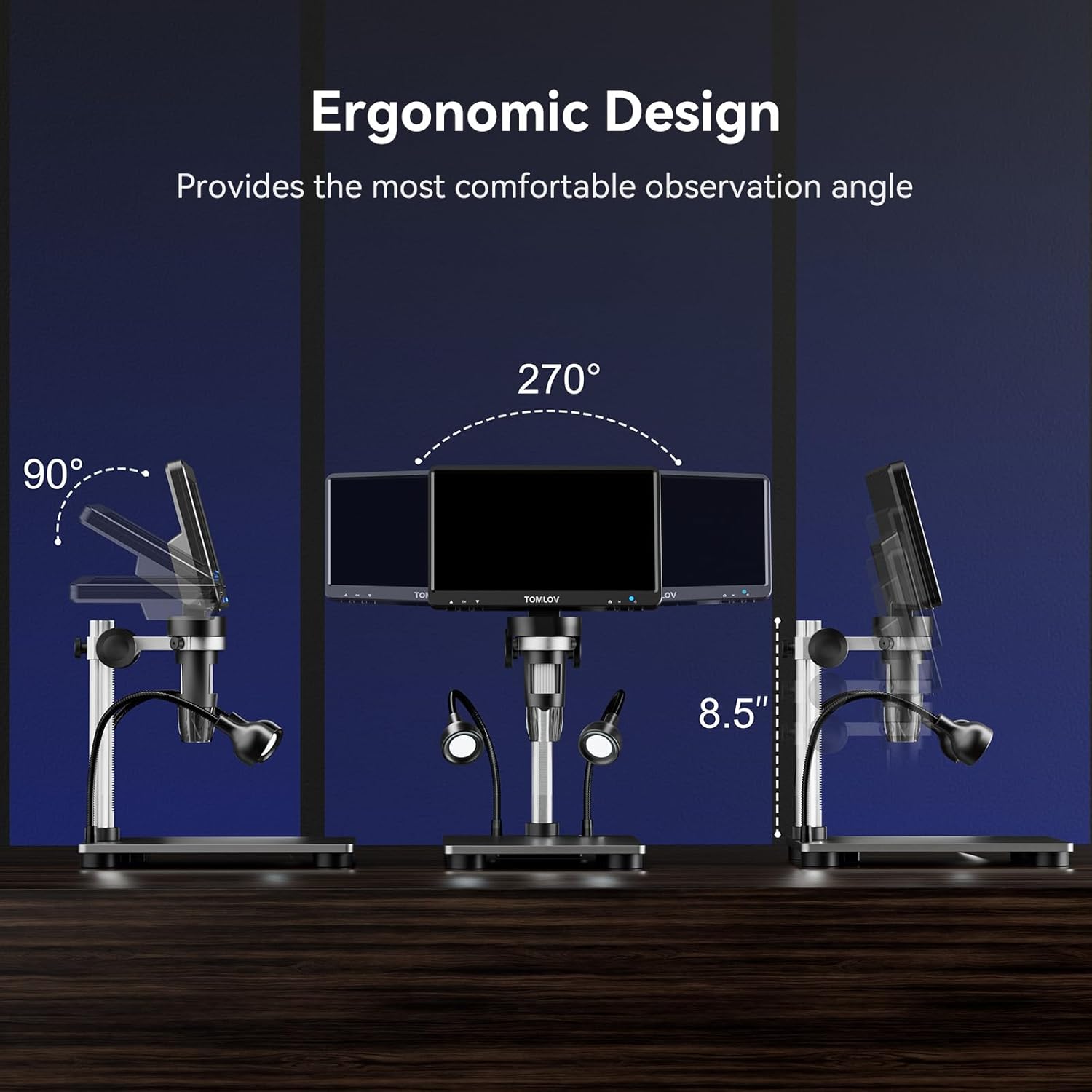
Image: Illustration of the ergonomic design, demonstrating the 90-degree tilt and 270-degree swivel capabilities of the 7-inch LCD screen for comfortable observation angles.
Nastavení
Follow these steps to assemble and prepare your TOMLOV DM9B Digital Microscope for use:
- Sestavte stojan: Attach the adjustable aluminum alloy stand to the base. Ensure all screws are tightened securely.
- Mount the Microscope Monitor: Slide the microscope monitor unit onto the bracket on the stand. Secure it in place using the locking knob.
- Connect Gooseneck Lights: Insert the two gooseneck LED lights into the designated ports on the base. Adjust their position as needed.
- Vložte SD kartu: Locate the TF (Micro SD) card slot on the side of the monitor. Insert the included 32GB Micro SD card until it clicks into place.
- Připojení napájení: Connect the USB cable to the DC5V port on the microscope monitor and plug the other end into a suitable 5V USB power adapter (not included) or a computer USB port.
- Počáteční zapnutí: Press and hold the power button on the microscope monitor to turn on the device.

Image: Visual guide showing the four basic steps to operate the microscope: 1. Turn on the microscope, 2. Adjust the distance between the object and the microscope lens, 3. Rotate the focus wheel to focus, 4. Observe object details on the HD screen.
Návod k obsluze
Základní operace
- Zapnutí/vypnutí: Stiskněte a podržte tlačítko napájení na monitoru po dobu 3 sekund pro zapnutí nebo vypnutí zařízení.
- Rotace obrazovky: The 7-inch LCD screen can be tilted up to 90 degrees and swiveled for optimal viewpohodlí.
Magnification and Focusing
To achieve clear images:
- Umístěte objekt, který chcete pozorovat, na základní desku přímo pod čočku mikroskopu.
- Adjust the height of the microscope unit on the stand to change the initial magnification and bring the object roughly into view.
- Rotate the focusing wheel on the microscope lens until the image on the screen is sharp and clear.

Image: A visual representation demonstrating the varying magnification levels (5X, 500X, 1200X) achievable with the TOMLOV DM9B Digital Microscope, showing increasing detail of a circuit board.
Nastavení osvětlení
The microscope is equipped with 8 adjustable LED fill lights around the lens and 2 flexible gooseneck lights for optimal illumination.
- Use the light adjustment buttons on the monitor or remote control to increase or decrease the brightness of the main LED lights.
- Manually adjust the position of the gooseneck lights to eliminate shadows and provide targeted illumination.
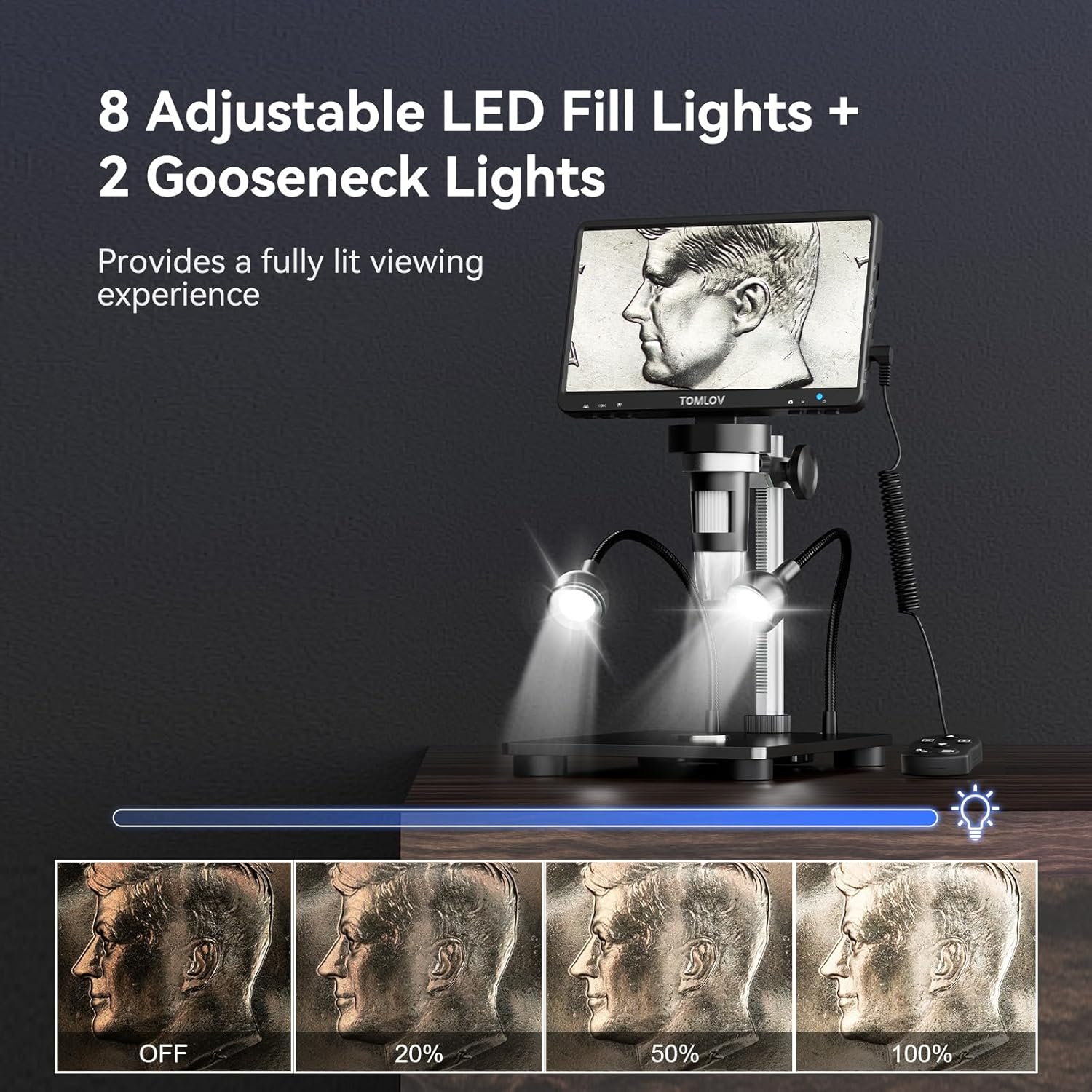
Image: A demonstration of the 8 adjustable LED fill lights and 2 gooseneck lights, showing different brightness levels from off to 100% illumination on a coin.
Fotografování a natáčení videa
The DM9B allows you to capture high-resolution photos and videos directly to the included 32GB Micro SD card.
- Press and hold the Menu button for 3 seconds to switch between "Photographing," "Video Recording," and "Playback" modes.
- In Photographing mode, press the OK button to take a photo.
- In Video Recording mode, press the OK button to start/stop recording.
- Use the remote control for convenient capture without disturbing the microscope.

Image: Display illustrating the video recording mode and photo capture mode on the microscope screen, highlighting the inclusion of a 32GB SD card for storage.
Video: An instructional video demonstrating how to use the TOMLOV DM9 Digital Microscope, covering assembly, basic operation, and various applications.
PC Connection (PC View)
Pro větší viewing experience and easier data sharing, connect your microscope to a PC or laptop.
- Připojte mikroskop k počítači pomocí dodaného kabelu USB.
- No additional software is required. For Windows, use the default "Windows Camera" app. For macOS, use "Photo Booth."
- The microscope will function as a webcam, allowing you to view the live feed on your computer screen.

Image: The TOMLOV DM9B Digital Microscope connected via USB to a laptop, demonstrating the PC view feature for real-time observation on a larger screen.
Údržba
- Čištění objektivu a obrazovky: Use a soft, lint-free cloth specifically designed for optical surfaces. For stubborn smudges, a small amount of lens cleaning solution can be applied to the cloth (not directly to the lens/screen).
- Čištění těla: Wipe the microscope body with a dry, soft cloth. Avoid using abrasive cleaners or solvents.
- Skladování: Store the microscope in a cool, dry place, away from direct sunlight and extreme temperatures. If not in use for extended periods, remove the Micro SD card and ensure the device is powered off.
- Péče o baterie: The microscope contains a rechargeable Lithium Ion battery. For optimal battery life, avoid fully discharging the battery frequently and store the device with a partial charge if not used for a long time.
Odstraňování problémů
| Problém | Možná příčina | Řešení |
|---|---|---|
| Žádný obraz na obrazovce. | Device not powered on; loose cable connection; screen brightness too low. | Ensure power button is pressed; check USB cable connection; adjust screen brightness. |
| Obrázek je rozmazaný. | Incorrect focus; object too far/close; dirty lens. | Adjust focusing wheel; adjust microscope height; clean the lens. |
| Nelze pořizovat fotografie/videa. | SD card not inserted or full; incorrect mode selected. | Ensure SD card is inserted correctly and has free space; switch to Photographing or Video Recording mode. |
| PC view nefunguje. | USB cable issue; incorrect software/app used. | Try a different USB port/cable; ensure you are using "Windows Camera" (Windows) or "Photo Booth" (macOS). |
| Světla nefungují. | Lights turned off or brightness set to minimum; loose connection. | Adjust light brightness; check gooseneck light connections. |
Specifikace
| Funkce | Detail |
|---|---|
| Název modelu | DM9B |
| Velikost obrazovky | 7palcový FHD LCD |
| Rozlišení fotoaparátu | 12 MP |
| Rozsah zvětšení | 5x až 1200x |
| Světelný zdroj | 8 Adjustable LED Fill Lights + 2 Gooseneck Lights |
| Materiál | Aluminum Alloy (Base, Stand, Holder) |
| Skladování | 32GB Micro SD karta (součástí balení) |
| Kompatibilita s PC | Windows, macOS (via USB) |
| Vstup napájení | 5 voltů |
| Baterie | 1 lithium-iontová baterie (součástí balení) |
| Hmotnost položky | 2.12 libry |
| Rozměry balení | 9.69 x 8.31 x 3.5 palce |
Záruka a podpora
TOMLOV products are designed and manufactured to the highest quality standards. For information regarding warranty coverage, technical support, or service inquiries, please refer to the contact information provided on the official TOMLOV webnebo obalu produktu. Uschovejte si účtenku jako doklad o koupi pro případ reklamace.


