Zavedení
This manual provides instructions for the VINABTY Universal Replacement Remote Control, model CT-8564 RC45161. This remote is designed to replace original remote controls for various JVC and Toshiba television models. It operates using infrared technology and requires no programming or complex setup, offering immediate functionality upon battery installation.
Its ergonomic design ensures comfortable handling, and the durable ABS material construction provides longevity. Please read this manual carefully to ensure proper use and maintenance of your remote control.
Nastavení
1. Instalace baterie
Dálkový ovladač vyžaduje k provozu dvě baterie AAA (nejsou součástí balení). Pro instalaci baterií postupujte takto:
- Najděte přihrádku na baterie na zadní straně dálkového ovladače.
- Posuňte kryt přihrádky na baterie dolů nebo stiskněte západku a zvedněte jej pro otevření.
- Vložte dvě baterie typu AAA a ujistěte se, že kladný (+) a záporný (-) pól správně shodují s označením uvnitř přihrádky.
- Nasaďte kryt přihrádky na baterie tak, že jej zasunete zpět na místo, dokud bezpečně nezacvakne.

Image: Back of the remote control with the battery compartment open, illustrating the correct orientation for AAA battery insertion.
2. První použití (programování není nutné)
This remote control is designed for immediate use with compatible JVC and Toshiba TV models. No programming, pairing, or complex setup procedures are required. Once the batteries are correctly installed, the remote is ready to operate your television.
- Point the remote control directly at your television's infrared receiver.
- Stiskněte tlačítko Moc tlačítko pro zapnutí televizoru.
- Test other functions such as volume, channel, and menu navigation to confirm compatibility.
Návod k obsluze
The remote control features a standard layout for easy navigation and control of your television. Below are common button functions:
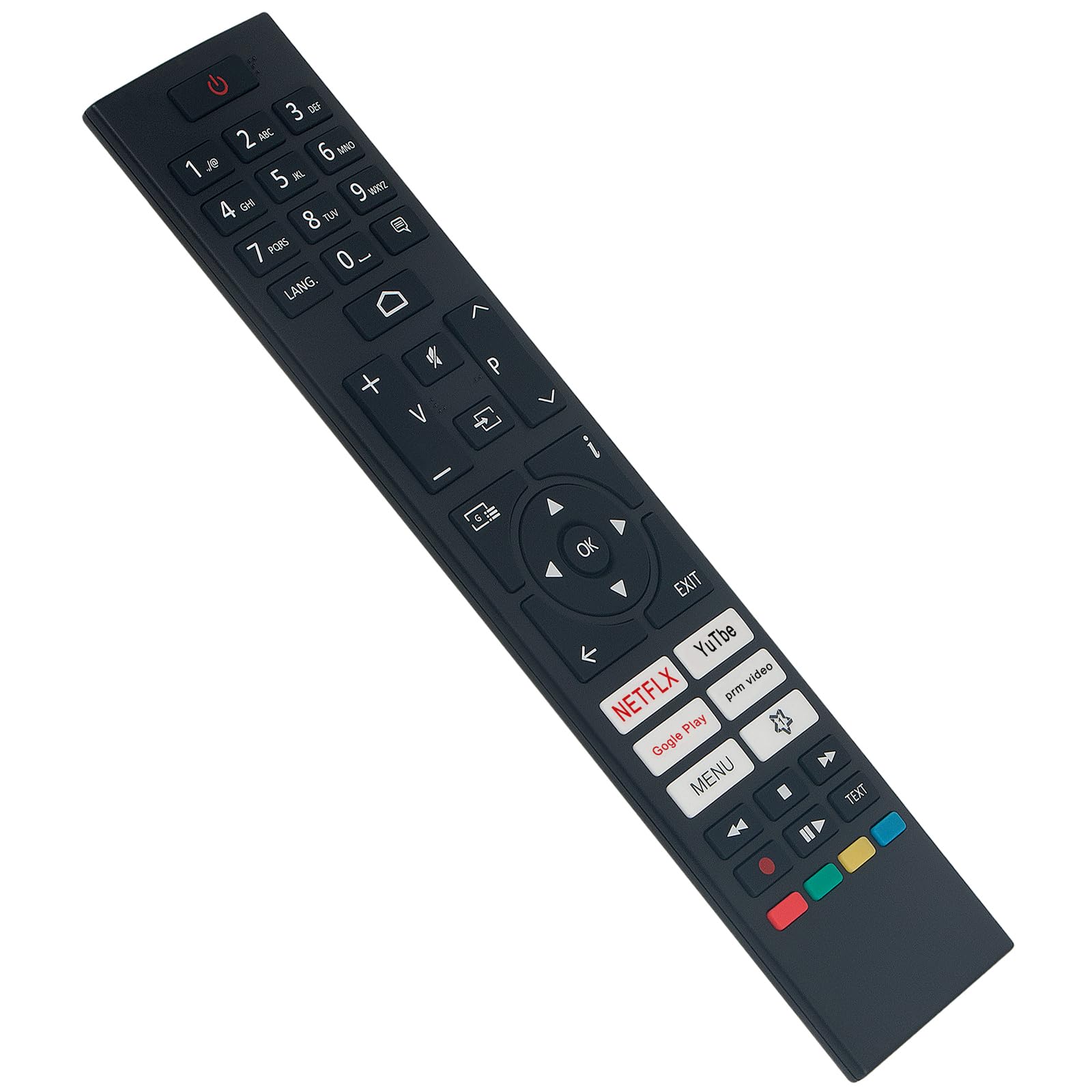
Obrázek: Přední strana view of the remote control, highlighting the button layout and overall dimensions (5 cm width, 22 cm length).
- Tlačítko napájení (●): Zapíná nebo vypíná televizor.
- Číselná tlačítka (0-9): Přímý výběr kanálů.
- Zvýšení/snížení hlasitosti (V+/V-): Upravuje hlasitost zvuku.
- Kanál nahoru/dolů (P+/P-): Změní televizní kanály.
- Tlačítko ztlumení (🔇): Ztlumí nebo zapne zvuk televizoru.
- Navigační tlačítko (nahoru, dolů, vlevo, vpravo, OK): Procházení nabídek a potvrzování výběrů.
- Tlačítko EXIT: Ukončí aktuální menu nebo funkci.
- Tlačítko MENU: Otevře hlavní nabídku televizoru.
- App Buttons (NETFLIX, YouTube, Google Play, Prime Video): Direct access to streaming applications.
- Barevná tlačítka (červená, zelená, žlutá, modrá): Used for specific functions within certain TV menus or applications.
- Ovládací prvky přehrávání: Play, Pause, Stop, Fast Forward, Rewind for media playback.
Ensure there is a clear line of sight between the remote control and the TV's infrared sensor for optimal performance.
Údržba
Čištění dálkového ovladače
Pro zachování vzhledu a funkčnosti dálkového ovladače:
- Otřete povrch měkkým suchým hadříkem.
- Na odolné nečistoty lehce dampnavlhčete hadřík vodou nebo jemným neabrazivním čisticím prostředkem.
- Nepoužívejte agresivní chemikálie, rozpouštědla ani abrazivní čisticí houbičky, protože by mohly poškodit povrchovou úpravu nebo vnitřní součásti dálkového ovladače.
Výměna baterie
Vyměňte baterie, když dálkový ovladač začne reagovat pomalu nebo přestane fungovat. Vždy vyměňte obě baterie současně za nové baterie AAA. Nekombinujte staré a nové baterie ani různé typy baterií.
Skladování
Pokud se dálkový ovladač delší dobu nepoužívá, doporučuje se baterie vyjmout, aby se zabránilo jejich vytečení a poškození.
Odstraňování problémů
Pokud máte problémy s dálkovým ovladačem, podívejte se na následující běžná řešení:
| Problém | Možná příčina / řešení |
|---|---|
| Dálkové ovládání nefunguje. |
|
| Dálkové ovládání funguje přerušovaně. |
|
| Některá tlačítka nefungují. |
|
Specifikace
- Značka: VINABTY
- Název modelu: CT-8564 RC45161
- Technologie připojení: Infračervený
- Kompatibilní zařízení: JVC and Toshiba Televisions
- Barva: Černý
- Speciální vlastnosti: No programming required, Ergonomic design
- Maximální rozsah: 10 metru (přibližně 33 stop)
- Počet tlačítek: 25
- Typ ovladače: Ovládání tlačítkem
- Zdroj napájení: 2 x AAA baterie (nejsou součástí balení)
Záruka a podpora
This product is designed for reliability and durability. In case of any issues or questions regarding the remote control's compatibility or functionality, please contact the seller or manufacturer directly for assistance.
Please refer to your purchase documentation for specific warranty terms and contact information. The manufacturer strives to provide quality service and support for their products.


