Zavedení
Welcome to the user manual for your new GMKtec G3 Plus Mini PC. This document provides essential information for setting up, operating, maintaining, and troubleshooting your device. Please read this manual thoroughly before using the product to ensure optimal performance and longevity.

The GMKtec G3 Plus is a compact and powerful mini PC designed for various computing needs, from daily tasks to home entertainment and office work.
Obsah balení
Verify that all items listed below are included in your package. If any items are missing or damaged, please contact GMKtec customer support.
- 1 x Nucbox G3 Plus Mini PC
- 1 x napájecí adaptér a kabel
- 1 x HDMI kabel
- 1 x držák VESA se šrouby
- 1 x Uživatelská příručka (tento dokument)

This image displays the standard items included in the GMKtec G3 Plus Mini PC retail packaging, ensuring you have everything needed for initial setup.
Vlastnosti produktu
The GMKtec G3 Plus Mini PC is engineered for efficiency and performance, offering a range of features for a seamless computing experience.
- Procesor: Intel Twin Lake N150 (4-core/4-thread, up to 3.6 GHz, 6MB Cache), offering enhanced performance over previous generations.
- Paměť: 16 GB RAM DDR4 3200 MHz (rozšiřitelná až na 32 GB).
- Skladování: 1TB M.2 2280 NVMe SSD (supports PCIe 3.0, expandable up to 2TB).
- Grafika: Integrated Intel Graphics (up to 1000MHz).
- Operační systém: Předinstalovaný systém Windows 11 Pro.
- Konektivita:
- WiFi 6 (802.11ax) for high-speed wireless internet.
- Bluetooth 5.2 pro připojení bezdrátových periferií.
- 2.5G Gigabit Ethernet (RJ45) for stable wired network connection.
- Porty:
- 4 x USB 3.2 ports (up to 5 Gbit/s).
- 2 x HDMI 2.0 ports (supports 4K @ 60Hz dual display output).
- 1 x 3.5mm Audio Jack.
- 1 x DC 12V 3A Power Input.
- 1 x Security Lock slot.
- Další funkce: Supports Wake on LAN, PXE Boot, RTC Wake, and Auto Power On.
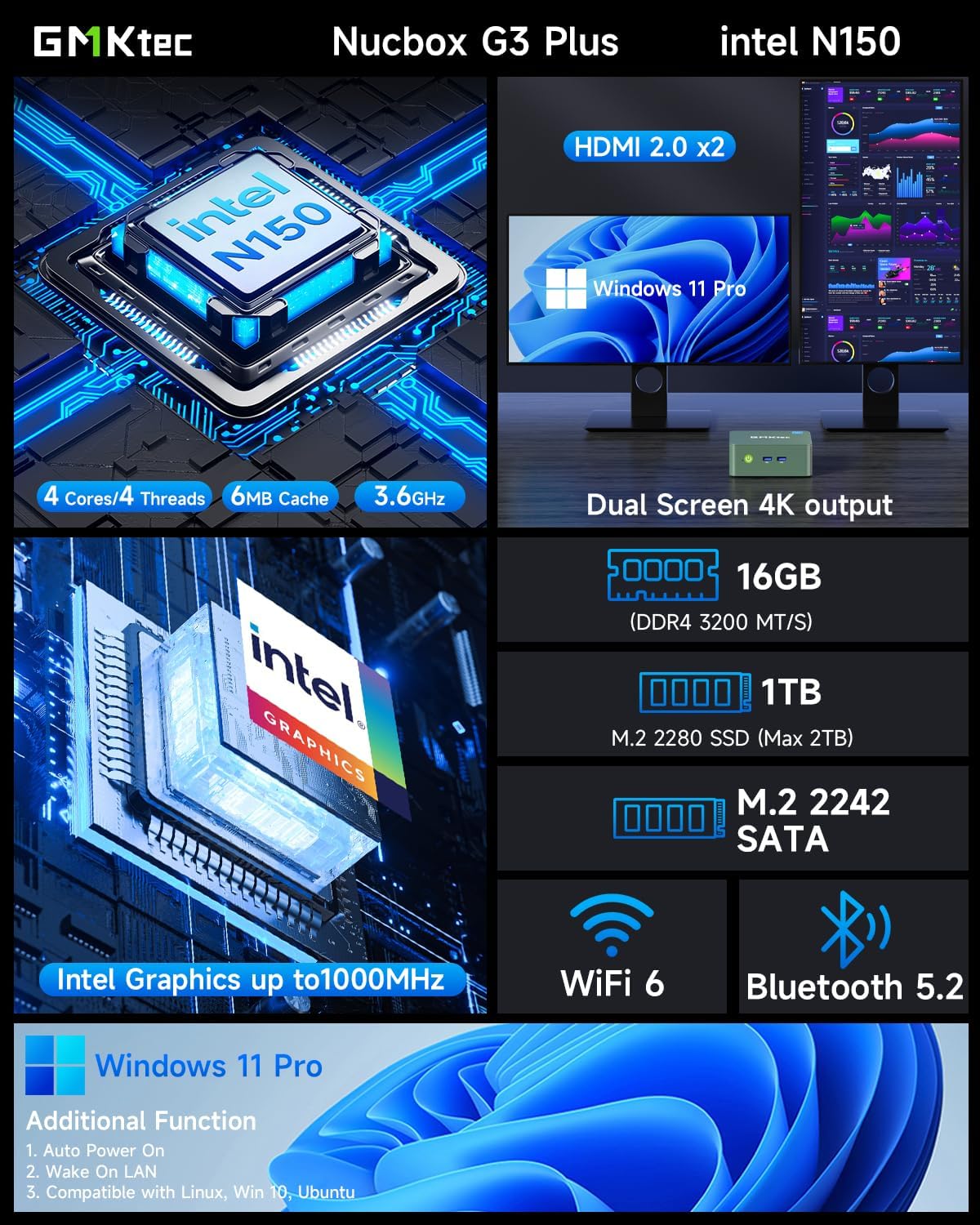
This visual summary details the core specifications and capabilities of the GMKtec G3 Plus, such as its processor, memory, storage, and display outputs.

This graph illustrates the performance advantage of the Intel Twin Lake N150 processor in the GMKtec G3 Plus, showing its improved multi-core and single-core capabilities compared to previous generation CPUs.
Průvodce nastavením
Follow these steps to set up your GMKtec G3 Plus Mini PC.
Step 1: Connect to Display
Connect your monitor(s) to the Mini PC using the provided HDMI cable. The GMKtec G3 Plus supports dual 4K @ 60Hz displays.

This image shows the mini PC connected to two screens, illustrating its ability to support a dual 4K display setup for enhanced productivity or entertainment.
Krok 2: Připojte periferní zařízení
Connect your keyboard, mouse, and other USB devices to the available USB 3.2 ports.
Krok 3: Připojte se k napájení
Plug the power adapter into the DC 12V 3A port on the Mini PC, then plug the power cable into a wall outlet.
Krok 4: Zapněte napájení
Stiskněte tlačítko napájení na přední straně Mini PC. Rozsvítí se kontrolka napájení.

This image provides a clear layout of all available ports on the GMKtec G3 Plus, guiding users on where to connect their peripherals and displays.
Návod k obsluze
Počáteční spuštění a nastavení systému Windows
Upon the first boot, the system will guide you through the Windows 11 Pro setup process. Follow the on-screen instructions to configure your language, region, network, and user account.
Připojení k síti
Váš Mini PC podporuje kabelová i bezdrátová síťová připojení.
Kabelové připojení (Ethernet)
Connect an Ethernet cable from your router or modem to the 2.5G Gigabit LAN port on the Mini PC.

This image highlights the advanced wireless capabilities of the mini PC, including the faster speeds and improved performance offered by WiFi 6 and Bluetooth 5.2.
Bezdrátové připojení (Wi-Fi)
During Windows setup or via Windows settings, select your Wi-Fi network and enter the password. The Mini PC supports Wi-Fi 6 (802.11ax) for optimal wireless performance.
Zařízení Bluetooth
To connect Bluetooth devices (e.g., keyboard, mouse, headphones), go to Windows Settings > Bluetooth & devices, turn on Bluetooth, and pair your device. The Mini PC features Bluetooth 5.2 for stable connections.
Nastavení duálního zobrazení
The GMKtec G3 Plus supports connecting two monitors simultaneously via its two HDMI 2.0 ports. Once connected, Windows will automatically detect the displays. You can configure display settings (extend, duplicate, etc.) in Windows Display Settings.
Údržba
Správná údržba zajistí dlouhou životnost a optimální výkon vašeho Mini PC.
- Čištění: Regularly clean the exterior of the Mini PC with a soft, dry cloth. Use compressed air to clear dust from the ventilation grilles to prevent overheating.
- Větrání: Ensure the Mini PC is placed in a well-ventilated area and that the cooling vents are not obstructed.
- Aktualizace softwaru: Keep your Windows operating system and drivers updated to ensure security and performance.
- Správa úložiště: Pravidelně uklízejte nepotřebné files and applications to maintain optimal storage performance.

This diagram provides insight into the internal design of the mini PC, highlighting key components and the cooling system, which is important for understanding maintenance needs.
Odstraňování problémů
Tato část se zabývá běžnými problémy, se kterými se můžete setkat.
Žádné napájení / Systém se nezapíná
- Ujistěte se, že je napájecí adaptér bezpečně připojen k Mini PC i k funkční zásuvce.
- Ověřte funkčnost elektrické zásuvky zapojením jiného zařízení.
- Pokud je k dispozici, zkuste jinou zásuvku.
Žádný výstup displeje
- Check if the HDMI cable is securely connected to both the Mini PC and the monitor.
- Ujistěte se, že je monitor zapnutý a nastavený na správný vstupní zdroj (HDMI 1, HDMI 2 atd.).
- Pokud je to možné, zkuste jiný kabel HDMI nebo monitor.
Wi-Fi / Bluetooth Connectivity Issues
- Ujistěte se, že je v nastavení systému Windows povoleno Wi-Fi/Bluetooth.
- Restartujte Mini PC a router/modem.
- Check for updated Wi-Fi/Bluetooth drivers on the GMKtec support webmísto.
- Ensure the Mini PC is within range of your Wi-Fi router.
System Slow or Unresponsive
- Zavřete nepotřebné aplikace běžící na pozadí.
- Zkontrolujte Správce úloh, zda neobsahuje procesy spotřebovávající vysokou kapacitu procesoru nebo paměti RAM.
- Ujistěte se, že je na SSD disku dostatek volného místa.
- Spusťte antivirovou kontrolu.
- Consider updating Windows and drivers.
Specifikace
| Funkce | Detail |
|---|---|
| Značka | GMKtec |
| Model | GMKtec NUCBOX G3 Plus |
| Procesor | Intel Twin Lake N150 (4 Cores, 4 Threads, up to 3.6 GHz, 6MB Cache) |
| Operační systém | Windows 11 Pro |
| BERAN | 16GB DDR4 3200MHz (Max 32GB) |
| Skladování | 1TB M.2 2280 NVMe SSD (PCIe 3.0, Max 2TB) |
| Grafika | Intel Integrated Graphics |
| Wi-Fi | Wi-Fi 6 (802.11ax) |
| Bluetooth | Bluetooth 5.2 |
| Ethernet | 2.5G Gigabit RJ45 |
| USB porty | 4x USB 3.2 |
| HDMI porty | 2× HDMI 2.0 (4K@60Hz) |
| Zvuk | 1 x 3.5 mm zvukový konektor |
| Vstup napájení | DC 12V 3A |
| Rozměry | 18 x 18 x 9 cm (balení) |
| Hmotnost | 850 grams (Package) |
Záruka a podpora
GMKtec provides a limited one-year warranty for each Mini PC, effective from the date of purchase. This warranty covers defects arising from design and manufacturing faults.
For any inquiries or technical assistance, please contact GMKtec customer support.
- Podpora Amazon: For purchase-related queries, log in to your Amazon account, navigate to "Your Orders," and select "Ask Product Question."
- Poprodejní podpora: For technical support or warranty claims, send an email to podpora@gmktec.com. GMKtec offers 24/7 customer support.

This image outlines the available channels for customer support and warranty claims, including Amazon's platform and direct email contact for GMKtec's after-sales team.


