1. Úvod
The OWON HDS271 is a versatile 3-in-1 handheld device, integrating a digital oscilloscope, a multimeter, and a waveform generator into a single compact unit. Designed for field service, education, and general electronics testing, this instrument offers a 70MHz bandwidth oscilloscope, a 24000-count digital multimeter, and a 100KHz signal generator. Its portable design, built-in rechargeable battery, and high-resolution color LCD make it an essential tool for various electrical measurement and analysis tasks.

Přední view of the OWON HDS271, showcasinjeho kompaktní design a barevný displej.
2. Bezpečnostní informace
To ensure safe operation and prevent damage to the device, please read and adhere to the following safety precautions:
- Obecná bezpečnost: Vždy používejte zařízení v rámci jeho specifikovaného objemutage, current, and frequency limits. Do not use the device if it appears damaged or is not operating correctly.
- Nebezpečí úrazu elektrickým proudem: Avoid contact with live circuits. Use caution when working with voltages above 30V AC RMS, 42V peak, or 60V DC, as these pose a shock hazard. Ensure probes are properly insulated.
- Probe Connections: Connect the ground lead of the oscilloscope probe to earth ground before connecting the probe tip to the circuit under test. Disconnect the probe tip first when finished.
- Bezpečnost baterie: Use only the specified charging adapter. Do not expose the battery to extreme temperatures or disassemble it. Dispose of batteries according to local regulations.
- Prostředí: Operate the device in a dry environment, away from moisture, dust, and direct sunlight.
3. Konec produktuview
The OWON HDS271 features a clear 3.5-inch color LCD and an intuitive button layout for easy operation. Below is a diagram illustrating the main components and controls of the device.
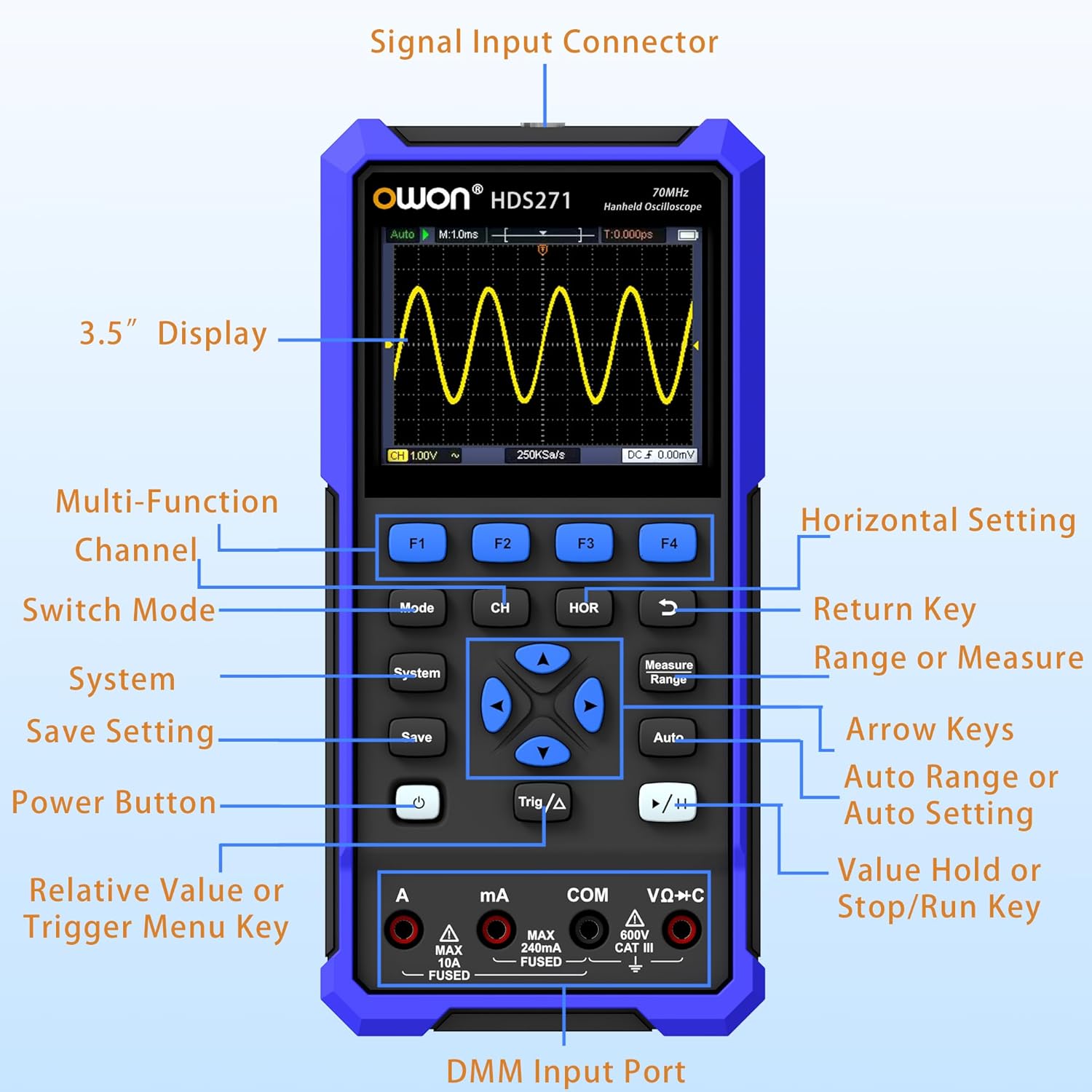
Detailed diagram of the OWON HDS271 front panel, indicating the function of each button, input port, and display area.
Klíčové komponenty:
- 3.5" Display: High-resolution color LCD for waveform and measurement data.
- Funkční tlačítka (F1-F4): Context-sensitive buttons for menu navigation and quick settings.
- Tlačítko režimu: Přepíná mezi režimy osciloskopu, multimetru a generátoru signálu.
- CH/1/2 Button: Selects oscilloscope channel or other channel-related settings.
- HOR Button: Adjusts horizontal scale/time base in oscilloscope mode.
- Systémové tlačítko: Přístup k nastavením a konfiguracím systému.
- Tlačítko Uložit: Saves waveforms or measurement data.
- Vypínač: Zapíná nebo vypíná zařízení.
- Trig/Δ Button: Adjusts trigger settings or enables delta measurements.
- Šipky: Navigates menus and adjusts parameters.
- Measure/Range Button: Initiates automatic measurements or adjusts measurement range.
- Tlačítko Auto: Performs auto-setup for oscilloscope or auto-ranging for multimeter.
- Run/Stop (▶/‖) Button: Spouští nebo zastavuje snímání průběhu.
- DMM Input Ports (A, mA, COM, VΩ+C): Connectors for multimeter probes.
- Konektor pro vstup signálu: BNC connector for oscilloscope probes and signal generator output.
4. Nastavení
4.1 Vybalení a počáteční kontrola
Carefully remove the OWON HDS271 and all accessories from the packaging. Inspect the device for any signs of physical damage. If any damage is found, contact your supplier immediately.
4.2 Nabíjení baterie
The HDS271 is equipped with a built-in 2000mAh lithium battery. Before first use, it is recommended to fully charge the device.
- Connect the provided USB Type-C cable to the Type-C port on the device.
- Connect the other end of the USB cable to a compatible USB power adapter (not always included) or a computer's USB port.
- The charging indicator on the device will show the charging status. A full charge typically takes several hours.

Detailní záběr view of the HDS271's bottom, highlighting the Type-C charging port and indicating the presence of a 2000mAh built-in lithium battery.
4.3 Připojení sond
- Osciloskopické sondy: Connect the BNC connector of the oscilloscope probe to the Signal Input Connector on the top of the device. Ensure the probe is properly compensated before use.
- Multimeter Leads: Insert the red test lead into the VΩ+C or A/mA input jack and the black test lead into the COM input jack for multimeter measurements.
5. Návod k obsluze
The HDS271 offers three primary functions: Oscilloscope, Multimeter, and Signal Generator. Use the Režim tlačítko pro přepínání mezi těmito funkcemi.

An illustration demonstrating the three primary functions of the HDS271: oscilloscope waveform display, multimeter voltage reading, and signal generator output.
5.1 Zapnutí/vypnutí
- Pro zapnutí stiskněte a podržte Moc tlačítko, dokud se obrazovka nerozsvítí.
- Chcete-li přístroj vypnout, stiskněte a podržte tlačítko Moc tlačítko, dokud se zařízení nevypne.
5.2 Režim osciloskopu
In Oscilloscope mode, the HDS271 displays real-time waveforms, allowing for detailed signal analysis.
- Stiskněte tlačítko Režim button to select Oscilloscope mode.
- Connect the oscilloscope probe to the signal input and the circuit under test.
- Stiskněte tlačítko Auto button for automatic setup of vertical, horizontal, and trigger settings.
- Použijte CH/1/2 button to select the channel (HDS271 is 1-channel).
- Adjust vertical scale (Volts/Div) and horizontal time base (Sec/Div) using the arrow keys and corresponding menu options (accessed via F-buttons or dedicated buttons like HORA).
- Adjust trigger level and mode using the Trig/Δ tlačítko a klávesy se šipkami.
- Použijte Opatření button to access automatic measurement functions (e.g., Vpp, Vmax, Freq).
- The Run/Stop (▶/‖) button pauses or resumes waveform acquisition.

Čtyři examples of waveforms displayed on the HDS271 screen, including mains waveform, TV signal wave, PLC pulse wave, and multi-audio frequency response signal.
5.3 Režim multimetru
The multimeter function provides precise measurements of various electrical parameters.
- Stiskněte tlačítko Režim button to select Multimeter mode.
- Connect the test leads to the appropriate DMM input ports (VΩ+C for voltage/resistance/capacitance, A for high current, mA for low current, COM for common ground).
- Select the desired measurement function (e.g., DCV, ACV, Resistance, Capacitance, Diode, Continuity) using the F-buttons or dedicated menu options.
- The device typically features auto-ranging, but manual range selection may be available via the Measure/Range tlačítko.
- Přečtěte si naměřenou hodnotu zobrazenou na obrazovce.
5.4 Režim generátoru signálu
Vestavěný generátor signálu může generovat různé průběhy vln pro testování obvodů.
- Stiskněte tlačítko Režim button to select Signal Generator mode.
- Connect the signal output (via the BNC connector) to the circuit or device you wish to test.
- Use the F-buttons and arrow keys to select the desired waveform type (Sine, Square, Sawtooth, Pulse).
- Upravte frekvenci a amplitude of the output signal according to your requirements.
- Ensure the output is enabled before connecting to sensitive circuits.
5.5 PC Software Connectivity
The HDS271 supports PC software connectivity via USB for data logging, waveform analysis, and device control.
- Install the OWON PC software on your computer (software typically available from the manufacturer's webstránky).
- Connect the HDS271 to your computer using the provided USB Type-C cable.
- Follow the instructions in the PC software to establish a connection and begin data transfer or remote control.
6. Údržba
6.1 Čištění
To maintain the device's appearance and functionality, clean it regularly.
- Otřete vnější část zařízení měkkým, damp tkanina. Nepoužívejte abrazivní čisticí prostředky nebo rozpouštědla.
- Ensure no moisture enters the device through ports or openings.
6.2 Péče o baterii a její skladování
Proper battery care extends the lifespan of the device.
- Jakmile se zobrazí indikátor slabé baterie, dobijte baterii.
- If storing the device for an extended period, charge the battery to approximately 50% to 70% capacity.
- Přístroj skladujte na chladném a suchém místě, mimo dosah přímého slunečního záření a extrémních teplot.
7. Řešení problémů
This section addresses common issues you might encounter with the OWON HDS271.
| Problém | Možná příčina | Řešení |
|---|---|---|
| Zařízení se nezapne | Slabá baterie; Tlačítko napájení nebylo správně stisknuto | Charge the battery; Press and hold the power button for a few seconds |
| No waveform displayed in OSC mode | Probe not connected; Incorrect vertical/horizontal settings; No signal input | Check probe connection; Use Auto button; Verify signal source |
| Incorrect multimeter readings | Leads connected incorrectly; Wrong measurement function selected; Out of range | Ensure leads are in correct ports; Select appropriate function; Use Auto-ranging or adjust range manually |
| Software pro PC se nepřipojuje | USB cable issue; Driver not installed; Software not running | Check USB cable; Install necessary drivers; Ensure software is open and configured |
8. Specifikace
The following table details the technical specifications of the OWON HDS271.

A summary graphic detailing the key specifications for the Digital Multimeter (DMM), Oscilloscope (OSC), and Signal Generator functions of the HDS271.
8.1 Oscilloscope (OSC) Specifications
- kanály: 1CH
- šířka pásma: 70 MHz
- Sample sazba: 250MSa/s (real-time)
- Record Length: 8K
- Waveform Refresh Rate: Up to 10,000wfms/s
- Vlastnosti: Auto Setup, Multiple Measurement Functions, Cursor Measurement, Slow Sweep Mode
8.2 Digital Multimeter (DMM) Specifications
- Zobrazit: 4 1/2 Digit, 24,000 Counts
- Funkce měření: svtage (AC/DC), Current (AC/DC), Resistance, Capacitance, Diode, Continuity
- Vlastnosti: True RMS, Auto-Ranging, Data Hold
8.3 Signal Generator (WG) Specifications
- Frekvence: 100 kHz
- Waveform Output: Sine, Square, Sawtooth, Pulse
- Maximální výkon Amplituda: 2.5Vpp
8.4 Všeobecné specifikace
- Zobrazit: 3.5 inch High-Resolution Color LCD
- Baterie: 2000mAh lithium-iontová baterie (součástí balení)
- Nabíjecí port: USB Type-C
- Konektivita: USB (for PC software)
- Rozměry produktu: 7.8 x 1.5 x 3.78 palce
- Hmotnost: 2.65 libry
- Výrobce: OWON
9. Záruka a podpora
OWON products are designed and manufactured to high-quality standards. For information regarding warranty coverage, please refer to the warranty card included with your product or visit the official OWON webmísto.
For technical support, troubleshooting assistance, or service inquiries, please contact OWON customer support through their official channels. Contact details can typically be found on the OWON webmístě nebo na obalu produktu.


