Zavedení
Děkuji za nákupasing the ROCAM Digital Alarm Clock. This clock features a large LED display, adjustable brightness and volume, dual alarms with weekend mode, and convenient USB/Type-C charging ports. This manual provides detailed instructions for setup, operation, and maintenance to ensure you get the most out of your new alarm clock.
Obsah balení
- Digitální budík ROCAM
- Napájecí adaptér (10W)
- Napájecí kabel
- Uživatelská příručka

Image: The ROCAM Digital Alarm Clock, its power adapter, and power cable, as typically found in the product packaging.
Konec produktuview
Familiarize yourself with the various parts and controls of your ROCAM Digital Alarm Clock.
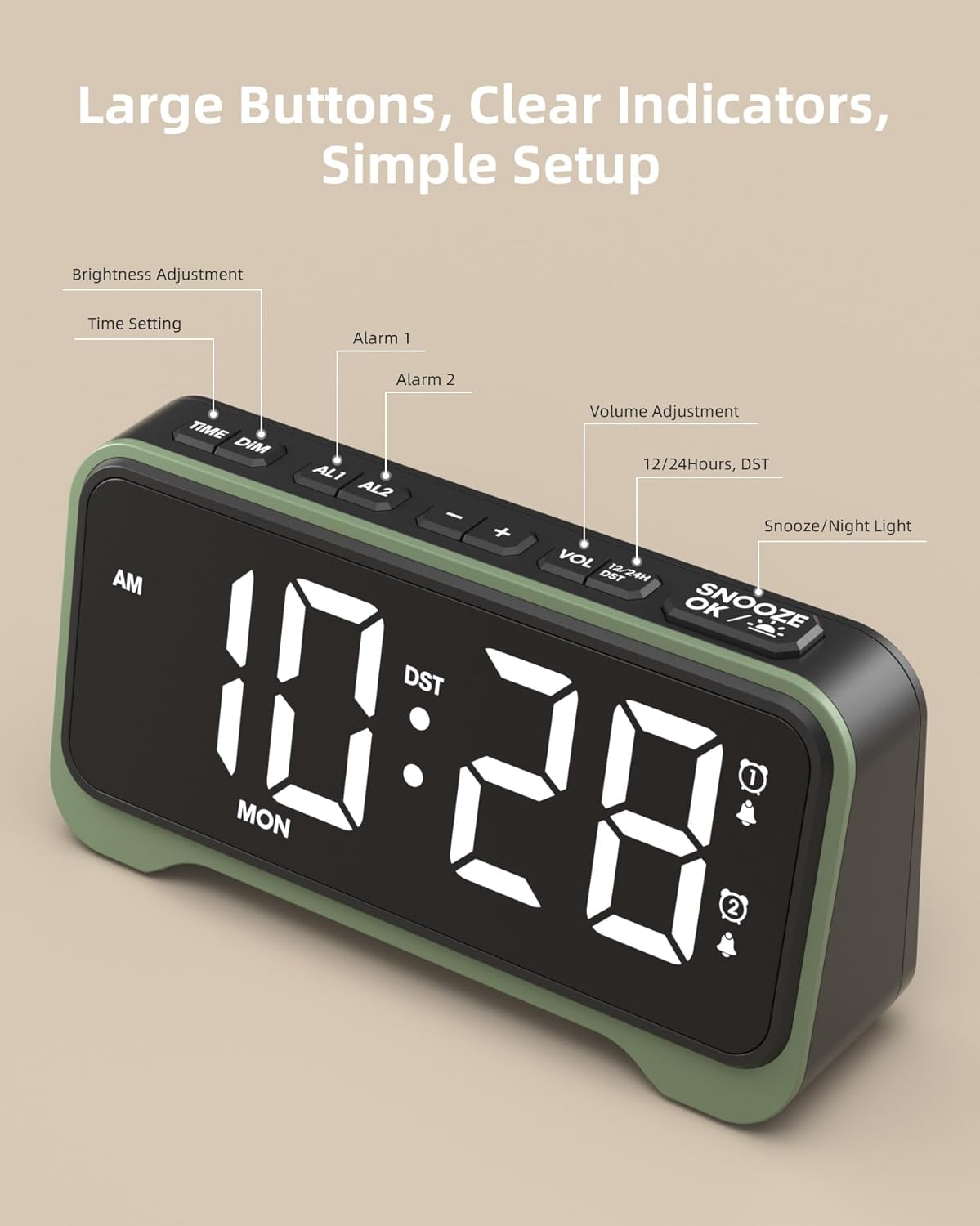
Obrázek: Nahoře view of the alarm clock highlighting the control buttons: TIME/DIM, AL1, AL2, -, +, VOL, 12/24H/DST, and SNOOZE/OK/Light.
Přední displej:
- Large LED Digits: Displays time, AM/PM indicator, and day of the week.
- Indikátory alarmu: Ikony pro Budík 1 a Budík 2.
- Indikátor DST: Shows when Daylight Saving Time is active.

Obrázek: Detailní záběr view of the alarm clock's large 7.5-inch display, emphasizing its clear and bold digits for easy readability.
Horní tlačítka:
- TIME/DIM: Press to set time; long press to adjust display brightness.
- AL1 / AL2: Press to set Alarm 1 or Alarm 2; long press to enable/disable alarms.
- - / +: Adjust values during setting; adjust volume during normal operation.
- VOL: Press to cycle through volume levels.
- 12/24H / DST: Press to switch between 12-hour and 24-hour format; long press to activate/deactivate DST.
- SNOOZE / OK / Light: Press to snooze alarm; press to confirm settings; long press to activate/deactivate night light.
Zadní panel:
- Port DC IN: Pro připojení napájecího adaptéru.
- Výstupní port USB-A: Pro nabíjení externích zařízení.
- Výstupní port USB-C: Pro nabíjení externích zařízení.
- Přihrádka na baterie: For 2 x AAA batteries (backup only).
- Alarm Mode Switches: Sliders for setting alarm frequency (MO-SO, MO-FRI, SA-SO).
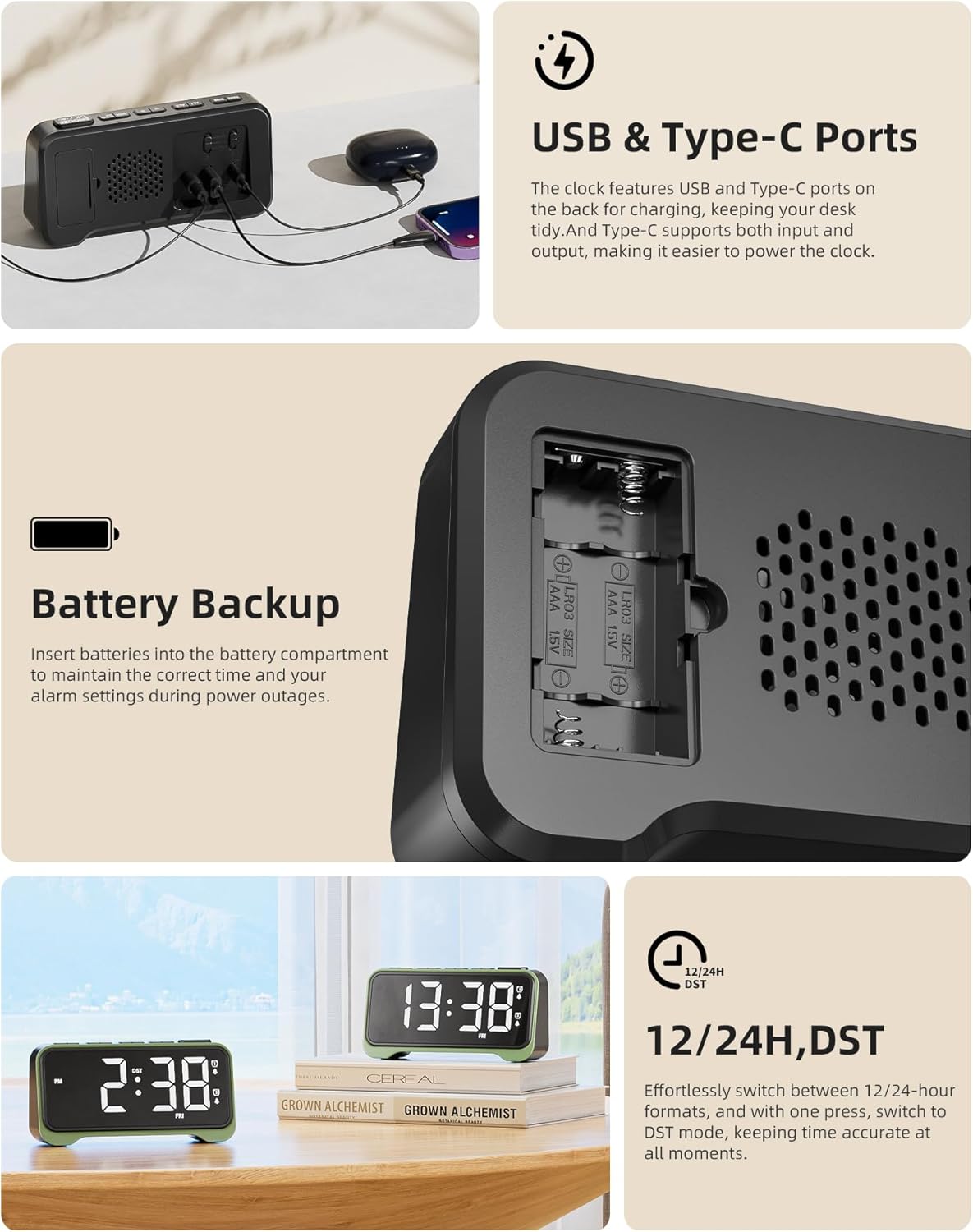
Image: A composite image showing the rear of the alarm clock with its USB and Type-C charging ports, the battery backup compartment, and a close-up of the alarm mode switches.
Nastavení
- Připojte napájení: Insert the DC plug of the power adapter into the DC IN port on the back of the alarm clock, then plug the adapter into a standard wall outlet. The display will light up.
- Instalace záložní baterie (volitelné, ale doporučené): Open the battery compartment on the back and insert 2 x AAA batteries (not included), observing the correct polarity (+/-). These batteries will preserve time and alarm settings during a power outage, but will not power the display or alarm sound.
Návod k obsluze
Nastavení času
- Stiskněte a podržte TIME/DIM tlačítko, dokud nezačnou blikat číslice hodin.
- Použijte + or - tlačítka pro nastavení hodiny.
- Stiskněte tlačítko TIME/DIM znovu stiskněte tlačítko pro přechod na nastavení minut. Použijte + or - upravit minuty.
- Stiskněte tlačítko TIME/DIM button again to move to the day of the week setting. Use + or - upravit den.
- Stiskněte tlačítko SNOOZE/OK/Light tlačítko pro potvrzení a ukončení režimu nastavení času.
Nastavení alarmů (Alarm 1 a Alarm 2)
The clock features two independent alarms. The process is identical for both.
- Stiskněte tlačítko AL1 or AL2 tlačítko. Čas budíku bude blikat.
- Použijte + or - tlačítka pro nastavení hodiny budíku.
- Stiskněte tlačítko AL1 or AL2 button again to move to the alarm minute setting. Use + or - upravit minuty.
- Stiskněte tlačítko SNOOZE/OK/Light button to confirm the alarm time. The corresponding alarm icon will appear on the display, indicating it is active.
- To disable an alarm, press and hold the AL1 or AL2 tlačítko, dokud ikona alarmu nezmizí z displeje.

Image: Visual representation of the dual alarm feature, showing two different alarm settings (e.g., 7:30 AM and 9:30 AM) and the physical switches on the back for setting alarm frequency (Mon-Sun, Mon-Fri, Sat-Sun).
Setting Alarm Frequency (Weekend Mode)
On the back of the alarm clock, there are physical switches for each alarm (AL1 and AL2) to select the alarm frequency:
- MO-SO (Monday-Sunday): Budík zvoní každý den.
- MO-FRI (Monday-Friday): Alarm sounds only on weekdays.
- SA-SO (Saturday-Sunday): Alarm sounds only on weekends.
Nastavení jasu displeje
The clock has 7 brightness levels for the main display.
- Stiskněte a podržte TIME/DIM button during normal time display. The brightness will cycle through the levels. Release the button when your desired brightness is reached.
Nastavení hlasitosti budíku
The alarm volume can be set to 5 levels (76 dB, 83 dB, 90 dB, 100 dB, 110 dB).
- Stiskněte tlačítko VOL button repeatedly to cycle through the 5 volume levels. The current volume level will be briefly displayed.

Image: The alarm clock on a surface, illustrating its capability as a loud alarm clock suitable for heavy sleepers, with 5 volume levels up to 110 dB.
Funkce Snooze
- Když zazvoní budík, stiskněte velké SNOOZE/OK/Light button to activate the snooze function. The alarm will pause for a few minutes (default snooze time is typically 9 minutes, refer to product specifics if different) and sound again.
- To turn off the alarm completely, press any other button (e.g., AL1, AL2, TIME/DIM) or let it ring for its full duration.
Funkce nočního světla
The clock features an integrated night light at the bottom with 3 adjustable brightness levels.
- Stiskněte a podržte SNOOZE/OK/Light button to turn the night light ON.
- Pokračujte ve stisknutí a podržení tlačítka SNOOZE/OK/Light button to cycle through the 3 brightness levels and OFF. Release the button at your desired setting.

Image: Two ROCAM Digital Alarm Clocks on a bedside table, one with its warm night light glowing, illustrating its use for gentle illumination.
Using USB/Type-C Charging Ports
The clock is equipped with a USB-A and a USB-C output port on the back for convenient charging of your mobile devices.
- Simply connect your device's charging cable to the appropriate USB-A or USB-C port on the back of the alarm clock.
- Ensure the alarm clock is powered via the main adapter for these ports to function.
12/24 Hour Format and Daylight Saving Time (DST)
- 12/24hodinový formát: Stiskněte tlačítko 12/24H/DST tlačítko pro přepínání mezi 12hodinovým (s indikátorem AM/PM) a 24hodinovým formátem času.
- Letní čas (DST): Stiskněte a podržte 12/24H/DST button to activate or deactivate DST. When active, the DST indicator will appear on the display, and the time will adjust by one hour.
Údržba
- Hodiny čistěte měkkým, suchým hadříkem. Nepoužívejte abrazivní čisticí prostředky ani rozpouštědla.
- Chraňte hodiny před přímým slunečním zářením, extrémními teplotami a vysokou vlhkostí.
- Ensure proper ventilation around the clock, especially if using the charging ports frequently.
- If not using the clock for an extended period, remove the AAA backup batteries to prevent leakage.
Odstraňování problémů
| Problém | Možná příčina / řešení |
|---|---|
| Displej hodin je prázdný. |
|
| Alarm se nespustí. |
|
| Čas je po výpadku proudu nesprávnýtage. |
|
| USB/Type-C charging ports not working. |
|
Specifikace
| Značka | ROCAM |
| Číslo modelu | CR1028E |
| Barva | Černý |
| Rozměry produktu | 16.9 x 3.81 x 8.6 cm |
| Hmotnost položky | 200 g |
| Materiál | Plast |
| Typ zobrazení | LED |
| Zdroj napájení | Napájení ze sítě |
| Zálohování baterie | 2 x AAA baterie (nejsou součástí balení) |
| Hlasitost alarmu | Adjustable (76-110 dB) |
| Speciální funkce | Loud Alarm, Snooze function, Large display, DST function, Dual Alarms, Weekend Mode, USB/Type-C Charging Ports, Night Light |
Záruka a podpora
ROCAM products are designed for reliability and performance. For warranty information or technical support, please refer to the contact details provided with your purchase or visit the official ROCAM webstránky. Uschovejte si prosím doklad o koupi pro případ reklamace.
For further assistance, you may contact ROCAM customer service through the details found on their Amazon store page: ROCAM Store.


