1. Úvod
Thank you for choosing the ADE CK2406-2 Radio-Controlled Digital Projection Alarm Clock. This device offers precise timekeeping, temperature monitoring, and convenient projection features to enhance your daily routine. Please read this manual carefully to ensure proper setup and operation of your new alarm clock.
2. Obsah balení
- ADE CK2406-2 Projection Alarm Clock
- External Wireless Sensor
- Napájecí kabel (síťový adaptér)
- 1 x baterie CR2032 (předinstalovaná pro záložní napájení)
- 2 x AAA Batteries (for external sensor)
- Uživatelská příručka (tento dokument)
3. Konec produktuview
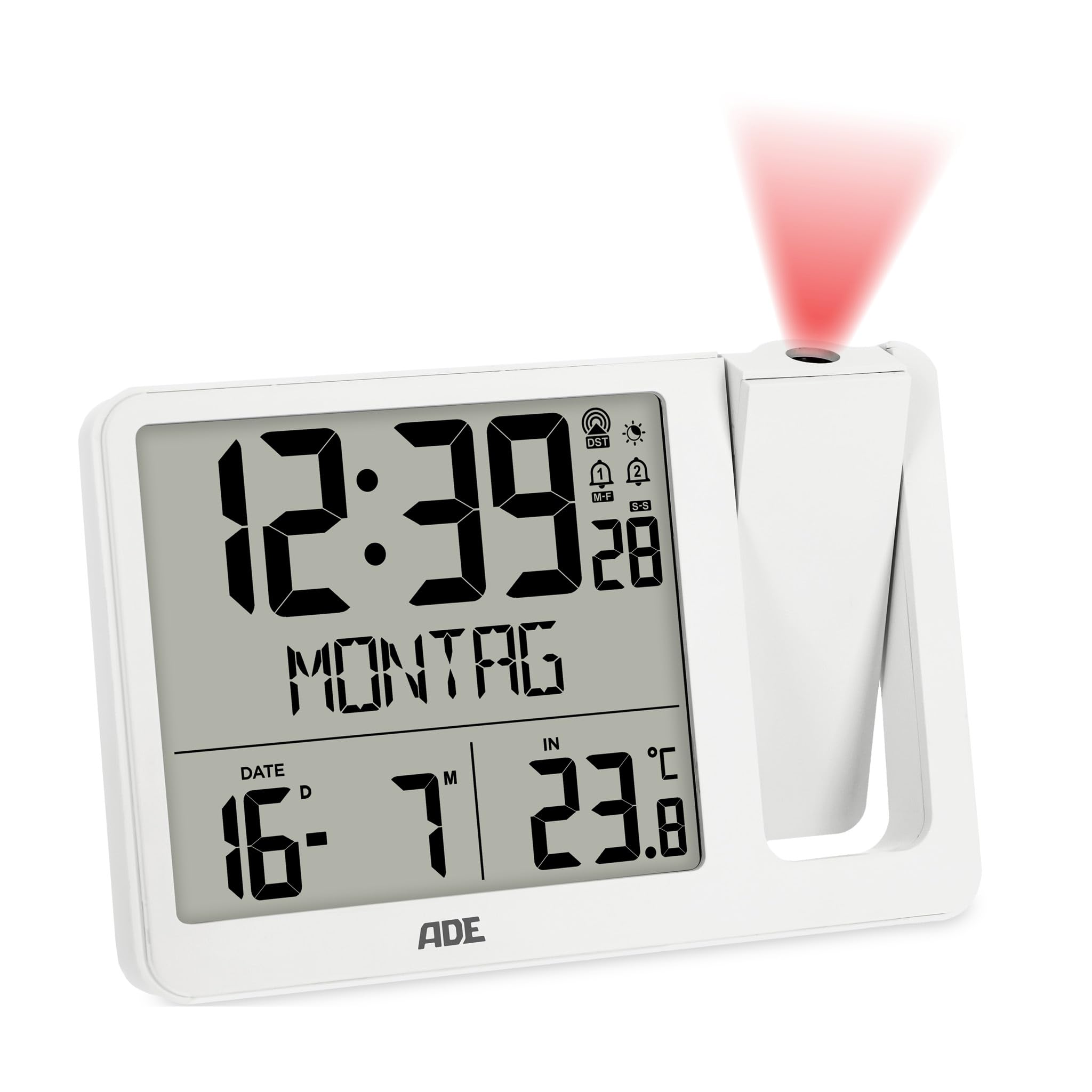
Obrázek 3.1: Přední strana view of the ADE CK2406-2 Projection Alarm Clock, showing the main unit with its large LCD display and the separate external sensor.
3.1 Hlavní jednotka
- LCD displej: Large screen (9.4 x 8.2 cm) showing time, date, day of the week, and temperature.
- Projekční rameno: Adjustable arm for projecting time and temperature onto a wall or ceiling. Can be rotated 180 degrees.
- Ovládací tlačítka: Located on the unit for setting time, alarms, display brightness, and other functions.
- USB nabíjecí port: Pro nabíjení mobilních zařízení.
- Příkon: Pro připojení síťového adaptéru.
- Přihrádka na baterie: Pro záložní baterii CR2032.
3.2 Externí senzor
- Teplotní senzor: Měří venkovní teplotu.
- Přihrádka na baterie: Pro 2 baterie typu AAA.
- Ukazatel převodovky: Light indicating data transmission.
4. Nastavení
4.1 Napájení hlavní jednotky
- Insert the pre-installed CR2032 battery into the main unit's battery compartment. This battery serves as a backup for time settings during power outages.
- Connect the provided power cable to the DC input port on the alarm clock and then plug it into a standard electrical outlet.
- The display will light up, and the clock will begin searching for the DCF radio signal to set the time automatically. This process may take several minutes.
4.2 Installing and Pairing the External Sensor
- Open the battery compartment of the external sensor.
- Insert the 2 x AAA batteries, ensuring correct polarity (+/-).
- Close the battery compartment. The sensor will automatically attempt to pair with the main unit.
- Place the external sensor in a sheltered outdoor location, away from direct sunlight and rain, to ensure accurate temperature readings.
- The main unit will display the outdoor temperature once successfully paired. If pairing fails, refer to the troubleshooting section.
5. Návod k obsluze
5.1 Nastavení času a data
The clock automatically sets the time via the DCF radio signal. If manual adjustment is needed:
- Stiskněte a podržte tlačítko „SET“ pro vstup do režimu nastavení času.
- Use the '+' or '-' buttons to adjust hours, minutes, year, month, and day.
- Press 'SET' again to confirm each setting and move to the next.
- The day of the week will automatically update based on the date. The day of the week can be displayed in 7 languages.
5.2 Alarm Settings (Alarm 1 & Alarm 2)
Zařízení má dva nezávislé časy buzení.
- Press the 'ALARM' button to select Alarm 1 or Alarm 2.
- Press and hold the 'ALARM' button to enter alarm setting mode for the selected alarm.
- Use the '+' or '-' buttons to set the desired alarm hour and minute.
- Press 'ALARM' to confirm.
- To activate/deactivate an alarm, press the 'ALARM' button repeatedly until the alarm icon appears/disappears on the display.
5.3 Funkce odložení
When an alarm sounds, press the 'SNOOZE' button (usually a large button on top) to temporarily silence the alarm. The alarm will sound again after a few minutes (default snooze time is typically 5-10 minutes).
5.4 Projekční funkce
- Adjust the projection arm to direct the projection onto a wall or ceiling.
- Rotate the projection lens to adjust the focus and clarity of the projected image.
- The projection can be rotated 180 degrees for optimal viewIng.
- Press the 'PROJECTION' button (or similar) to toggle the projection on/off or to switch between displaying time, indoor temperature, or outdoor temperature.
5.5 Jas displeje
The LCD display has automatic brightness control and three manual brightness levels.
- Automatický jas: Jas displeje se automaticky upravuje na základě okolních světelných podmínek.
- Manuální nastavení jasu: Press the 'BRIGHTNESS' button (or similar) to cycle through three manual brightness levels.
5.6 Zobrazení teploty
The clock displays both indoor and outdoor temperatures.
- Press the 'TEMP' button (or similar) to switch between indoor and outdoor temperature display on the main screen.
- The device records daily minimum and maximum temperature values, which reset at midnight.
5.7 USB nabíjení
Connect your mobile device to the USB charging port on the alarm clock to charge it. Note that this port is for charging only and does not transfer data.
6. Údržba
- Clean the alarm clock and external sensor with a soft, dry cloth. Do not use abrasive cleaners or solvents.
- Nevystavujte hlavní jednotku přímému slunečnímu záření, extrémním teplotám nebo vysoké vlhkosti.
- Ensure the external sensor is placed in a location protected from direct weather elements.
- Replace batteries in the external sensor (2 x AAA) and the main unit's backup (1 x CR2032) as needed.
7. Řešení problémů
- No Display / Power: Ensure the power cable is securely connected to both the alarm clock and the power outlet. Check the outlet for power.
- Nesprávný čas: Ensure the clock is receiving a clear DCF radio signal. Place the unit near a window if possible. Manual time setting is also available.
- External Sensor Not Displaying Temperature: Check if the external sensor batteries are correctly installed and not depleted. Ensure the sensor is within range of the main unit and free from obstructions. Re-pair the sensor if necessary (refer to setup section).
- Projekce nejasná: Adjust the focus ring on the projection arm. Ensure the projection arm is correctly angled towards the desired surface.
- Alarm nezní: Verify that the alarm is activated (alarm icon visible on display) and the volume is not set to minimum (if adjustable).
8. Specifikace
| Funkce | Detail |
|---|---|
| Značka | ADE |
| Číslo modelu | CK2406-2 |
| Barva | Bílý |
| Rozměry produktu (D x Š x V) | 15.4 x 3.81 x 10.4 cm |
| Hmotnost | 410 gramů |
| Materiál | Akrylonitrilbutadienstyren (ABS) |
| Typ zobrazení | Digitální LCD |
| Zdroj napájení | Elektrický kabel (AC adaptér) |
| Záložní baterie | 1 x CR2032 (součástí balení) |
| External Sensor Batteries | 2 x AAA (součástí balení) |
| Speciální funkce | Temperature display, Calendar display, Dual Alarms, Snooze, Summer time, USB Charging Port, Radio-controlled time, Projection |
9. Záruka a podpora
For warranty information or technical support, please refer to the documentation provided with your purchase or contact ADE customer service through the retailer where the product was purchased. Please retain your proof of purchase for any warranty claims.


