Zavedení
The ExtreLife Keychain is a versatile and durable key finder designed to help you keep track of your valuable items. Compatible with Apple's Find My network, it offers precise location tracking, sound alerts, and left-behind notifications. Its robust metal construction, IP67 waterproof rating, and rechargeable battery ensure long-lasting performance. Additionally, it features a convenient built-in bottle opener and a carabiner design for easy attachment to various items.
Klíčové vlastnosti
- Works with Apple Find My: Seamlessly integrates with the Apple Find My network for precise location tracking of your items. (Note: Compatible with iPhone 8 series or later running iOS 14.5 or later.)
- Hlasitý reproduktor: Play a sound from the keychain to easily locate misplaced items within Bluetooth range (up to 50m/160ft).
- Připomenutí ponechání pozadu: Receive instant notifications on your iPhone when the keychain goes out of Bluetooth range, preventing accidental loss.
- Odolná konstrukce: Crafted from rugged stainless steel and metal cases, offering excellent protection against drops and scratches.
- Dobíjecí baterie: Equipped with a long-lasting rechargeable battery that provides up to 4 months of usage on a single charge. Includes a Type-C charging cable.
- Multifunkční design: Features a built-in bottle opener and a carabiner for easy attachment to keys, luggage, backpacks, pet collars, and more.
- IP67 voděodolný: Certified IP67 rating ensures complete protection against dust and immersion in water up to 3 feet for 30 minutes.
Vizuální konecview

The ExtreLife Keychain, showcasing its compact design and integration with the Apple Find My app for easy tracking.

Detailní view of the keychain's robust all-metal construction, dual key rings, and integrated bottle opener.
Produktová videa
This video demonstrates the ExtreLife Keychain's core functionalities, including its compatibility with Apple Find My and the heavy-duty bottle opener feature.
Learn how the ExtreLife Keychain adds an extra level of convenience to your daily life, highlighting its various practical applications.
Průvodce nastavením
1. Počáteční poplatek
Before first use, fully charge your ExtreLife Keychain using the provided Type-C cable. The charging port is located on the side of the device. A full charge can last up to 4 months.

The keychain features a convenient Type-C charging port, eliminating the need for disposable batteries.
2. Zapnout
Short press the power button once to turn on the keychain. A beep sound will indicate it is powered on.
3. Pairing with Apple Find My
- Ensure your iPhone is set up for Find My (iOS 14.5 or later) and Two-Factor Authentication is turned on for your Apple ID.
- Otevřete Najít můj aplikace na vašem iPhone.
- V Položky klepněte na Add New Item.
- Klepněte Další podporovaná položka. Your iPhone will search for your key.
- Once your key is detected, tap Připojit.
- Follow the onscreen steps to name your item and register it to your Apple ID.
- Ensure your key appears in the Položky tab. If not, perform a factory reset on the key (press the power button 5 times in a row) and try again.
This video provides a step-by-step guide on how to pair your ExtreLife Key Finder with your Apple device using the Find My app.
Návod k obsluze
1. Vyhledání vaší položky
- Otevřete Najít můj aplikace
- Klepněte na Položky tab.
- Tap your key on the map.
- To play a sound alert: Tap Přehrát zvuk. The keychain will emit a loud sound to help you locate it.
- To get directions: Tap Pokyny to open the Maps app and navigate to the last known location of your item.
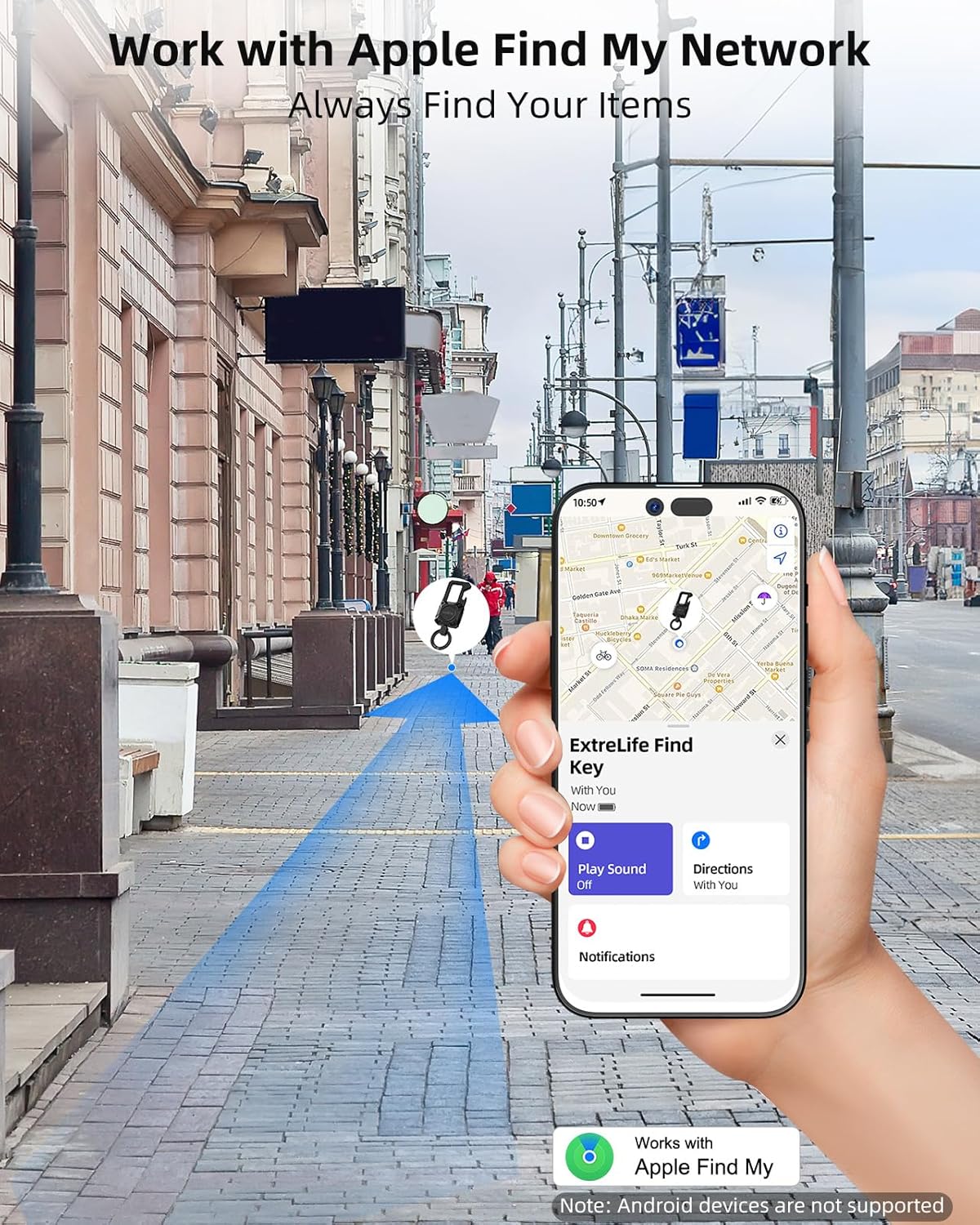
Utilize the Apple Find My network to track your keychain's location globally or locally.
2. Left-Behind Notifications
Zajistěte
Související dokumenty - MFK02
 |
Uživatelská příručka stojanu na peněženku ExtreLife Find Komplexní uživatelská příručka pro stojánek na peněženku ExtreLife Find (model MF05). Tato příručka podrobně popisuje nastavení, párování s Apple Find My, lokalizaci, nabíjení přes MagSafe, bezpečnostní opatření a shodu s předpisy FCC pro vaše příslušenství k peněžence. |
 |
Uživatelská příručka k držáku peněženky ExtreLife MF41 Uživatelská příručka k držáku peněženky ExtreLife MF41 s podrobným popisem nastavení, párování s aplikací Apple Find My, lokalizace, nabíjení a bezpečnostních informací. |
 |
Uživatelská příručka k Miroddi MFK02 Find Key | Průvodce nastavením, párováním a sledováním Komplexní uživatelská příručka pro klíč Miroddi MFK02 Find Key. Naučte se, jak jej nastavit, spárovat s iPhonem, najít klíč a porozumět bezpečnostním varováním. Zahrnuje informace o shodě s předpisy FCC. |