1. Úvod
This manual provides essential information for the safe and efficient use of your BenQ GW2791 27-inch Full HD 100Hz IPS Eye-Care Monitor. Please read it thoroughly before operating the device and retain it for future reference. The BenQ GW2791 is designed to deliver stunning visuals with advanced eye-care features for enhanced comfort during extended use.
2. Bezpečnostní informace
- Zdroj napájení: Use only the power adapter supplied with the monitor. Ensure the power outlet meets the specified voltage požadavky.
- Větrání: Do not block ventilation openings. Maintain adequate space around the monitor for proper airflow to prevent overheating.
- Umístění: Place the monitor on a stable, flat surface. Avoid placing it in direct sunlight, near heat sources, or in environments with excessive dust or humidity.
- Čištění: Disconnect the power cord before cleaning. Use a soft, dry cloth to clean the screen and exterior. Avoid liquid cleaners or abrasive materials.
- Zacházení: S monitorem zacházejte opatrně. Zabraňte jeho pádu nebo silným nárazům.
- Demontáž: Nepokoušejte se monitor rozebírat ani opravovat sami. Veškerý servis svěřte kvalifikovanému servisnímu personálu.
3. Obsah balení
Ověřte, zda jsou v balení přítomny všechny položky. Pokud některé položky chybí nebo jsou poškozené, obraťte se na prodejce.
- Monitor BenQ GW2791
- Stojan na monitor (základna a krk)
- HDMI kabel
- Napájecí adaptér
- Napájecí kabel
- Stručný průvodce / Uživatelská příručka
Video: Unboxing and First Impressions of the BenQ Eye Care Monitor. This video demonstrates the contents of the package and initial setup steps.
4. Nastavení
4.1 Sestavení stojanu monitoru
- Opatrně vyjměte komponenty monitoru a stojanu z obalu.
- Attach the stand neck to the monitor panel by aligning the connectors and pressing firmly until it clicks into place.
- Připevněte základnu stojanu k krku stojanu. Zajistěte ji pojistným šroubem umístěným na spodní straně základny.
- Sestavený monitor umístěte na stabilní, rovný povrch.
Video: Demonstration of monitor stand assembly and initial power-on. This video illustrates the physical setup process.
4.2 Propojovací kabely
- Connect the power cord to the power adapter, then connect the adapter to the monitor's power input. Plug the power cord into a wall outlet.
- Connect one end of the HDMI cable to the HDMI port on your computer and the other end to an available HDMI port on the monitor. Alternatively, use a DisplayPort cable for DisplayPort connections.
- If desired, connect external audio devices to the audio output port on the monitor.
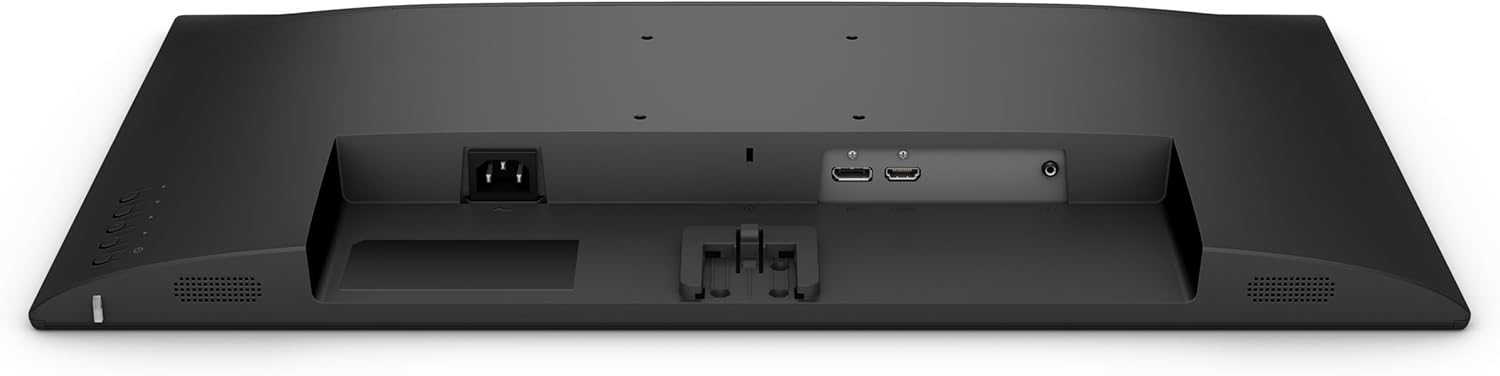
Obraz: Zadní view of the BenQ GW2791 monitor, highlighting the HDMI, DisplayPort, and power input connections.
5. Návod k obsluze
5.1 Zapnutí/vypnutí
Stisknutím tlačítka napájení, které se nachází v pravé dolní části monitoru, jej zapnete nebo vypnete. Kontrolka napájení se rozsvítí, když je monitor aktivní.
5.2 Navigace v nabídce OSD (On-Screen Display)
The OSD menu allows you to adjust various monitor settings. Use the joystick or buttons located on the bottom right of the monitor to navigate the menu:
- Stiskněte: Zadat/Potvrdit výběr.
- Nahoru/dolů: Procházejte možnostmi nabídky.
- Vlevo/vpravo: Upravte hodnoty nebo se pohybujte mezi podnabídkami.
5.3 Nastavení klíčů
- Jas/kontrast: Upravte celkový jas a kontrast displeje.
- Barevné režimy: Select from various preset color modes (e.g., Standard, Movie, ePaper, FPS) to optimize the display for different content types.
- Výběr vstupu: Ruční přepínání mezi vstupy HDMI a DisplayPort.
- Funkce péče o zrak: Access and configure Flicker-Free, Low Blue Light Plus, and Eyesafe 2.0 settings.
6. Funkce Overview
The BenQ GW2791 monitor incorporates several technologies to enhance visual quality and user comfort.
- Panel IPS: Provides accurate color and image reproduction with wide viewing angles (99% sRGB color space).
- Obnovovací frekvence 100Hz: Offers a smoother visual experience, reducing motion blur and improving responsiveness.
- Ultrathin Bezel Design: Minimizes distractions and allows for seamless multi-monitor setups.
- Režim elektronického papíru: Optimizes display settings for reading, reducing eye strain during long sessions by simulating a paper-like appearance.
- TUV-Certified Eye-Care: Certified by TUV Rheinland for eye-friendly technologies.
- Technologie Flicker-Free: Eliminates screen flickering at all brightness levels, reducing eye fatigue.
- Nízká hladina modrého světla Plus: Filters out harmful blue-violet light while maintaining vivid colors, protecting your eyes from potential damage.
- Eyesafe 2.0: Ensures reduced blue light emission with vivid color retention.
- Software Eye-CareU: Integrated software for easy access and customization of eye-care features.

Obraz: The BenQ GW2791 monitor showcasing its IPS panel, 99% sRGB color space, TUV certification, and Eye-Care features for stunning visuals.

Obraz: Visual explanation of Low Blue Light Plus technology, demonstrating how it filters harmful blue-violet light to protect eyes.
7. Údržba
- Čištění obrazovky: Jemně otřete obrazovku měkkým hadříkem, který nepouští vlákna. V případě odolných skvrn lehceampen the cloth with water or a specialized screen cleaner (ensure it's alcohol-free) and wipe carefully.
- Čištění exteriéru: K čištění monitoru používejte měkký, suchý hadřík casing. Avoid harsh chemicals that may damage the finish.
- Skladování: Pokud monitor delší dobu nepoužíváte, skladujte jej na chladném a suchém místě, mimo dosah přímého slunečního záření a extrémních teplot.
8. Řešení problémů
| Problém | Možná příčina | Řešení |
|---|---|---|
| Na obrazovce není žádný obraz | Odpojený napájecí kabel; Odpojený video kabel; Vybrán nesprávný vstup. | Ujistěte se, že jsou napájecí a video kabely bezpečně připojeny. V nabídce OSD vyberte správný vstupní zdroj. |
| Obraz je rozmazaný nebo zkreslený | Nesprávné rozlišení; Uvolněný videokabel. | Nastavte rozlišení displeje na 1920x1080. Zkontrolujte připojení videokabelu. |
| Obrazovka bliká | Problém s obnovovací frekvencí; Vnější rušení. | Ujistěte se, že je obnovovací frekvence nastavena na 100 Hz. Zkontrolujte, zda se v blízkosti nenacházejí elektronická zařízení, která by způsobovala rušení. |
| Žádný zvuk | Odpojený audio kabel; Hlasitost příliš nízká; Ztlumený zvuk. | Check audio cable connections. Adjust volume via OSD or connected device. Ensure not muted. |
9. Specifikace
| Funkce | Specifikace |
|---|---|
| Název modelu | GW2791 |
| Velikost obrazovky | 27 palce |
| Typ panelu | IPS |
| Rezoluce | 1920 × 1080 (FHD 1080p) |
| Obnovovací frekvence | 100 Hz |
| Poměr stran | 16:9 |
| Barevný gamut | 99% sRGB |
| Povrch obrazovky | Matný |
| Konektivita | HDMI, DisplayPort |
| Funkce péče o zrak | TUV-Certified, Flicker-Free, Low Blue Light Plus, Eyesafe 2.0, Eye-CareU |
| Hmotnost položky | 12.14 libry |
| Rozměry produktu | 18 x 7 x 24 palce |
| Barva | Černý |
10. Záruka a podpora
BenQ provides a limited warranty for its products. Please refer to the warranty card included in your package or visit the official BenQ webPodrobné záruční podmínky platné pro váš region naleznete na webových stránkách.
Pro technickou podporu, registraci produktu nebo dotazy ohledně servisu navštivte prosím Obchod BenQ na Amazonu or the official BenQ support webmísto.