1. Úvod
This manual provides instructions for the installation, operation, and maintenance of your SOUNDKITS Single Din Touchscreen Radio. This device integrates modern infotainment features such as Apple CarPlay, Android Auto, Bluetooth connectivity, and a 6.5-inch IPS display into a standard single DIN form factor, suitable for upgrading classic vehicles.

Image: The SOUNDKITS Single Din Touchscreen Radio unit, featuring a 6.5-inch IPS display showing the Apple CarPlay interface, accompanied by its infrared remote control.
2. Bezpečnostní informace
Read all instructions carefully before installation and operation. Failure to follow these instructions may result in injury or damage to the device or vehicle.
- Doporučená profesionální instalace: Due to the complexity of car audio systems, professional installation is advised.
- Zdroj napájení: Připojujte přístroj pouze k 12V stejnosměrnému napájení se záporným uzemněním.
- Zapojení: Ensure all wiring is correctly connected to prevent short circuits and damage. Insulate all exposed wires.
- Bezpečnost jízdy: Neobsluhujte jednotku způsobem, který by vás rozptyloval od řízení. Vždy upřednostňujte bezpečnost silničního provozu.
- Teplota: Nevystavujte jednotku extrémním teplotám nebo přímému slunečnímu záření po delší dobu.
- vlhkost: Udržujte přístroj v suchu. Vystavení vlhkosti může způsobit poruchu nebo úraz elektrickým proudem.
3. Obsah balení
Ověřte, zda jsou v balení přítomny všechny položky:
- Single Din CarPlay Stereo Unit
- Kabelový svazek
- Montážní sady
- IR dálkové ovládání
- Uživatelská příručka (tento dokument)
4. Konec produktuview
4.1 Ovládací prvky a porty na předním panelu
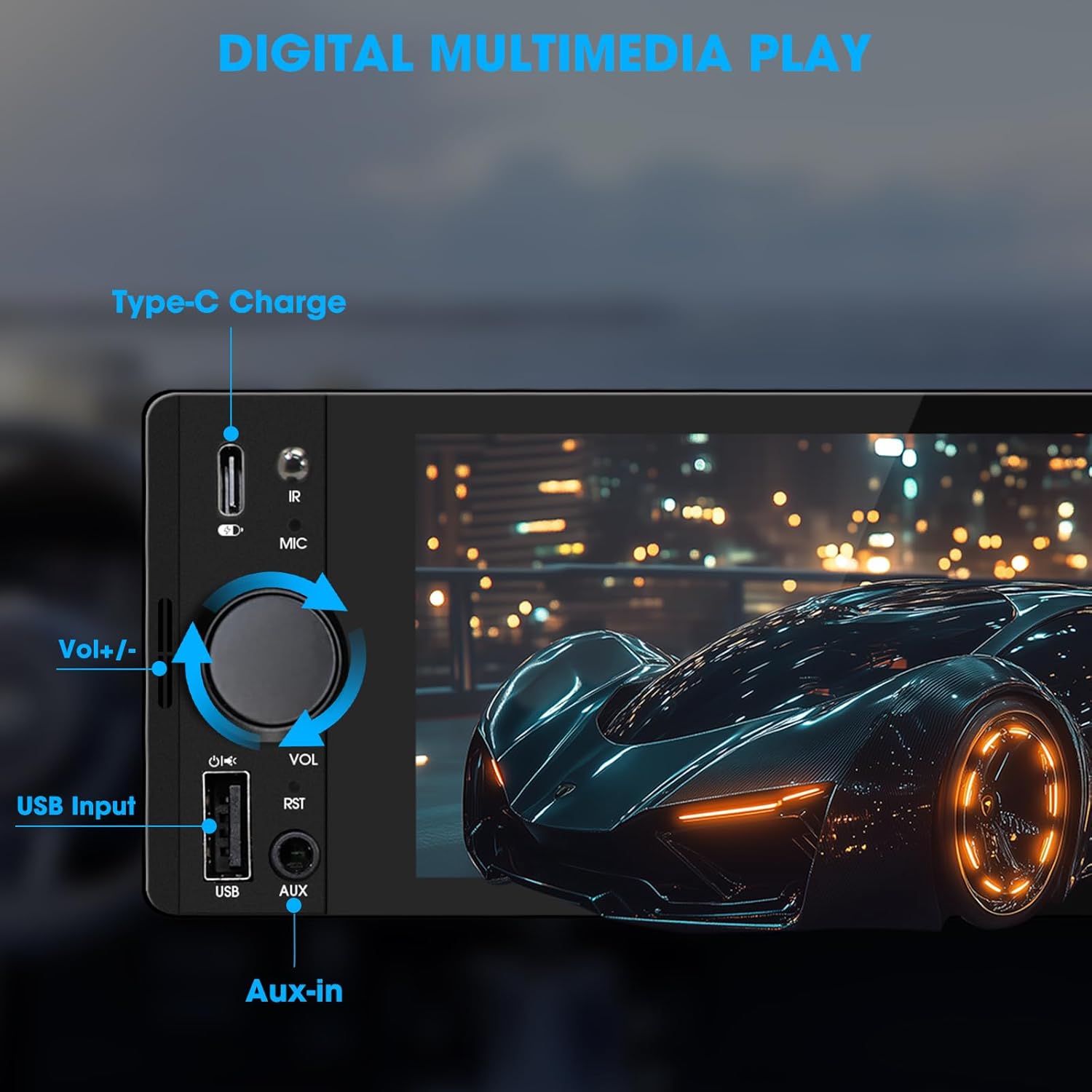
Image: Close-up of the radio's front panel, highlighting the Type-C charging port, IR receiver, microphone, volume knob, USB input, and AUX-in port.
- 6.5palcový IPS dotykový displej: Main display for all functions and interfaces.
- Ovladač hlasitosti (VOL): Otočením upravíte hlasitost. Stisknutím ztlumíte/zapnete zvuk.
- Vstup USB: For media playback, CarPlay/Android Auto connection, and phone mirroring.
- Vstup AUX: 3.5mm audio input for external audio devices.
- Nabíjecí port typu C: Provides 2.1A quick charging for compatible devices.
- Mikrofon (MIC): Vestavěný mikrofon pro hands-free hovory a hlasové příkazy.
- IR přijímač: Pro ovládání dálkovým ovládáním.
- Tlačítko Reset (RST): Small button to reset the unit (requires a thin object like a paperclip).
4.2 Připojení zadního panelu

Image: Diagram showing the rear connections of the radio, including the main wiring harness, RCA outputs, external microphone jack, and radio antenna input.
- Main Wiring Harness Connector: Connects to the vehicle's power, speaker, and control wires.
- RCA Audio Outputs (L-OUT, R-OUT): Pro připojení externích ampzáchranáři.
- RCA Video Outputs (V-OUT1, V-OUT2): For connecting external monitors (e.g., headrest monitors).
- Zadníview Vstup kamery (CAMIN): RCA vstup pro zadní reproduktoryview fotoaparát.
- Konektor pro externí mikrofon: For connecting an optional external microphone.
- Vstup rádiové antény: Connects to the vehicle's AM/FM antenna.
5. Nastavení a instalace
This section outlines the general steps for installing the SOUNDKITS Single Din Touchscreen Radio. Professional installation is recommended.
5.1 Kontrolní seznam před instalací
- Před zahájením instalace se ujistěte, že je baterie vozidla odpojena.
- Confirm the vehicle has a standard single DIN slot.
- Gather necessary tools (wire strippers, crimpers, electrical tape, screwdriver).

Image: A visual comparison showing older car radios replaced by the modern SOUNDKITS Single Din Touchscreen Radio, demonstrating the aesthetic upgrade.
5.2 Zapojení kabeláže
Refer to the provided wiring harness diagram for specific connections. The harness uses universal ISO interface and wire color coding.
| Barva drátu | Funkce |
|---|---|
| Žluť | Konstantní 12V (baterie) |
| Červený | Accessory 12V (Ignition) |
| Černý | Země (GND) |
| Modrý | Anténa/AmpDálkové zapnutí Lifier |
| Pomerančový | Illumination/Dimmer |
| Hnědý | Ovládání na volantu (SWC) |
| Zelená/Bílá | Levý zadní reproduktor (+) |
| Zelená/Černá | Levý zadní reproduktor (-) |
| Fialová / bílá | Pravý zadní reproduktor (+) |
| Fialová/Černá | Pravý zadní reproduktor (-) |
| Bílé / bílé | Levý přední reproduktor (+) |
| Bílá/Černá | Přední levý reproduktor (-) |
| Šedá/Bílá | Pravý přední reproduktor (+) |
| Šedá/Černá | Pravý přední reproduktor (-) |
| Reverse (often Pink/Brown) | Reverse Gear Signal (for rearview Fotoaparát) |
Poznámka: Always cross-reference with your vehicle's specific wiring diagram and the diagram provided with the product's harness. Incorrect wiring can cause damage.
5.3 Montáž jednotky
- Secure the mounting sleeve into the vehicle's single DIN dash opening.
- Connect all necessary wiring harnesses, antenna, and any external accessories (e.g., rearview kamera, externí mikrofon).
- Carefully slide the head unit into the mounting sleeve until it locks into place.
- Znovu připojte baterii vozidla.
- Před opětovnou montáží obložení palubní desky vyzkoušejte všechny funkce.
6. Návod k obsluze
6.1 Základní obsluha
- Zapnutí/vypnutí: The unit powers on with the vehicle's ignition. Press and hold the volume knob to turn off/on the display.
- Ovládání hlasitosti: Rotate the volume knob clockwise to increase volume, counter-clockwise to decrease. Press the knob to mute/unmute.
- Rozhraní dotykové obrazovky: Navigate menus and select options by tapping or swiping on the 6.5-inch IPS touchscreen.
6.2 Připojení Bluetooth

Image: The radio's display showing a successful Bluetooth 5.3 connection to a smartphone, with music playback information visible.
- Z hlavní nabídky vyberte Bluetooth ikona.
- On your smartphone, search for available Bluetooth devices and select "SOUNDKITS" (or similar device name).
- Pokud budete vyzváni, potvrďte párovací kód na obou zařízeních.
- Once connected, you can make hands-free calls and stream audio.
6.3 Apple CarPlay a Android Auto
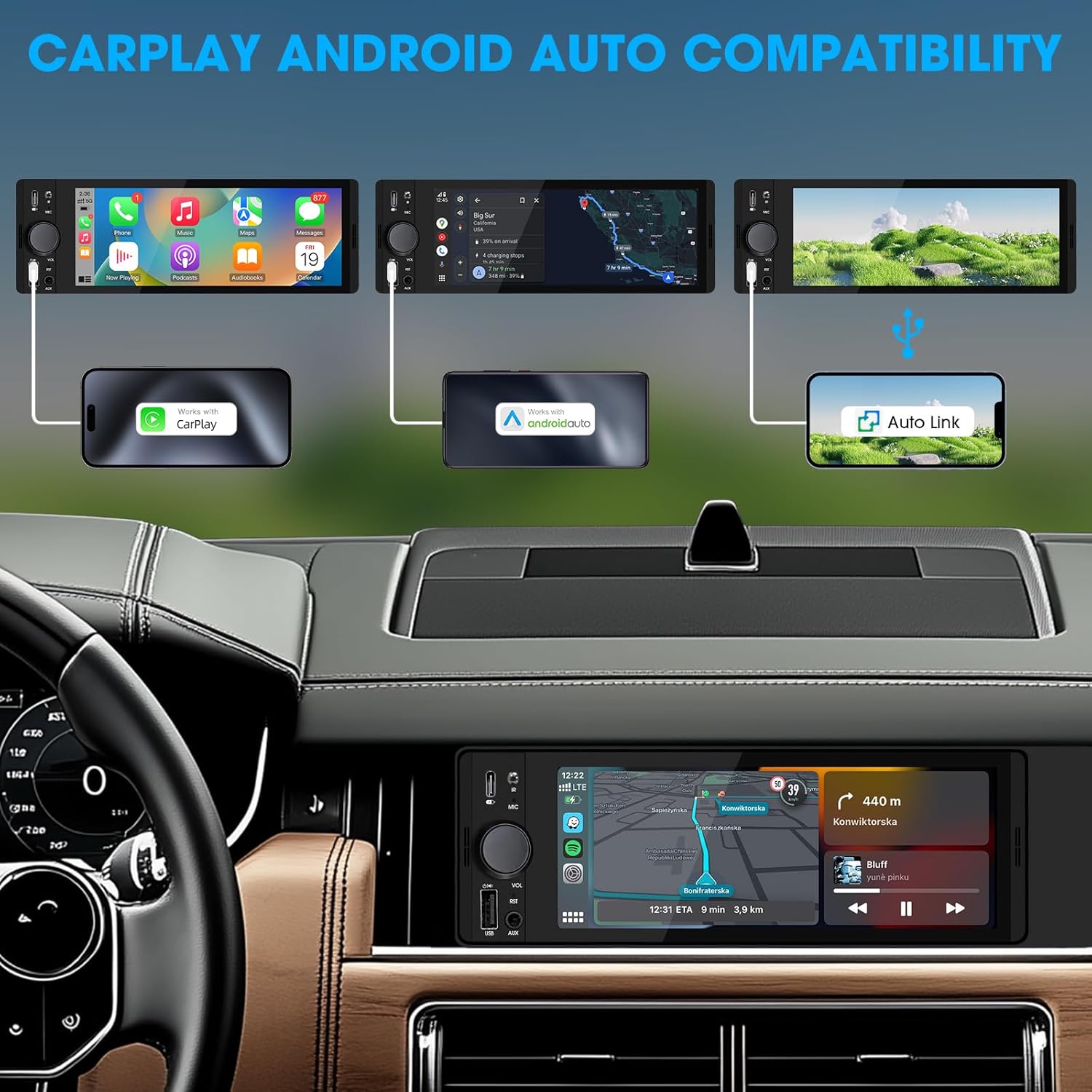
Image: An illustration demonstrating how to connect smartphones via USB for Apple CarPlay, Android Auto, and Auto Link functionality on the car stereo.
- Connect your iPhone (for CarPlay) or Android phone (for Android Auto) to the unit's USB port using a certified USB cable.
- The unit will automatically detect the connection and launch the respective interface.
- Follow any on-screen prompts on your phone or the unit to complete the setup.
- Access navigation, music, calls, and other compatible apps directly from the touchscreen.
6.4 USB Phone Mirroring
This feature allows you to display your smartphone's screen directly on the unit's display.
- Connect your smartphone to the unit's USB port.
- Select the "Phonelink" or "Mirrorlink" option from the main menu.
- Follow the on-screen instructions to establish the connection. This may require installing a specific app on your phone.
6.5 Rádio (AM/FM)

Image: The radio interface displaying AM and FM frequency ranges and signal strength, indicating available stations.
- Z hlavní nabídky vyberte Rádio ikona.
- Klepněte AM or FM to switch bands.
- Použijte Hledat buttons to automatically search for stations.
- Tap and hold a preset number to save the current station.
6.6 Media Playback (USB, AUX)
- USB: Vložte USB disk do USB portu. Jednotka automaticky detekuje a přehraje kompatibilní audio/video files. Navigovat filepomocí rozhraní na obrazovce.
- AUX: Connect an external audio device to the 3.5mm AUX-in port using an audio cable. Select the AUX source from the main menu.
6.7 Hlasové ovládání

Image: A driver interacting with the car stereo using voice commands for Siri and Google Assistant, demonstrating hands-free operation.
When connected via CarPlay or Android Auto, you can activate your phone's voice assistant (Siri or Google Assistant) by pressing the voice control button on the unit (if available) or by using the voice command phrase (e.g., "Hey Siri" or "Ok Google").
6.8 Ovládání na volantu (SWC)
Image: The steering wheel control configuration screen on the radio, showing options to program various buttons for functions like volume, track skip, and mode.
If your vehicle supports steering wheel controls, connect the SWC wire during installation. Access the Ovládání na volantu settings in the unit's menu to program the buttons to control various functions (e.g., volume, track skip, mode).
6.9 Nastavení ekvalizéru

Image: The audio equalizer settings interface, showing adjustable frequency bands and preset options, alongside a diagram of RCA audio and video outputs.
Přístup k Nastavení zvuku or EQ menu to adjust audio parameters. The unit features a 10-band equalizer with preset options (e.g., Pop, Rock, Jazz) and custom settings to tailor the sound output to your preference.
6.10 Zadníview Vstup fotoaparátu
Připojte zadní částview camera to the CAMIN RCA input. When the vehicle is shifted into reverse, the unit will automatically display the camera feed, enhancing parking safety.
7. Specifikace
| Funkce | Detail |
|---|---|
| Číslo modelu | Single Din Touchscreen Radio |
| Zobrazit | 6.5 Inch HD IPS Touch Screen (1024x600 resolution) |
| Konektivita | Bluetooth 5.3, USB, Auxiliary, Type-C (charging) |
| Integrace smartphonu | Apple CarPlay (Wired), Android Auto (Wired), Screen Mirroring |
| Zvukový výstup | 300W Peak Power, 4-CH RCA Out, 10-band EQ |
| Rádiový tuner | AM (530–1710 kHz), FM (87.5–107.9 MHz) |
| přehrávání videa | 1080p Video Playback, H.264, H.265/HEVC encoding |
| Kontrolní metody | Touchscreen, IR Remote Control, Steering Wheel Control, Voice Control |
| Rozměry | 4.5 x 7.36 x 2.4 palce (produkt) |
| Hmotnost | 2.03 libry |
| Napájení | 12V DC (záporné uzemnění) |
8. Řešení problémů
V této části naleznete běžné problémy a jejich řešení.
8.1 Bez napájení
- Zkontrolujte zapojení: Ensure the yellow (constant 12V), red (accessory 12V), and black (ground) wires are correctly connected and have proper voltage.
- pojistka: Check the fuse on the unit's wiring harness and the vehicle's fuse box. Replace if blown.
- Baterie: Ensure the vehicle's battery is charged and connected.
8.2 Žádný zvuk
- Úroveň hlasitosti: Increase the volume. Check if the unit is muted.
- Zapojení reproduktorů: Verify all speaker wires are correctly connected and not short-circuited.
- Výběr zdroje: Ensure the correct audio source (e.g., Radio, USB, Bluetooth, AUX) is selected.
- Ampživější: Pokud externí amplifier is used, ensure it is powered on and correctly wired.
8.3 CarPlay/Android Auto se nepřipojuje
- USB kabel: Use a high-quality, certified USB data cable. Faulty cables can prevent connection.
- USB port: Ensure the phone is connected to the correct USB port on the unit.
- Nastavení telefonu: Zkontrolujte nastavení telefonu a ujistěte se, že je CarPlay/Android Auto povoleno a že se může připojit k zařízení.
- Aktualizace softwaru: Ensure your phone's operating system and any relevant apps (e.g., Android Auto app) are up to date.
8.4 Dotyková obrazovka nereaguje
- Reset Unit: Use a thin object to press the RST button on the front panel to perform a soft reset.
- Cyklus napájení: Turn off the vehicle's ignition, wait a few minutes, then restart.
9. Údržba
- Čištění obrazovky: Use a soft, lint-free cloth to gently wipe the touchscreen. For stubborn marks, slightly dampOtřete hadřík vodou nebo čisticím prostředkem na obrazovky. Vyhněte se agresivním chemikáliím.
- Generální úklid: Use a dry, soft cloth to wipe the unit's body. Do not use abrasive cleaners or solvents.
- Aktualizace firmwaru: Pravidelně kontrolujte informace od výrobce webPro zajištění optimálního výkonu a kompatibility vyhledejte dostupné aktualizace firmwaru na webu.
10. Záruka a podpora
SOUNDKITS provides the following support and warranty information:
- Záruka: The product comes with a 12-month responsibility for all products.
- Free Replacement/Refund: A 90-day free replacement or refund policy is available.
- Technical Guidance & Support: Lifetime technical guidance and support are provided.
- Služby zákazníkům: Fast response within 24 hours for inquiries.
For further assistance, please contact SOUNDKITS customer support through the platform where the product was purchased or visit the official SOUNDKITS store page.
You can typically find contact information by navigating to the seller's profile on the purchase platform and selecting "Ask a question."

Image: A graphic detailing SOUNDKITS' customer service commitments: 24-hour fast response, 90-day free replacement or refund, 12-month product responsibility, and lifetime technical guidance & support.


