Zavedení
Děkuji za nákupasing the Sunbuck Mini Audio Interface and Small Amplifier bundle. This comprehensive system is designed to enhance your audio experience, whether for home entertainment, music playback, or professional recording. The bundle includes the AS-35BU Stereo Amplifier and a 24Bit/192kHz USB-C Audio Interface, offering versatility and high-fidelity sound.
Please read this manual carefully before operating the devices to ensure proper usage, optimal performance, and safety.
Bezpečnostní informace
- Napájení: Use only the specified power adapter for each device. Ensure the voltage odpovídá požadavkům.
- Větrání: Neblokujte větrací otvory. Zajistěte dostatečné proudění vzduchu kolem jednotek, abyste zabránili přehřátí.
- Voda a vlhkost: Keep the devices away from water, moisture, and high humidity. Do not operate with wet hands.
- Čištění: Před čištěním odpojte napájení. Použijte měkký, suchý hadřík. Nepoužívejte tekuté čisticí prostředky ani aerosoly.
- Servis: Do not attempt to service these devices yourself. Refer all servicing to qualified service personnel.
- Umístění: Place the devices on a stable, flat surface. Avoid placing them near heat sources or in direct sunlight.
- 48V fantomové napájení: When using the audio interface's 48V phantom power, ensure your microphone is compatible to avoid damage.
Co je v krabici

Image: The contents of the Sunbuck product box, including the AS-35BU Stereo Amplifier, its remote control, an FM antenna, and an AC power plug.
- 1 x Sunbuck AS-35BU Stereo Ampzvlhčovač (110V)
- 1 x Dálkové ovládání
- 1x FM anténa
- 1 x AC Power Plug
- 1 x Sunbuck USB-C Audio Interface
- 1 x kabel USB-C na USB-A
Konec produktuview
Stereofonní reproduktor Sunbuck AS-35BU Ampdoživotní
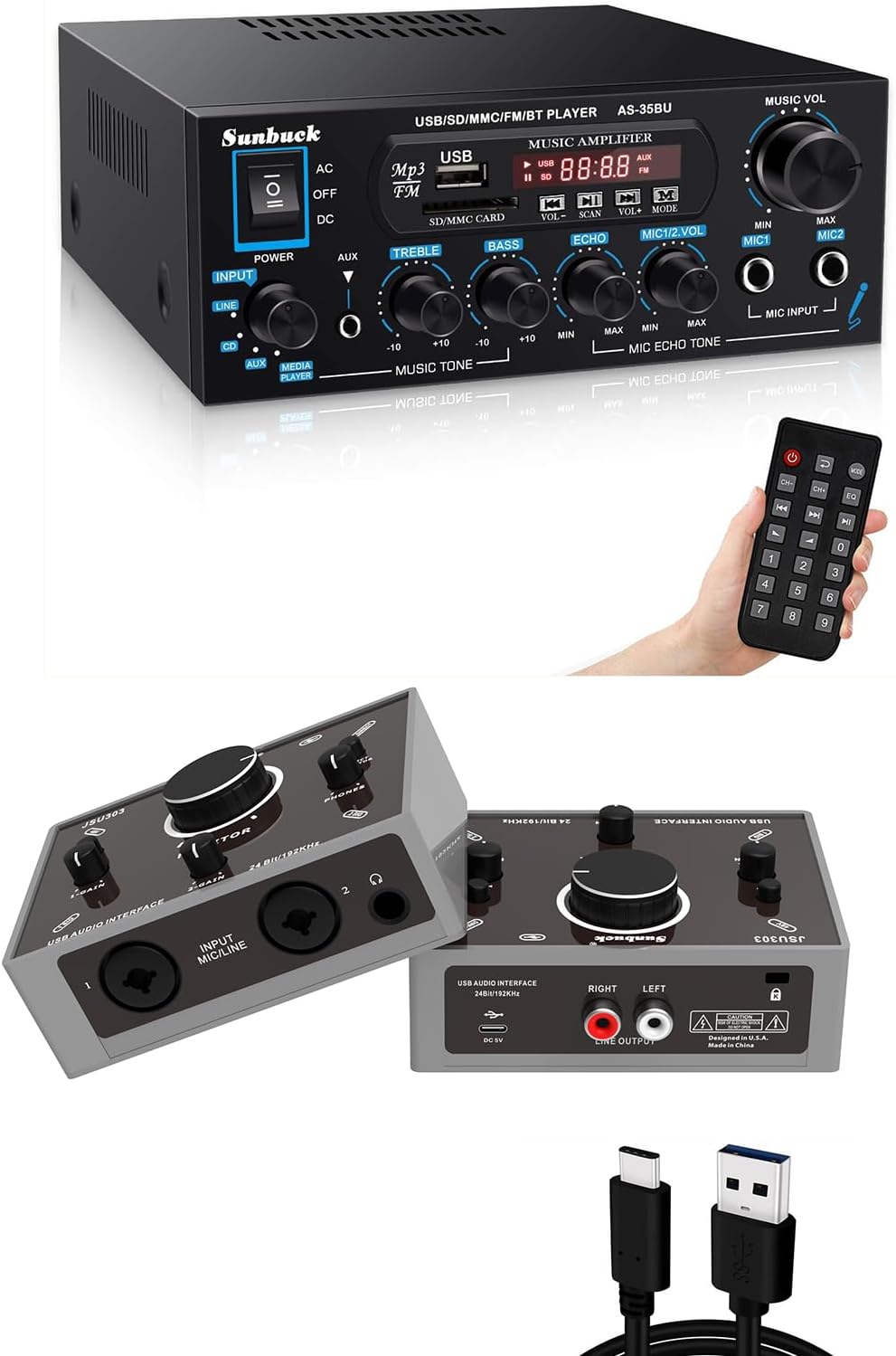
Image: The Sunbuck AS-35BU Stereo Amplifier (top) and the USB-C Audio Interface (bottom), illustrating their compact size and various controls.
The AS-35BU is a compact yet powerful stereo amplifier designed for home audio systems. It delivers a maximum output of 400W x 2 (RMS 60W x 2), making it suitable for various environments such as offices, small apartments, basements, and garages. It features upgraded audio processing chips for high fidelity, low distortion, and low noise.
Klíčové vlastnosti:
- Diverse Input Methods: Supports Bluetooth, SD card, USB, AUX, FM radio, and microphone inputs.
- Více zdrojů zvuku: Connects to iPhones, Android devices, iPads, PCs/Laptops (Windows/Mac), and CD/Media players.
- Kompatibilita reproduktorů: Compatible with various speaker types including outdoor/bookshelf speakers, computer/home speakers, ceiling speakers, and car/motorcycle speakers.
- Tone and Echo Control: Independent controls for Treble, Bass, and Microphone Echo.

Image: Visual representation of the flexible and diverse input methods supported by the Sunbuck amplifier, including Bluetooth, SD card, USB, AUX, microphones, FM radio, and CD/DVD players.

Image: The rear panel of the Sunbuck AS-35BU amplifier, detailing its RCA audio input, 2-channel speaker outputs, FM antenna connection, and power input. Examples of compatible audio sources and speaker types are also shown.
Sunbuck USB-C Audio Interface
The Sunbuck USB-C Audio Interface is a portable and handy device designed for high-quality recording. It supports up to 24-bit/192kHz audio conversion, making it ideal for home recording studios, musicians, and podcasters. Its plug-and-play design ensures ease of use without requiring additional drivers.
Klíčové vlastnosti:
- 24Bit/192kHz Recording: Provides professional-grade audio resolution for clear and detailed recordings.
- 48V fantomové napájení: Supplies necessary power for condenser microphones, ensuring pure sound signal.
- Ultra-Low Latency & Direct Monitor: Enables real-time monitoring without delay, crucial for recording.
- Kombinované vstupy: Features XLR/TRS combo jacks for connecting microphones and instruments (guitar, keyboard).
- Plug and Play: Driver-free operation for quick setup on PC/Mac.

Image: The Sunbuck USB-C Audio Interface connected to a laptop, demonstrating its use in a professional recording environment with cables plugged into its input jacks.

Obrázek: Podrobný diagram znázorňujícíasing the versatile combo inputs and outputs of the Sunbuck USB-C Audio Interface, illustrating how various audio devices like guitars, microphones, keyboards, headphones, PCs/MACs, speakers, and mixers can be connected.
Nastavení
Setting up the AS-35BU Stereo Ampdoživotní
- Připojení reproduktorů: Připojte pasivní reproduktory k výstupním konektorům reproduktorů na zadní straně ampDbejte na správnou polaritu (+ k + a - k -).
- Připojení zdrojů zvuku:
- RCA vstup: Use RCA cables to connect audio devices (e.g., CD player, TV, DVD player) to the "AUDIO INPUT" jacks on the rear panel.
- Vstup AUX: Use a 3.5mm audio cable to connect devices to the front panel AUX input.
- USB/SD karta: Vložte USB disk nebo SD kartu do příslušných slotů na předním panelu pro přehrávání médií.
- Bluetooth: Zapněte amplifier, select Bluetooth mode. On your device, search for "AS-35BU" and pair.
- Mikrofony: Connect microphones to the MIC1 or MIC2 input jacks on the front panel.
- Anténa FM: Connect the included FM antenna to the "FM ANT" terminal on the rear for radio reception.
- Připojte napájení: Plug the AC power cord into the amplifier's power input and then into a wall outlet.
Setting up the USB-C Audio Interface
- Připojení k počítači: Use the provided USB-C to USB-A cable to connect the audio interface to a USB port on your PC or Mac. The device is plug-and-play and typically does not require driver installation.
- Připojení mikrofonů/nástrojů:
- Mikrofony: Connect XLR microphones to the combo input jacks (1 or 2). If using a condenser microphone requiring phantom power, activate the 48V switch.
- Nástroje: Connect instruments (e.g., guitar, keyboard) using a 1/4" TRS cable to the combo input jacks.
- Připojení výstupních zařízení:
- Sluchátka: Connect headphones to the 1/4" headphone jack for direct monitoring.
- Speakers/Mixer: Connect studio monitors or a mixer to the "LINE OUTPUT" RCA jacks.
- Nastavení zvuku systému: On your computer, select the Sunbuck Audio Interface as the default input and output device in your sound settings or Digital Audio Workstation (DAW) software.
Návod k obsluze
Operating the AS-35BU Stereo Ampdoživotní
- Zapnutí/vypnutí: Use the "POWER" switch on the front panel to turn the ampživější zapnuto nebo vypnuto.
- Výběr vstupu: Press the "INPUT" button or use the remote control to cycle through input sources (CD, AUX, MEDIA PLAYER). For Bluetooth, USB, SD, and FM, use the "MODE" button on the media player section.
- Hlasitost hudby: Adjust the "MUSIC VOL" knob to control the overall output volume.
- Tónová kontrola: Use the "TREBLE" and "BASS" knobs to adjust the high and low frequencies of the music.
- Ovládání mikrofonu:
- MIC1/MIC2 Volume: Adjust individual microphone volumes using the "MIC1 VOL" and "MIC2 VOL" knobs.
- MIC ECHO: Use the "ECHO" knob to add or remove echo effect to the microphone sound.
- Provoz přehrávače médií:
- USB/SD přehrávání: Insert a USB drive or SD card. The amplifier will automatically detect and play supported audio files. Use the playback controls (Play/Pause, Next, Previous) on the front panel or remote.
- FM rádio: Select FM mode. Use the "SCAN" button to auto-scan and save stations. Use "PREV" and "NEXT" to navigate saved stations.
- Bluetooth: Once paired, play audio from your Bluetooth device.

Image: The Sunbuck AS-35BU amplifier positioned in a living room setup with speakers, illustrating its capability to provide sufficient power for enjoying music in a home environment.
Operating the USB-C Audio Interface
- Ovládání vstupního zisku: Adjust the "GAIN" knobs for each input channel to set the appropriate input level for your microphone or instrument. Monitor the input level indicators in your DAW to avoid clipping.
- 48V fantomové napájení: If using a condenser microphone, press the "48V" button to supply phantom power. Ensure the microphone is connected before activating.
- Přímé sledování: Use the "MONITOR" knob to blend between the direct input signal and the playback from your computer. This allows for zero-latency monitoring during recording.
- Hlasitost sluchátek: Adjust the "PHONES" knob to control the volume of your connected headphones.
- Hlavní výstupní hlasitost: Adjust the "OUTPUT" knob to control the volume sent to your connected speakers or mixer.
- Záznam: Open your preferred Digital Audio Workstation (DAW) software (e.g., Audacity, GarageBand, Ableton Live, Logic Pro, Pro Tools). Select the Sunbuck Audio Interface as your input device and begin recording.

Image: A person singing into a microphone that is connected to the Sunbuck USB-C Audio Interface, highlighting the device's capability to provide an outstanding mic preamplifier for clear vocal recording.

Image: A person playing an acoustic guitar while connected to the Sunbuck USB-C Audio Interface, illustrating the device's plug-and-play design and ease of use for musicians.
Údržba
- Čištění: Wipe the exterior surfaces of both devices with a soft, dry, lint-free cloth. Do not use abrasive cleaners, waxes, or solvents.
- Prach: Keep the devices free from dust. Use a soft brush or compressed air to clean vents and ports periodically.
- Skladování: When not in use for extended periods, store the devices in a cool, dry place, away from direct sunlight and extreme temperatures.
- Péče o kabely: Handle cables carefully. Avoid sharp bends or kinks that can damage the internal wires.
Odstraňování problémů
AS-35BU Stereo Ampdoživotní
| Problém | Možná příčina / řešení |
|---|---|
| Žádná síla | Check if the power cord is securely connected to the amplifier and the wall outlet. Ensure the power switch is in the "ON" position. |
| Žádný zvukový výstup |
|
| Bluetooth se nepřipojuje |
|
| Mikrofon nefunguje |
|
USB-C audio rozhraní
| Problém | Možná příčina / řešení |
|---|---|
| No sound from interface |
|
| Microphone not detected / No phantom power |
|
| Latency during recording |
|
Specifikace
Stereofonní reproduktor Sunbuck AS-35BU Ampdoživotní
- Výkon: Max 400W x 2 (RMS 60W x 2)
- Zpracování zvuku: Upgraded audio processing chips for high fidelity
- Vstupy: RCA (CD, Line), AUX (3.5mm), USB, SD/MMC, Bluetooth, FM, 2 x Microphone (1/4" TS)
- výstupy: 2-Channel Speaker Output
- Ovládání: Music Volume, Treble, Bass, Echo, Mic1 Volume, Mic2 Volume, Input Selector, Media Player Controls
- Napájení: AC 110V
Sunbuck USB-C Audio Interface
- Rozlišení zvuku: Až 24 bitů/192 kHz
- Vstupy: 2 x kombinovaný XLR/TRS (mikrofonní/linkový/nástrojový)
- výstupy: RCA Line Output (L/R), 1/4" Headphone Output
- Fantomová síla: +48V přepínatelné
- Sledování: Direct Monitor function
- Konektivita: USB-C (USB 2.0 compatible)
- Kompatibilita: Windows, macOS (Driver-free)
Záruka a podpora
Specific warranty information and detailed support contacts are not available in the provided product data. For warranty claims, technical support, or service inquiries, please refer to the documentation included with your purchase or contact Sunbuck customer service directly through their official webna webu nebo u prodejce, kde byl produkt zakoupen.
Uschovejte si prosím doklad o koupi pro účely záruky.


