1. Konec produktuview
The Kurio Smart Watch is designed for children and teenagers aged 6 and above, offering a range of features to support an active and engaging lifestyle. This device combines activity tracking, health monitoring, and entertainment in a durable, waterproof design.
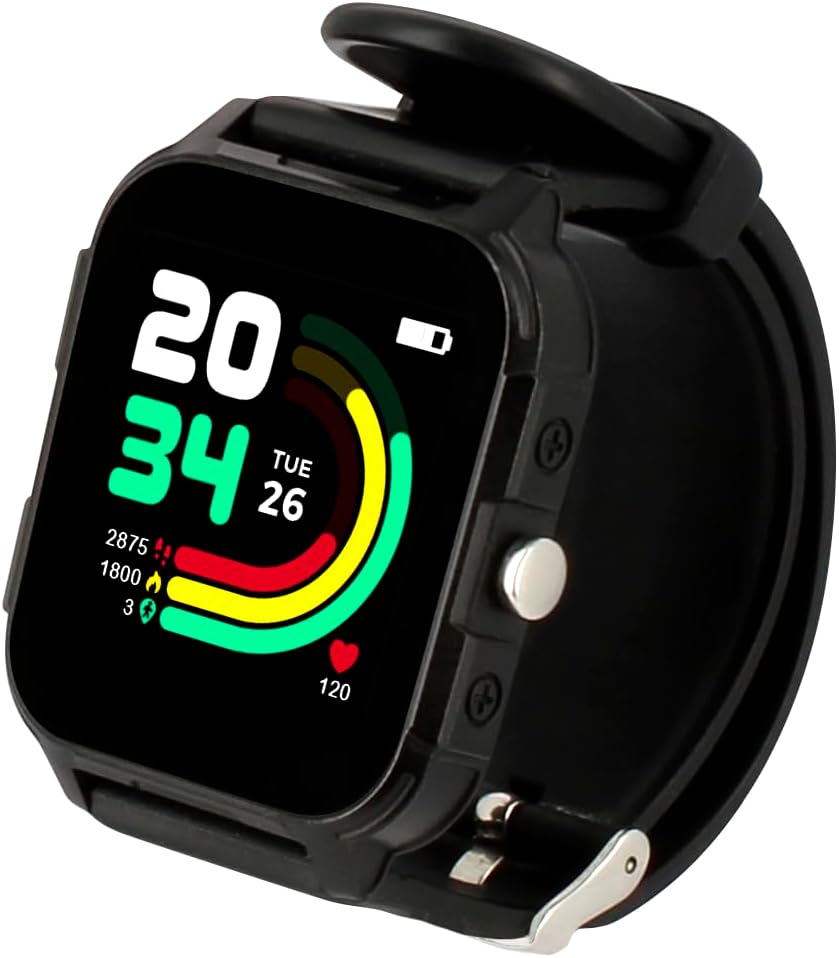
Image: The Kurio Smart Watch in black, showcasing its digital display with time, date, and activity progress rings.
Klíčové vlastnosti:
- Sledování aktivity: Sleduje kroky, vzdálenost a spálené kalorie.
- Monitor stavu: Includes heart rate and sleep tracking.
- Integrované hry: Four pre-installed games for entertainment.
- Companion Application: Synchronizes with a smartphone app for data review a přizpůsobení.
- Přizpůsobitelné ciferníky: Over 100 watch faces available via the app.
- Odolný design: Equipped with a large color touchscreen and IP68 waterproof rating.
- Baterie s dlouhou výdrží: Designed for extended use between charges.
2. Co je v krabici
- Kurio Smart Watch (Black)
- Magnetický USB nabíjecí kabel
- Uživatelská příručka

Image: The Kurio Smart Watch packaging, illustrating the watch and its accessories.
3. Bezpečnostní informace
WARNING: Not suitable for children under 3 years due to small parts.
Always ensure the watch is worn securely but not too tightly. If skin irritation occurs, discontinue use and consult a medical professional.
4. Nastavení
4.1 Počáteční poplatek
Before first use, fully charge your Kurio Smart Watch using the provided magnetic USB charging cable. Connect the magnetic end to the charging points on the back of the watch and the USB end to a compatible power adapter (not included) or computer USB port.
4.2 Zapnutí/vypnutí
To power on the watch, press and hold the side button until the screen illuminates. To power off, navigate to the settings menu on the watch and select the power off option.
4.3 Instalace a párování aplikace
- Download the official Kurio Smart Watch application from your smartphone's app store (available for iOS and Android).
- Open the app and follow the on-screen instructions to create a new user profile.
- Enable Bluetooth on your smartphone and ensure the watch is powered on and discoverable.
- Within the app, search for and select your Kurio Smart Watch to initiate the pairing process.
- Confirm the pairing on both your smartphone and the watch if prompted.

Image: The Kurio Smart Watch paired with a smartphone, showing the companion application interface.
5. Návod k obsluze
5.1 Navigace v rozhraní
The Kurio Smart Watch features a responsive color touchscreen. Swipe left, right, up, or down to access different menus and features. Tap icons to select applications or confirm actions.

Image: The watch display showing the main menu with icons for Home, Today's Activity, Sports, Heart Rate, and Alarms.
5.2 Sledování aktivity
The watch automatically tracks daily activity such as steps, distance, and calories. You can view your progress directly on the watch face or through the companion app.

Image: The watch displaying options for tracking different sports activities, such as hiking and cycling.
5.3 Monitorování zdraví
- Srdeční frekvence: Access the heart rate monitor feature from the main menu to measure your current heart rate.
- Sledování spánku: Wear the watch overnight to track sleep patterns. Detailed sleep reports are available in the companion app.
5.4 Games and Entertainment
The watch includes four integrated games. Navigate to the games section to access and play them. An interactive virtual pet also evolves based on the user's physical activity level.
NIKDY Přizpůsobení
Personalize your watch by changing watch faces through the companion app. Over 100 designs are available to suit individual preferences.
5.6 Setting Silent Mode
To set the watch to silent mode:
- From the main screen, swipe down or navigate to the 'Settings' icon.
- Tap on 'Settings'.
- Scroll down and tap on 'Ring set' or 'Sound settings'.
- Select 'Silent' for 'Caller ringtone' and 'Message ringtone'.
Video: Instructions on how to activate silent mode on the smartwatch, demonstrating navigation through the settings menu to adjust ringtone options.
6. Údržba
6.1 Čištění
Otřete displej a řemínek hodinek měkkým hadříkemamp hadříkem. Nepoužívejte agresivní chemikálie nebo abrazivní materiály, protože by mohly zařízení poškodit.
6.2 Voděodolnost
The Kurio Smart Watch has an IP68 waterproof rating, meaning it is resistant to dust and can withstand immersion in water up to 1.5 meters for up to 30 minutes. It is suitable for swimming but not for diving or high-pressure water activities.
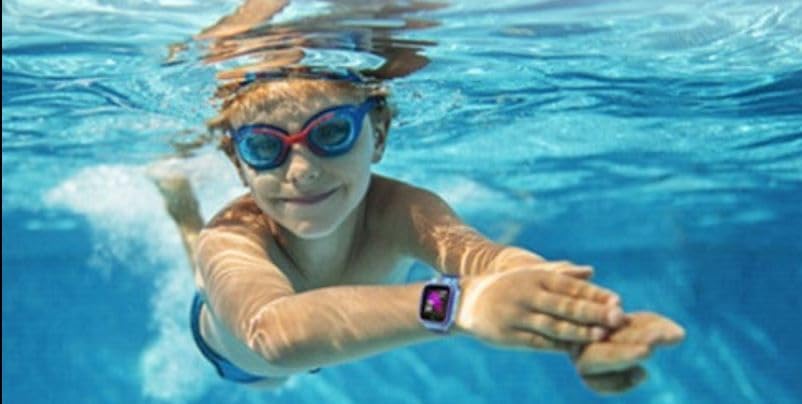
Image: A child swimming underwater while wearing the Kurio Smart Watch, demonstrating its water resistance.
6.3 Péče o baterii
To prolong battery life, avoid fully discharging the watch frequently. Charge the watch regularly, especially if it will not be used for an extended period.
7. Řešení problémů
7.1 Hodinky se nezapínají
- Ujistěte se, že jsou hodinky plně nabité. Připojte je k magnetické nabíječce alespoň na 30 minut.
- Stiskněte a podržte boční tlačítko po dobu 10–15 sekund pro pokus o nucený restart.
7.2 Problémy s párováním
- Ujistěte se, že máte na smartphonu a hodinkách povoleno Bluetooth.
- Ensure the watch is within range of your smartphone.
- Restartujte hodinky i chytrý telefon a poté zkuste spárování znovu.
- If issues persist, try unpairing the device from your phone's Bluetooth settings and re-pairing through the Kurio app.
7.3 Nepřesné údaje o aktivitě
- Ensure the watch is worn correctly on the wrist, not too loose or too tight.
- Calibrate the watch through the companion app if a calibration option is available.
- Note that activity trackers are not medical devices and provide estimates.
8. Specifikace
| Funkce | Detail |
|---|---|
| Číslo modelu | 1121500141 |
| Rozměry (D x Š x V) | 12.8 x 4 x 15 cm |
| Hmotnost | 240 gramů |
| Doporučený věk | 6 let a více |
| Hlavní materiál | Plast |
| Barva | Černý |
| Typ baterie | Lithium-iontová / Lithium-polymerová |
| Technologie připojení | Bluetooth |
| Standard bezdrátové komunikace | Bluetooth |
| GPS | Bez GPS |
| Tvar | Náměstí |
| Voděodolnost | IP68 |
| Kompatibilní zařízení | Smartphone |
9. Záruka a podpora
Kurio offers a two-year warranty for this product. For any malfunctions or issues, please contact the technical support team.
Kontaktujte podporu:
E-mail: assistance-kurio@jumboplay.com
Please include your model number (1121500141) and a detailed description of the issue when contacting support.


