1. Úvod
The virtavo VistaFlask 2K Security Camera is a wireless, battery-powered outdoor camera designed to enhance your home security. Featuring 2K QHD imaging, AI motion detection, starlight lens for colorful night vision, and weatherproof construction, it provides reliable surveillance in various conditions. This manual provides detailed instructions for setting up, operating, maintaining, and troubleshooting your camera.

Image: Two virtavo VistaFlask 2K security cameras, designed for outdoor use.
2. Bezpečnostní informace
- Ujistěte se, že je kamera bezpečně nainstalována, aby nedošlo k jejímu pádu.
- K nabíjení baterie používejte pouze určený nabíjecí kabel a napájecí adaptér.
- Nevystavujte fotoaparát extrémním teplotám mimo jeho provozní rozsah.
- Avoid disassembling or modifying the camera, as this will void the warranty and may cause damage.
- Uchovávejte fotoaparát a jeho příslušenství mimo dosah dětí.
3. Obsah balení
- virtavo VistaFlask 2K Security Camera(s)
- Montážní držák(y)
- USB nabíjecí kabel
- Uživatelská příručka
- Montážní šrouby a kotvy
4. Konec produktuview
The virtavo VistaFlask camera features a compact design with essential components for optimal performance. Key elements include the lens, IR LEDs for night vision, a microphone for audio input, a speaker for two-way communication, and a motion sensor. The power switch, sync button, and charging port are located at the bottom of the camera, alongside the microSD card slot for local storage.

Obrázek: Interní view highlighting the battery and electronic components.

Obrázek: Spodní část view of the camera with power switch, charging port, sync button, and microSD card slot.
5. Průvodce nastavením
5.1 Počáteční nastavení
- Nabijte kameru: Before first use, fully charge the camera using the provided USB cable. The battery lasts 1-3 months per charge depending on usage.
- Stáhněte si aplikaci: Hledat 'HOME V' in your smartphone's app store (iOS or Android) and download the application.
- Vytvořit účet: Open the 'HOME V' app and follow the on-screen instructions to register a new account or log in if you already have one.
5.2 Párování a připojení kamery
Follow these steps to pair your virtavo VistaFlask camera with the 'HOME V' app. For a visual guide, please refer to the official installation video below.
Video: Official virtavo VistaFlask Installation Guide Setup. This video demonstrates the step-by-step process of binding the camera to the 'HOME V' app using QR codes, including powering on the camera, confirming the red light flashing, connecting to the camera's hotspot, and connecting to your home Wi-Fi network.
- Přidat zařízení: In the 'HOME V' app, tap the '+' icon to add a new device.
- Naskenujte QR kód: Grant camera access to the app. Scan the QR code located on the back of your virtavo VistaFlask camera.
- Zapnutí: Ensure the camera is powered on. The power switch is located at the bottom.
- Confirm Flashing Light: Confirm that the camera's red indicator light is flashing rapidly. If not, press and hold the 'Sync' button for 5-10 seconds until you hear a 'Du' sound or see rapid flashing.
- Připojení k hotspotu kamery: The app will prompt you to connect to the camera's Wi-Fi hotspot (e.g., 'IPC365_AP-XXXX'). Confirm and join this network.
- Select Home Wi-Fi: Choose your home 2.4GHz Wi-Fi network from the list and enter the correct password. Note: This device only supports 2.4GHz Wi-Fi.
- Pojmenujte svůj fotoaparát: Once connected, name your camera for easy identification (e.g., 'Front Door', 'Living Room').
5.3 Fyzická instalace
The virtavo VistaFlask camera is designed for easy installation, both indoors and outdoors. Its weatherproof design ensures durability.

Image: Easy installation on smooth surfaces like glass or tiles, no drilling required.

Image: Wireless connection for remote access.
- Vyberte umístění: Select a location with good Wi-Fi signal strength and a clear view oblasti, kterou chcete monitorovat.
- Montáž: Use the provided mounting bracket, screws, and anchors to securely attach the camera to a wall or other suitable surface. Ensure the camera is positioned to capture the desired field of view.
- Odolný vůči povětrnostním vlivům: The camera is designed to withstand various weather conditions, making it suitable for outdoor use.
6. Návod k obsluze
6.1 Živě View a obousměrný zvuk
Access real-time video feed and communicate through the camera using the 'HOME V' app.
- Žít View: Otevřete aplikaci a vyberte fotoaparát view živé vysílání.
- Obousměrný zvuk: Klepněte na ikonu mikrofonu v živém vysílání view to speak through the camera's speaker, and listen through its microphone.
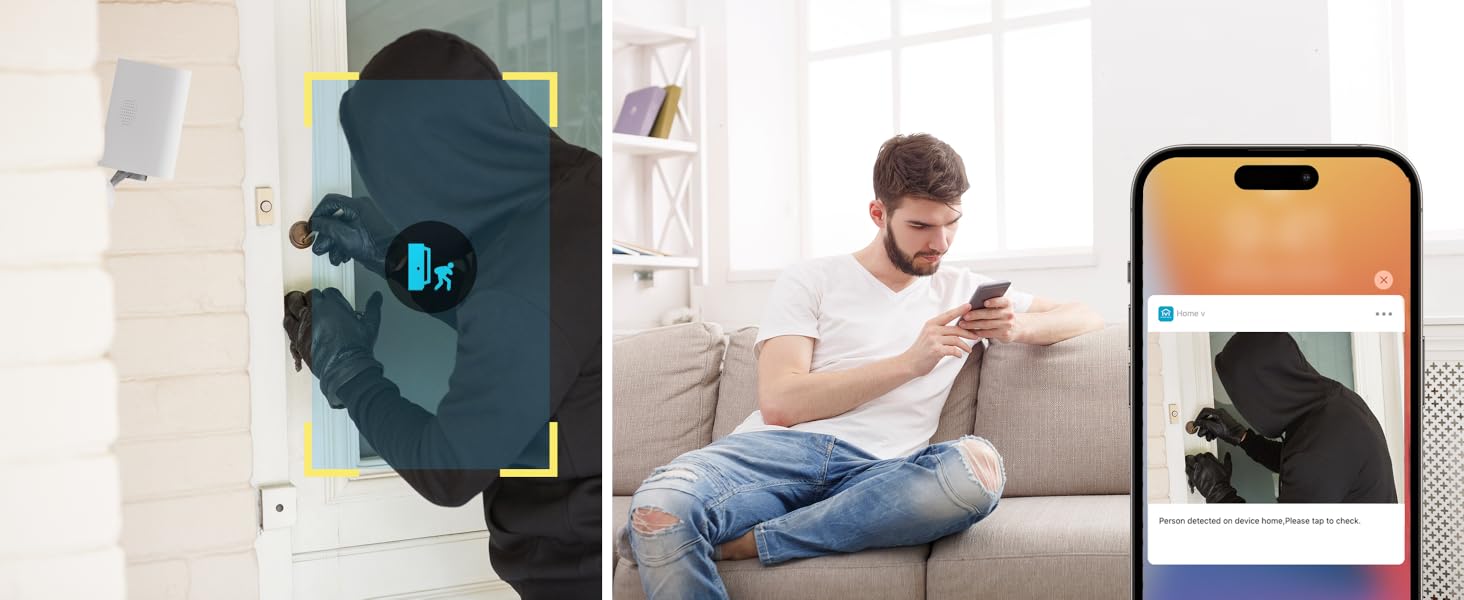
Image: Two-way audio feature for communication.
6.2 Detekce pohybu a upozornění
The camera features advanced PIR motion detection and AI capabilities to minimize false alarms.
- Detekce pohybu PIR: Detects motion up to 30 feet.
- Chytrá upozornění: Receive instant notifications on your smartphone when motion is detected.
- AI Detection (Cloud Subscription): With an optional cloud subscription, the camera can differentiate between humans, vehicles, and animals, reducing irrelevant alerts.
- Přizpůsobitelné detekční zóny: Set specific areas for motion detection to focus on critical zones and ignore others.
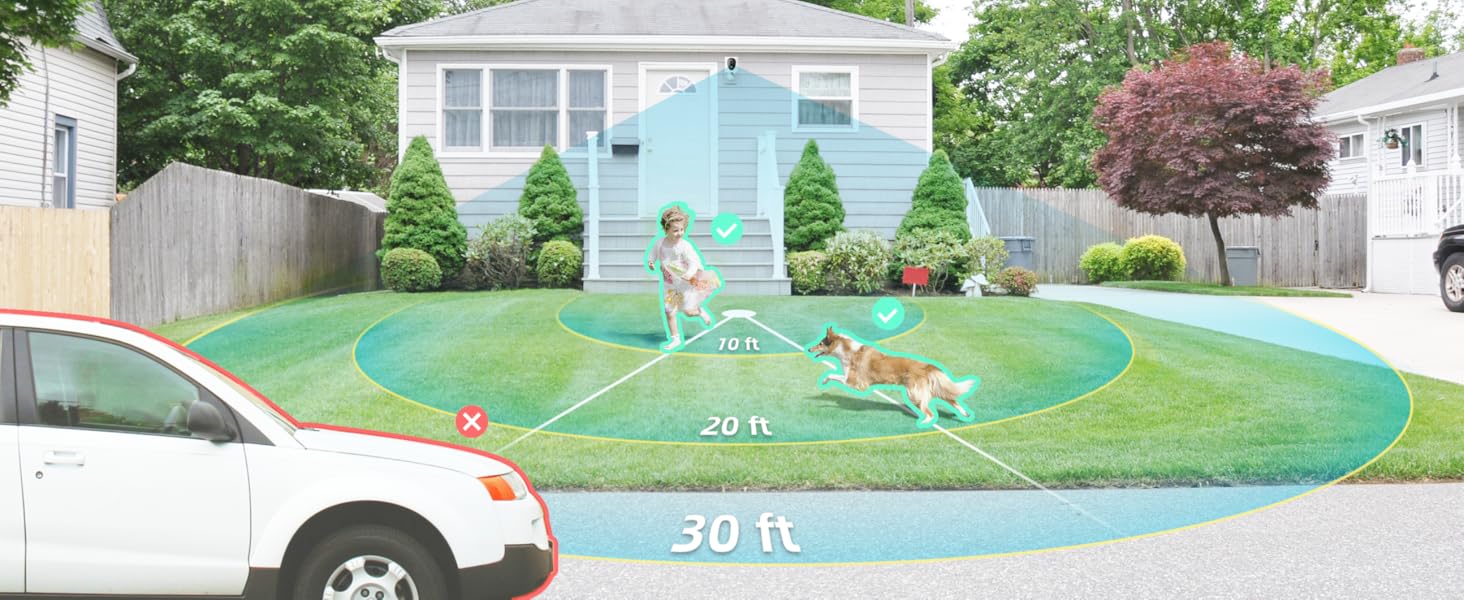
Image: Smart detection distinguishing between people, vehicles, and animals.
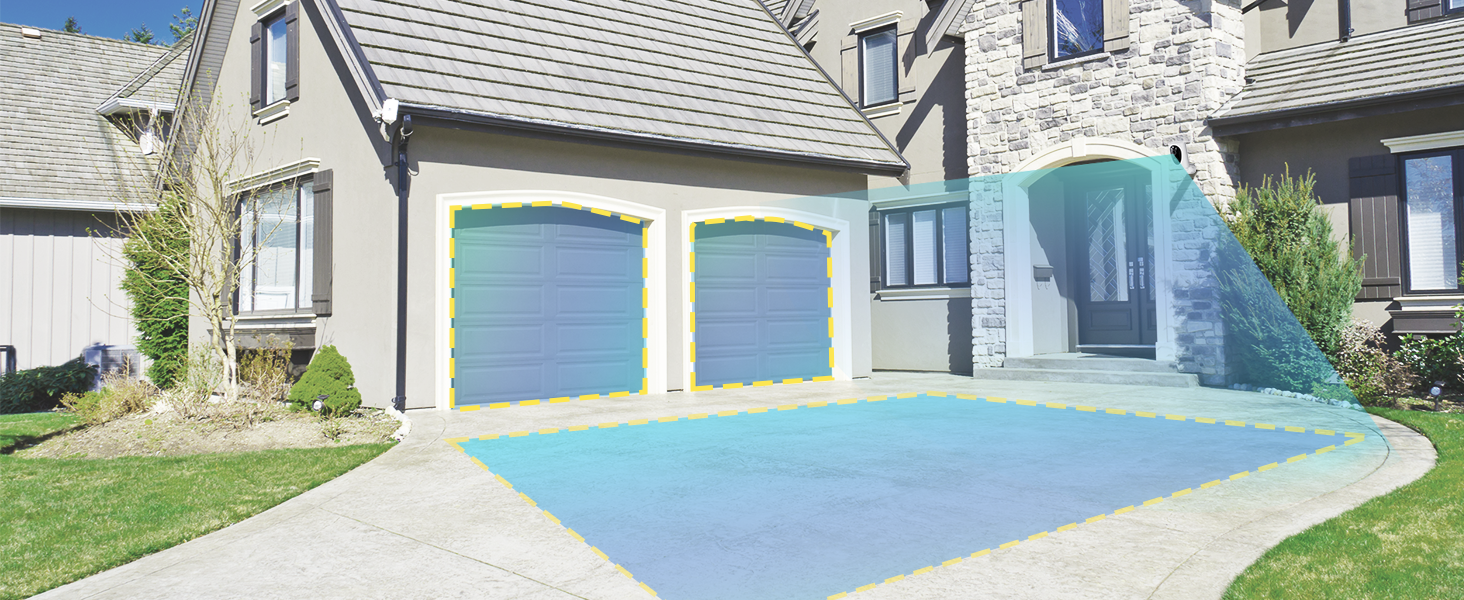
Image: Customizable motion detection zones.

Image: Instant alerts with image previews.
6.3 Noční vidění
The camera provides clear vision even in low-light conditions.
- Barevné noční vidění: Utilizes Starlight technology and a wide F1.6 aperture for vivid, color-rich images in low light.
- IR noční vidění: Equipped with 2 high-intensity IR LEDs for clear black-and-white viewing in complete darkness.

Image: Superior 2K QHD imaging and color-rich night vision.
6.4 Nahrávání a ukládání
Your data is secured with flexible storage options.
- Místní úložiště: Supports microSD cards from 32GB to 256GB for continuous recording, even without network access. (MicroSD card not included).
- Cloudové úložiště: Optional cloud storage plans offer additional features like snapshot alerts and advanced AI capabilities. Video encryption ensures privacy.

Image: Comparison of no-fee basic storage (SD card) and cloud storage options.
6.5 App Features and Remote Access
Manage and control your security remotely via the 'HOME V' app.
- Vzdálený dohled: Monitor your home from anywhere with an internet connection.
- Přístup pro více uživatelů: Share camera access with family members.
- Plánování: Set schedules for recording or alerts.

Image: Remote access and multi-user monitoring via the 'HOME V' app.
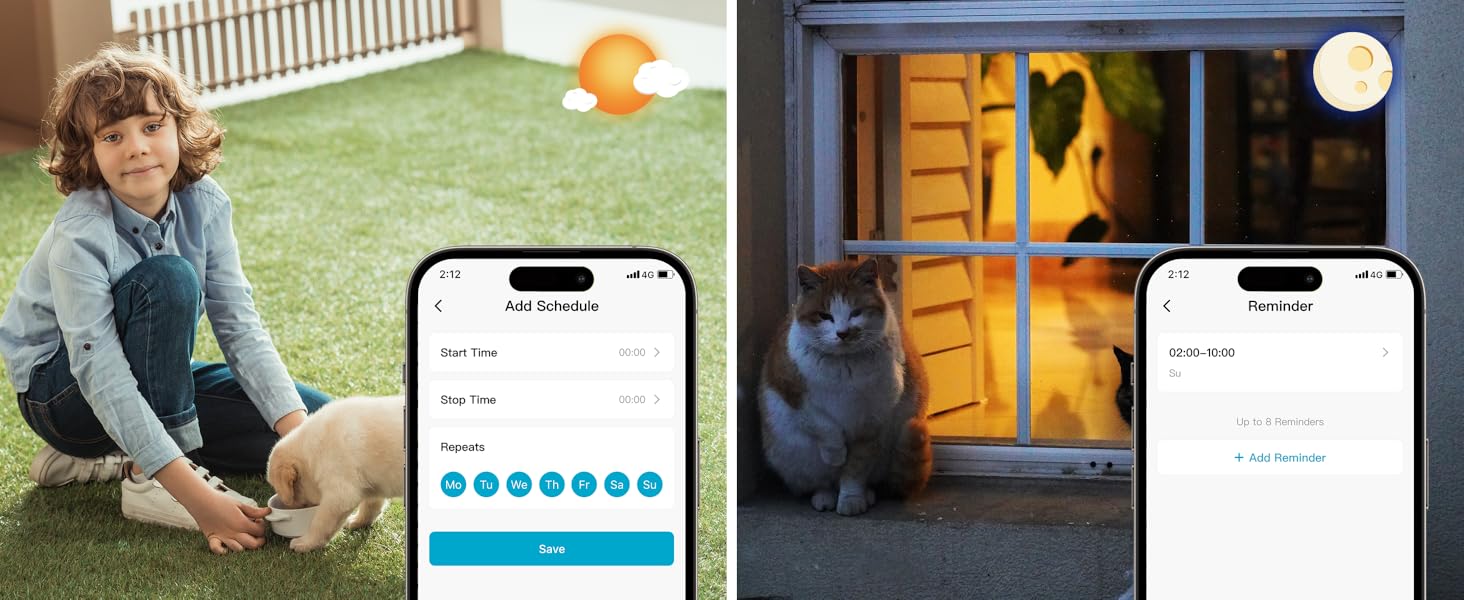
Image: App features including scheduling and reminders.
7. Údržba
- Nabíjení baterie: Recharge the camera battery when prompted by the app. A full charge can last 1-3 months depending on activity.
- Čištění: Jemně otřete objektiv a tělo fotoaparátu měkkým hadříkemamp tkanina. Vyhněte se abrazivním čisticím prostředkům.
- Aktualizace firmwaru: Regularly check the 'HOME V' app for firmware updates to ensure optimal performance and security.
8. Řešení problémů
| Problém | Možná příčina | Řešení |
|---|---|---|
| Fotoaparát se nezapne | Vybitá baterie; Vypínač vypnutý | Charge the camera fully; Ensure power switch is in the 'ON' position. |
| Nelze se připojit k Wi-Fi | Incorrect Wi-Fi password; 5GHz Wi-Fi network; Weak Wi-Fi signal | Verify password; Ensure you are connecting to a 2.4GHz network; Move camera closer to router or use a Wi-Fi extender. |
| Časté falešné poplachy | High motion sensitivity; Unfiltered motion sources (e.g., trees, animals) | Adjust motion sensitivity in app; Set up detection zones to exclude irrelevant areas; Consider cloud subscription for AI detection. |
| Poor night vision clarity | Dirty lens; Obstruction in front of camera; Insufficient ambient light for color night vision | Clean the lens; Remove obstructions; Ensure adequate ambient light for color mode or switch to IR night vision. |
| Baterie se rychle vybíjí | High activity/recordings; Frequent live view access; Weak Wi-Fi signal | Reduce motion detection sensitivity; Limit live view sessions; Improve Wi-Fi signal strength. |
9. Specifikace
| Funkce | Detail |
|---|---|
| Název modelu | LJH10 |
| Vnitřní/venkovní použití | Uvnitř, venku |
| Zdroj napájení | Battery Powered (4400mAh rechargeable Lithium battery) |
| Protokol připojení | Wi-Fi (pouze 2.4 GHz) |
| Typ ovladače | Aplikace HOME V |
| Typ montáže | Držák na zeď |
| Rozlišení záznamu videa | 2K QHD |
| Viewúhel | 120 Degrees (Field of View: 130 Degrees) |
| Rozsah nočního vidění | 30 stop |
| Technologie nízkého osvětlení | Starlight (F1.6 aperture, 3.0mm focal length) |
| Počet IR LED | 2 |
| Úroveň odolnosti proti vodě | Vodotěsný |
| Rozměry (D x Š x V) | 2.7 x 1.3 x 3.2 palce |
| Hmotnost položky | 1.41 libry |
| Možnosti úložiště | MicroSD (32GB-256GB), Cloud Storage |
| Speciální funkce | 2-Way Audio, Battery Powered, Local Recording, Motion Sensor, Night Vision, AI Motion Detection |
10. Záruka a podpora
virtavo products are designed for reliability and performance. For information regarding product warranty, please refer to the warranty card included in your product packaging or visit the official virtavo website. If you encounter any issues or have questions not covered in this manual, please contact virtavo customer support through the 'HOME V' app or their official support channels for assistance.


