Zavedení
Děkujeme, že jste si vybrali O.urlife Mini Drone. This drone is equipped with dual 4K cameras, offering high-quality photo and video capture, and can be controlled via a smartphone app for real-time viewing. Designed for ease of use, it features one-button takeoff/landing, altitude hold, headless mode, and gesture control, making it suitable for beginners and enthusiasts alike. Its compact, foldable design ensures portability for all your adventures. Please read this manual carefully before operation to ensure safe and optimal performance.
Bezpečnostní pokyny
Always prioritize safety when operating your drone. Failure to follow these guidelines may result in injury, damage to property, or legal issues.
- Přečtěte si manuál: Fully understand all instructions and warnings before first flight.
- Otevřený prostor: Always fly in open, unobstructed areas, away from people, animals, buildings, and power lines. Avoid flying in strong winds.
- Přímá viditelnost: Udržujte s dronem neustále vizuální kontakt.
- Bezpečnost baterie: Use only original batteries and charging cables. Do not overcharge or short-circuit batteries. Discontinue use if batteries are damaged or swollen.
- Bezpečnost vrtule: Keep fingers, hair, and loose clothing away from rotating propellers. Always turn off the drone before handling propellers.
- Věkové omezení: Tento produkt je doporučen pro uživatele starší 14 let.
- Soulad s právními předpisy: Buďte si vědomi a dodržujte místní zákony a předpisy týkající se provozu dronů.
Obsah balení
Ověřte, zda jsou v balení přítomny všechny položky:

Image: Contents of the Ourlife Mini Drone package, showing the drone, remote control, two rechargeable batteries, a screwdriver, four protective frames, four main propellers, a USB charging cable, and an instruction manual.
- Ourlife Mini Drone x 1
- Dálkové ovládání x 1
- Rechargeable Drone Battery x 2
- Šroubovák x 1
- Ochranný rám x 4
- Main Propeller x 4 (spare)
- USB nabíjecí kabel x 1
- Návod k použití x 1
Note: The remote control requires 3 AAA batteries, which are not included.
Konec produktuview
Familiarize yourself with the drone and remote control components.

Obrázek: Ourlife Mini Drone in its unfolded state, alongside its remote control, two drone batteries, and the drone in its folded, compact form.
Součásti dronu
- Skládací ramena: Pro kompaktní skladování a přenosnost.
- Vrtule: Čtyři hlavní vrtule pro let.
- Duální fotoaparáty: Front 4K camera (120° adjustable) and bottom optical flow lens for stable flight and diverse shooting angles.
- Přihrádka na baterie: Nachází se v zadní části dronu.
- LED světla: Zobrazuje stav a orientaci dronu.

Obrázek: Detail view z Ourlife Mini Drone's dual camera system, highlighting the adjustable front camera and the lower lens for stable flight. The front camera can be adjusted by 120 degrees.
Rozložení dálkového ovládání
- Levý joystick: Ovládá nadmořskou výšku (nahoru/dolů) a rotaci (doleva/doprava).
- Pravý joystick: Ovládá pohyb vpřed/vzad a vlevo/vpravo.
- Tlačítko pro vzlet/přistání s jedním tlačítkem: Zahájí automatický vzlet nebo přistání.
- Tlačítko režimu bez hlavy: Aktivuje/deaktivuje režim bezhlavého zobrazení.
- Tlačítko pro přepínání rychlosti: Toggles between different flight speeds (low, medium, high).
- Tlačítko pro otočení o 360°: Provede otočení o 360 stupňů.
- Držák telefonu: Pro upevnění smartphonu na view FPV feed.
Nastavení
1. Nabíjení baterie dronu
- Připojte nabíjecí kabel USB k baterii dronu.
- Plug the USB end into a 5V/1A USB adapter (not included) or a computer USB port.
- The indicator light on the cable will show charging status. It will turn off or change color when fully charged.
2. Instalace baterie dronu
- Ujistěte se, že je dron vypnutý.
- Insert the charged battery into the battery compartment at the rear of the drone until it clicks into place.
3. Instalace baterií dálkového ovládání
- Otevřete přihrádku na baterie na zadní straně dálkového ovladače.
- Vložte 3 baterie AAA (nejsou součástí balení) dle vyznačené polarity.
- Bezpečně zavřete kryt bateriového prostoru.
4. Attaching Propeller Guards
- Carefully attach the four protective frames to each motor arm of the drone.
- Ensure they are securely fastened to prevent detachment during flight.
5. App Installation (KY UFO)
- Scan the QR code provided in the manual or search for "KY UFO" in your smartphone's app store (App Store for iOS, Google Play for Android).
- Stáhněte a nainstalujte aplikaci.
- Turn on the drone, then go to your phone's Wi-Fi settings and connect to the drone's Wi-Fi network (usually named "KY-UFO-XXXXXX").
- Open the KY UFO app to access the real-time FPV feed and advanced controls.
Návod k obsluze
1. Párování dronu a dálkového ovladače
- Umístěte dron na rovný a rovný povrch.
- Zapněte dron. Kontrolky dronu začnou blikat.
- Zapněte dálkové ovládání.
- Push the left joystick all the way up, then pull it all the way down. The drone's lights will stop flashing and remain solid, indicating successful pairing.
2 Základní ovládací prvky letu
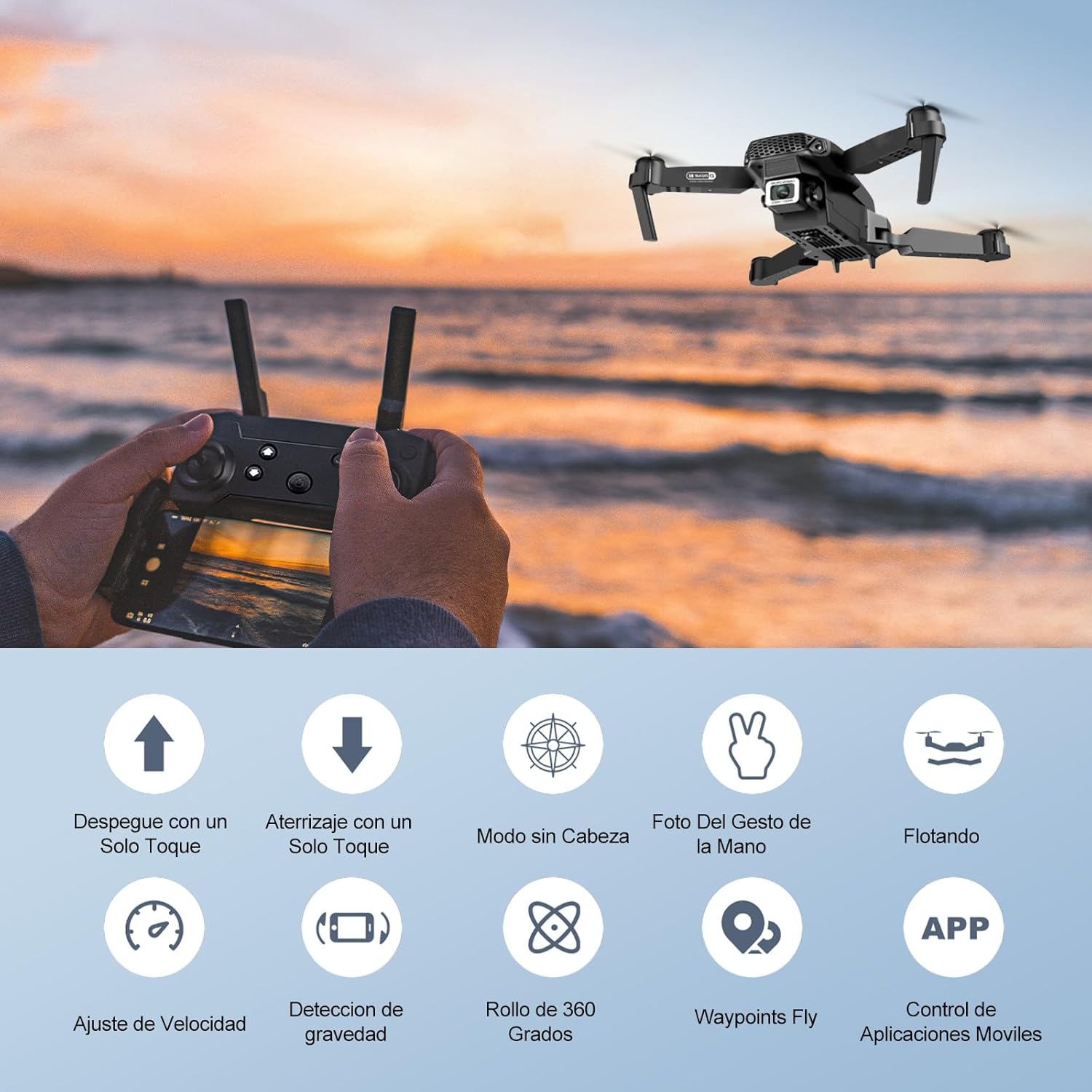
Image: Icons representing various flight features: One-touch takeoff, One-touch landing, Headless Mode, Hand Gesture Photo, Floating (Altitude Hold), Speed Adjustment, Gravity Detection, 360 Degree Roll, Waypoints Fly, and APP Control.
- Vzlet jedním klíčem: Stiskněte tlačítko Vzlet/přistání jedním tlačítkem button. The drone will automatically ascend and hover at a certain altitude.
- Přistání jedním klíčem: Stiskněte tlačítko Vzlet/přistání jedním tlačítkem button again. The drone will automatically descend and land.
- Držení nadmořské výšky: The drone maintains its current altitude automatically, allowing for stable hovering.
- Levý joystick (plyn/stáčení):
- Tlačítko nahoru/dolů: Zvýšení/snížení nadmořské výšky.
- Push left/right: Rotate drone left/right.
- Right Joystick (Forward/Backward/Sideways):
- Push up/down: Fly forward/backward.
- Push left/right: Fly left/right (strafe).

Obrázek: Ourlife Mini Drone taking off or landing with a single button press, illustrating the ease of use for beginners.
3. Pokročilé letové funkce
- Bezhlavý režim: Stiskněte tlačítko Bezhlavý režim button. In this mode, the drone's orientation is relative to the pilot, regardless of the drone's actual front. This simplifies control, especially for beginners.
- Otočení o 360°: Fly the drone to a height of at least 2 meters. Press the Otočení o 360 ° button, then push the right joystick in any direction to perform a flip in that direction.
- Gesture Control (Photos/Videos): With the KY UFO app open, make specific hand gestures in front of the drone's camera to trigger photo or video recording.
- "V" Gesture: Triggers photo capture.
- Gesta dlaní: Triggers video recording.
- Let na trase: In the KY UFO app, draw a desired flight path on your smartphone screen. The drone will automatically follow this path.
- Nastavení rychlosti: Stiskněte tlačítko Přepínač rychlosti button to cycle through low, medium, and high-speed modes. Adjust according to your skill level and environmental conditions.
- FPV Real-Time Transmission: Connect your smartphone to the drone's Wi-Fi. Open the KY UFO app to view live video feed from the drone's camera on your phone screen.
- Gravitační indukce: In the KY UFO app, activate gravity induction mode. You can then control the drone's movement by tilting your smartphone.

Obrázek: Ourlife Mini Drone performing a 360-degree flip in the air and demonstrating the Waypoints Fly feature, where the drone follows a pre-drawn path.

Image: Demonstrates 1080P FPV Real-Time Transmission, showing a live view from the drone. Also illustrates gesture control for taking photos (V-sign) and recording videos (palm gesture), and the 120-degree adjustable camera angle.
Údržba
- Čištění: K čištění dronu a dálkového ovladače používejte měkký, suchý hadřík. Nepoužívejte agresivní chemikálie ani rozpouštědla.
- Výměna vrtule: If propellers are damaged, replace them with spare ones provided. Ensure correct propeller (A or B) is installed on the corresponding motor.
- Péče o baterie: Baterie skladujte na chladném a suchém místě. Plně nabité nebo zcela vybité baterie neskladujte delší dobu. Pro dlouhodobé skladování je nabijte přibližně na 50 %.
- Skladování: When not in use, store the drone and its accessories in a safe, dry place, away from direct sunlight and extreme temperatures.
Odstraňování problémů
| Problém | Možná příčina | Řešení |
|---|---|---|
| Dron nereaguje na dálkové ovládání. | Not paired; low battery (drone/remote); interference. | Re-pair drone and remote. Charge batteries. Move to an area with less interference. |
| Dron se během letu unáší. | Not calibrated; uneven surface at takeoff; wind. | Calibrate the gyroscope (refer to app instructions). Take off from a flat surface. Avoid flying in windy conditions. |
| Camera feed is not showing in app. | Not connected to drone Wi-Fi; app issue. | Ensure phone is connected to the drone's Wi-Fi network. Restart the app and drone. |
| Krátká doba letu. | Baterie není plně nabitá; stará baterie. | Před letem se ujistěte, že je baterie plně nabitá. Zvažte výměnu starých baterií. |
| Drone crashes easily. | Lack of experience; strong wind; damaged propellers. | Practice in open areas. Avoid strong winds. Replace damaged propellers. |
Specifikace

Image: Diagram showing the dimensions of the Ourlife Mini Drone (unfolded and folded) and its remote control in inches.
| Funkce | Detail |
|---|---|
| Značka | Ourlife |
| Číslo modelu | AF-E88-BK |
| Hmotnost produktu | 430 g (přibližně 0.95 libry) |
| Rozměry produktu (rozbalené) | 28 x 22 x 5 cm (přibližně 11 x 8.7 x 2 palce) |
| Rozměry výrobku (složené) | 12.5 x 8.1 x 5.3 cm (přibližně 4.9 x 3.2 x 2.1 palce) |
| Typ baterie | Lithium-iontová (2 v ceně) |
| Rozlišení záznamu videa | 4K (dvě kamery) |
| Technologie připojení | Wi-Fi |
| Kontrolní metoda | Dálkové ovládání, aplikace pro chytré telefony |
| Barva | Černý |
Záruka a podpora
Ourlife provides post-sale warranty support for this product. If you encounter any issues with the drone, remote control, or the KY UFO application during flight or operation, please do not hesitate to contact the seller directly for assistance.
For optimal performance and to minimize potential issues, it is recommended to conduct initial flight tests in an open space, especially when using the propeller protectors. Please note that wind interference may occur when operating outdoors.


