1. Úvod
This manual provides essential information for the safe and efficient use of your XIAOMI Vacuum Cleaner G20 Max. Please read it thoroughly before first use and retain it for future reference. The G20 Max features 180AW strong suction power, an LED display, a specialized pet hair brush, and a 60-minute run time for comprehensive cleaning.

Image: The main unit of the XIAOMI Vacuum Cleaner G20 Max, showcasinjeho elegantní design.
2. Důležité bezpečnostní pokyny
Abyste snížili riziko požáru, úrazu elektrickým proudem nebo zranění, vždy dodržujte při používání elektrických spotřebičů základní bezpečnostní opatření, včetně následujících:
- Před použitím spotřebiče si přečtěte všechny pokyny.
- Nenechávejte spotřebič zapojený do zásuvky. Pokud jej nepoužíváte a před servisem, odpojte jej ze zásuvky.
- Nepoužívejte venku nebo na mokrém povrchu.
- Nedovolte, aby byl používán jako hračka. Při používání dětmi nebo v jejich blízkosti je nutná zvýšená pozornost.
- Používejte pouze tak, jak je popsáno v tomto návodu. Používejte pouze příslušenství doporučená výrobcem.
- Nepoužívejte s poškozeným kabelem nebo zástrčkou. Pokud spotřebič nefunguje, jak má, byl upuštěn, poškozen, ponechán venku nebo spadl do vody, vraťte jej do servisního střediska.
- Netahejte ani nepřenášejte za kabel, nepoužívejte kabel jako rukojeť, nezavírejte na kabel dvířka ani netahejte za kabel kolem ostrých hran nebo rohů. Nepřejíždějte spotřebičem přes kabel. Udržujte kabel mimo dosah horkých povrchů.
- Neodpojujte tahem za kabel. Při odpojování uchopte zástrčku, nikoli kabel.
- Nemanipulujte se zástrčkou nebo spotřebičem mokrýma rukama.
- Do otvorů nevkládejte žádné předměty. Nepoužívejte se zablokovaným otvorem; chraňte před prachem, žmolky, vlasy a vším, co by mohlo omezit proudění vzduchu.
- Udržujte vlasy, volné oblečení, prsty a všechny části těla v dostatečné vzdálenosti od otvorů a pohyblivých částí.
- Nesbírejte nic, co hoří nebo kouří, jako jsou cigarety, zápalky nebo horký popel.
- Nepoužívejte k vysávání hořlavých nebo hořlavých kapalin, jako je benzín, ani je nepoužívejte v oblastech, kde se mohou vyskytovat.
- Nevysávejte toxické materiály (např. chlórové bělidlo, čpavkový čistič, čistič odpadů).
- Nepoužívejte bez nasazeného sáčku na prach a/nebo filtrů.
- Před odpojením vypněte všechny ovládací prvky.
- Při čištění na schodech dbejte zvýšené opatrnosti.
- Nepoužívejte k vyzvedávání tvrdých nebo ostrých předmětů, jako je sklo, hřebíky, šrouby, mince atd.
3. Součásti produktu a příslušenství
The XIAOMI Vacuum Cleaner G20 Max comes with a comprehensive set of accessories designed for versatile cleaning tasks. Familiarize yourself with each component:
- Hlavní vakuová jednotka: The core device housing the motor, dustbin, and controls.
- Motorised Brush with LED Lights: For general floor cleaning, illuminating hidden dust.
- Nástroj na látky a matrace: Designed for upholstery and bedding.
- Combination Crevice Tool: A versatile tool for narrow spaces and dusting.
- Prodlužovací hadice: Provides extended reach for cleaning high or awkward areas.
- Pet Groom Tool: Specifically designed for grooming pets and collecting loose hair.
- Wall Dock with Charging Station: Pro pohodlné skladování a nabíjení.
- Sada příslušenství: Additional small parts and brushes.
- Adaptér: Power supply for charging.

Image: A comparison table highlighting features and accessories across different Xiaomi vacuum models, including the G20 Max.

Image: The 2-in-1 nozzle attachment, useful for cleaning crevices and surfaces.
4. Nastavení a první použití
4.1 Montáž
- Vybalte všechny komponenty a ujistěte se, že jsou všechny díly přítomny.
- Connect the main vacuum unit to the extension wand until it clicks into place.
- Attach the desired cleaning head (e.g., motorised brush) to the end of the extension wand.
- Pro ruční použití připojte příslušenství přímo k hlavní jednotce.
4.2 Nabíjení baterie
Before first use, fully charge the vacuum cleaner. The battery provides up to 60 minutes of runtime in Eco mode.
- Mount the wall dock in a suitable location near a power outlet.
- Connect the adapter to the charging station and plug it into a power outlet.
- Place the vacuum cleaner onto the charging station. The LED display will indicate charging status.
- Plné nabití obvykle trvá přibližně 3.5 hodiny.

Image: The wall-mounted charging dock, providing a convenient storage and charging solution for the vacuum.
5. Obsluha vysavače
5.1 Zapnutí/vypnutí a výběr režimu
Press the power button on the handle to turn the vacuum on or off. Use the mode selection button to cycle through the three power modes: Eco, Standard, and High Power.
- Eko režim: Pro lehké čištění a prodlouženou výdrž baterie (až 60 minut).
- Standardní režim: For daily cleaning of small particles and general floor surfaces.
- Režim vysokého výkonu: For stubborn dirt and large debris, providing maximum suction.

Image: The LED display on the vacuum cleaner, indicating battery level and current operating mode.
5.2 Používání příloh
Vyberte si vhodný nástavec pro váš úklid:
- Motorised Brush with LED Lights: Ideal for all floor types. The built-in LED lamp reveals hidden dust for a more thorough clean.
- Pet Groom Tool: Use this tool to gently groom your pet and simultaneously vacuum loose hair. Ensure your pet is comfortable with the tool before use.
- Combination Crevice Tool: Perfect for reaching into tight corners, between sofa cushions, or for dusting delicate surfaces.
- Prodlužovací hadice: Connect this to the main unit or extension wand with an accessory for increased flexibility and reach, useful for cleaning high shelves or inside vehicles.
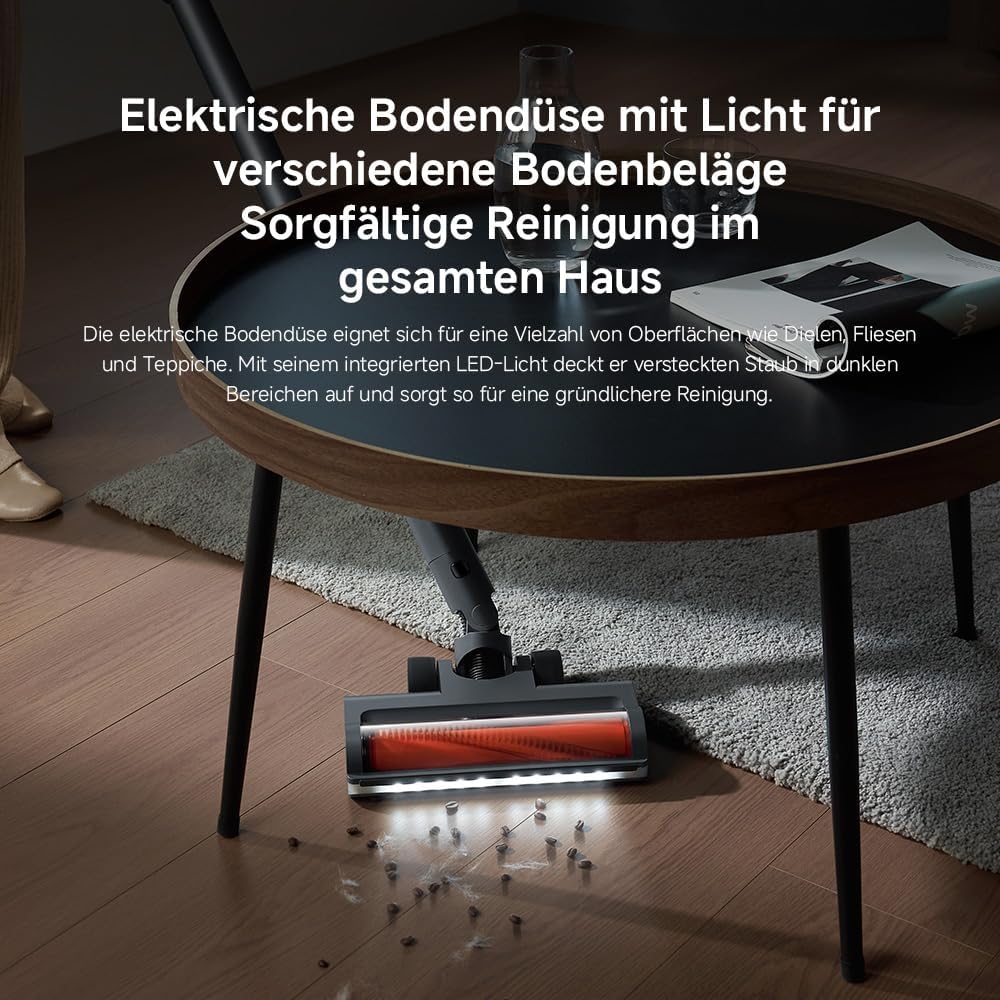
Image: The motorised floor nozzle with LED lights, highlighting its ability to reveal dust on a hard floor surface.
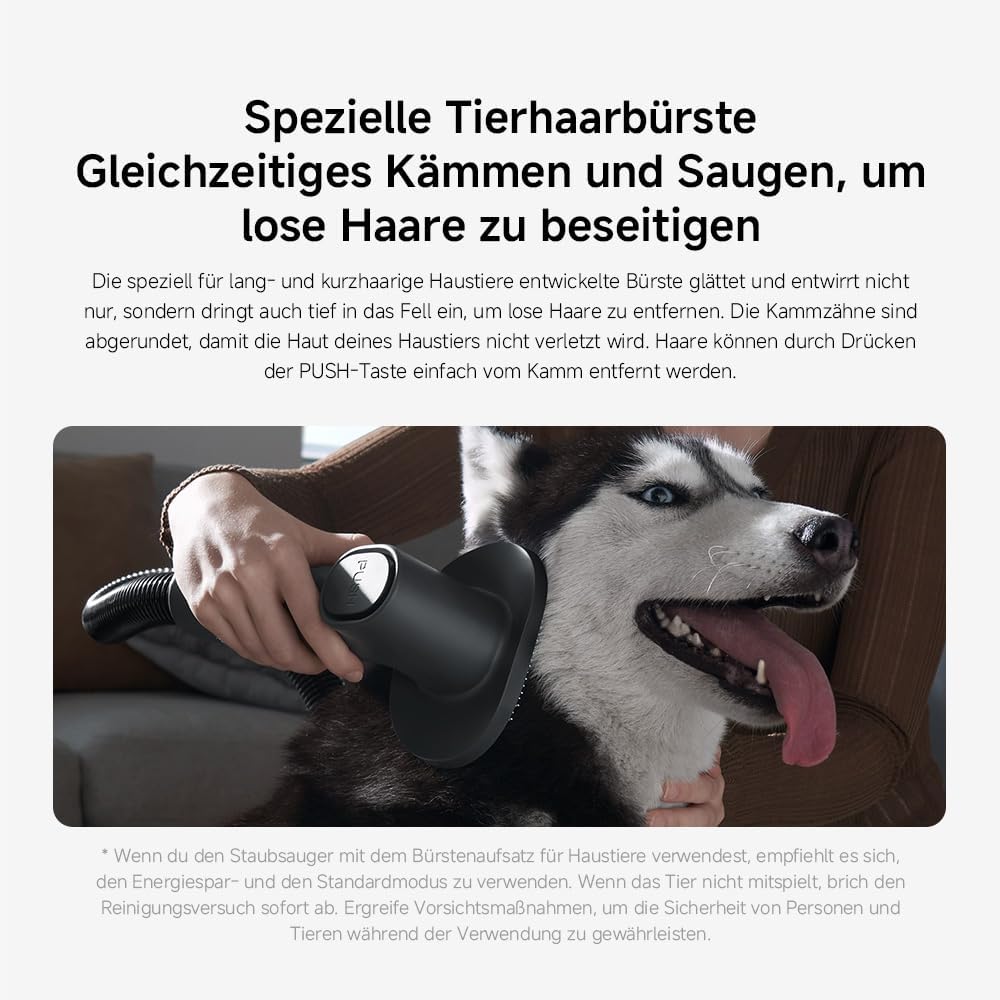
Image: The specialized pet hair brush attachment in use, demonstrating its function for grooming and vacuuming pet fur.

Image: The vacuum cleaner equipped with the extension hose and a crevice tool, reaching a high surface for cleaning.
6. Údržba a péče
Pravidelná údržba zajišťuje optimální výkon a prodlužuje životnost vašeho vysavače.
6.1 Vyprázdnění odpadkového koše
The 0.6-liter dustbin should be emptied regularly, especially when the MAX line is reached.
- Ujistěte se, že je vysavač vypnutý a odpojený od nabíječky.
- Stiskněte tlačítko pro uvolnění nádoby na prach a odpojte ji od hlavní jednotky.
- Position the dustbin over a waste bin and press the bottom release button to open the flap and empty the contents.
- Zavřete klapku a znovu připevněte nádobu na prach k hlavní jednotce, dokud bezpečně nezacvakne.

Image: A hand demonstrating the process of emptying the vacuum cleaner's dustbin.
6.2 Čištění filtrů
The G20 Max features a 5-stage precision filtration system with washable components, including a HEPA filter. Clean filters regularly to maintain suction power.
- Vyjměte nádobu na prach, jak je popsáno výše.
- Otočte a vytáhněte sestavu filtru z nádoby na prach.
- Separate the individual filter components.
- Rinse all washable filter parts under running water until clean. Do not use detergents.
- Allow all filter components to air dry completely for at least 24 hours before reassembling and placing back into the vacuum. Ensure they are completely dry to prevent mold or damage.

Image: Various washable filter components being cleaned under running water, illustrating the ease of maintenance.
6.3 Čištění kartáčového válce
Periodically check the brush roll for tangled hair or debris. Use scissors to cut away any tangled hair and remove it. The brush roll can often be removed for easier cleaning.
7. Řešení problémů
If you encounter issues with your XIAOMI Vacuum Cleaner G20 Max, refer to the following common problems and solutions:
| Problém | Možná příčina | Řešení |
|---|---|---|
| Vakuum se nezapne | Baterie je vybitá Tlačítko napájení není správně stisknuto | Plně nabijte baterii Ujistěte se, že je tlačítko napájení pevně stisknuto |
| Ztráta sacího výkonu | Popelnice je plná Filtry jsou ucpané Hose or brush head is blocked | Vyprázdněte popelnici Vyčistěte nebo vyměňte filtry Zkontrolujte a odstraňte případné ucpání |
| Baterie se nenabíjí | Nabíječka není správně připojena Faulty adapter or charging dock | Ensure adapter is securely plugged into both the dock and power outlet Pokud problémy přetrvávají, kontaktujte zákaznickou podporu |
| Válec kartáče se neotáčí | Vlasy nebo nečistoty zamotané do kartáče Brush head attachment not properly connected | Clean the brush roll, removing any obstructions Bezpečně znovu nasaďte hlavici kartáčku |
If the problem persists after attempting these solutions, please contact XIAOMI customer support for further assistance.
8. Specifikace produktu
| Funkce | Detail |
|---|---|
| Značka | XIAOMI |
| Číslo modelu | Xiaomi Vacuum Cleaner G20 Max EU 57805 |
| Barva | Titanově šedá |
| Rozměry produktu | 12.4 x 22.6 x 34 cm |
| Hmotnost položky | 3.7 kg |
| Kapacita | 0.6 litru |
| Výkon / Wattage | 450 wattů |
| Počet rychlostí | 3 |
| Úroveň hluku | 72 decibelů |
| Doba běhu | Up to 1 hour (in Eco mode) |
| Speciální funkce | Bezsáčkové, Bezdrátové, HEPA, Lehké, Bezchybné čištění |
| Typ filtru | HEPA filtr |
| Zahrnuté komponenty | Accessory Kit, Adapter, Charging Dock, Crevice Tool, Dusting Brush |
| Je Cordless? | Ano |
9. Záruka a zákaznická podpora
Your XIAOMI Vacuum Cleaner G20 Max is covered by a manufacturer's warranty. Please refer to the warranty card included in your product packaging for specific terms and conditions, including the warranty period and coverage details.
For technical support, service, or warranty claims, please contact XIAOMI customer service through their official website or the contact information provided in your product documentation. When contacting support, please have your model number (BHR8828EU) and purchase date ready.
You can find more information and support resources on the official XIAOMI webmísto: www.mi.com/global/support