1. Úvod
Thank you for choosing the EvoFox Ronin Wired Mechanical Gaming Keyboard. This manual provides detailed instructions for setting up, operating, and maintaining your keyboard to ensure optimal performance and longevity. The EvoFox Ronin is designed for a superior typing and gaming experience, featuring advanced sound dampening, customizable switches, and dynamic RGB lighting.

Image 1.1: EvoFox Ronin Wired Mechanical Gaming Keyboard (Black)
Klíčové vlastnosti:
- 9-Layer Gasket Structure: Advanced design for reduced noise, improved stability, and enhanced tactile feedback.
- Hot-Swappable Outemu Red Silent Switches: Customizable, durable, and smooth typing experience with included switch puller.
- Per-Key RGB Backlighting: 21 effects and Audio Sync Mode for personalized and immersive lighting.
- Vyhrazený knoflík pro ovládání hlasitosti: Convenient control over audio levels.
- Powerful Windows Software: Program keys, create macros, control backlighting, and manage profiles with onboard memory.
- Kompatibilita napříč platformami: Easily switch between Windows and Mac modes.
- Detachable Braided USB-C Cable: Robust 1.5m cable with EMI ring for reliable connection and portability.
2. Obsah balení
Prosím, ověřte, zda jsou v balení přítomny všechny položky:
- 1 x EvoFox Ronin Mechanical Gaming Keyboard
- 1 x stahovák klíčenky
- 4 x Outemu Red Switches (Spare)
- 1 x Uživatelská příručka
3. Konec produktuview
3.1 Struktura těsnění
The EvoFox Ronin features an advanced 9-layer gasket structure. This design incorporates silicone gaskets, a mounting plate, and multiple layers of vibration and sound dampening materials to provide a stable, quiet, and comfortable typing experience by minimizing unwanted noise and resonance.
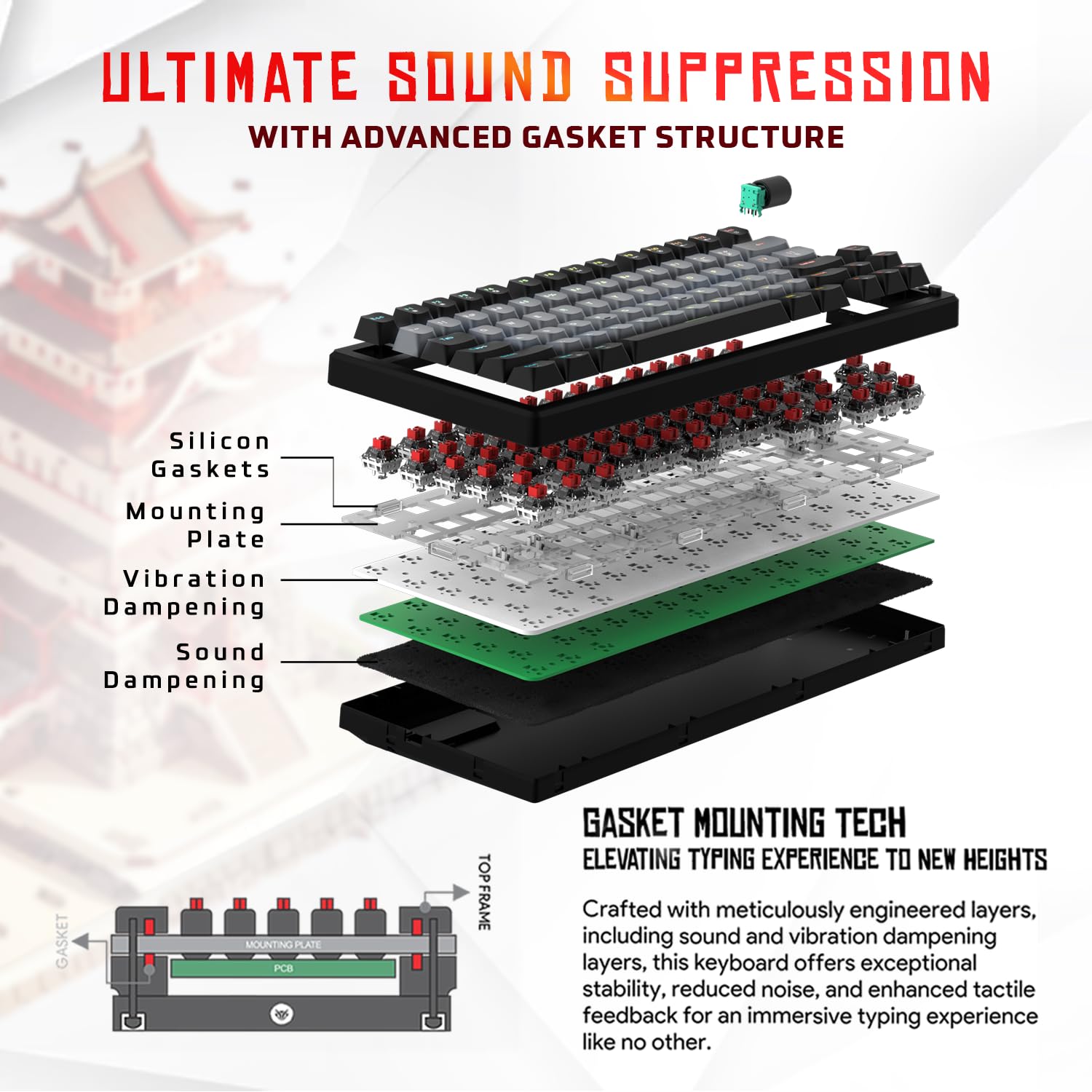
Obrázek 3.1: Rozložený view of the 9-layer gasket structure, showing silicone gaskets, mounting plate, and dampzačišťující vrstvy.
3.2 Outemu Red Silent Switches
The keyboard is equipped with Outemu Red Dust Proof Switches, known for their linear and silent operation. These switches are hot-swappable, allowing users to easily replace them with other compatible 3-pin mechanical switches without soldering, enabling full customization of the typing feel.
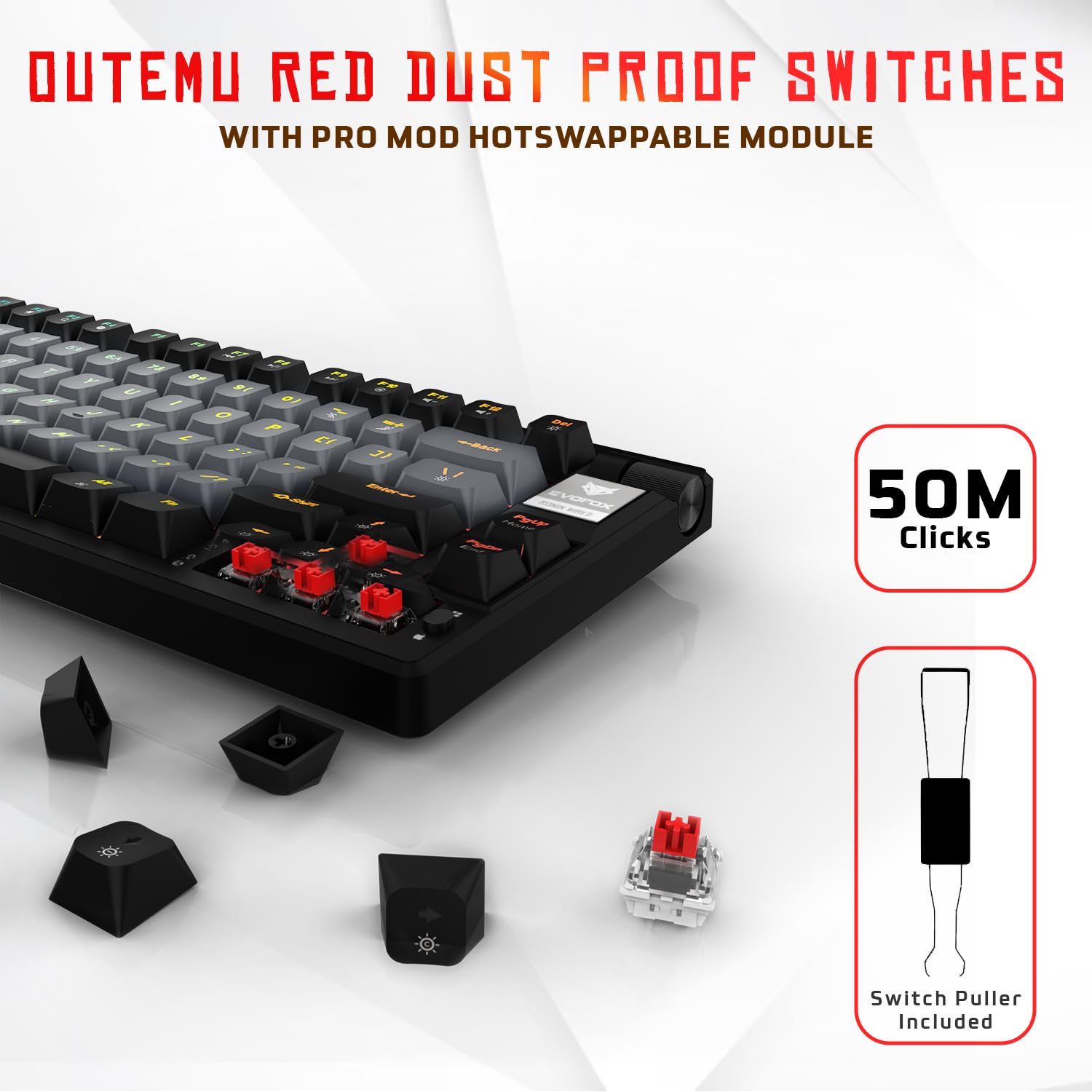
Image 3.2: Close-up of Outemu Red switches and the included switch puller, demonstrating hot-swappable functionality.
3.3 Per-Key RGB Backlighting
Each key on the EvoFox Ronin features individual RGB backlighting, offering 16 million colors and 21 pre-set lighting effects. The lighting can be customized directly on the keyboard or through the dedicated software, including an Audio Sync Mode that reacts to sound.

Image 3.3: The EvoFox Ronin keyboard showcasinjeho přizpůsobitelné RGB podsvícení pro každou klávesu.
3.4 Dedicated Volume Knob
A metal volume knob is integrated into the keyboard for quick and precise audio adjustments. Rotate to change volume, and press to mute/unmute.
3.5 Detachable USB-C Cable
The keyboard connects via a robust 1.5-meter braided USB-C cable, which is detachable for easy portability and storage. The cable includes an EMI ring to minimize signal interference.

Image 3.4: Features of the EvoFox Ronin, including the volume knob, detachable USB-C cable, and double-height adjustable legs.
4. Pokyny k nastavení
Follow these steps to set up your EvoFox Ronin keyboard:
- Rozbalte klávesnici: Opatrně vyjměte klávesnici a veškeré příslušenství z obalu.
- Připojení kabelu USB-C: Vložte konec USB-C dodaného kabelu do portu na zadní straně klávesnice.
- Připojení k počítači: Plug the USB-A end of the cable into an available USB port on your computer (PC or Mac).
- Instalace ovladače: Klávesnice je plug-and-play. Váš operační systém by měl automaticky detekovat a nainstalovat potřebné ovladače.
- Volitelná instalace softwaru: For advanced customization, download the dedicated Windows software from the official EvoFox webmísto.
5. Návod k obsluze
5.1 Základní funkce kláves
The EvoFox Ronin functions as a standard TKL (Tenkeyless) keyboard. All keys perform their labeled functions. The keyboard supports N-Key Rollover, ensuring every key press is registered accurately, even during rapid input.
5.2 Multimediální a funkční klávesy
Access multimedia and additional functions by pressing the Fn key in combination with the designated F-keys or other keys. Refer to the keycap legends for specific functions (e.g., Fn + F1 for media player, Fn + F2 for volume down).
5.3 Ovládání RGB osvětlení
You can control the RGB lighting directly from the keyboard:
- Efekty změny: Použití Fn + \| pro cyklické přepínání mezi 21 různými světelnými efekty.
- Upravit jas: Použití Fn + šipka nahoru pro zvýšení jasu a Fn + šipka dolů ke snížení jasu.
- Upravit rychlost: Použití Fn + šipka doleva to decrease effect speed and Fn + šipka vpravo pro zvýšení rychlosti efektu.
- Audio Sync Mode: Activate specific modes that react to audio input.
5.4 Přizpůsobení softwaru
The dedicated Windows software allows for comprehensive customization:
- Klíčové programování: Přemapujte libovolnou klávesu na jinou funkci.
- Vytvoření makra: Zaznamenejte a přiřaďte složité klávesové sekvence jedné klávese.
- Backlighting Effects: Fine-tune RGB colors, effects, brightness, and speed.
- Profile Řízení: Vytvořte a uložte více profesionálůfilepro různé aplikace nebo hry.
- Míra hlasování: Adjust the polling rate up to 1000Hz.

Image 5.1: Screenshot of the EvoFox Ronin's dedicated software, showing options for light settings, button settings, and macro management.
5.5 Cross-Platform Compatibility
The keyboard supports both Windows and Mac operating systems. Use the designated key combination (typically Fn + Win or similar, refer to keycap legends) to switch between modes, ensuring correct key mapping for your OS.
6. Údržba
6.1 Čištění klávesnice
Pro zachování vzhledu a funkčnosti klávesnice:
- Před čištěním odpojte klávesnici od počítače.
- K odstranění prachu a nečistot z prostoru mezi klávesami použijte nádobku se stlačeným vzduchem.
- Otřete klávesy a povrch klávesnice měkkým, lehce suchým hadříkem.amp hadříkem. Zabraňte nadměrné vlhkosti.
- Nepoužívejte drsné chemikálie ani abrazivní čisticí prostředky.
6.2 Výměna spínačů
The EvoFox Ronin features hot-swappable switches, allowing for easy replacement without soldering:
- Odpojte klávesnici od počítače.
- Pomocí přiloženého stahováku kláves jemně odstraňte požadovanou klávesu.
- Use the included switch puller to carefully grip the top and bottom clips of the switch and pull it straight up.
- Align the pins of the new switch with the holes on the PCB and gently press it down until it clicks into place. Ensure the pins are not bent.
- Vyměňte krytku kláves.

Image 6.1: A keycap being removed from the keyboard using a keycap puller.
7. Řešení problémů
If you encounter issues with your EvoFox Ronin keyboard, refer to the following common solutions:
- Klávesnice nereaguje:
- Ujistěte se, že je kabel USB-C bezpečně připojen ke klávesnici i k počítači.
- Zkuste připojit klávesnici k jinému USB portu na počítači.
- Otestujte klávesnici na jiném počítači, abyste vyloučili problém specifický pro daný počítač.
- Restartujte počítač.
- RGB osvětlení nefunguje/je nesprávné:
- Check the on-board lighting controls (Fn key combinations) to ensure brightness is not set to zero or an effect is not disabled.
- If using the software, ensure it is running and the correct profile je aktivní.
- Reinstall the keyboard software if issues persist.
- Klíče se neregistrují:
- Ujistěte se, že pod klávesou nebo spínačem nejsou žádné nečistoty.
- If a specific key is not working, try replacing its switch (refer to Section 6.2).
- Check for bent pins on the switch if you recently replaced one.
- Software Issues (e.g., Antivirus Flagging):
- Ensure you download the software from the official EvoFox website to avoid unofficial versions.
- If your antivirus flags the software, you may need to add an exception for the software's executable file. Proceed with caution and only if you trust the source.
- Contact EvoFox support for the latest software version or assistance.
8. Specifikace
| Funkce | Detail |
|---|---|
| Značka | EvoFox |
| Název modelu | EvoFox Ronin TKL Wired |
| Popis klávesnice | Mechanické |
| Technologie připojení | USB-C (kabelový) |
| Spínače | Outemu Red Silent Dust Proof Switches (Hot-Swappable) |
| Podsvícení | Per-Key RGB (16 Million Colors, 21 Effects, Audio Sync Mode) |
| Míra hlasování | Až 1000 Hz |
| Převrácení klíče | N-Key Rollover (All Anti-Ghosting Keys) |
| Speciální funkce | Advanced Gasket Structure, Compact TKL Design, Multimedia Keys, Pro Mod Hotswap Module, Powerful Windows Software, Dedicated Volume Controller |
| Kompatibilní zařízení | Notebook, PC |
| Hardwarová platforma | PC/Mac/Linux/Unix |
| Délka kabelu | 1.5m Detachable Braided Type-C with EMI Ring |
| Materiál | Plast |
| Rozměry produktu | 32 x 13.5 x 2.6 cm |
| Hmotnost položky | 640 g |
| Země původu | Čína |
9. Záruka a podpora
The EvoFox Ronin Mechanical Gaming Keyboard comes with a standard manufacturer's warranty. Please refer to the warranty card included in your package for specific terms and conditions, including warranty period and coverage details.
For technical support, troubleshooting assistance, or warranty claims, please contact EvoFox customer support. You can find contact information on the official EvoFox website or through the manufacturer, Allied Electronics & Magnetics Private Limited.
Výrobce: Allied Electronics & Magnetics Private Limited
Adresa: C-64/4, Okhla Fáze - 2, Nové Dillí - 110020


