1. Úvod
This manual provides detailed instructions for the installation, operation, and maintenance of your Hodozzy 7-inch Android Car Radio. This unit is designed for Volkswagen Touareg (2004-2011) and Volkswagen Transporter T5 Multivan (2004-2009) models. It features a 7-inch full-capacity touchscreen with 1280x720 resolution, 4GB RAM, 64GB ROM, and supports various advanced functionalities.

Image: Hodozzy Android Car Radio installed in a Volkswagen dashboard.
2. Co je v krabici
Ujistěte se prosím, že balení obsahuje všechny následující komponenty:
- 1 x Android přehrávač
- Napájecí kabely (různé typy)
- 1 x RCA kabel
- 1 x vstupní kabel zadní kamery
- 1 x Rádiová anténa
- 1 x CANbus
- 1x GPS anténa
- 2 x USB kabely
- 1 x Uživatelská příručka
- 1x zadní View Fotoaparát
- 1 x mikrofon
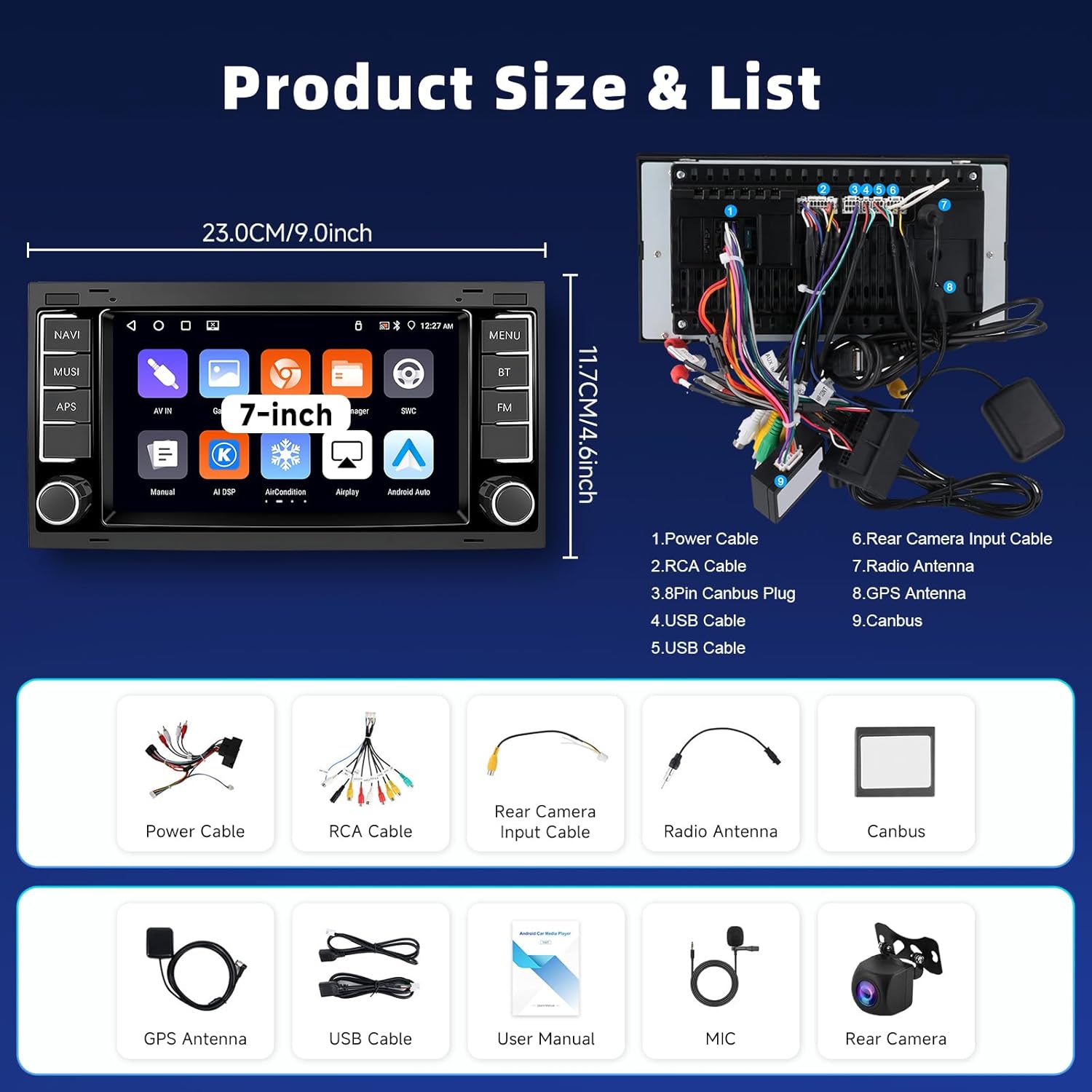
Image: Diagram showing the product size and list of included accessories.
3. Nastavení a instalace
Follow these steps for proper installation of your Hodozzy car radio. It is recommended to consult a professional for installation if you are unsure.
3.1. Removing the Original Car Radio
Carefully remove the trim around your original car radio using appropriate tools. Unscrew and detach the original unit, then disconnect all cables.
Video: Demonstration of removing the original car radio and disconnecting its cables.
3.2. Power-On Test and Wiring
Before full installation, perform a power-on test. Connect the compatible power cord and, if your vehicle model requires a Canbus, connect it. Ensure ACC wiring is correctly done. Connect the protocol serial cable when using Canbus. If the device powers on normally, proceed with the next wiring steps. If it fails, contact the after-sales team.
- Select the compatible power cord for your vehicle model.
- Connect the Canbus as per your vehicle model. If the vehicle requires a Canbus but it's not connected, the device may fail to power on.
- Complete ACC wiring based on the Canbus connection. Disconnect the ACC port if using a Canbus.
- Connect the protocol serial cable when using Canbus.
- Connect the RCA cable, USB cables, Rear Camera Input Cable, Radio Antenna, and GPS Antenna to the corresponding ports on the new unit.
Video: Detailed steps for connecting power, Canbus, and other essential cables for the initial power-on test.
3.3. Zadníview Zapojení kamery
Připojte zadní částview camera as follows:
- Připojte zadní částview camera's video output to the
Související dokumenty - 09fded25-e459-4860-a2c0-bd1aae741927

Uživatelská příručka pro 10.1palcové autorádio s Androidem a dvěma DIN systémy
Tato uživatelská příručka obsahuje komplexní pokyny k obsluze a instalaci 10.1palcového dvoudinového autorádia s Androidem, včetně funkcí, specifikací, zapojení, řešení problémů a pokročilých funkcí, jako je GPS navigace, Bluetooth a Mirror Link.
Návod k obsluze navigačního systému Hodozzy pro automobily s Androidem
Tato uživatelská příručka obsahuje podrobné pokyny k navigačnímu systému Hodozzy pro Android, které zahrnují jeho rozhraní, funkce, režimy, nastavení, instalaci a offline mapové funkce.
EU Data Act Transparency Declaration for Android In-Vehicle Multimedia Device
This document outlines the transparency declaration for an Android-based in-vehicle multimedia device in accordance with the EU Data Act, detailing data generation, processing, transmission, and software updates.
WP Suspension 4357/4860 MXMA Frontfork Workshop Manual
This workshop manual from WP Suspension offers detailed instructions for the disassembly and assembly of the 4357/4860 MXMA front forks, ensuring proper maintenance and optimal performance for motorcycle enthusiasts and technicians.
Continental Metal Products Catheter Storage Cabinets: Features, Specs & Options
Explore Continental Metal Products' range of durable stainless steel Catheter Storage Cabinets. Discover features, specifications, dimensions, and customization options for healthcare facilities.