1. Úvod
This manual provides essential instructions for the safe and effective use of your Dekala PlaySmart Kids Phone. Please read it thoroughly before operating the device and retain it for future reference.
2. Bezpečnostní informace
Varování:
- Tento produkt je určen pro děti od 36 měsíců.
- Během používání se doporučuje dohled dospělé osoby.
- Nevystavujte zařízení vodě nebo extrémním teplotám.
- Udržujte malé části mimo dosah malých dětí, abyste předešli nebezpečí udušení.
- Používejte pouze dodaný nabíjecí kabel a adaptér.
3. Obsah balení
Zkontrolujte prosím balení, zda neobsahuje následující položky:
- Dekala PlaySmart Kids Phone
- USB nabíjecí kabel
- Uživatelská příručka (tento dokument)
- (Additional accessories may vary by package)
4. Konec produktuview
The Dekala PlaySmart Kids Phone is designed to provide an engaging and educational experience for children. It features a 2.8-inch HD touchscreen and a durable build.

Obrázek 1: Dekala PlaySmart Kids Phone, showing the front screen and the back panel with camera lenses.
Klíčové vlastnosti:
- 180° Rotatable Camera: For photos and video recording.
- Music Player: Enjoy pre-loaded or user-added music.
- Video Recorder: Capture moments.
- Educational Games: 26 puzzle games to stimulate learning.
- Habit Tracker: Helps children manage daily routines.
- Calendar: Basic time management.
- Learning Cards & Audiobooks: 100 learning cards and 10 audio storybooks for educational content.
- Parental Controls: Manage screen time and access to features.
5. Nastavení
5.1. Nabíjení zařízení
- Connect the USB charging cable to the charging port on the phone.
- Zapojte druhý konec kabelu USB do kompatibilního napájecího adaptéru USB (není součástí balení) nebo do portu USB počítače.
- The screen will indicate charging status. Allow approximately 2-3 hours for a full charge.
- Po úplném nabití nabíječku odpojte.
5.2. Zapnutí/vypnutí
- Zapnutí: Stiskněte a podržte tlačítko napájení (obvykle umístěné na boku), dokud se obrazovka nerozsvítí.
- To power off: Press and hold the power button, then follow the on-screen prompts to shut down.
5.3. Počáteční nastavení
Při prvním zapnutí můžete být vyzváni k nastavení data, času a jazyka. Postupujte podle pokynů na obrazovce.
6. Návod k obsluze

Obrázek 2: Main interface displaying various applications and customizable wallpapers.
6.1. Navigace
- Dotyková obrazovka: Klepnutím na ikony otevřete aplikace, přejetím prstem přejdete mezi obrazovkami.
- Tlačítko Domů: A physical or on-screen button (usually at the bottom center) to return to the main screen.
6.2. Camera and Video Recorder
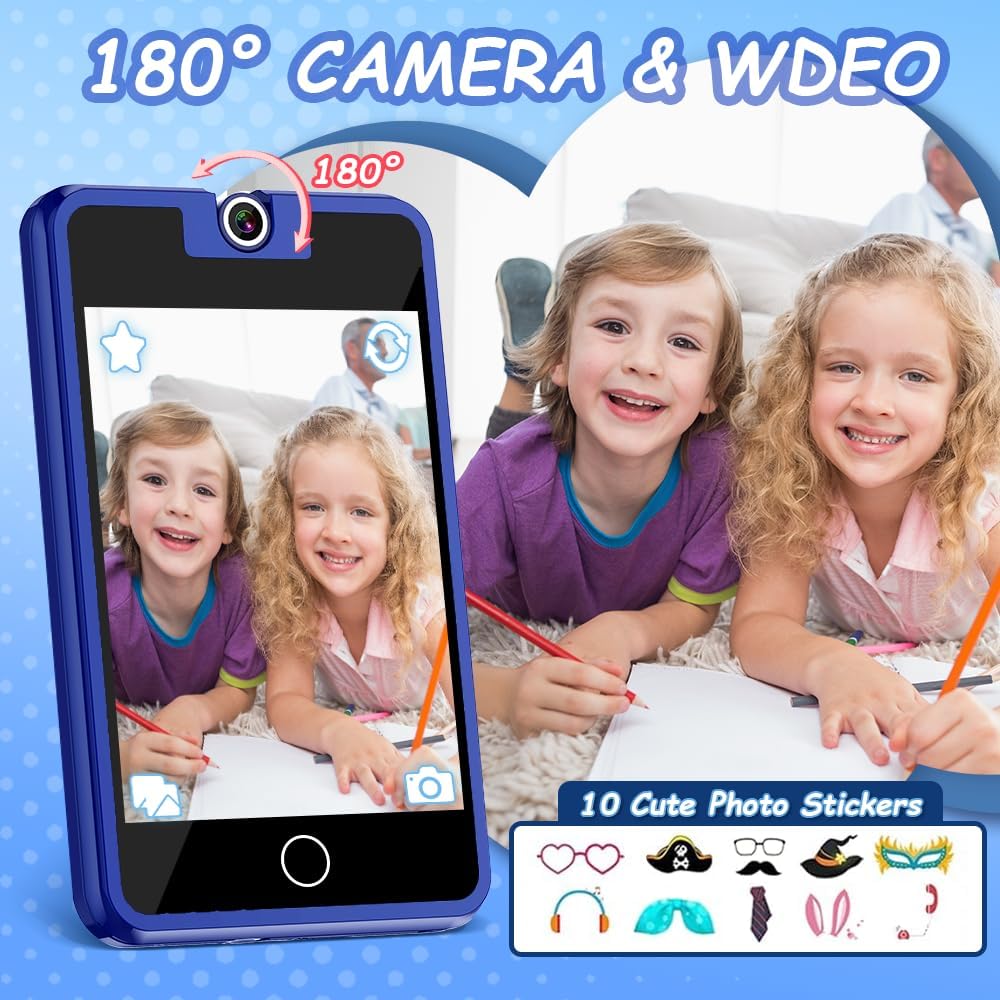
Obrázek 3: The 180° rotatable camera in action, allowing for both front and rear-facing shots. Includes options for fun photo stickers.
- Klepnutím na ikonu „Fotoaparát“ otevřete aplikaci fotoaparátu.
- Rotate the camera lens 180° to switch between front and rear views.
- Klepnutím na tlačítko spouště pořídíte fotografii nebo spustíte/zastavíte nahrávání videa.
- Explore fun photo stickers and filters within the camera app.
6.3. Hudební přehrávač

Obrázek 4: Music player interface, showing track information and playback controls.
- Tap the "Music" icon to access the music player.
- Browse pre-loaded songs or any music files transferred to the device.
- Use the on-screen controls for play, pause, skip, and volume adjustment.
6.4. Vzdělávací hry

Obrázek 5: Example of an educational puzzle game and the variety of games available.
- Tap the "Games" icon to view the selection of 26 puzzle games.
- Select a game to start playing.
- Parental controls can be used to manage access to games (see section 6.7).
6.5. Habit Tracker

Obrázek 6: The habit tracker interface, designed to help children manage and track daily routines.
- Tap the "Habit Tracker" icon.
- Set up and track daily activities such as "Get Up," "Brush Your Teeth," "Homework," etc.
- Use the alarm and timer functions to assist with habit formation.
6.6. Learning Cards and Audiobooks

Obrázek 7: Learning content including 100 learning cards covering various themes and 10 audio storybooks.
- Access "Knowledge Card" for 100 learning cards on various topics.
- Open "Story" to listen to 10 pre-loaded audiobooks.
6.7. Rodičovská kontrola
The device includes parental control features to manage screen time and access to specific applications or content.
- Přejděte do nabídky „Nastavení“.
- Locate and select "Parental Control" or a similar option.
- Set a password (if prompted) to secure the settings.
- Adjust settings for screen time limits, game access, and other features as desired.
7. Údržba
- Čištění: Use a soft, dry cloth to clean the screen and body of the device. Do not use liquid cleaners or abrasive materials.
- Skladování: Pokud zařízení nepoužíváte, skladujte jej na chladném a suchém místě mimo dosah přímého slunečního záření.
- Péče o baterie: Chcete-li prodloužit životnost baterie, vyvarujte se častého úplného vybíjení baterie. Zařízení pravidelně nabíjejte.
8. Řešení problémů
| Problém | Možná příčina | Řešení |
|---|---|---|
| Zařízení se nezapne. | Slabá baterie. | Nabíjejte zařízení alespoň 30 minut. |
| Obrazovka nereaguje. | Dočasná softwarová závada. | Proveďte měkký reset podržením tlačítka napájení po dobu 10-15 sekund. |
| Není slyšet zvuk. | Hlasitost je příliš nízká nebo ztlumená. | Check volume settings in the "Settings" menu or use volume buttons. |
| Games are not accessible. | Parental controls enabled. | Adjust parental control settings in the "Settings" menu. |
9. Specifikace
- Model: PlaySmart
- Obrazovka: 2.8palcový HD dotykový displej
- Fotoaparát: Otočná o 180°
- Rozměry: 2 x 0.3 x 3 palce
- Hmotnost: 5 unce
- Baterie: 1 nestandardní baterie (součástí balení)
- Doporučený věk: 36 měsíců +
- Značka: Dekala
10. Informace o záruce
Specific warranty details are not provided in the product information. Please refer to the product packaging or contact the manufacturer directly for warranty terms and conditions.
11. Zákaznická podpora
For further assistance, technical support, or inquiries, please contact Dekala customer service through their official webstránky nebo kontaktní informace uvedené na obalu produktu.
Webmísto: Dekala Store on Amazon


