1. Úvod
This manual provides comprehensive instructions for the VINABTY N2QBYA000051 replacement remote control. This remote is designed to function as a direct replacement for original Panasonic Smart TV remote controls, offering an ergonomic design and voice control capabilities. Please read this manual thoroughly before using the remote control to ensure proper operation and to maximize its features.
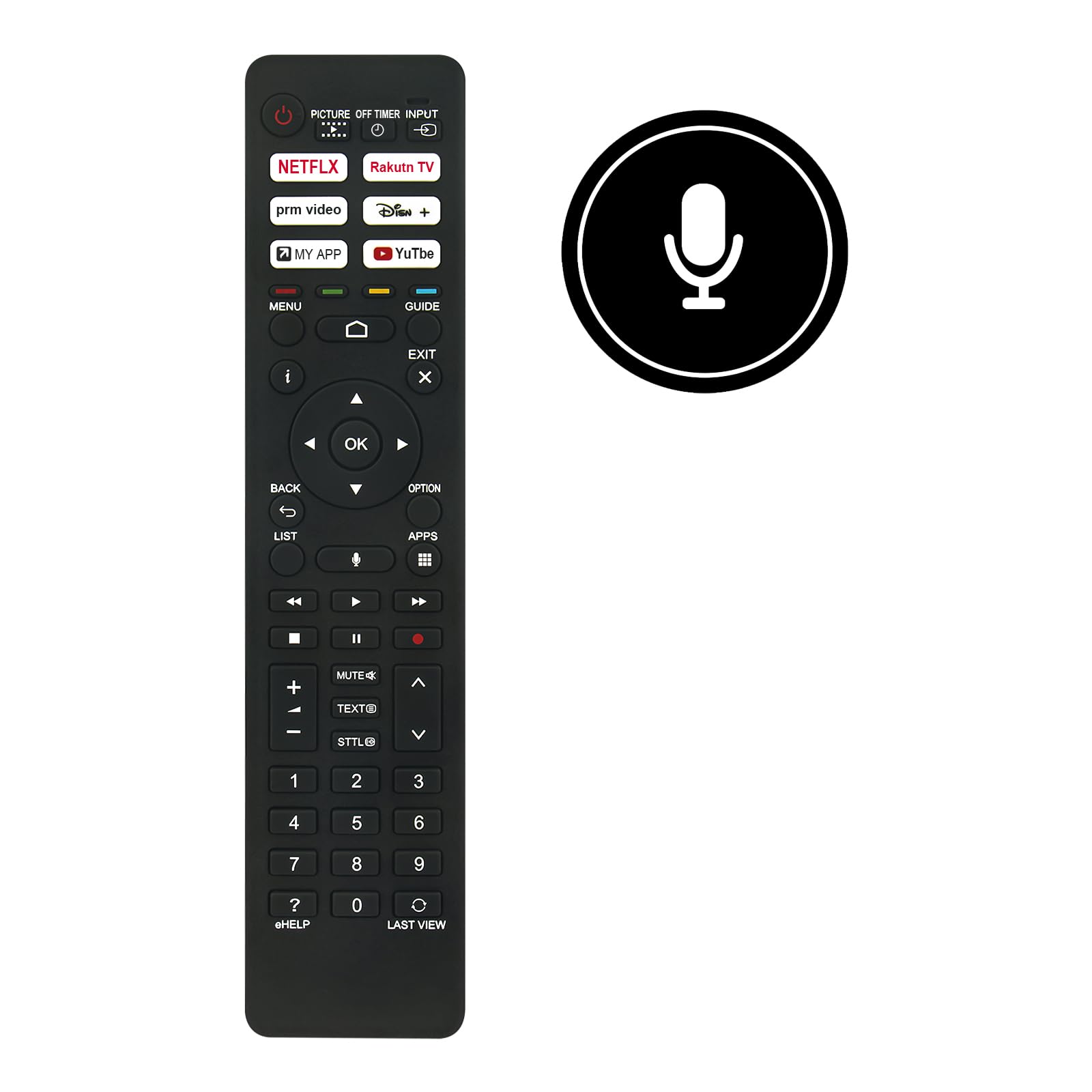
Obrázek 1: Přední strana view of the VINABTY N2QBYA000051 remote control with approximate dimensions.
2. Nastavení
2.1 Instalace baterie
Dálkový ovladač vyžaduje k provozu dvě (2) baterie typu AAA. Pro instalaci baterií postupujte takto:
- Najděte kryt prostoru pro baterie na zadní straně dálkového ovladače.
- Jemně posuňte kryt dolů nebo stiskněte západku (pokud je k dispozici) a otevřete přihrádku.
- Vložte dvě baterie typu AAA a ujistěte se, že kladný (+) a záporný (-) pól správně shodují s označením uvnitř přihrádky.
- Nasaďte kryt přihrádky na baterie tak, že jej zasunete zpět na místo, dokud bezpečně nezacvakne.

Obrázek 2: Přihrádka na baterie s otvory pro baterie AAA.
2.2 Pokyny k párování
This remote control utilizes Bluetooth connectivity for advanced features like voice control. It needs to be paired with your Panasonic Smart TV after initial power-on. The exact pairing procedure may vary slightly depending on your specific Panasonic TV model. Refer to your TV's user manual for detailed pairing instructions. A general pairing process is as follows:
- Ensure your Panasonic Smart TV is powered on.
- On your TV, navigate to the Nastavení menu.
- Hledejte možnosti, jako například Dálkové ovladače a příslušenství, Nastavení Bluetoothnebo Nastavení systému.
- Vyberte možnost Přidat zařízení or Spárujte dálkové ovládání.
- Follow the on-screen prompts. You may need to press and hold specific buttons on the VINABTY remote (e.g., the OK tlačítko a Zadní button simultaneously, or a dedicated pairing button if available) until an indicator light on the remote flashes, signifying it is in pairing mode.
- Once the remote appears in the list of available devices on your TV screen, select it to complete the pairing process.
- A confirmation message should appear on your TV screen once pairing is successful.
If the remote does not respond after battery installation, ensure the batteries are fresh and correctly inserted, and attempt the pairing process.
3. Návod k obsluze
3.1 Funkce tlačítekview
The VINABTY N2QBYA000051 remote control features a standard layout for intuitive navigation and control of your Panasonic Smart TV. Below is a general overview of key button groups:

Obrázek 3: Přední strana view rozložení tlačítek dálkového ovladače.
- Tlačítko napájení (⏻): Zapíná nebo vypíná televizor.
- Vstup/zdroj: Vybere vstupní zdroj (HDMI, AV atd.).
- Netflix, Rakuten TV, prm video, Disney+, MY APP, YouTube: Dedicated buttons for quick access to popular streaming services and custom apps.
- Navigační tlačítko (nahoru, dolů, vlevo, vpravo, OK): Používá se k navigaci v nabídkách a potvrzování výběrů.
- Zadní: Návrat na předchozí obrazovku nebo do nabídky.
- Výstup: Ukončí aktuální menu nebo aplikaci.
- Menu: Otevře hlavní nabídku televizoru.
- Průvodce: Přístup k elektronickému programovému průvodci.
- Zvýšení/snížení hlasitosti (+/-): Upravuje hlasitost televizoru.
- Ztlumit: Ztlumí nebo zapne zvuk televizoru.
- Kanál nahoru/dolů (∧/∨): Změní televizní kanály.
- Číselná klávesnice (0-9): Přímé zadávání čísel kanálů nebo jiných číselných vstupů.
- Tlačítka pro ovládání médií (Přehrát, Pozastavit, Zastavit, Přetočit zpět, Rychle přetočit vpřed): Ovládá přehrávání médií.
- Voice Control Button (Microphone icon): Activates the voice assistant feature.
- pomáhat: Accesses the TV's electronic help guide.
3.2 Hlasové ovládání
The remote control supports voice control functionality, allowing you to issue commands to your TV using your voice. To use voice control:
- Ensure the remote control is successfully paired with your Panasonic Smart TV via Bluetooth.
- Stiskněte a podržte Tlačítko hlasového ovládání (ikona mikrofonu) na dálkovém ovladači.
- Mluvte jasně do mikrofonu umístěného na dálkovém ovladači.
- Release the button once you have finished speaking your command.
- Your TV will process the command and respond accordingly.
Note: Voice control functionality requires an active internet connection on your TV and may depend on specific TV model features and regional availability.
4. Údržba
4.1 Čištění
Pro zachování vzhledu a funkčnosti dálkového ovladače:
- Otřete povrch měkkým suchým hadříkem.
- Pro odolnou špínu lehceampnavlhčete hadřík vodou nebo jemným neabrazivním čisticím prostředkem.
- Nepoužívejte agresivní chemikálie, rozpouštědla nebo abrazivní materiály, protože by mohly poškodit povrchovou úpravu nebo vnitřní součásti dálkového ovladače.
4.2 Skladování
When not in use for extended periods, it is recommended to:
- Remove the batteries to prevent leakage, which can damage the remote control.
- Dálkový ovladač skladujte na chladném a suchém místě mimo přímé sluneční světlo a extrémní teploty.
5. Řešení problémů
If you encounter issues with your VINABTY N2QBYA000051 remote control, refer to the following common problems and solutions:
- Dálkové ovládání nereaguje:
- Check if the batteries are correctly inserted with the proper polarity (+/-).
- Vyměňte staré nebo vybité baterie za nové baterie typu AAA.
- Ensure there are no obstructions between the remote control and the TV's sensor (if using IR, though this is primarily Bluetooth).
- Znovu se pokuste o párování, jak je popsáno v části 2.2.
- Hlasové ovládání nefunguje:
- Confirm the remote is successfully paired via Bluetooth. Voice control requires Bluetooth connectivity.
- Ensure your TV has an active internet connection.
- Mluvte jasně a přímo do mikrofonu dálkového ovladače.
- Check your TV's settings for voice control activation or microphone permissions.
- Specific Buttons Not Functioning:
- Some advanced functions or app buttons may require specific TV software versions or configurations.
- Ensure the remote is fully paired and recognized by the TV.
- Clean the remote control to ensure no debris is obstructing button presses.
6. Specifikace
| Funkce | Detail |
|---|---|
| Číslo modelu | N2QBYA000051 |
| Značka | VINABTY |
| Kompatibilní značka | Panasonic |
| Materiál | ABS |
| Barva | Černý |
| Technologie připojení | Bluetooth |
| Typ ovládání | Ovládání tlačítky, hlasové ovládání |
| Maximální dosah | Přibližně 10 metrů (33 stop) |
| Zdroj napájení | 2 x AAA baterie (nejsou součástí balení) |
| Speciální funkce | Ergonomic Design, Voice Search |
| Kompatibilní modely televizorů | TX-75LXX889, TX-50LXF887, TX-43LXN888, TX-65LXX889, TX-55LX810E, TX-65LXN888, TX-50LXT886, TX-65LXW834, TX-75LXN888, TX-43LX810E, TX-43LX, TX-50LX, TX-65LX, TX-43LX800E, TX-43LX810, TX-43LX810E, TX-43LXF887, TX-43LXN888, TX-50LX800E, TX-50LX810, TX-50LX810E, TX-55LX810, TX-55LX800E, TX-65LX800E, TX-65LX810E, TX-75LX800E, TZZ00003864A, N2QBYA000051/R3PA265 |
7. Záruka a podpora
7.1 Informace o záruce
Konkrétní podrobnosti o záruce pro tento produkt nejsou uvedeny v dostupných informacích. Záruční podmínky naleznete v dokumentaci k nákupu nebo se obraťte na prodejce.
7.2 Zákaznická podpora
Should you encounter any issues or require assistance with your VINABTY N2QBYA000051 remote control, please contact the seller or manufacturer's customer service. The manufacturer states: "If there is a problem with our product or service, please let us know and we will provide a satisfactory response within 24 hours."
For further assistance, you may also refer to the support section of your Panasonic Smart TV's official webstránky nebo uživatelské příručky.
